 Tesseract
Any two shots, joined in one move.
Pick a cut in the timeline and a kind of transition. A video model takes the last frame before the cut and the first frame after it, and makes the move that carries one shot into the next.
- 46 kinds of transition
- 2 to 8 seconds long
- Priced before it is made
How it works.
- Pick the cutAny cut between two clips in the timeline. The transition goes in between them and moves the rest of the timeline later.
- 46 kindsA whip pan, a match cut, a portal, ink, smoke, shattering glass, flames, snow and more.
- Made from your two shotsIt starts on the last frame of one clip and lands on the first frame of the next, so both ends match your footage.
- Choose the lengthFrom 2 to 8 seconds.
- Priced firstThe button shows the price before anything is made, and undo takes the transition back out.
- Or just askAsk the assistant for a whip pan between two clips: it tells you the price and puts one in once you say yes.
Two frames in, one move out.
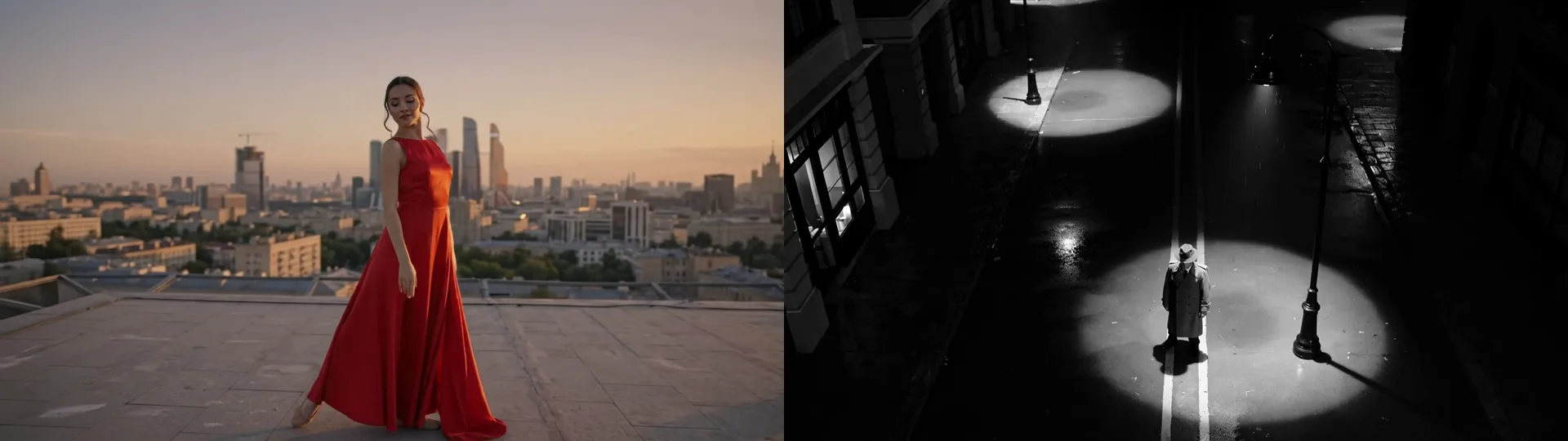
The last frame of the dancer’s clip and the first frame of the detective’s. From these two pictures and one word, “whip”, the model made the 3-second move between them, and the cuts on each side do not show. Our example was made with the Tesseract beta.
- Clips are made by video models: this needs you signed in to Tesseract (charged to your allowance) or your own fal.ai key.
Questions people ask
Where is it in the app?
In the video editor, select the clip before the cut, then under Transitions choose AI transition. Or ask the assistant.
What does it cost?
Each transition is made by a video model, so it is paid: from your Tesseract allowance when you are signed in, or with your own fal.ai key. The price is on the button before you make it.
Does it change my clips?
No. It goes in between them, in place of any transition already on that cut, and undo puts the timeline back as it was.
Join your first two shots.
Free on Mac, Windows and Linux, with every other tool included.