 Tesseract
 AI photo editor: layers plus AI fills that change only what you select.
Retouch, paint, mask and filter your pictures on your computer, at no cost. Type in one box and AI fills a selection, changes the whole picture, grows the canvas or restyles it, and each result lands as a new layer you can undo.
- Layers, masks and PSD files
- 204 AI styles
- Free, no add-ons
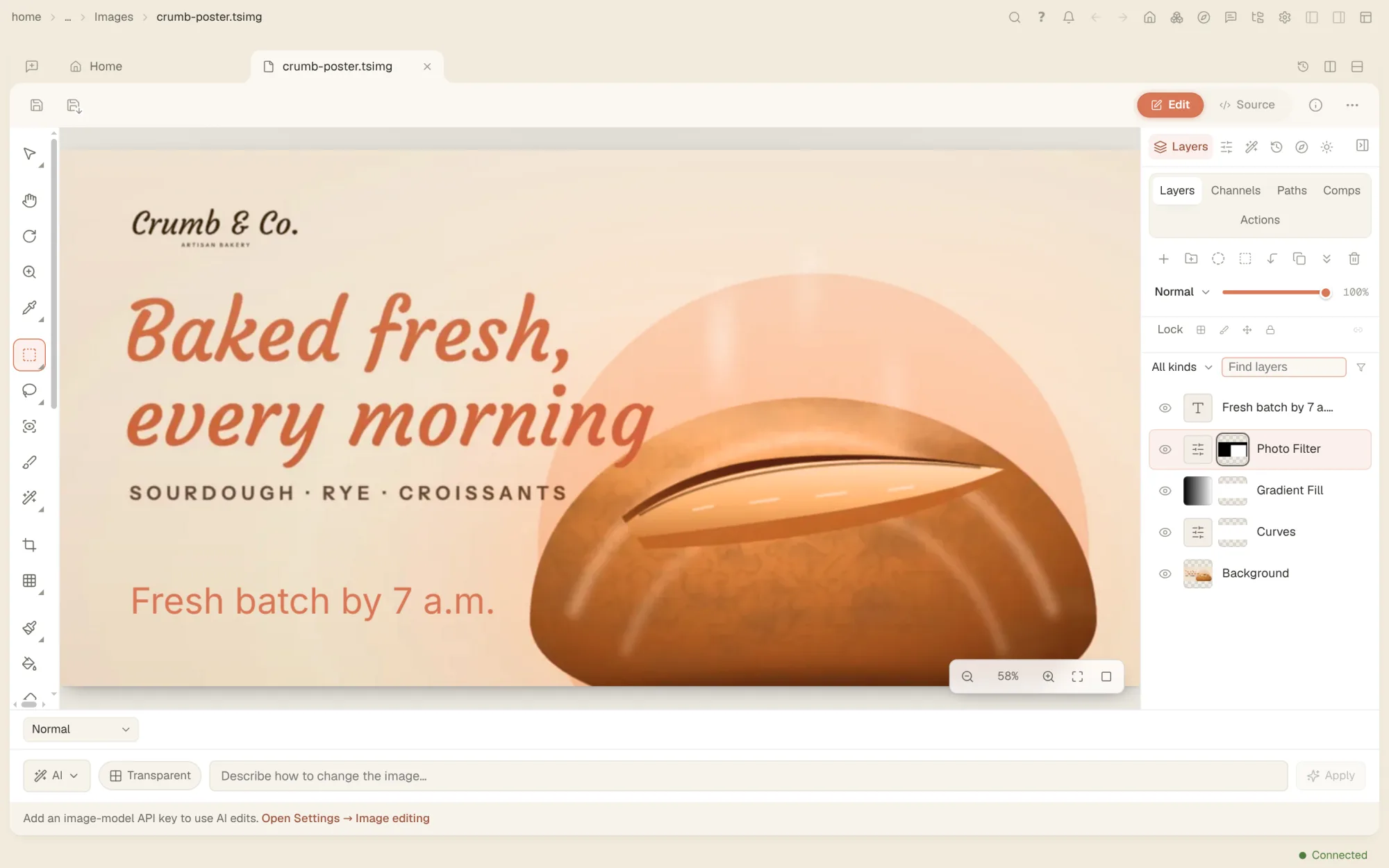
A full image editor, before any AI.
- SelectionsMarquees, lassos, a magic wand, quick and object selection, the subject or the sky in one click, and feather, grow and quick mask.
- Painting and retouchingBrushes with pen pressure and tilt, healing, patch, clone and remove tools, dodge and burn, and .abr brush files.
- Layers and masksGroups, 16 kinds of adjustment layer, fill and shape layers, masks with density and feather, blend modes and layer styles.
- FiltersBlur, distort, noise, pixelate, sharpen and stylize, warping and lens correction, each with a live preview.
- DevelopProfiles, light and colour sliders, auto tone and white balance, curves, local masks, presets and a before and after view.
- Runs on your computerSmart selection and background removal run on your own machine, so nothing is uploaded for them.
- AI fill, edit and expandFill a selection, change the whole picture or grow the canvas. A fill changes only the pixels you selected, and each result is a new layer.
- 204 AI stylesRestyle a picture as a painting, a photo style, animation, 3D and more, search the styles, or write one of your own.
- Transparent backgroundsIcons, logos and stickers with a real transparent background, switched on for you when your words ask for one.
Ask in the chat. The agent works in your picture.
The agent reads the picture and its layers, then adds layers and adjustments, runs filters, selects, and develops the photo, all through the editor itself. Every change shows in the editor and is one step you can undo.
- Layers added, renamed, blended and merged by asking
- Adjustments and filters with their settings
- Or do it all yourself: the editor works without the agent
- The AI actions make a picture with an image model: they use credit on your Tesseract account, or an image key of your own added in Settings.
Questions people ask
Is the photo editor free?
Yes. Editing by hand is part of the free app and runs on your computer. The AI actions (fill, edit, generate, expand and the AI styles) each make one picture with an image model, using credit on your Tesseract account or an image key of your own.
Which parts work offline?
Everything except the AI actions: selections, painting, retouching, layers, filters, Develop, smart selection and background removal, once its model has downloaded the first time.
Will an AI fill change parts of my photo I didn’t select?
No. The model’s result is cut to your selection and laid over the original, so every pixel outside the selection stays exactly as it was.
Can it open PSD files?
Yes. Layered PSD files open with their groups, masks, adjustment layers, layer styles and text.
Can I just tell the agent what to change?
Yes. Ask in the chat. The agent works through the editor’s own layers, adjustments and filters, so you see each change and can undo it.
Your photos, and an AI that edits them with you.
Free on Mac, Windows and Linux, with every other tool included.