 Tesseract
 AI video editor: a full timeline, with an AI that edits beside you.
Cut a whole edit on a timeline, or fix one clip in a few clicks: trim it, reframe it for a phone, caption it and export. Ask in the chat and the agent runs the same actions you would, and you see each change in the editor.
- Timeline, multicam and colour
- Captions and editing by transcript
- Free, no add-ons
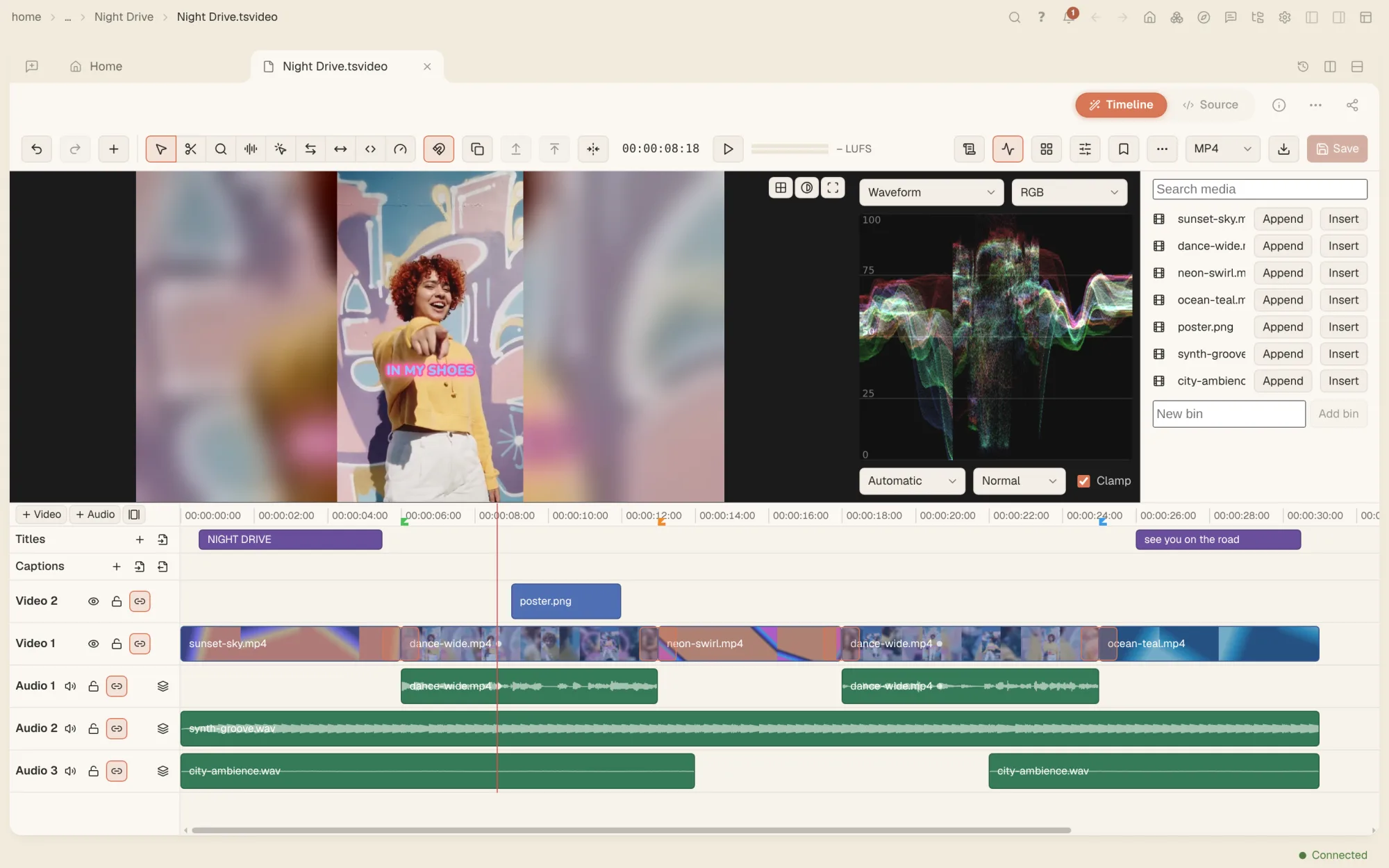
Everything an edit needs.
- Timeline editingVideo and audio tracks, razor, ripple, roll, slip and slide edits, speed ramps, frame holds, nested sequences, a media bin, markers and three-point editing.
- Transitions, titles and effectsDissolves and a library of wipes at any cut, picture in picture with keyframes, blend modes, an effects rack, stabilising and animated titles.
- Colour and scopesExposure, temperature, lift, gamma and gain, RGB curves, LUTs from .cube files and colour keyframes, with waveform, parade, histogram and vectorscope.
- Sound and mixingClip gain, fades and volume keyframes, a mixer with buses, EQ, compressor, reverb and limiter, and the quiet parts of a clip cut out in one step.
- MulticamLine up one clip per camera by their starts or by their sound, then cut between angles by clicking or by pressing 1 to 9 while it plays.
- Edit by transcriptSelect words in the transcript and press Delete to cut them from the edit, and take out filler words and long pauses in one step.
- CaptionsCaptions built from the transcript, burned into the video or saved as SRT, WebVTT and other caption files.
- Quick fixes to one clipOpen any video file to trim it, reframe it to 9:16, 16:9 or 1:1, adjust it, add text, transcribe it by speaker and export, with no project to set up.
- AI editsAn AI transition of 46 kinds at any cut, a clip changed from a typed instruction or relit, and its sound split into voice, music and the rest, each priced first. New
- Move an edit to another editorTimelines go in and out as FCPXML, Premiere XML, EDL, OpenTimelineIO, AAF and OMF, and anything a format can’t carry is named.
Say what you want changed. Watch it happen in the edit.
Every edit you can make with a button, the agent can make too. Ask it to trim the first three seconds and make the clip 9:16, or to grade two shots to match, and it works in the open editor while you watch. It can read the scopes as numbers, so it checks that the shots really match.
- Edits, trims, grades, mixes and multicam cuts, by asking
- Every change shows in the same panels you would use
- Or do it all yourself: the editor works without the agent
Your footage in, your edit out.
Open your video files, or a timeline from another editor. Your original files are never changed: every export is a new file, rendered on your computer.
- .mp4
- .mov
- .webm
- .tsvideo
- .fcpxml
- .xml
- .edl
- .otio
- .aaf
- .omf
- .mp4
- .tsvideo
- .fcpxml
- .xml
- .edl
- .otio
- .aaf
- .omf
- .srt
- .vtt
- .ttml
- .scc
- .mp3
- .wav
Questions people ask
Is the video editor free?
Yes. The editor is part of the free app and renders on your computer. Only the AI edits use a model: an AI transition, a clip changed from a typed instruction, relighting or splitting the sound, and each shows its price before it runs.
Does editing change my original video?
No. A quick fix to one clip renders to a new file and opens it in a new tab. A timeline project refers to your media and exports a new MP4.
Can I move an edit to Premiere or Final Cut?
Yes. The timeline exports FCPXML, Final Cut Pro 7 / Premiere XML, CMX 3600 EDL, OpenTimelineIO, AAF and OMF, and names anything the chosen format can’t carry.
Can I remove “um” and long pauses automatically?
Yes. Transcribe the media, then remove filler words, or pauses longer than a length you set, in one step. Every unlocked track is cut to match.
Can I just tell the agent what to change?
Yes. Ask in the chat. The agent runs the editor’s own actions, so you see each change in the panels and can undo it.
Can I use the video editor in the web app?
Yes. The makers and editors also work in the web app, run by the computer it is connected to.
Your footage, and an agent that edits it.
Free on Mac, Windows and Linux, with every other tool included.