 Tesseract
Direct the camera. Get the shot.
Name a move, such as a crane down, a dolly in, an orbit or a crash zoom, or stack up to three in one shot. Then set the genre, the era, the lens and the light. The video maker writes it the way a director would and has the clip made.
- 98 camera moves
- Up to three in one shot
- 55 colour looks
How it works.
- Name the move98 moves in nine kinds: push and pull, cranes, orbits, zooms, pans and tilts, handheld and aerial, speed, locked-off and special moves.
- Stack up to threeMoves run one after another or together in one shot: a crane down, then a dolly in; or a dolly in with a handheld feel.
- Genre and era26 genres and 14 eras set the wardrobe, the props and the way the scene is lit.
- Lens and light18 lenses and 22 lighting setups, from a wide anamorphic frame to one hard light carving a face out of the dark.
- How it feels18 emotions for the person in the shot. Ask the assistant to play one subtle, clear or strong.
- Film and colour looks18 film looks in the shot itself, and 55 colour looks laid over it on your computer.
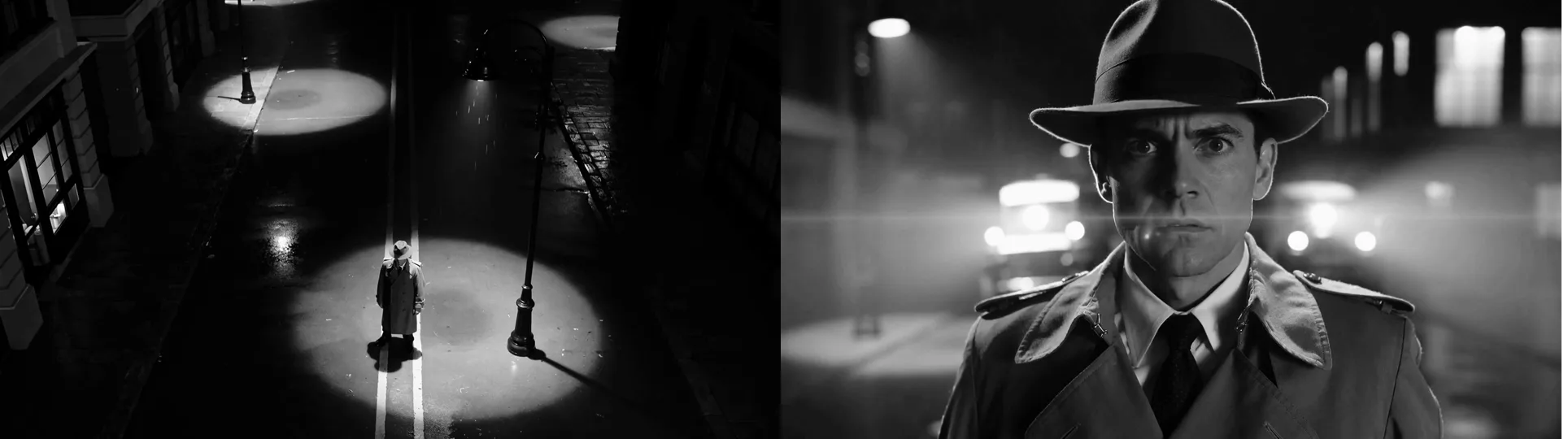
From above the street to his face, in one shot.
The first and the last frame of our example. The request named two moves, a crane down and then a dolly in, with the noir genre, the 1940s, an anamorphic lens and low-key light. The detective was made from those words alone, and the black and white is one of the colour looks. Our example was made with the Tesseract beta.
- Clips are made by video models: this needs you signed in to Tesseract (charged to your allowance) or your own fal.ai key.
- The colour looks are applied on your computer, at no cost.
Questions people ask
Where is it in the app?
On Home, open Make a video, then Direction: camera moves, lens, light, genre and colour, for the whole video and for each shot. Or ask the assistant, for example “a crane down, then a dolly in”.
Can I combine moves?
Yes, up to three in one shot. They run one after another, like a crane down followed by a dolly in, or together, like a dolly in with a handheld feel.
What does it cost?
Each clip is made by a video model, so it is paid: from your Tesseract allowance when you are signed in, or with your own fal.ai key. The colour looks cost nothing.
Direct your first shot.
Free on Mac, Windows and Linux, with every other tool included.