 Tesseract
 Agentic IDE · free · Mac, Windows, Linux
One agentic IDE for every coding agent.
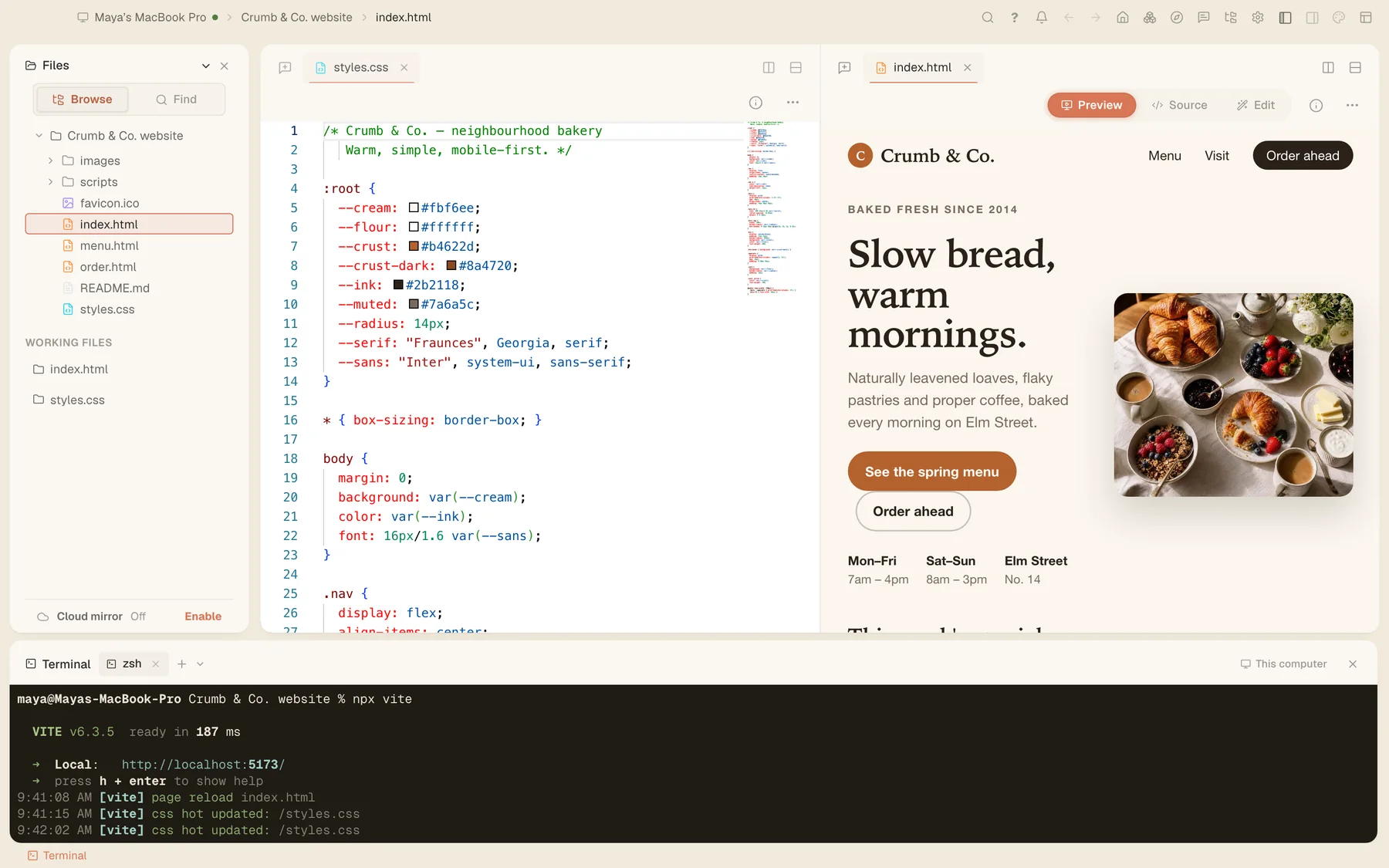
Tesseract is a free desktop app where AI agents do the work — plan, edit, run, check — while you review. Run Claude Code, Codex, Gemini CLI and 11 more in one window, beside a code editor, a terminal and a live preview, on the accounts you already have.
Updated
- 14agent frameworks
- 148app actions the AI can take
- 131search engines
- 18file viewers and editors
- 3desktop systems: Mac, Windows, Linux
The agents
14 coding agents. Pick one for each conversation.
Tesseract runs each agent itself, installed on your computer and signed in with its own account or key. It installs the ones you pick.
| Agent | Made by | How you sign in |
|---|---|---|
| Claude Code | Anthropic | Sign in with your Claude account (Pro or Max), or use an Anthropic API key. |
| OpenAI Codex | OpenAI | Sign in with ChatGPT, or use an OpenAI API key. |
| OpenCode | the OpenCode open-source project | Log in to any of its 75+ model providers, one by one. |
| Gemini CLI | Use a Gemini API key. Google sign-in now works only with a Gemini Code Assist licence: Google stopped serving personal and Google AI Pro/Ultra accounts in Gemini CLI on June 18, 2026. | |
| Antigravity CLI | Sign in with your Google account — personal accounts and Google AI Pro and Ultra plans included — or use a Gemini API key. Tesseract installs it from Google’s own release. | |
| Kimi Code | Moonshot AI | Sign in with your Kimi account. |
| Qwen Code | Alibaba’s Qwen team | Sign in with Qwen, or set an OpenAI-compatible key in it. |
| MiniMax Code | MiniMax | Sign in with MiniMax, or save a MiniMax API key in it. |
| CodeBuddy | Tencent | Sign in through its own CLI first, on the international site. |
| Grok Build | xAI | Sign in with your Grok account. |
| Cursor | Anysphere, the makers of Cursor | Sign in with your Cursor account. |
| Hermes Agent | Nous Research | Use an OpenRouter key; Tesseract installs it through a community installer. |
| OpenClaw | the OpenClaw open-source project | Use an OpenRouter key; Tesseract runs a private OpenClaw Gateway for it. |
| NanoClaw | the NanoClaw open-source project | Use an API key, or the sign-in already on your machine; it runs on the Claude Agent SDK. |
Each agent’s page lists what works with it in Tesseract, feature by feature, from the app’s own catalog.
The workspace
An IDE built around the agent.
- Editor and terminalThe Monaco editor with a file tree and multi-pane tabs, and an integrated terminal, next to the conversation.
- Live preview and a browserWatch the result while the agent works, and point at an element in the embedded browser to talk about it.
- What it changedA reviewable diff of a turn or a whole conversation, and “Restore files to here” on the frameworks that support it.
- Apps inside the appAsk for a tool, a dashboard or a game and the agent builds it in a sandboxed panel beside the chat.
- 18 viewers and editorsCode, Markdown, CSV, PDF, Word, Excel, images, audio, video, fonts and hex — and about 20 archive formats as folders.
- Search everythingFind any past conversation by what was said in it, across every agent, and pick it up where it stopped.
Control
It plans first. You decide how far it goes.
- Chat, Plan or Full accessSet for each conversation. In Plan it writes an editable plan and waits for your go-ahead.
- Asks before risky callsOn the frameworks that can pause on a tool call, a risky one waits for your answer.
- Deletes only by exact pathA delete that depends on the folder a command happens to run in is refused, and the agent is told to name the real path.
- Keeps going when you’re awayLet it answer its own questions and work overnight; it leaves a report of every choice it made.
- Scheduled jobsRepeat a task on a schedule, on whichever framework you choose.
- Checks its own workReinforced verification sends the agent back until its own review comes back clean.
Accounts
Your subscriptions. Your keys. No markup.
- Use what you pay forClaude Code with your Claude account, Codex with ChatGPT, or an API key. Tesseract adds no charge on top.
- Backup accountsAdd more than one; when an account reaches its limit, the next takes over.
- Or no account at allStart on a free allowance through Tesseract, and top up from $10 when you want the most capable models.
Beyond one machine
Agents on every computer you own.
- tesseract-agentRun any framework on a Mac, Linux or Windows machine or a server, as a background service:
npm i -g tesseract-agent "--allow-scripts=tesseract-agent,ffmpeg-static,node-datachannel,@homebridge/node-pty-prebuilt-multiarch". - One fleetSee every machine and what it is running, browse their files as if they were local, and keep project folders in sync.
- Remote desktop and a private networkReach any of your computers, and connect them on a private network by name.
Extend it
Your tools, plugged in.
- MCPAny MCP server over stdio, HTTP or SSE, and servers from the official registry with security verdicts.
- Skills and extensionsBuilt-in skills for code review, security review, verification and parallel work; more from ClawHub; extensions with their own tools, panels and commands.
- Drive it from outside148 actions the AI can take in the app, and a local debug port (Chrome DevTools Protocol) in Developer Options.
Questions
About Tesseract as an agentic IDE.
- What is an agentic IDE?
- An editor where an AI agent does the work end to end: it reads the project, makes a plan, edits files, runs commands and checks the result, while you review and approve. Tesseract is one: a desktop app with a code editor, a terminal and a live preview, built around the agent instead of around autocomplete.
- Which coding agents does Tesseract run?
- 14: Claude Code, OpenAI Codex, OpenCode, Gemini CLI, Antigravity CLI, Kimi Code, Qwen Code, MiniMax Code, CodeBuddy, Grok Build, Cursor, Hermes Agent, OpenClaw, NanoClaw. Each conversation picks its own, and you can switch.
- Is Tesseract free?
- Yes. Tesseract has no subscription. Sign in to an agent with the account you already have, or use a free allowance through Tesseract; pay-as-you-go top-ups, from $10, unlock the most capable models.
- Can I use my Claude or ChatGPT subscription?
- Yes. Sign in to Claude Code with your Claude account, and to Codex with ChatGPT. Tesseract adds no charge on top, and your plan’s own limits apply. You can add backup accounts, and when one reaches its limit the next takes over.
- Does it work on Linux?
- Yes. Tesseract runs on macOS, Windows and Linux, and installs itself and updates itself on all three.
- Can different agents work at the same time?
- Yes. Each conversation has its own framework and model, so Claude Code can work in one while Codex or OpenCode works in another, in the same project or in different ones.
- How do I keep the agent from doing something I did not want?
- Choose Chat, Plan or Full access for each conversation. In Plan it shows an editable plan and waits for you; the frameworks that support it ask before a risky tool call; a delete must name the exact path; and on the frameworks that support it you can restore the files a conversation touched to an earlier message.
- Is Tesseract the same as the Tesseract OCR library?
- No. This Tesseract is an AI agent app made by Eightcell Labs. Tesseract OCR is an unrelated open-source text-recognition engine.