For professionals

Simple on the surface. A full workstation underneath.

The same app runs agents across all your machines, links them in a private network, and opens up to your own frameworks, tools and extensions. Free with the AI subscription you already have.

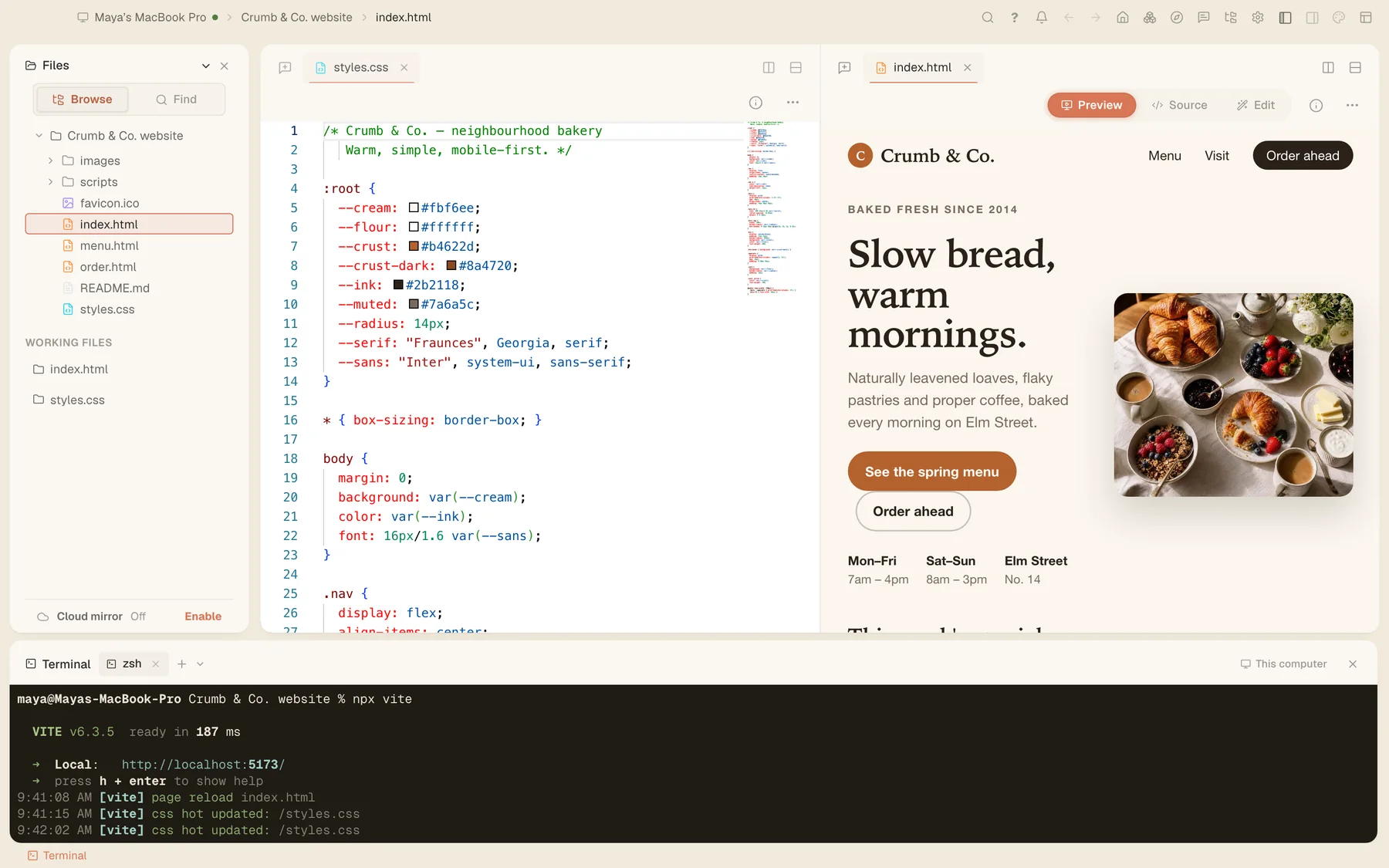
The bakery site's stylesheet in the code editor, its live preview, and a terminal.
Your fleet

Every computer you own, working as one.

Remote desktop

See and control any of your computers from another one, smoothly. Start a session with a one-time code, ask for access by email, or use a password for machines nobody is sitting at.

  • One-time codes that expire after 30 minutes
  • Up to three people watching the same screen
  • A standalone Remote Desktop app for Mac, Windows and Linux
  • Connects directly when the network allows, through a relay when it doesn’t

On Windows, the lock screen and admin prompts stay with the person at the machine.
Free as its own app: Tesseract Remote Desktop →

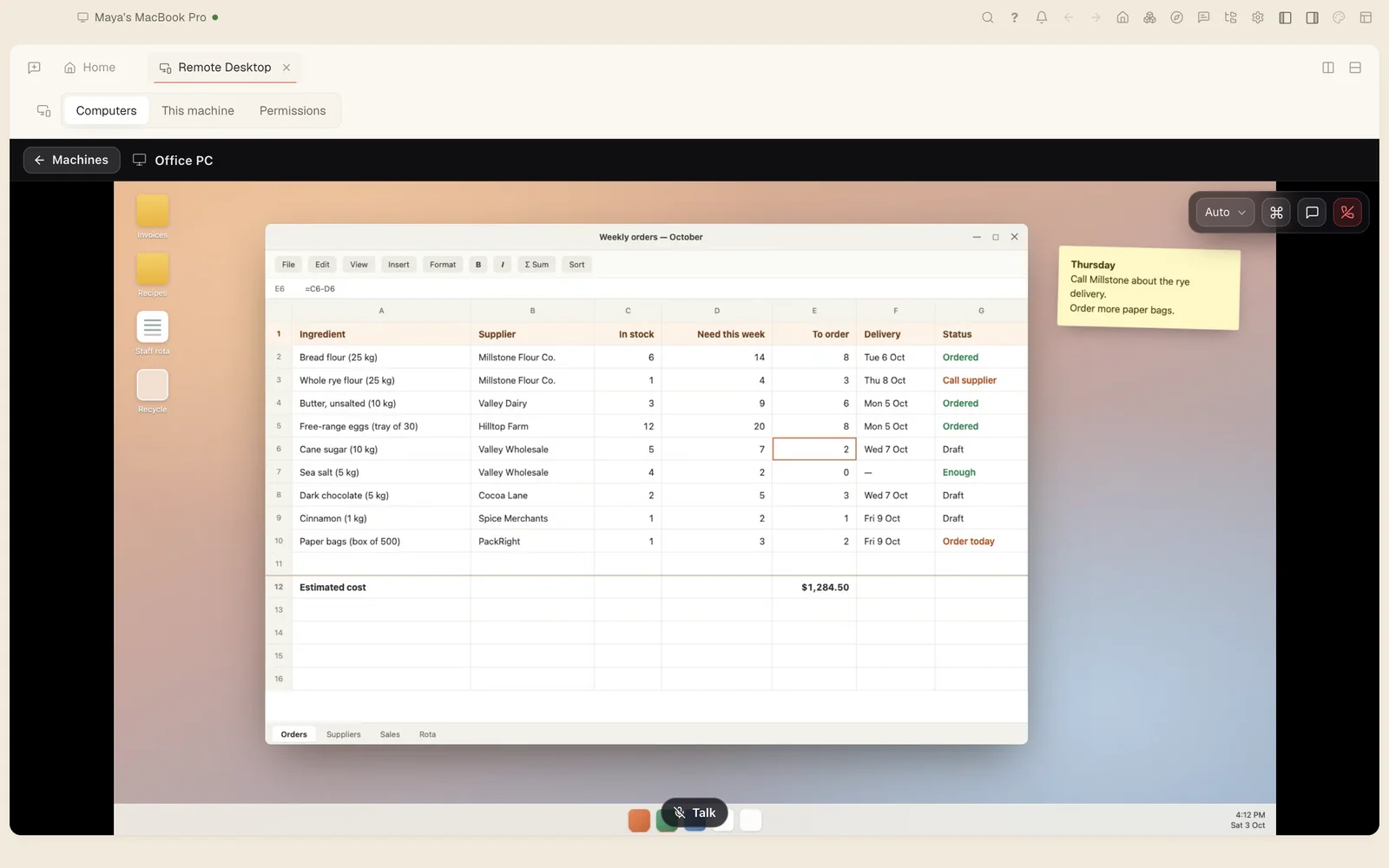
A remote desktop session showing the shop PC's order spreadsheet.

A private network for your machines

Every computer you add joins a private network with its own certificates and reaches the others by name, wherever each one is. Traffic goes straight between machines when it can; when it can’t, a relay passes it on still encrypted.

  • Linux, macOS and Windows
  • Machines reachable by their real hostnames
  • Direct connections through home and office routers, a relay only as a fallback
  • Send all your internet traffic through one of your machines, an exit node the network owner allows

Free as its own app: Tesseract Mesh →

Four machines on a private network: direct connections between them, and an encrypted relay as a fallback. relay, still encrypted maya-macbookmacOS studio-imacmacOS office-pcWindows cupboard-serverLinux direct
Machines connect directly by name; a relay passes traffic on, still encrypted, only when a direct path isn’t possible.

Agents on your computers and servers

Any machine you own can run agents for you: your laptop, the iMac in the back office or a Linux server in a cupboard. Machines dial out, so there are no ports to open, and work carries on after you close the window.

  • tesseract-agent for any Mac, Linux or Windows machine with Node 20 or newer
  • Runs as a background service, with any framework via --engine
  • Several agents on one machine with --instance
  • See every machine and what it is running from My Computers

On Windows the agent runs as a task that starts at logon.

# install

$npm i -g tesseract-agent "--allow-scripts=tesseract-agent,ffmpeg-static,node-datachannel,@homebridge/node-pty-prebuilt-multiarch"

# sign in with a one-time code in your browser

$tesseract-agent login

# run it as a service, then check on it

$tesseract-agent install

$tesseract-agent status

tesseract-agent on npm →

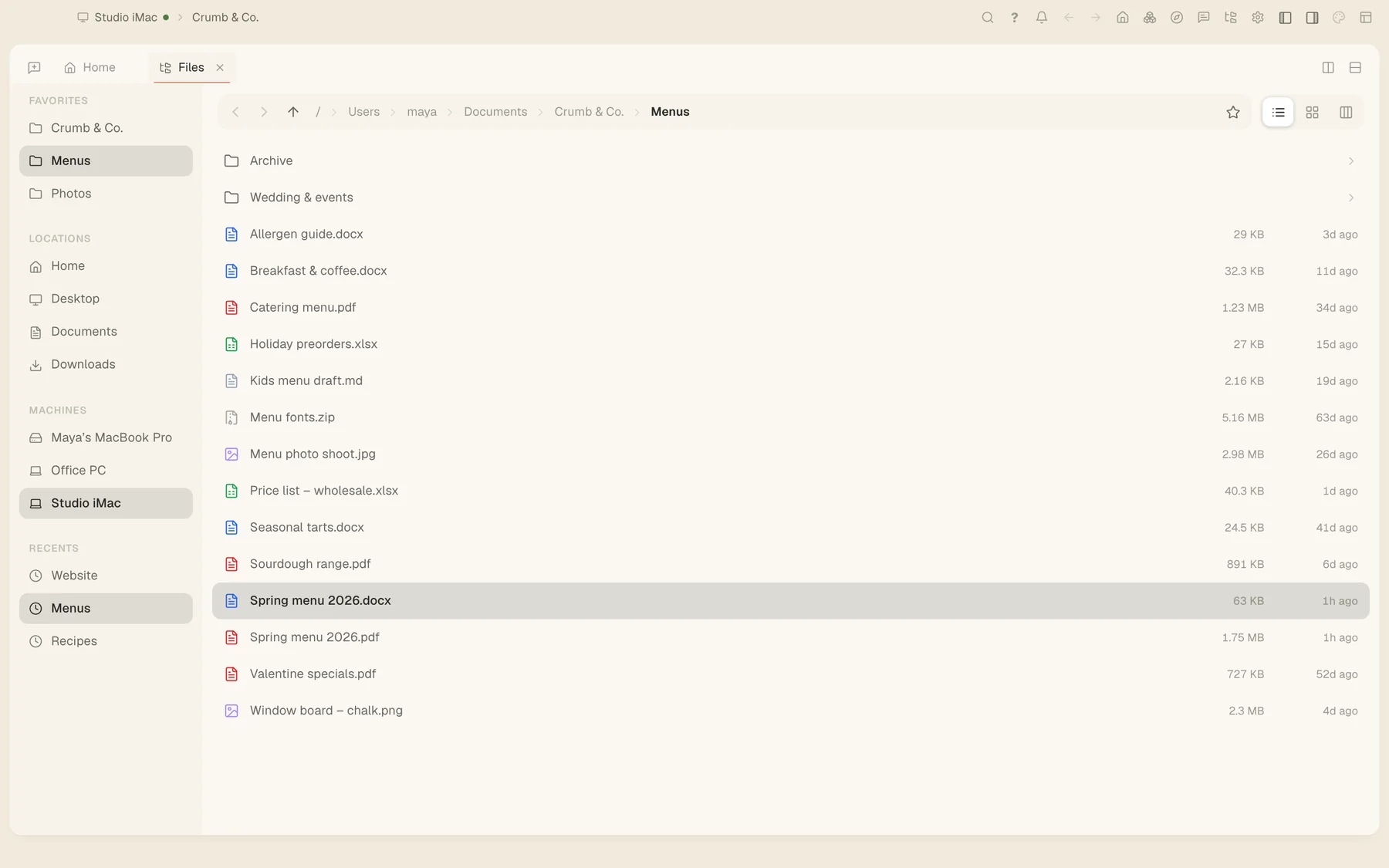
Explore every machine’s files

One Files view browses every computer you own as if its folders were local. Open, preview, edit and move files on the iMac from your laptop.

  • A Machines sidebar in the Files view
  • On Mac, your machines appear in Finder
  • On Windows and Linux, as a mounted drive
  • Archives open like ordinary folders
Files open on the Studio iMac, with the other machines listed in the Machines sidebar.

Folder sync between your computers

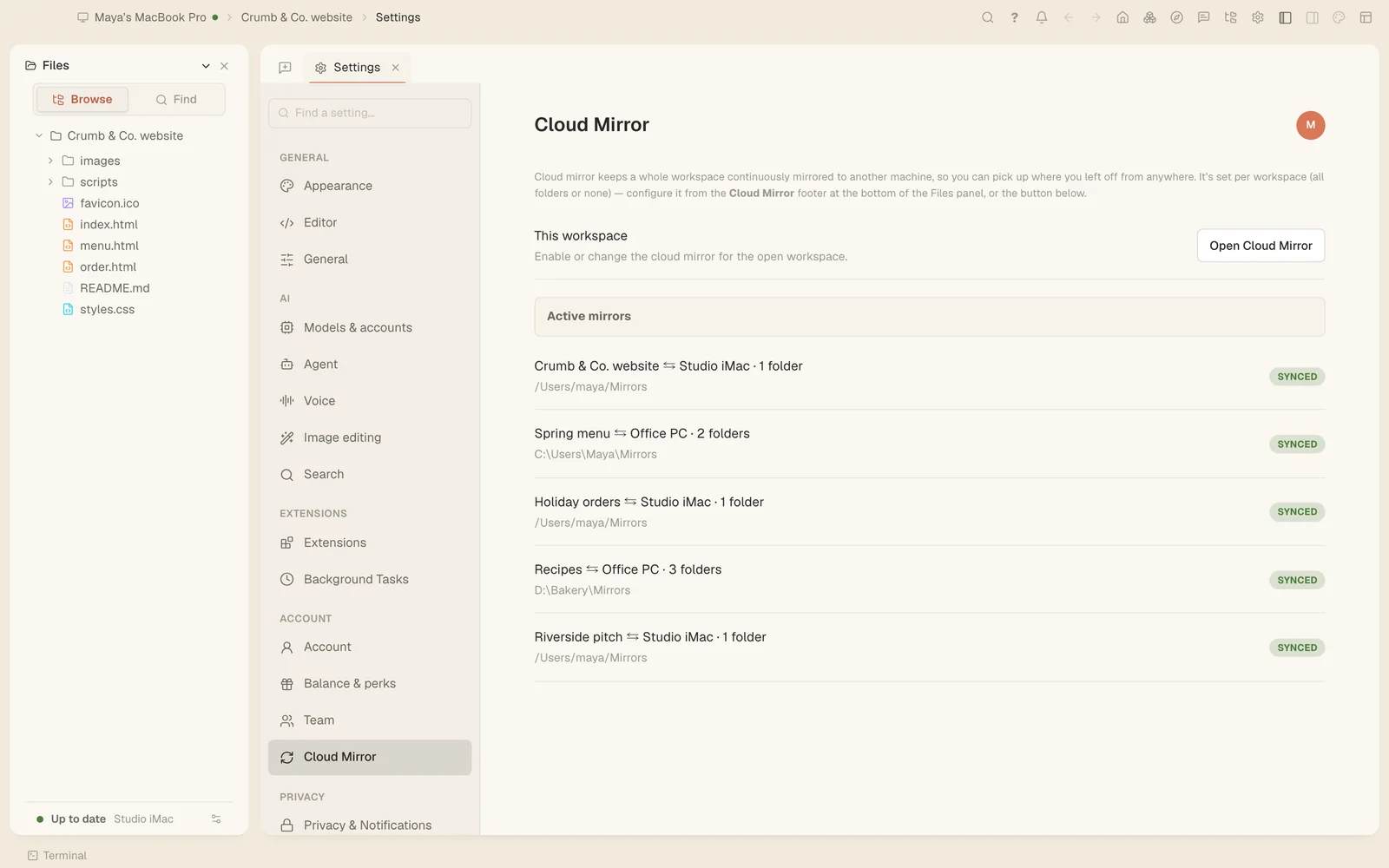
Point two of your computers at the same project folder and Tesseract keeps both copies in step, in both directions, with the status of every synced folder at a glance.

  • Two-way, between machines you own
  • Skips the files your project’s git ignores
  • A list of every synced folder and its state

Both machines need to be online, and the newest change wins.

Folder sync settings listing five folders, all in sync.

Clipboard and file sharing across devices

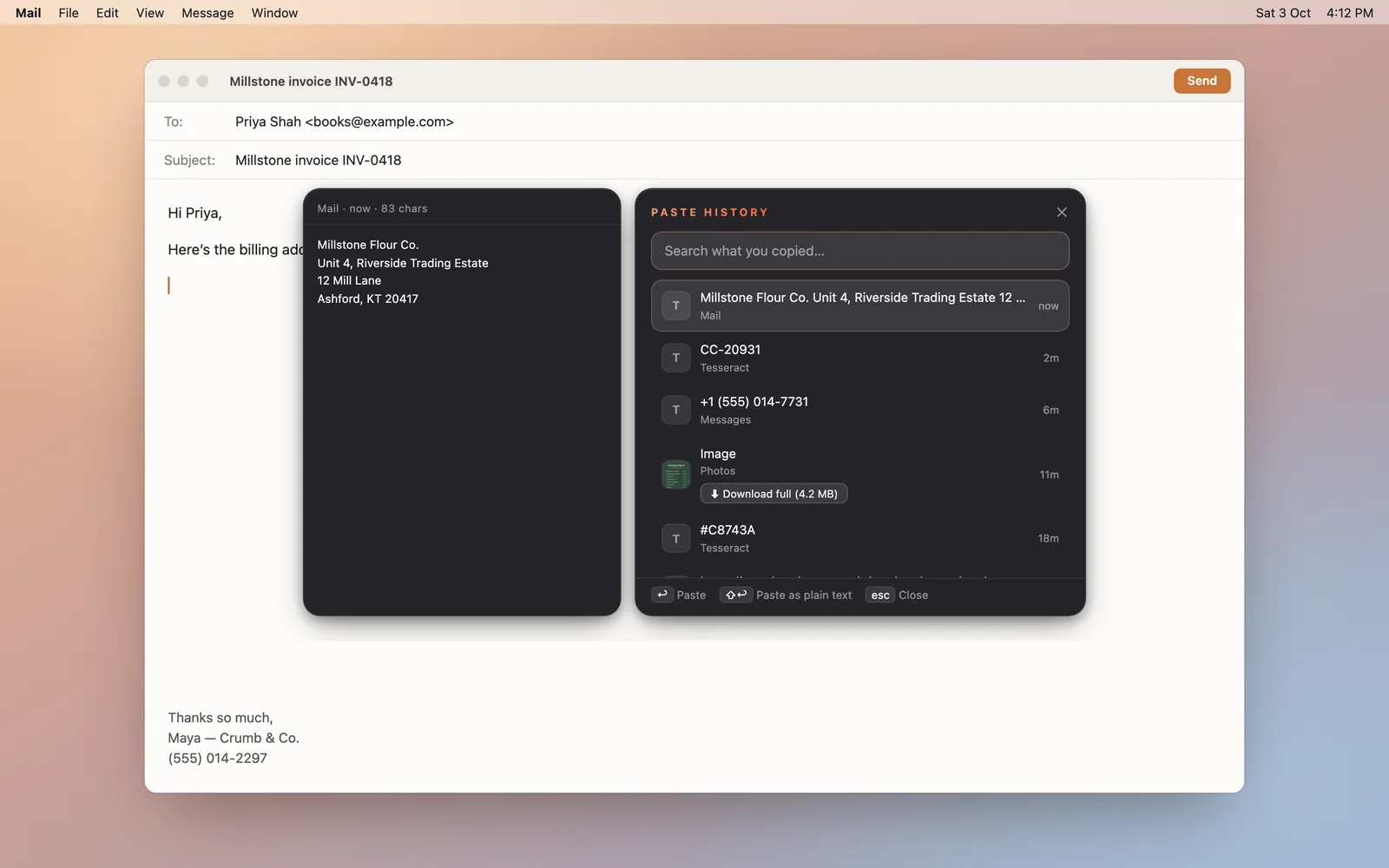
Copy on one computer and paste on another, text or images, with a searchable history of everything you copied. Send files to your own devices or to other people.

  • Mac, Windows and Linux; ⌘⇧V or Alt+Shift+V opens the history
  • 500 items, text up to 100,000 characters, images up to 10 MB
  • Skips password managers and secure fields
  • Files up to 2 GB per drop, with codes and rules for what you accept
  • Drops to other accounts are encrypted before they leave your machine
Paste history over an email, with an address, an order number and an image copied earlier.
Your AI stack

Your agents, your models, your tools.

Agent frameworks and models

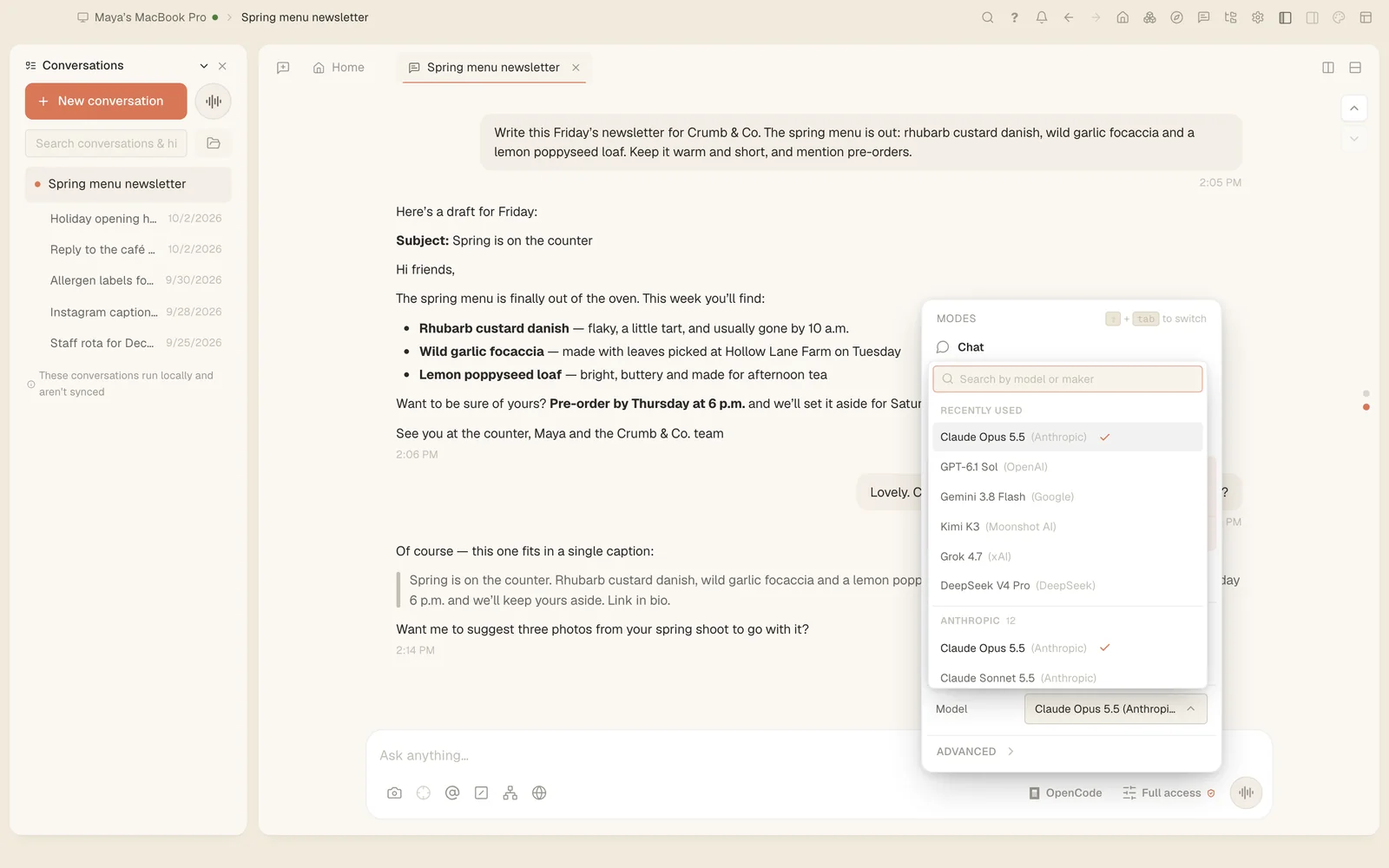
Tesseract runs the agent you prefer, signed in with your own account, and you can switch for each conversation.

  • 14 frameworks: Claude Code, OpenAI Codex, Gemini CLI, Antigravity CLI, OpenCode, Kimi Code, Qwen Code, MiniMax Code, CodeBuddy, Grok Build, Cursor, Hermes Agent, OpenClaw and NanoClaw
  • Backup accounts: when one hits its limit, the next takes over
  • Model lists come live from each framework, so new models appear without an update
  • Through the Tesseract Gateway, models from every major maker in one list

All 14 agents, and what works with each →

The model menu in a conversation, with recent models and models grouped by maker.

Skills and built-in capabilities

Out of the box, the agent can work your computer, a real browser and the web, and it comes with skills for the jobs professionals repeat.

  • Built-in skills: code review, security review, simplify, verification, parallel work, decks, charts and diagrams, image generation
  • Works your mouse, keyboard and screen on Mac, Windows and Linux
  • A real browser for forms and live pages
  • Web search across 131 engines
  • More skills from the ClawHub catalogue
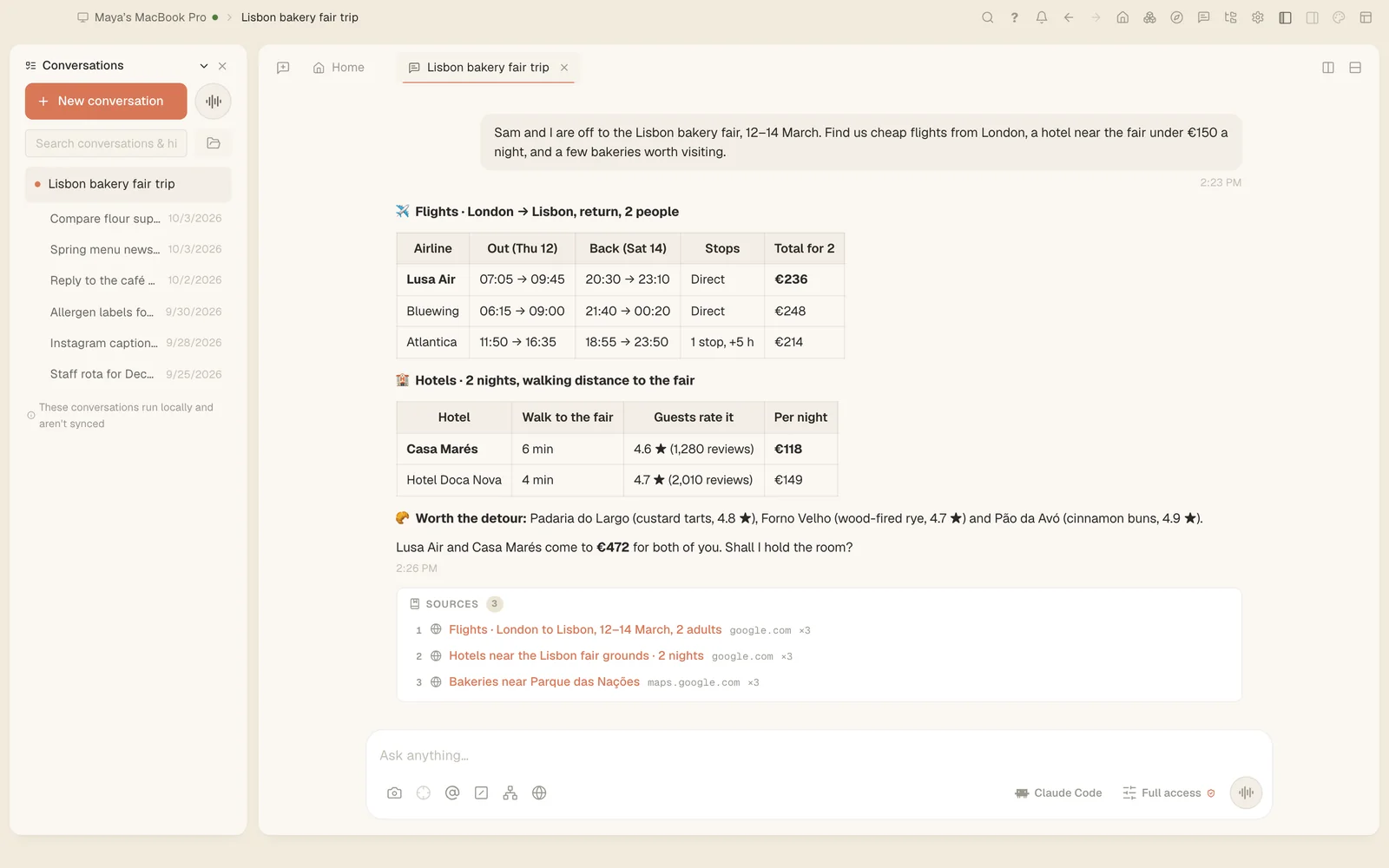
A conversation with flight and hotel options for a trip to Lisbon, with sources.

Drive Tesseract from your own tools

The agent can operate Tesseract itself, and you can attach your own tools to it: a debugger, a script or another AI client.

  • 148 actions across 19 areas the AI can perform: settings, frameworks, devices, themes and more
  • A local debug port (Chrome DevTools Protocol), switched on in Developer Options
  • The raw trace of every turn in the debug view
  • Its computer-control tools can be connected to Claude Desktop or Cursor through a config file

# Settings → Developer Options → debug port

# then, on the same machine:

$curl -s http://127.0.0.1:9222/json/list

# attach DevTools, Playwright or your own script

Run modes, unattended and scheduled work

Decide how much it may do on its own, review its plan before it starts, and let it keep going when you step away.

  • Chat, Plan or Full access, per conversation
  • An editable plan before it acts
  • “Keep going when I’m away” answers its own questions after two minutes
  • Scheduled jobs that repeat
  • File changes can be undone on frameworks that support it
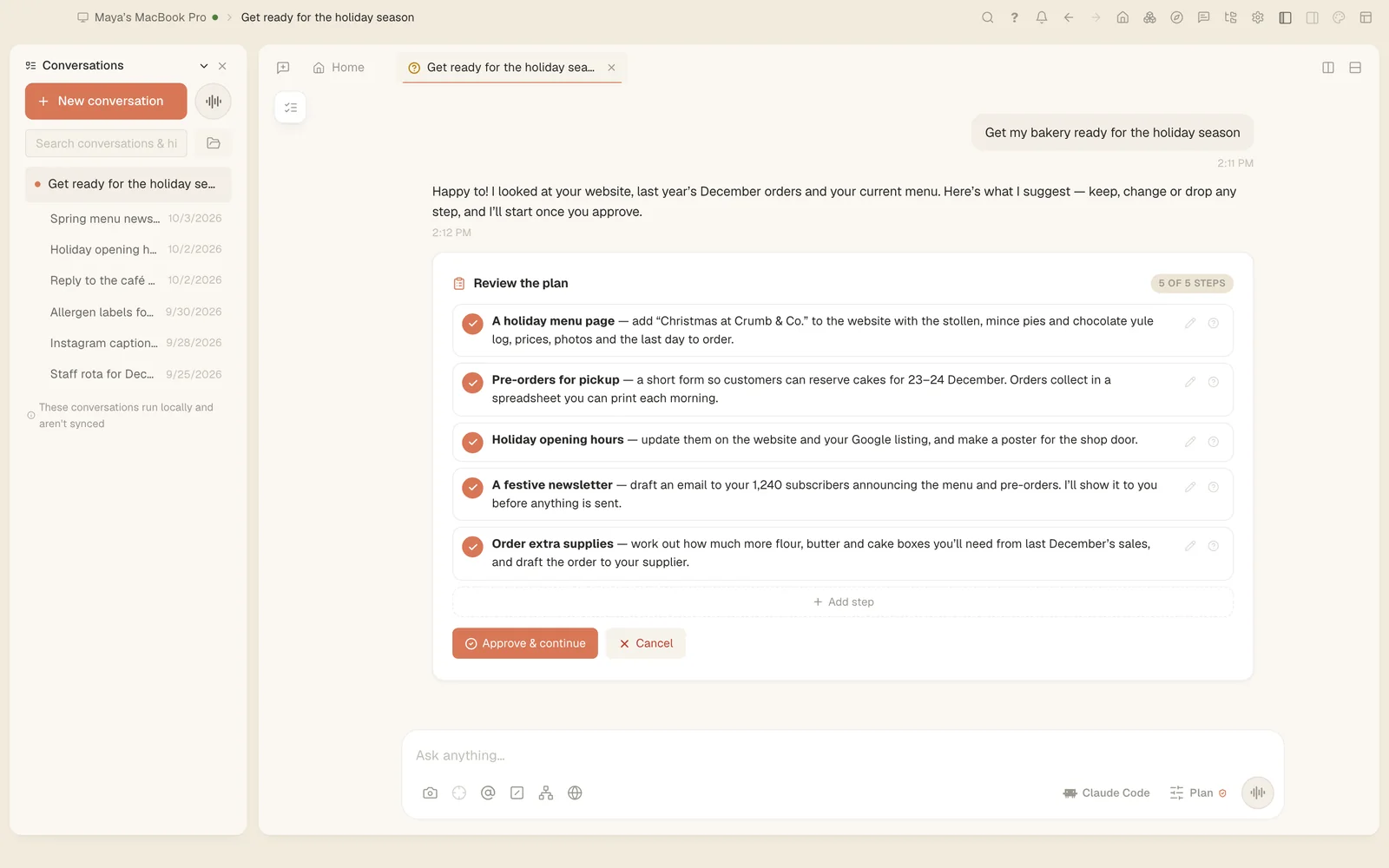
A five-step plan for the holiday season, waiting for approval.
Your workspace

Documents, code and apps in one window.

Build apps inside the app

Ask for a tool, a dashboard or a game and the agent builds it right there, in a sandboxed panel beside the chat. The panel talks back to the agent and reopens with the conversation.

  • Works on any framework
  • Pin a panel inside the chat or keep it beside it
  • Up to 32 panels per conversation
  • Ready-made boards too, like chess with an offline engine
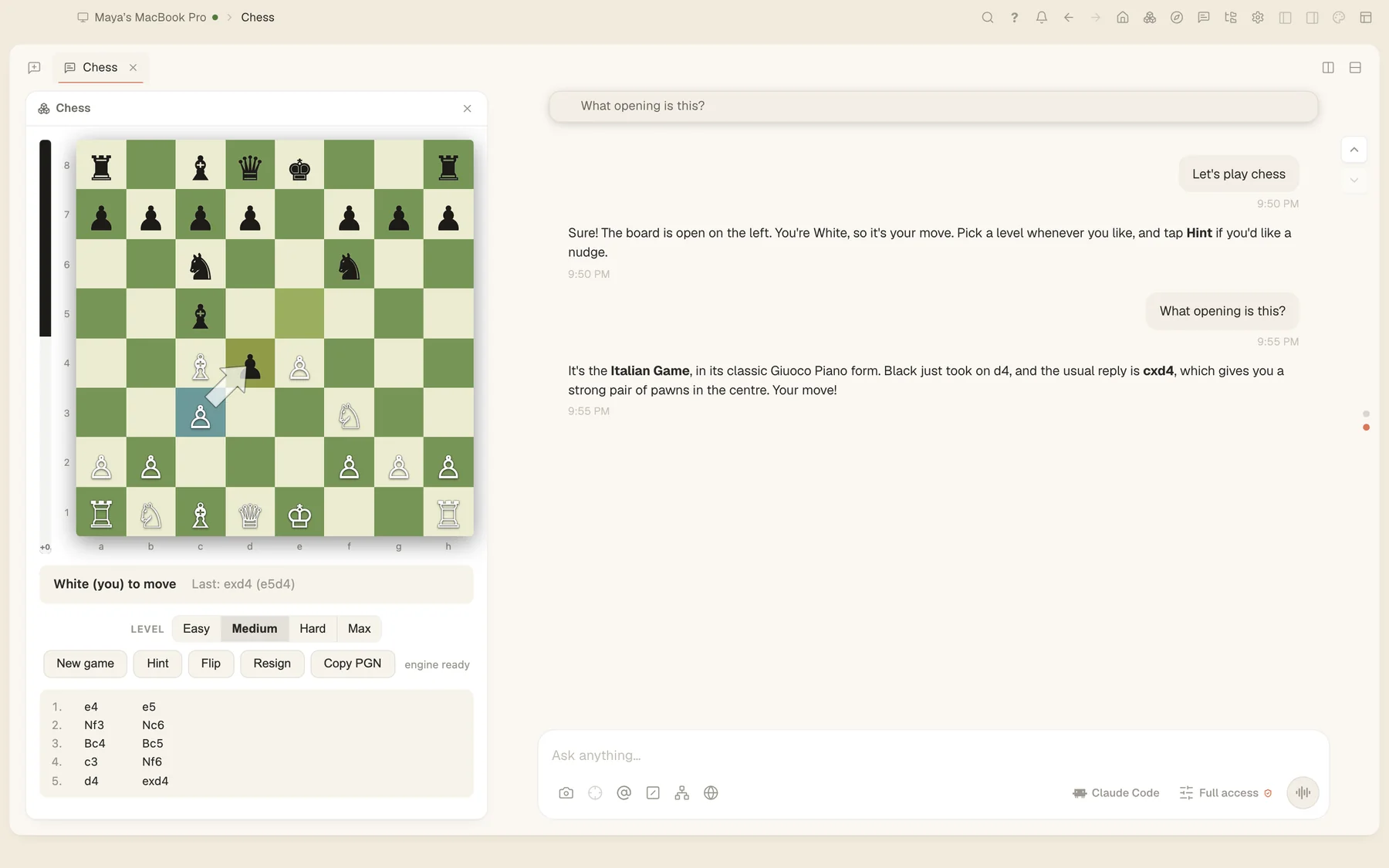
A chess board running in a panel beside the conversation.

Documents and files

Open almost anything without leaving the app: 18 viewers and editors, from Word and PDF to fonts, video and raw bytes.

  • Word: edit the content (exact layout isn’t kept)
  • Excel: edit values (formulas and formatting aren’t saved)
  • PDF: view and edit; PowerPoint: view
  • Code, Markdown, CSV grids, images, audio, video, fonts and hex
  • About 20 archive formats as folders (rar, iso and cab read-only)
  • .docx
  • .xlsx
  • .pdf
  • .pptx
  • .md
  • .csv
  • .html
  • .ts .py .go …
  • .png .jpg .webp
  • .mp4 .mov
  • .mp3 .wav
  • .ttf .otf .woff2
  • .zip .7z .tar
  • .rar .iso
  • hex

A full code workspace

Open a project and the editor is there, next to the agent: edit by hand, run commands and watch the result in a live preview.

  • The Monaco editor with a file tree and multi-pane tabs
  • An integrated terminal
  • An embedded browser with an element picker
  • Live preview while the agent works
The bakery site's stylesheet in the editor, its live preview, and a terminal.

Themes and customization

Restyle the whole app, from colours and fonts to backgrounds and sounds, and switch off any part of a theme you don’t want.

  • 10 themes in the box, each built as an extension
  • 8 parts of a theme you can switch off one by one
  • 14 design packs that restyle everything you create
  • Light, dark or follow the system
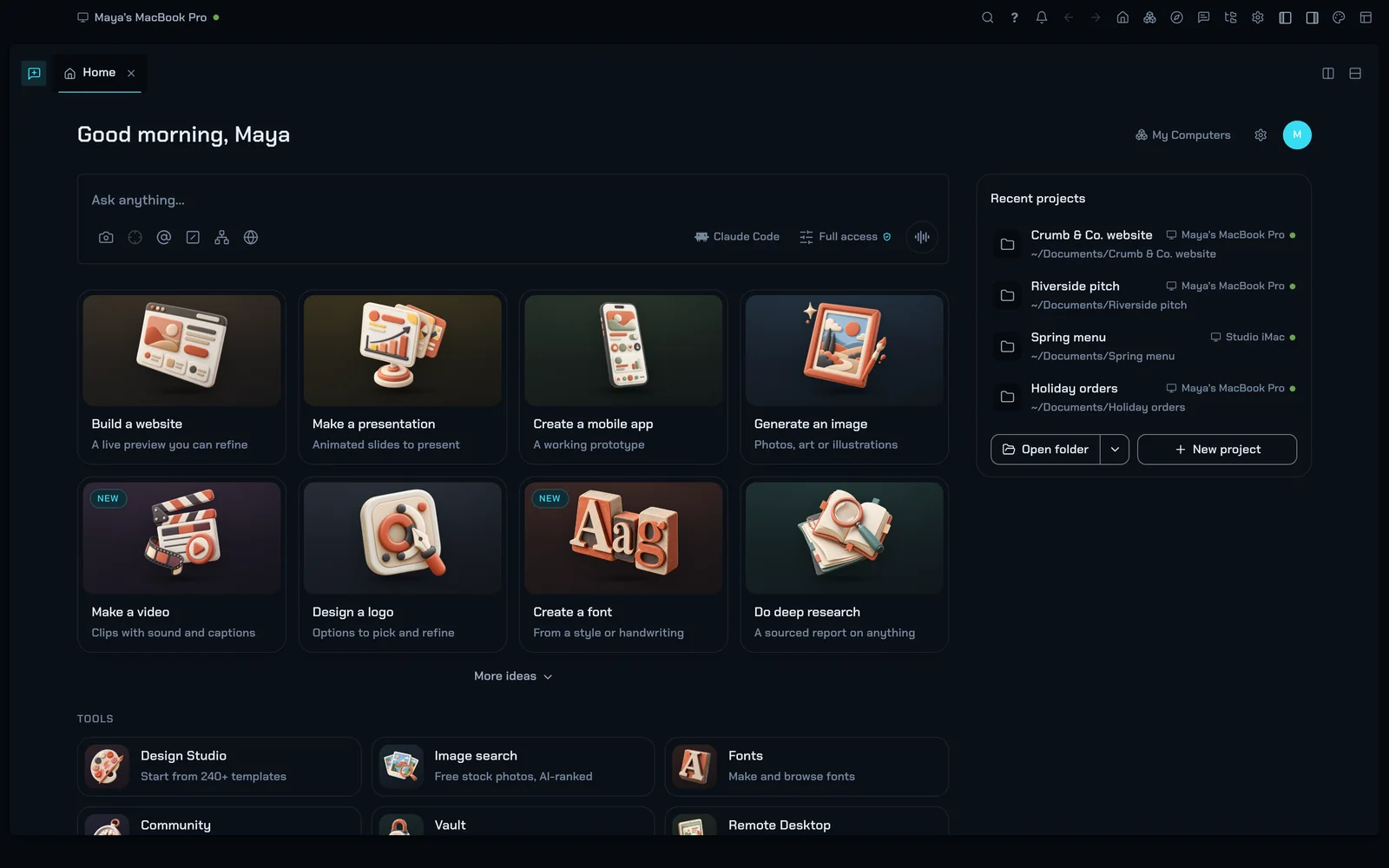
The home screen restyled by the dark Neon Terminal theme.

Extensions, plugins and skills

Extend Tesseract with one manifest. An extension can add commands, panels, tabs, menu items, file types, themes and agent tools, and asks for exactly the permissions it needs.

  • 15 contribution points, from agent tools and hooks to settings pages
  • 8 permissions you grant: files, network, secrets, reskinning and more
  • Skills and plugins from ClawHub, MCP servers from the official registry, with security verdicts in the catalogue
  • Any MCP server over stdio, HTTP or SSE

// package.json of an extension

"tesseract": {

"id": "shop-orders",

"name": "Shop orders",

"grants": ["network"],

"contributes": {

"commands": [{ "id": "orders.today",

"title": "Today’s orders" }],

"statusBarItems": [{ "id": "orders.count",

"command": "orders.today" }]

}

}

Your team

Talk, plan and work together.

Atrium, the team communicator

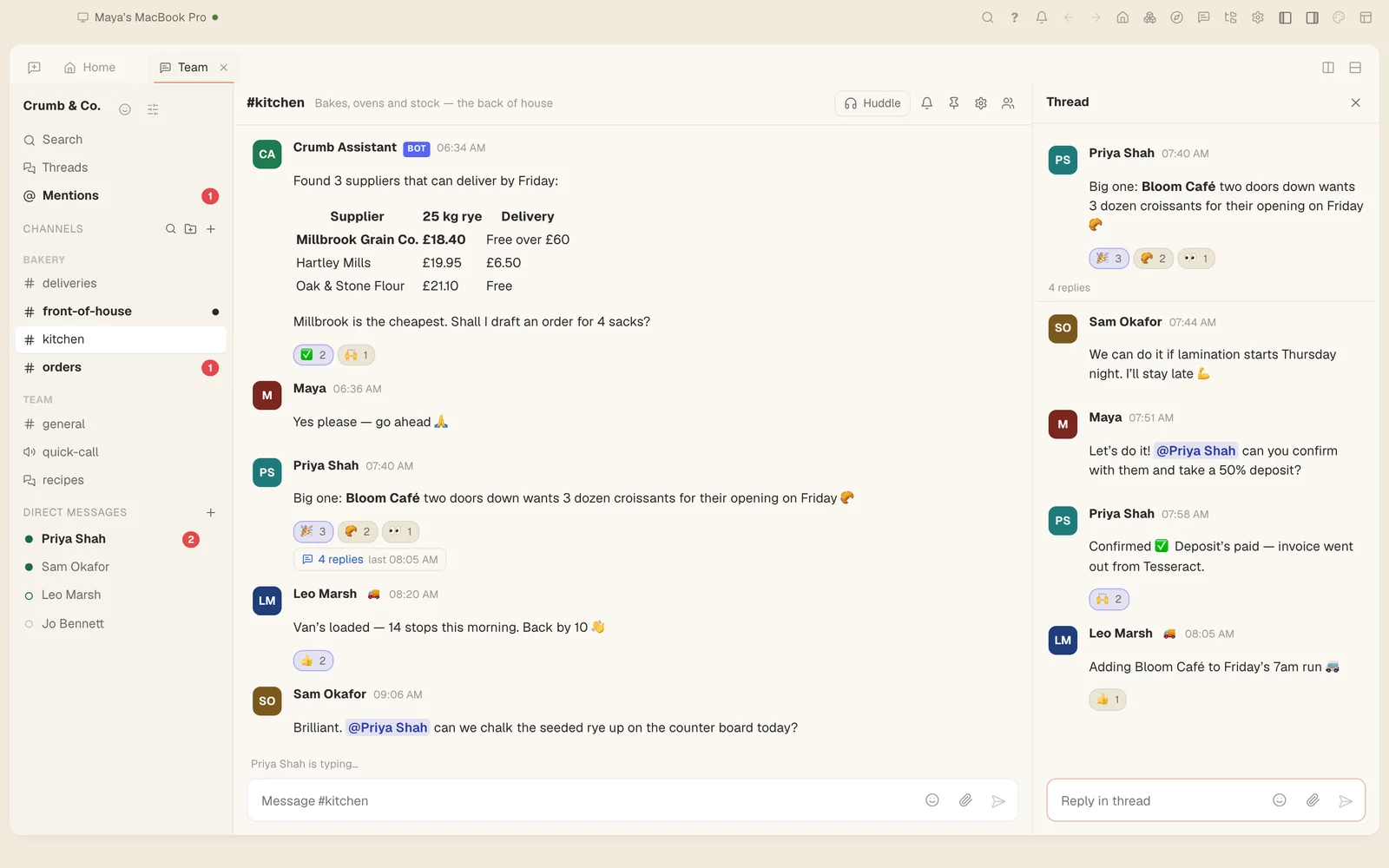
Workspaces, channels and threads for your team, with AI that answers questions and catches you up. Built into Tesseract, and a free app of its own.

  • Channels, forums, direct messages and group DMs of up to 9 people
  • Threads, mentions, reactions and search
  • “Ask” and “Catch me up” on any conversation
  • Canvases shared like Google Docs: viewer, commenter or editor
  • A bot API and incoming webhooks

Needs a Tesseract account.

Free as its own app: Tesseract Atrium →

Atrium with a thread and an AI teammate posting a price table.

Voice and video callsBeta

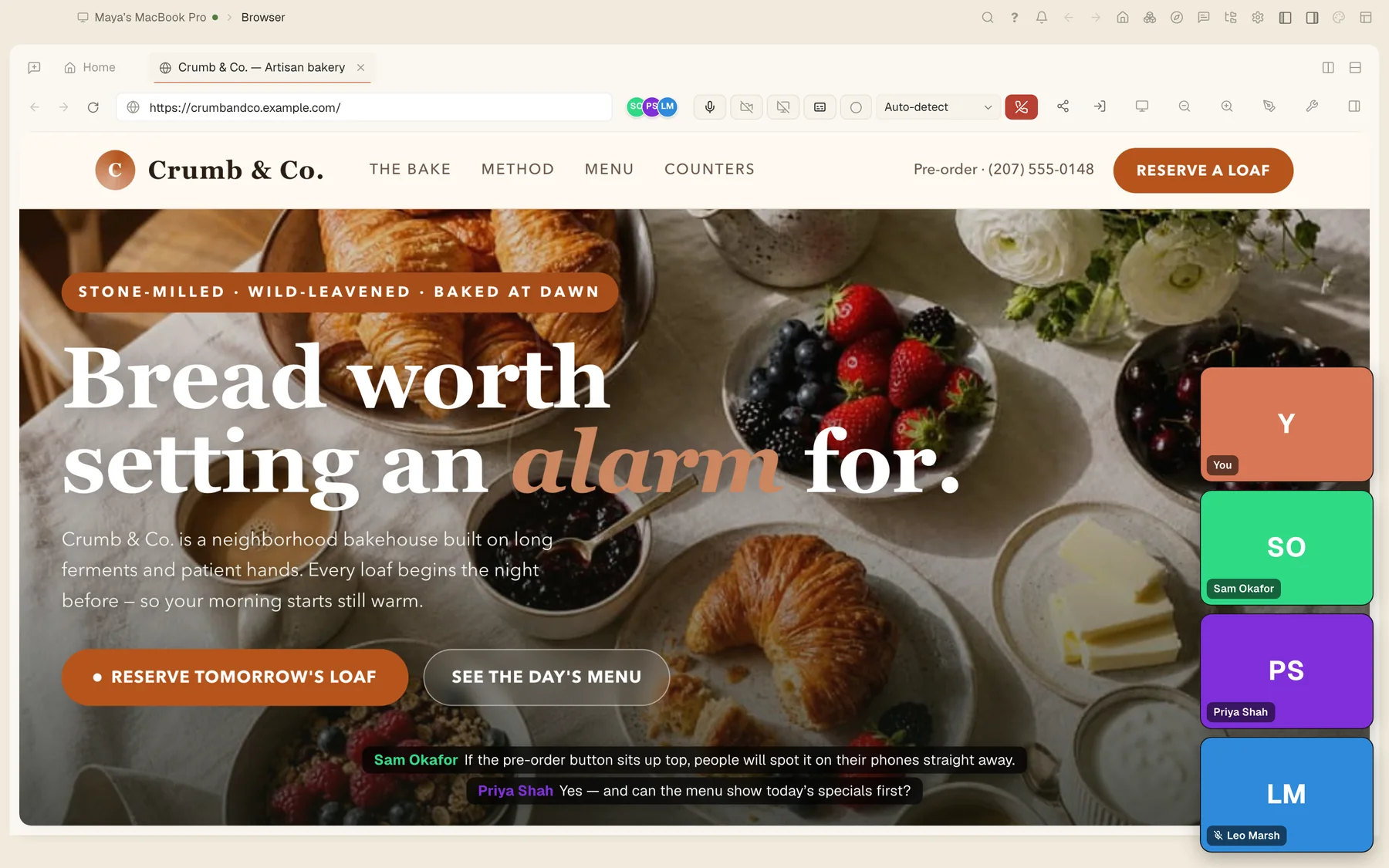
Meet without leaving the app: group calls with screen sharing, live captions, and a written summary posted to the channel when you hang up.

  • Group audio and video with screen sharing
  • Live captions, using your own OpenAI or Gemini key
  • An AI summary of every call, posted to the channel

In beta while it rolls out.

A video call reviewing the bakery website, with live captions.

Personal assistants in your messengersComing soon

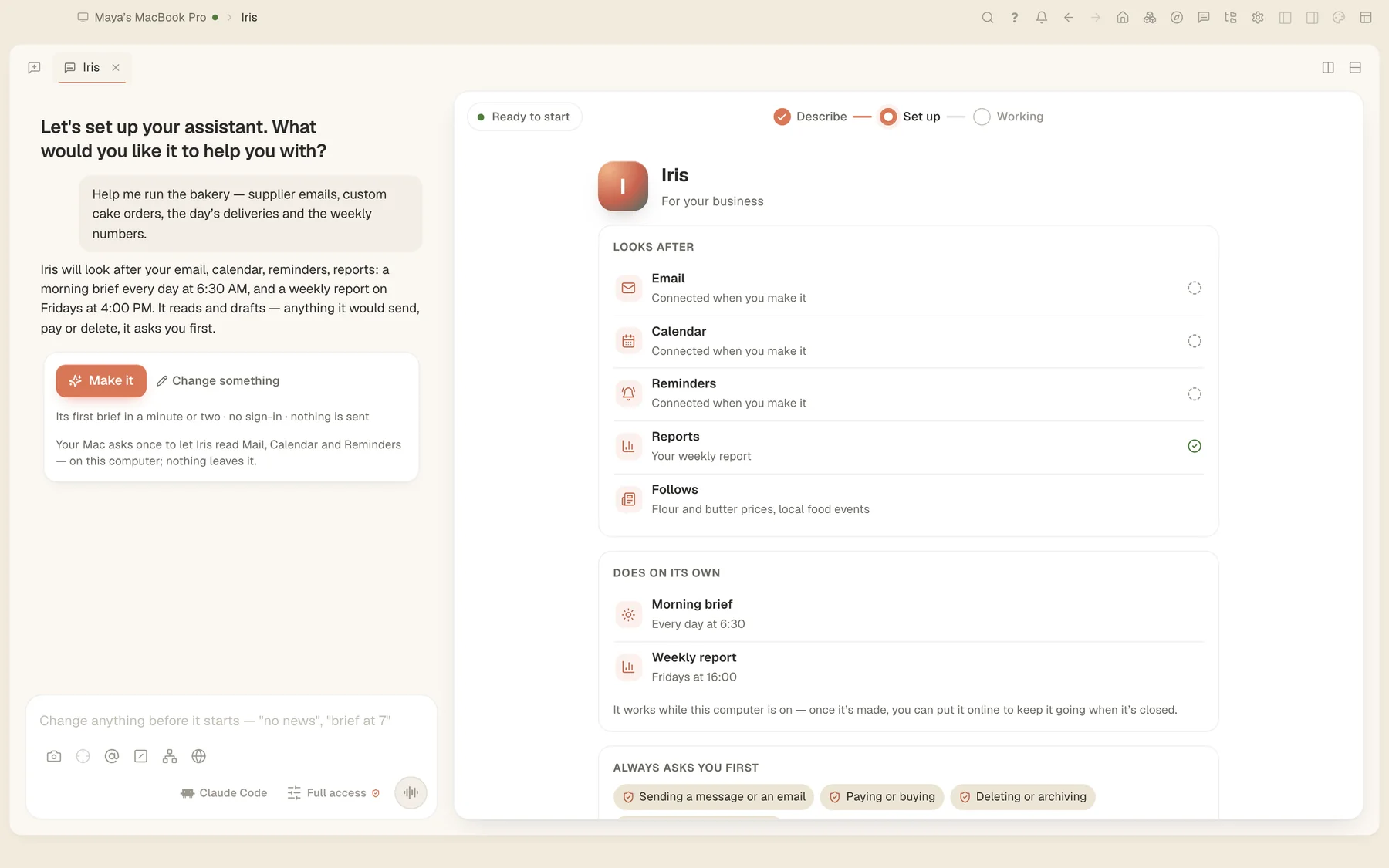
Make your own assistant with the personal-assistant maker, then reach it wherever you already talk: Atrium first, and the messengers, email and phone lines you use. It can run on your computer, or online so it answers when your computer is off.

  • Answers on Atrium, Telegram, WhatsApp, Slack, Discord, Signal, Matrix, Mattermost, email and phone calls
  • Connects to 60+ services, including Gmail, Google Calendar, Microsoft 365 and Teams
  • Its own name, picture, personality and specialist skills, with memory and separate conversations
  • Morning briefs and routines on a schedule; it asks before it sends anything
  • Runs on the AI subscription you already have, or on Tesseract’s own models

Coming soon. Running it online will use Tesseract hosting.

The personal-assistant maker: naming the assistant and choosing where it answers.
Ship it

From your screen to the world.

One-click deployment and hostingComing soon

Publish the websites and apps you build with one click, from the website you made or the preview of any project, to a live address of its own.

  • One click from your site or app to a live address
  • Your own domain
  • Free for personal sites, Pro for apps that never sleep
  • crumbandco.mytesseract.app
  • Live in one click
  • Your own domain
More for pros

And the small things that add up.

  • SpotlightOne keystroke opens Tesseract over any app with your screen attached: ⌥Space on Mac, Alt+Shift+Space on Windows and Linux.
  • Hands-free voiceTalk to it and it answers out loud; the guide is free and works before you sign in.
  • Two installs side by sideRun two independent copies on one machine, each with its own settings.
  • Three update channelsStable, Beta, and a patch channel that ships small fixes and applies them when you’re not mid-task.
  • Browser companionA browser extension for your own signed-in browser, installed from the release download.

How your data is handled

What happens to your work, in plain words.

Read the privacy policy →
  • Your files stay on your computers. Tesseract works on them where they are.
  • Provider keys are kept by the background service, out of the app’s interface. If you sign in, they sync with your settings through your account.
  • Set a vault master password and your passwords are encrypted on your device with Argon2id and AES-256-GCM.
  • Files you send to other accounts are encrypted on your machine before they are uploaded.
  • Paste history skips password managers and secure fields.
  • Conversations are stored and processed in the cloud, as the terms describe. The privacy policy lists everything we collect.

Free with the AI you already pay for.

Bring your Claude or ChatGPT subscription and Tesseract never meters it. No subscription? Start on the free allowance.