 Tesseract
How an AI agent builds a PowerPoint deck: our design
How Tesseract turns one sentence into a researched deck with speaker notes and a PowerPoint download: the pipeline, the tricks, the numbers and the results.
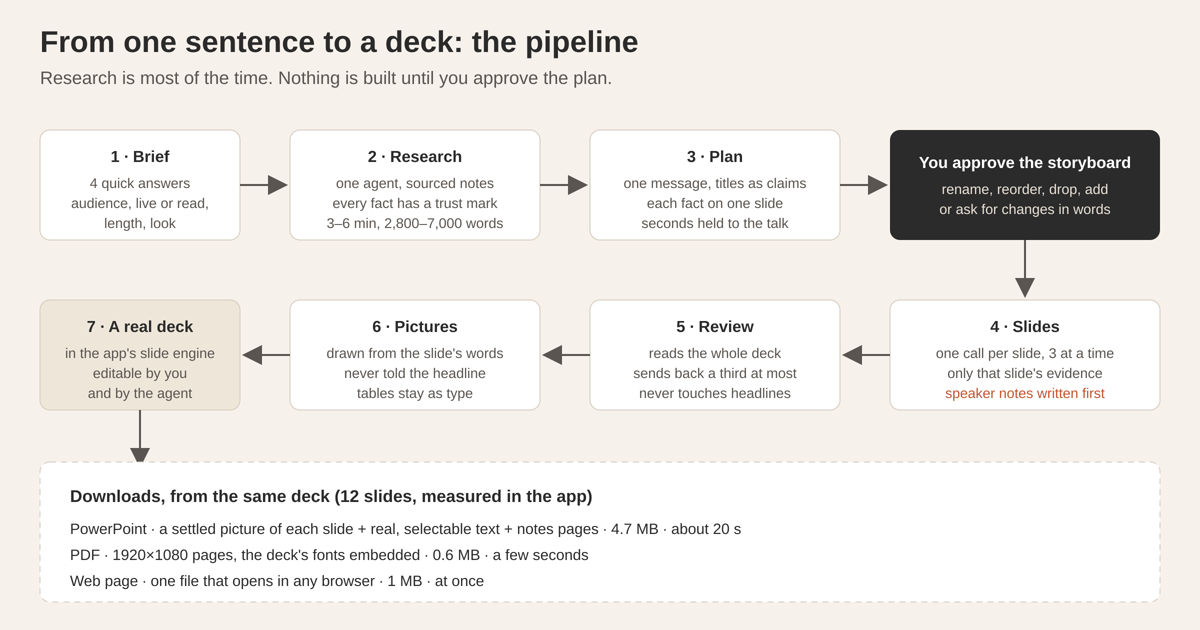
Tesseract builds a deck in seven steps: four quick questions, research by one agent into sourced notes, a storyboard you approve, slides written one at a time with only their own evidence and the speaker notes first, a review of the whole deck, pictures drawn from each slide’s exact words, and a real deck you can edit and download as PowerPoint, PDF or a web page.
This post explains how each step works, the tricks that make the output ready to present, and the numbers we measured in the running app.
What problem are we actually solving?
Asking a language model for “a presentation about X” gives you something that looks like a deck and fails as one. The titles are topics (“Market overview”), the slides are walls of bullets, the numbers come from nowhere, and the speaker has nothing to say that isn’t already on screen. The model did what it was asked: it summarised what it knew into slide-shaped boxes.
A deck that works is a different object. It makes one argument. Each slide carries one claim, shows the evidence for it, and leaves the explaining to the person speaking. The words on screen are few; the words spoken are many; the research underneath is larger still. When we looked at hand-made decks that worked, they rested on about 24,000 words of notes for about 1,100 words on the slides.
So the design question was not “how do we get a model to output slides”. It was “how do we make a model do the work a good presenter does before anyone sees a slide”: find the facts, decide the one message, pick which fact proves which point, and only then write. Everything below follows from that.
How does Tesseract turn one sentence into a deck?
The pipeline has seven steps, and you see two of them as decisions.
- Brief. You give a topic, then answer four questions, each with one tap or your own words: who it is for, whether it will be presented live or sent to be read, how long, and which look. Length follows time, at about one slide a minute plus a cover and a close: 5, 10, 20 or 30 minutes give 6, 10, 18 or 26 slides. A deck to be read is offered at 8, 12 or 20 pages. The most it plans is 40.
- Research. One agent gathers sourced notes and saves them into the deck, one file per theme, plus an “angles” note with the strongest claims, the likely pushback and what is still missing.
- Plan. A storyboard: each slide’s title, what it will show, a sketch of the visual and how many facts it rests on. This is the first decision. You can rename, reorder, drop or add slides, or ask for changes in words. Nothing is built until you say so.
- Slides. One model call per slide, three at a time where the model allows it.
- Review. One call reads the whole deck and sends weak slides back.
- Pictures. Each content slide’s visual is drawn from the slide’s own words and numbers.
- Assembly. Each slide is written into a real deck in the app’s own slide engine as it arrives, which you can then edit, present or download.
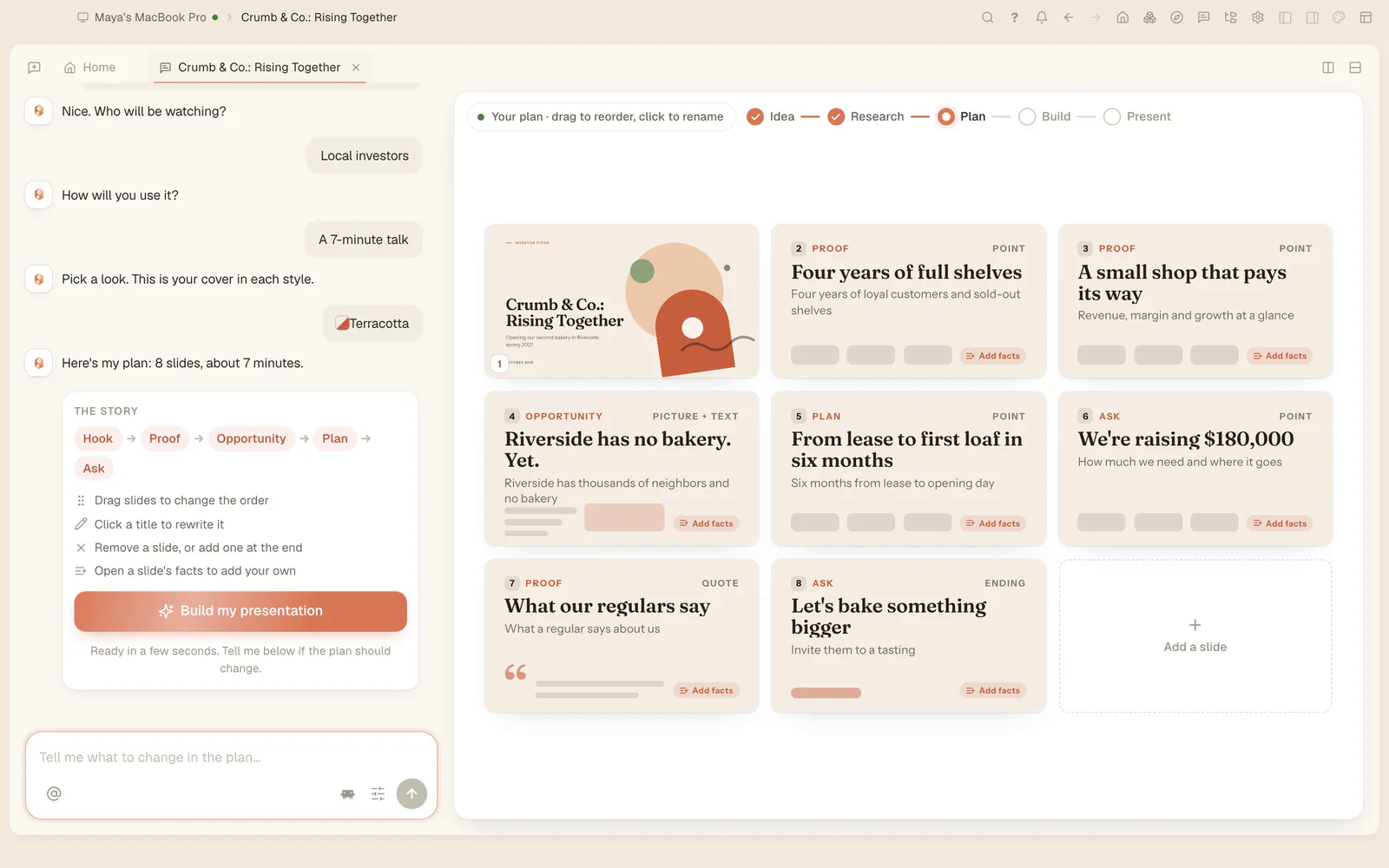
The storyboard above is the second decision point and the most important screen in the flow. Titles there are already claims (“Four years of full shelves”, “We’re raising $180,000”), and each card shows how many facts back it.
Why does research come before any slide?
Because a model writing slides from memory invents the evidence. Our rule is that a slide may only say what the notes can prove, so the notes have to exist first and have to be trustworthy.
The research agent follows four rules. Every fact carries its source from the moment it is written down. Figures are copied exactly and never rounded; a figure that could not be found is recorded as not found, not guessed. When two sources disagree, both are kept. And every fact gets a trust mark:
[solid]       official or primary source
[fair]        reputable secondary source
[weak]        a single unconfirmed source
[unverified]  nothing could be looked up
[own]         the presenter's own statement (theirs to make, not audited)
The last mark matters more than it looks. When the deck is your case, a pitch or a proposal, the agent reads your material first: project documents, up to 12 of your earlier decks, attachments. It marks what it finds as your statement and only then searches the web, and the plan is written in your voice. Your claim that the shop sold out every Saturday is yours to make; the deck should not treat it as an outside fact, and it should not ignore it either.
The notes stay with the deck as files you can read and edit. They never go into a PowerPoint, PDF or web export. In the chat, the research shows as one progress card rather than dozens of tool calls.
In three real runs, research took 3 to 6 minutes and produced 5 to 7 notes of 2,765 to 7,066 words. That is most of the total time, and it is where the quality comes from.
What makes a good plan?
The plan is where a pile of notes becomes an argument. We hold it to five rules:
- One message: a full sentence with something at stake. Not “Our bakery”, but what the audience should believe or do afterwards.
- A storyline of 2 to 5 parts that don’t overlap. The kind of deck (pitch, report, lesson, proposal and so on) sets the starting shape; the person can change it.
- The title is the point. At most 10 words, with the number in it: “Online orders overtook the shop in spring”, never “Sales channels”.
- Each fact belongs to one slide. The evidence is copied from the notes into the slide it supports. A title the notes cannot prove is rewritten or dropped.
- A visual and a number of seconds per slide, held to the length of the talk.
Sentence titles aren’t our taste. In a controlled study, slides with a sentence headline supported by visual evidence improved comprehension with an effect size of d = 0.81, and such slides averaged 21 words against 41 for common practice. The method is known as assertion-evidence.
The plan also returns two lists. Gaps are questions public sources could answer. Needs are facts only you have, shown as “Stronger with what only you know”. The agent asks for those instead of inventing them.
The time budget is given as a number. A plan for a 5-minute talk is told 300 seconds, and it comes back at 300. Models hit a stated target precisely.
Popular rules of thumb such as “always start with an agenda” or “ten slides” stay conventions you can ask for, so the pipeline follows the evidence and your wishes.
Why are the speaker notes written first?
Each slide is its own model call. The call gets the brief, the message, the whole storyline, and only this slide’s evidence. Giving a slide only its own facts is what stops the same finding from turning up on three slides.
The trick is the order of the answer. The structure the model fills in puts the speaker notes first, then the visual, then the few words that sit beside it:
1. say     talk track at ~130 words a minute, ending "If asked: <fact + source>"
2. visual  one of 21 kinds, filled only with figures from the evidence
3. words   at most 2 short lines for a talk, 3 for a page to be read, plus a source line
Once the model has written what the speaker will say, it no longer needs to put it on the slide. Reversing the order fills the slide with the talk. The budgets follow from this: about 25 words for a slide that is glanced at, about 60 for a page that is read.
For a talk, the notes carry the point, how to read the visual, one thing that is not on the slide, a lead-in to the next slide, and an “If asked:” fact with its source, for the question you know is coming. For a deck that will be read, the notes are two or three sentences for whoever sends it.
A final step checks every answer against what the slide kit can actually draw. A chart with no numbers or a diagram with one item is dropped, and the slide becomes a plain statement of its point. A slide is never an empty frame.
Every answer is held to a JSON Schema that the model provider enforces. We write one set of schemas to the strictest provider’s rules so the same shapes work everywhere: every object closed, every property required, one plain type per field, and only type, properties, required, items and enum used. A field with no answer says “unsaid” or “none”, so every provider accepts the request.
What does the review catch?
Slides written in parallel don’t know about each other. So after they’re written, one call reads the whole deck and looks for what only the whole deck shows:
- the same point made twice;
- figures that differ between slides;
- a slide that doesn’t show what its headline claims;
- placeholders;
- notes that read the slide aloud;
- claims about the audience’s own organisation that nobody could know;
- a close that asks for nothing.
It may send back about a third of the slides at most, each with one instruction. It may not touch the headlines, because you approved those in the plan.
In our test runs, it caught an opening claim about the audience’s own staff that no source made, one finding repeated on two slides, 27% and 30% for the same share on neighbouring pages, chart bars with no unit, a cause the notes don’t give, and talk tracks that narrated the layout (“on the left… on the right…”).
How are the pictures drawn with every number kept exact?
Each content slide’s visual, except tables, is drawn by the app’s image generator from the slide’s exact words and numbers, in the look’s colours, as a flat 3:2 vector-style picture. Big numbers stay as real type beside the picture, and tables are never drawn as pictures, because a table is exact only as type.
Two details make this work. First, the image prompt is told neither the headline nor the big number, so the picture shows the idea and the real type carries the figure. Second, transparency. The picture is drawn on a key colour chosen against the look (magenta, unless the look uses something close to it) and the image tool cuts it away directly, with clean edges.
The underlying data stays in the slide, so the plain chart can be brought back at any time. After an edit, each picture is checked against what it was drawn for and redrawn if the chart changed. In a test, 10 pictures took about a minute, three at a time, 12 to 15 seconds each, with every word and number as given.
What does “editable PowerPoint” mean here?
We want to be precise about what you get.
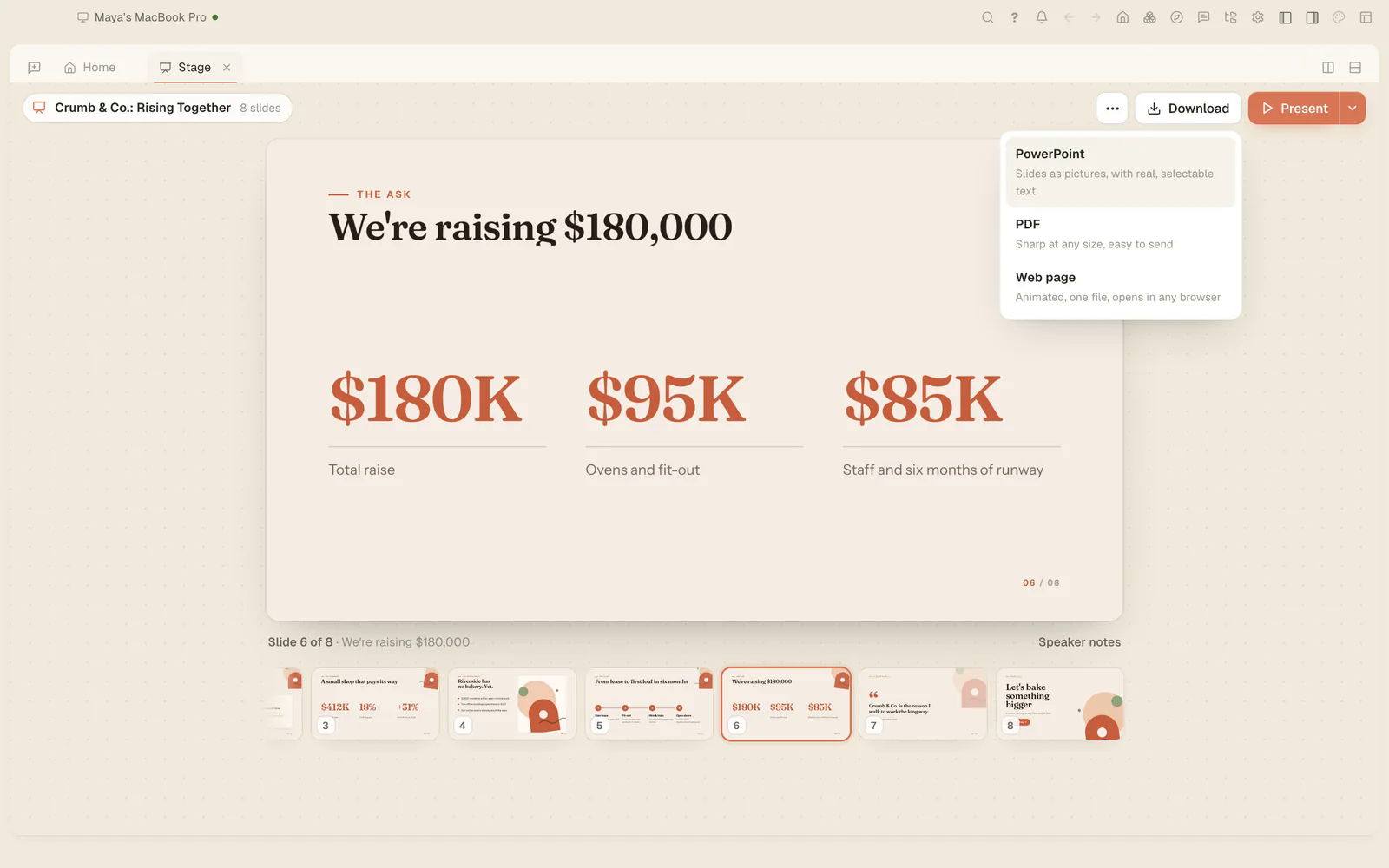
The deck is fully editable inside Tesseract. It is a real deck in the app’s slide engine, each slide its own file. You can edit it there, and so can the agent: you can change the notes, edit one slide’s facts, rewrite one slide, or ask in the chat.
The PowerPoint file is a different thing. Each slide is a picture of the live slide, taken once it has stopped moving, with a layer of real, selectable text on top, plus notes pages carrying the talk track. Charts and illustrations are part of the picture. We chose this because it is faithful: the slide looks exactly as designed in any version of PowerPoint, and the text can still be searched, copied and edited. The rule behind it is simple: words are real text, never rotated and never hidden from the accessibility tree, so the export keeps them.
A faithful picture takes one trick. Slides can animate: numbers count up, shapes drift. In export mode, numbers start at their final value, nothing loops, and a slide is captured when two consecutive small frames match. Every figure is exact, and the closing slide is captured in 2.0 seconds.
| Download | What you get | Size (12 slides) | Time |
|---|---|---|---|
| PowerPoint | a settled picture of each slide, real selectable text on top, 12 notes pages | 4.7 MB | about 20 s |
| 1920×1080 pages, the deck’s own fonts embedded, every figure at its final value | 0.6 MB | a few seconds | |
| Web page | one file that opens from disk and moves by keyboard | 1 MB | at once |
What did we measure end to end?
On 3 October we ran the whole flow in the app, by clicking and typing as a person would: a 10-minute talk on global warming for final-year students.
| Step | Result |
|---|---|
| Brief | 14 s |
| Research | 3 min 16 s, 6 notes, 3,600 words |
| Plan | 11 slides |
| Build | 62 s, 2 slides improved by the review |
| Rewrite one slide | 11–20 s |
| Update the plan from new notes | 27 s, nothing on disk touched |
| Build again | 66 s |
| Change the look | 4 s |
Across three earlier runs (a 10-minute talk in English, 12 pages to read in Romanian, a 5-minute talk in English), the plan took 14 to 44 seconds, the slides 24 to 36 seconds, and the review 12 to 28 seconds with 2 to 4 rewrites. A researched deck takes 4 to 8 minutes, almost all of it research. The shape held every time: 10 to 40 words on a slide, 90 to 200 words spoken per slide, and 2,800 to 7,000 words of notes underneath.
Questions
Does the AI make up statistics? No. Every figure on a slide is copied from a research note that carries its source and a trust mark, and a figure that could not be found is recorded as not found. You can open the notes and check each one.
Can I edit the PowerPoint file? Yes. The text is real and selectable, and the speaker notes are there. To change a chart or a picture, edit the deck in Tesseract and download it again.
Can I use my own data? Yes. For your own case, the agent reads your project documents, earlier decks and attachments first and marks them as your statements.
How long does it take? In our runs, 4 to 8 minutes for a researched deck, almost all of it research. Building the slides after you approve the plan took about a minute.
What happens when I add new notes later? Tesseract offers “Update the presentation”. A rebuild keeps the new slides in memory and writes them only once all exist, so your deck stays as it is until the new one is complete. “Leave my slides as they are” keeps everything exactly as it was.
Try it
Ask Tesseract for a presentation in one sentence and answer its four questions. You’ll see the plan before anything is built. For how the same “simple on top, a lot underneath” idea works in four other features, read We make complex things simple, and for how the agent keeps facts across sessions, how AI agents remember across sessions. Tesseract is free to start at tesseract.dev.