 Tesseract
Conductor alternatives after the Meta news
Conductor alternatives for Mac, Windows and Linux: Orca, Paradev, Paseo, T3 Code, Herdr, Emdash, Nimbalyst, Claude Squad and Tesseract AI, facts dated.
Last checked: 2026-11-25.
The Conductor alternatives worth a look are Orca, Paradev (formerly Superset), Paseo, Herdr and T3 Code, the tools developers named most on Hacker News after the news, plus Emdash, Nimbalyst, Claude Squad and Tesseract AI; most are free, open source apps that run Claude Code, Codex and other agents side by side. Tesseract AI is our pick if you want Mac, Windows and Linux, 14 agent frameworks in one app, and a free allowance with no API key. It is not open source, so if that matters to you, start with Orca, T3 Code, Paseo or Herdr.
What happened to Conductor?
On November 4, 2026 a Hacker News post titled Conductor is joining Meta drew 222 points and 221 comments. A week later, on November 12, a second thread, Announcement: Conductor Is Back, quoted the team: “Plans have changed! We’ll still be developing Conductor.”
So Conductor is still around. People kept looking anyway: Google now finishes “conductor alternative” with “for windows”, “for linux”, “claude code” and “for opencode”, and Hacker News got threads like Suggest Alternatives for Conductor.build. Conductor’s own site describes a Mac app that runs Claude Code, Codex and Cursor agents in parallel, in isolated workspaces. If you’re on Windows or Linux, or you want more agents, read on.
How do the Conductor alternatives compare?
| Tool | Mac / Windows / Linux | Agents it runs | Open source | Price, as its own page states |
|---|---|---|---|---|
| Tesseract AI | Mac, Windows, Linux | Claude Code, Codex and 12 more, including OpenCode, Gemini CLI, Cursor, Grok Build, Kimi Code and Qwen Code | No | Free download; a free allowance with no API key; nothing charged for using your own Claude or ChatGPT plan |
| Conductor (for reference) | Mac | Claude Code, Codex, Cursor | — | — |
| Orca | Mac, Windows, Linux; iOS and Android companion | Claude Code, Codex, OpenCode, Grok, Gemini, Cursor, GitHub Copilot, Amp; “27 supported agents” | Yes, MIT | ”Free and open source” |
| Paradev (formerly Superset) | Mac, Linux; iOS and Android apps | Claude Code, Codex, OpenCode, Gemini, Cursor Agent, any CLI agent | Yes, MIT | Free plan $0; Pro $20 per user a month ($16 billed yearly); Team $60; Ultra $200 |
| Paseo | Mac, Windows, Linux; iOS, Android, web | Claude Code, Codex, Copilot, OpenCode, Pi, Antigravity; also Cursor and Gemini CLI | Yes, Apache-2.0 | — |
| T3 Code | Mac, Windows, Linux; iOS, Android, web | Claude Code, Codex, Cursor, OpenCode, Grok Build, Antigravity, Kiro, Pi, any ACP agent | Yes, MIT | ”Free, open source” |
| Herdr | Mac (Apple silicon), Windows, Linux; iPhone, iPad, Android | ”Anything that runs in a terminal” | Yes, Apache 2.0 | Free |
| Emdash Classic | Mac, Windows, Linux | Claude Code, Codex, OpenCode, Cursor, Amp, Qwen Code, Copilot and more | Yes, Apache-2.0 | — |
| Nimbalyst | Mac, Windows, Linux; iOS | Claude Code, Codex; OpenCode and Copilot in alpha | Yes, MIT | ”Free for individuals” |
| Claude Squad | — (a terminal app; needs tmux) | Claude Code, Codex, Gemini, Aider, OpenCode, Amp | Yes, AGPL-3.0 | — |
Every cell comes from the tool’s own website or GitHub page, read on November 25, 2026. A ”—” means the page we read doesn’t say. Wherever a tool runs your own Claude or ChatGPT plan, the use counts against that plan’s limits.
Why Tesseract AI is one good pick
It runs on all three systems. Tesseract AI is a desktop app for Mac, Windows and Linux, and it installs and updates itself on each. That answers the most common follow-up search, “Conductor alternative for Windows”.
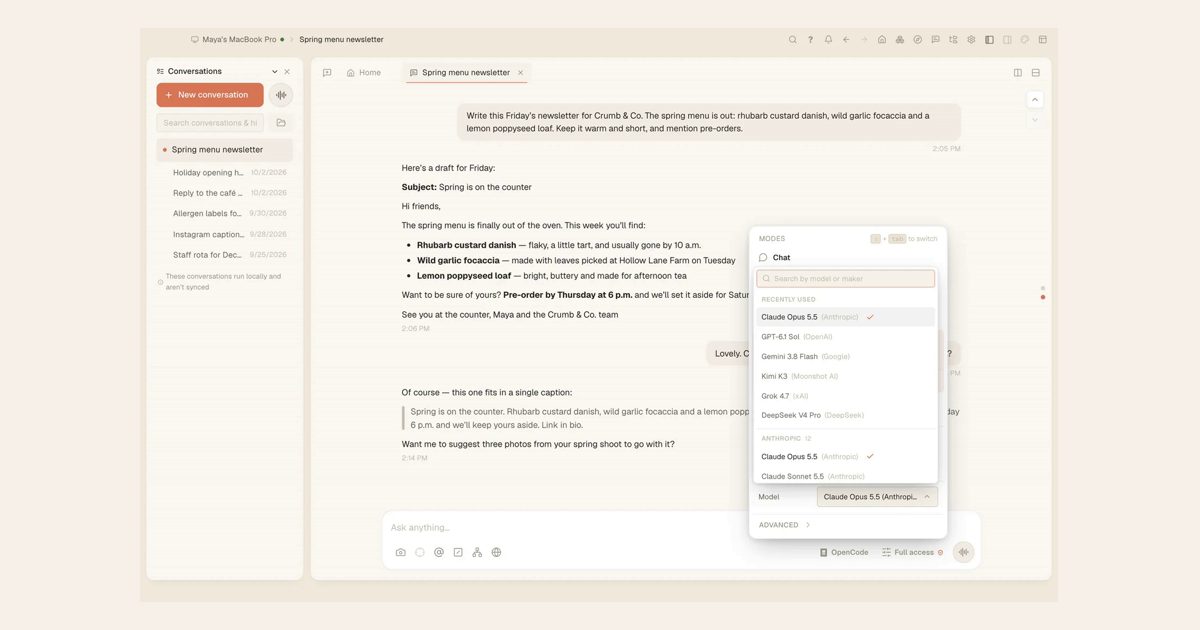
Fourteen agent frameworks, one per conversation. Claude Code, OpenAI Codex, OpenCode, Gemini CLI, Antigravity CLI, Kimi Code, Qwen Code, MiniMax Code, CodeBuddy, Grok Build, Cursor, Hermes Agent, OpenClaw and NanoClaw. Each conversation has its own agent and model, so Claude Code can work on one task while Codex works on another, in the same project. A conversation can also move to another agent partway through and keep its history. How one chat drives 14 agent frameworks explains how that works.
Parallel work that stays out of each other’s way. Two conversations in one project each claim the files they’re changing and commit only their own changes. The Uncommitted changes panel under the file tree shows which conversation made each change. With Codex, OpenCode, Gemini CLI or any agent other than Claude Code, it can also hand work to helpers in their own Git worktree, with the changes waiting on a branch for your review. You get a reviewable diff of a turn or a whole conversation, and Restore files to here on the frameworks that support it.
It costs nothing to start. Tesseract AI is free to download. With no subscription, start on the free allowance, which runs an agent for you with no API key. If you already pay for Claude or ChatGPT, sign in with that plan: Tesseract AI itself charges nothing for it, and use counts against your plan’s own limits. Add a second account and it takes over when the first one reaches its limit.
More than the agents. A code editor, a terminal and a live preview sit beside the chat. Agents can run on your other computers and servers, and a free iPhone app lets you follow them and answer them away from your desk.
Not open source. Tesseract AI is free to download and use, but its code isn’t published. If an open license matters to your team, the tools below are open source.
For a side-by-side of just the two apps, see Tesseract AI vs Conductor.
When another tool fits better
Orca
Orca was the tool named most often in the Hacker News thread. It’s MIT-licensed, runs on all three systems, has iOS and Android companion apps, and lists 27 supported agents. Its site says “Free and open source. New features shipped daily.”
Pick Orca if you want an open source app with a very wide agent list and a phone companion.
Paradev (formerly Superset)
Paradev calls itself “the open-source workspace for Claude Code, Codex, and any coding agent”. Each task gets its own worktree, branch and terminal. The free plan covers local workspaces, the desktop app and the CLI with no credit card. Paid plans add remote access, automations and cloud workspaces. It also has a CLI, a TypeScript SDK and an MCP server.
Pick Paradev if you’re on Mac or Linux and want a team plan with cloud workspaces, or an SDK to script it.
Paseo
Paseo is “an open source agentic development environment for desktop, mobile, web, and CLI”. It offers downloads for macOS, Windows, Linux, iOS and Android, plus a web app that connects to a server from any browser. Each agent runs in its own worktree.
Pick Paseo if you want to reach the same agents from a desktop, a phone and a browser, under Apache-2.0.
T3 Code
T3 Code is “the open-source control plane for coding agents”. It runs the agents on your machine and gives them one interface on desktop, phone and the web. Its site says it plainly: “T3 Code doesn’t resell tokens.”
Pick T3 Code if you want a fast, MIT-licensed interface that drives any ACP agent you already have signed in.
Herdr
Herdr is “a native app for running coding agents”. Its agents live in a background runtime, so they keep running when you close the window or lose an SSH connection. It runs anything that works in a terminal. The app, the runtime and the terminal UI are all Apache 2.0 and free.
Pick Herdr if you live in the terminal and want agents that survive a closed laptop lid or a dropped SSH session.
Emdash
Emdash Classic is “the open-source desktop app for running coding agents in parallel”, with agents in separate Git worktrees, locally or over SSH. Its makers now also build Emdash 2.0, a platform for running coding agents for a whole team, open for early access.
Pick Emdash if you want an Apache-2.0 desktop app that also runs agents on remote machines over SSH.
Nimbalyst
Nimbalyst is “the visual workspace for Codex and Claude Code”, with editors for markdown, mockups, diagrams, tasks and data models next to the sessions. It’s MIT-licensed, free for individuals, and has an iOS app.
Pick Nimbalyst if your work around the code (specs, mockups, diagrams) matters as much as the agent sessions.
Claude Squad
Claude Squad is “a terminal app that manages multiple Claude Code, Codex, Gemini” agents, each in its own workspace, built on tmux.
Pick Claude Squad if you want something small, open source (AGPL-3.0) and keyboard-driven, with no desktop app.
How do I move from Conductor to Tesseract AI?
- Download Tesseract AI from tesseract.dev for Mac, Windows or Linux. It’s free.
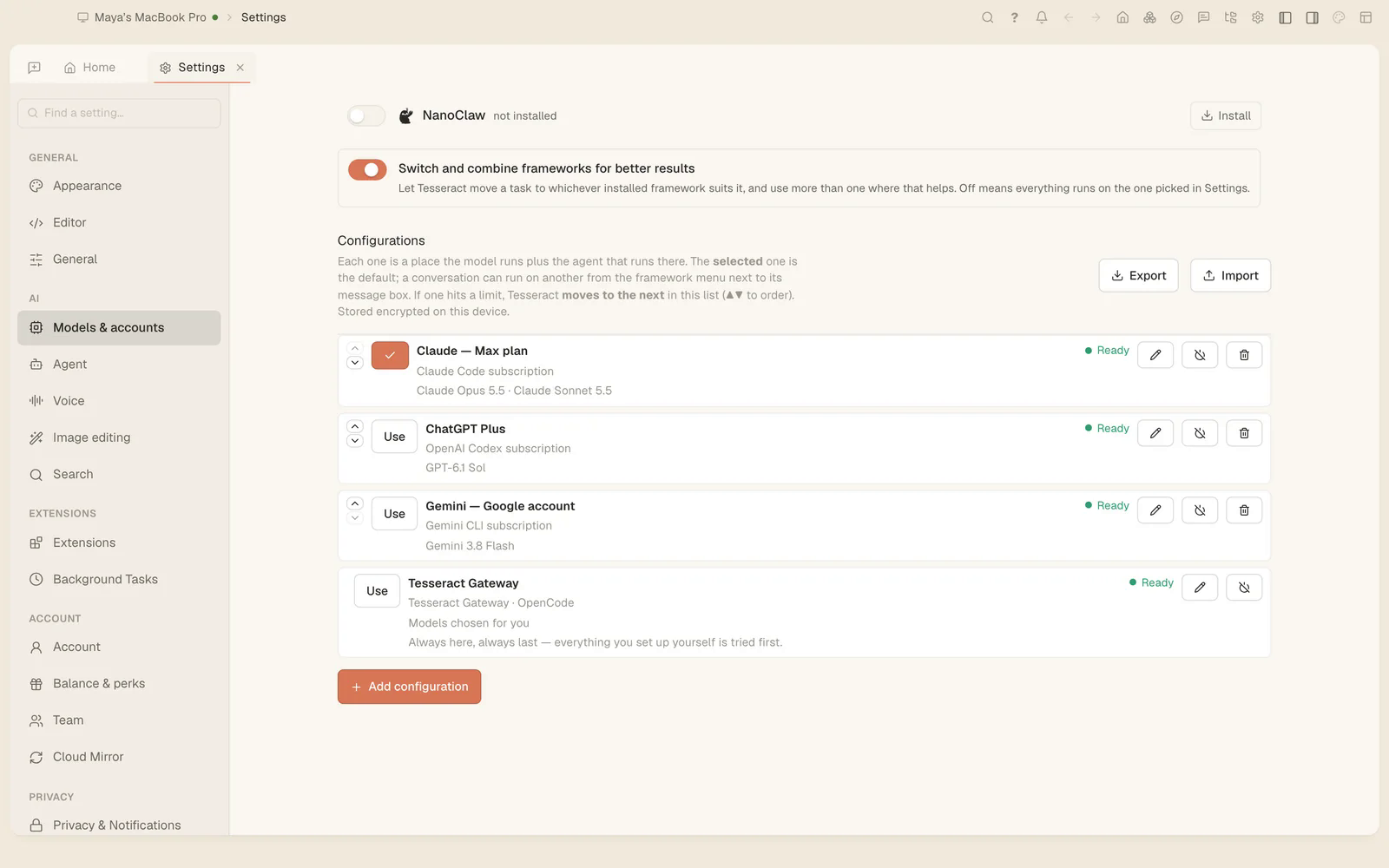
- Install your agents. Open Settings → Models & accounts. Under Frameworks, press Install next to each agent you used in Conductor. Details shows the version and the install output.
- Sign in. Press Add an account, choose the framework, and use your subscription, an API key or the agent’s existing sign-in. No plan yet? Leave it on the free allowance.
- Pick a default. Under Frameworks, set New conversations start on to the agent you use most.
- Open your repository. Conductor’s branches stay in your repository as ordinary Git branches, so Tesseract AI opens them as they are. Your Conductor chats stay in Conductor or its export. They don’t move across.
- Start one conversation per task. To change the agent for a conversation, click the model button beside the message box, open Runs on and pick it. Start a second conversation for the next task and the two work in parallel.
- Review before you merge. Check the diff of each turn or conversation, and the Uncommitted changes panel to see which conversation changed what.
The full walkthrough is in how to use several coding agents in one app. If you mainly want two agents together, see Claude Code and Codex in one app.
Questions
Is Conductor shutting down?
The November 4 thread said Conductor was joining Meta. The November 12 thread quoted the team saying “Plans have changed! We’ll still be developing Conductor.” Conductor’s own site describes its Mac app. For anything newer, check Conductor’s own announcements.
Is there a Conductor alternative for Windows?
Yes. Tesseract AI, Orca, Paseo, T3 Code, Herdr, Emdash Classic and Nimbalyst all list Windows on their own sites or GitHub pages.
Is there a Conductor alternative for Linux?
Yes. All of those run on Linux, and so does Paradev.
Which Conductor alternative works with OpenCode?
Tesseract AI, Orca, Paradev, Paseo, T3 Code and Emdash list OpenCode by name, and Nimbalyst lists it in alpha. Herdr runs anything that works in a terminal.
Do I need an API key?
Not for Tesseract AI’s free allowance. The other tools drive the agents you have installed and signed in, so they run on the plans and keys you already have.
Is Tesseract AI open source?
No. It’s free to download and use, but it isn’t open source. Orca, Paradev, Paseo, T3 Code, Herdr, Emdash, Nimbalyst and Claude Squad are.
Sources
- Hacker News threads, November 4, 5 and 12, 2026 (linked above; read November 24, 2026)
- Conductor: https://www.conductor.build (read November 25, 2026)
- Orca: https://orca.dev and https://github.com/stablyai/orca (read November 25, 2026)
- Paradev: https://paradev.com, https://paradev.com/pricing and https://github.com/ParadevAI/Paradev (read November 25, 2026)
- Paseo: https://paseo.sh/download and https://github.com/getpaseo/paseo (read November 25, 2026)
- T3 Code: https://t3.codes and https://github.com/pingdotgg/t3code (read November 25, 2026)
- Herdr: https://herdr.dev and https://github.com/herdrdev/herdr (read November 25, 2026)
- Emdash: https://emdash.com and https://github.com/generalaction/emdash (read November 25, 2026)
- Nimbalyst: https://nimbalyst.com (read November 25, 2026)
- Claude Squad: https://github.com/smtg-ai/claude-squad (read November 25, 2026)
- Tesseract AI: https://tesseract.dev/agentic-ide/ https://tesseract.dev/compare/tesseract-vs-conductor/ and https://tesseract.dev/guides/use-several-coding-agents/ (read November 25, 2026)
Want Claude Code, Codex and twelve more agents side by side on any computer? Download Tesseract AI free.