 Tesseract
How AI agents remember across sessions: our design
How Tesseract gives Claude Code, Codex and 12 other agents a long-term memory that finds the right past item without filling the context window. With numbers.
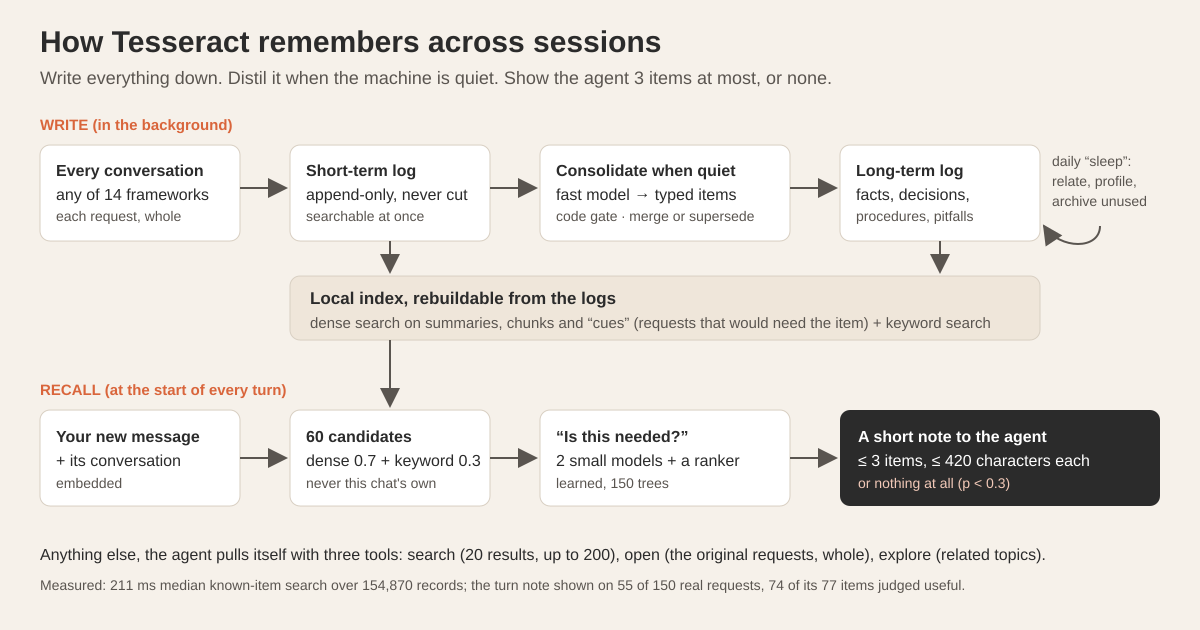
An AI agent remembers across sessions in Tesseract because everything is written down whole, distilled into typed items when your computer is quiet, and searched at the start of every turn. Two small models and a learned ranker then decide whether anything is needed. The agent gets at most three short items, or nothing, and fetches the rest itself with search tools.
That last part is the whole design in one line: a memory that says nothing most of the time. Below is how it works and what we measured.
Why do agents forget, and why is “put it all in the prompt” wrong?
Claude Code, Codex and the other agent frameworks start every session with an empty head. They read your project’s instruction file, and some keep their own notes, but last Tuesday’s decision about the database schema, the build flag that broke CI, or the fact that you prefer pnpm all live in old conversations the new session never sees.
The obvious fix is to paste more history into the prompt. It works badly. Models read long contexts unevenly, and quality drops as the context fills with material that is only loosely related to the task (Chroma’s “context rot” study shows the effect across many models). Research on coding agents points the same way: when a memory system pushed a retrieved summary into every task, agents did worse than with no memory at all in one benchmark we read (22% vs 26% solved), and in another, 11 of 12 memory set-ups failed to beat memory switched off.
So the goal was never “remember more”. It was: remember everything, and show almost none of it, only the item this turn actually needs, and only when there is one.
What do you see as a user?
Not much, by design.
- Memory is on by default, in Settings → Privacy → Memory. With it on, what you do in every project on that computer is remembered, across all 14 agent frameworks Tesseract runs.
- At the start of each turn, the agent may receive a short note of relevant past items. You don’t see it in your message; it goes to the agent alongside it.
- Agents also get three memory tools: search, open and explore, so they can look up anything more themselves.
- You can still keep notes: titled Markdown files, scoped to you or to a project, that agents read, write and forget with tools. Only their titles (up to 1,500 characters in total) sit in the agent’s instructions.
- Switching memory off stops the search service. Clear wipes it.
If you want to see how full a conversation’s own context is, you can ask it, as we showed in asking where your file is, or what a chat cost. Long-term memory is the other half: what lives outside any one conversation. A separate mechanism keeps the task carrying on after a restart.
How is a memory written?
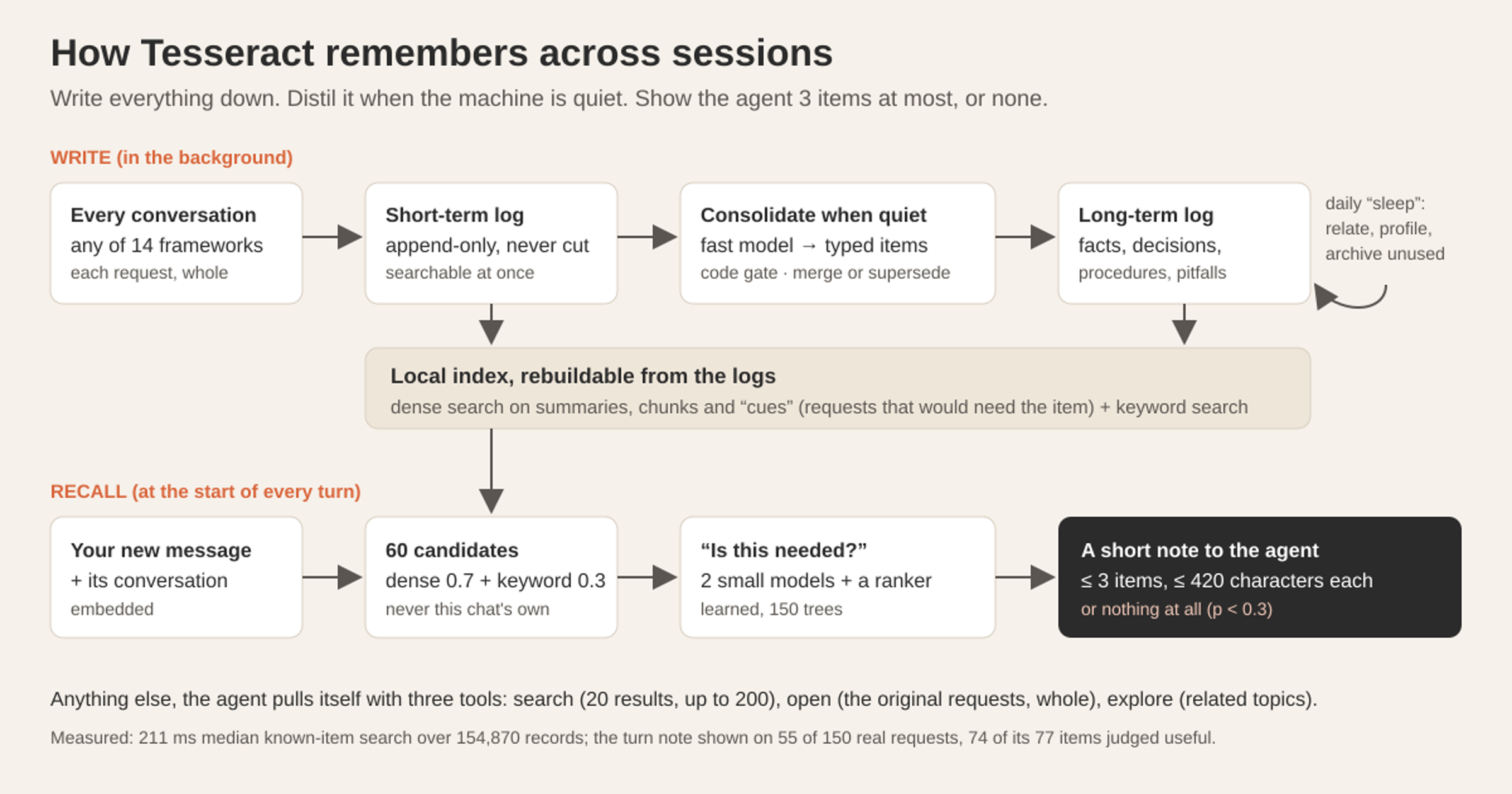
Writing happens in three stages, modelled loosely on how people consolidate memories: take everything in, distil it later, tidy up overnight.
1. Capture: everything, whole, immediately
Every request in every conversation, from every framework’s own session store, is appended to a short-term log. Nothing is summarised and nothing is cut: long requests, tool steps and outputs are kept whole and split into chunks for search. Each record is searchable at once by its raw text, with no model involved.
Capture runs 30 seconds after the app starts, every 15 minutes, and 20 seconds after each turn ends. A scrubber replaces known API-key formats and long high-entropy strings before anything is stored.
2. Consolidation: typed items, written when the machine is quiet
A conversation is consolidated once it has settled: quiet for an hour, or a day old. The machine must be quiet too (no turn for five minutes); the worker checks every 30 minutes. Then one request to the framework’s fast model turns that window into typed items: a fact, decision, procedure, pitfall, architecture note, preference, observation or episode.
Each item gets a title, a short summary that serves as its search key, a body, 4–8 cues and 3–12 concepts. Cues are made-up future requests that would need this item (“why does the build fail on the old Linux box?”). They are the most useful thing we index: for every embedding model we tried, searching for what someone would ask beats searching for what the item says.
Then code, not a model, decides what survives. Items marked inferred, contested or ambiguous are dropped, as is anything below importance 2. Procedures, snippets and pitfalls learned from a request that failed, or whose outcome is unclear, are dropped too: a “how to deploy” written from a deploy that broke is worse than no memory.
3. Reconcile: merge, supersede or relate, never overwrite
A new item is compared with what is already known:
| Similarity to an existing item | What happens |
|---|---|
| 0.93 or more (0.97 for episodes) | Merged into the known item; the merged body keeps every fact of both |
| 0.80 to 0.93 | One batched model decision: same, updates, contradicts (supersede), different, or related |
| Below 0.80 | Stored as a new item |
Two rules, adapted from the Graphiti project, keep merges honest. Different numbers, dates or versions are never “the same”. And when the model is unsure, the answer is “related”, not “same”. A contradicted item is superseded, not deleted: it records when it was replaced, and the old text stays as its own record.
Raw requests stay searchable even after they are distilled. A request is kept as a separate episode only when no typed item came from it, so the store does not hold the same thing twice. Observations carry two dates, when something happened and when you mentioned it, and things that last (a job, a server, a project) get start and end dates.
Sleep: the nightly tidy-up
Once a day, when the machine is quiet, a “sleep” pass relates every pair of neighbouring items from similarity 0.80, re-scores each item (priority = importance × recency × use, with a different half-life per kind), and archives items that have stayed low and unused for 180 days. Archived items leave the active index; nothing is deleted from the log.
Sleep also writes profiles: a dated timeline of one subject, such as a project or a machine, rewritten only when that subject’s items change, at most 400 a night.
Where is it stored?
On your computer (the models that embed and judge text are hosted; see the questions at the end). The append-only logs, short-term and long-term, are the source of truth. The search index runs in Qdrant, a vector database the app runs locally beside itself with a key made fresh for each run. If the index is lost or its format changes, it is rebuilt from the logs, with no model call.
The index keeps a 1-bit copy of each vector in memory and re-scores the best matches from disk. On a Mac holding 154,000 vectors, it used about 270 MB of RAM at idle, took 1.9 ms per query vector and 17.8 ms for a full fused query, and restarted in 0.8 s. On a synthetic store ten times as dense (300,000 items, 3.3 million points), memory-mapping everything cut anonymous RAM by 85% for 40 ms more per query.
How does the right memory reach the agent?
This is the hard part, and where most of the work went.
First stage: 60 candidates
At the start of a turn, your message and its conversation context are embedded. Two searches run over the active items: dense search over summary keys, body chunks and cues, and keyword (BM25) search in any language. Their results are fused, with weights of 0.7 for dense and 0.3 for keywords. The current conversation’s own items are excluded, since the agent already has them. The top 60 go on.
Second stage: “is this needed?”
Similarity alone is a poor judge of usefulness. In our calibration, only 9% of items with a cosine similarity of 0.3–0.4 were actually useful to the turn, and only 19% of those above 0.5. A threshold on similarity would either flood the agent or starve it.
So two small decision models are asked, in parallel, whether each candidate is needed for this request. A learned ranker, a 150-tree gradient-boosted model (LightGBM) that runs inside the app’s TypeScript, combines their answers with the similarities and with metadata: the item’s age, whether it comes from the same project, whether it is a saved note.
The note: three items, or none
At most three items with a probability of 0.3 or more go into the note, each cut to 420 characters. The agent opens the full item with a tool if it wants it. Below the threshold, no note is added at all. If no decision model is reachable, a local ranker stands in with a stricter bar of 0.4. Answers that arrive late are dropped, so the note never holds up the turn.
The note frames each item as a record of what happened before, not as an instruction to follow now. Notes appear in real turns on Claude Code, Codex and OpenCode; we verified each.
On demand: search, open, explore
When the agent needs more, it searches. The search tool returns 20 items by default and up to 200, can filter by dates (items inside the range come first, the rest still follow), shows the passage that matched, and re-ranks its top 30 with a cross-encoder. That re-ranking runs on Tesseract’s own GPU service, not on your device. Open shows an item’s source requests whole. Explore walks the concept graph to related items.
What did we measure?
| Test | Result | How it was measured |
|---|---|---|
| Finding a known item | first result 94.3%, top 5 97%, top 10 99%; 211 ms median, 302 ms p95 | 300 memories from one heavy user’s full history (154,870 records, 1.35 million search points), each searched with a question a model wrote from it |
| The turn note | shown on 55 of 150 real requests; 74 of its 77 items judged useful; 239 ms median | 150 real requests replayed |
| The ranker | a needed item in the top 5 for 82.2% (± 1.5); at p ≥ 0.3, 1.8 items per turn, a needed item for 63% of requests, 46% of shown items needed | 241 hand-labelled requests, cross-fitted |
| Other languages | within 3.1 points of English | 7 language variants of the same requests |
| Live latency of the note | 1,064 ms median, 1,361 ms p95 | 50 real requests; end to end over 30 conversations, 1,094 / 1,358 ms |
| Consolidation | 15% fewer records, 0 exact duplicates, no loss on strict labels | the shipped rule re-measured |
We also ran two public benchmarks, LongMemEval and LoCoMo, against two well-known open memory systems, Mem0 and Graphiti, with the same reading model and the same room for each (28,000 characters, about 7,000 tokens). With the design described here, on questions held out from tuning, a single search matched Mem0 on LoCoMo (80.3% against 80.5%), and on LongMemEval we led by 6 to 9 points.
We also ran an A/B on real requests in the research pipeline: plans written with memory won 65% of comparisons, against 20% for plans written without it (sign test, p < 10⁻⁶). That test shaped the design: the note is small and appears only when an item is needed.
Questions
Where is my memory stored? The logs and the index are stored on your computer. Turning text into search vectors, the two small “is this needed?” models, and re-ranking explicit searches run on Tesseract’s GPU service or a model provider. Known key formats and long random strings are scrubbed before anything is stored.
Does it work with every agent framework? Capture reads from every framework’s session store, and the memory tools are available to every framework Tesseract runs (the 14 are listed here). We verified the turn note in real turns on Claude Code, Codex and OpenCode.
Will it fill my context window? No. The note is at most three items of 420 characters each, and most turns get none. Note titles in the instructions are capped at 1,500 characters. Everything else is fetched on demand.
How do I turn it off or reset it? Settings → Privacy → Memory. Switching it off stops the search service; Clear wipes what was remembered.
Why not just use the framework’s own memory? Use it too. Framework memories live inside one tool. Tesseract’s memory spans every project and every framework on your computer, so a decision made in a Codex session can reach a Claude Code session next week.
Try it
Memory is on by default in Tesseract on Mac, Windows and Linux. Work as you normally do for a few days, then start a new conversation and ask about something you decided last week.