 Tesseract
Atrium as its own app: team chat without the AI app
Tesseract Atrium as a free desktop app: what is in it, how it shares your sign-in with Tesseract, why it runs no service, and why it starts fast.
Tesseract Atrium is Tesseract’s team chat as a free desktop app for Mac, Windows and Linux: workspaces, channels, direct messages, threads, search, canvases and AI catch-ups in one window. It shows the same chat as Tesseract’s Atrium tab, not a copy, shares your sign-in with Tesseract, and runs no agent of its own.
What Atrium’s AI does with a busy channel is covered in catch up on team chat by asking and team chat that catches you up. This post covers the standalone app: who it is for, what is in the window, how it behaves on a computer that also runs Tesseract, and why it stays small and fast.
Who is the Atrium app for?
It is for the people on your team who need the conversation but not the AI workspace. Think of the colleague who reads #orders and answers threads but has no need to build a deck or run an agent. Atrium gives them the chat on its own.
From the Atrium page:
- Free, no subscription. It needs a Tesseract account.
- Six downloads. Mac (Apple silicon or Intel), Windows x64 or ARM as a portable app, and Linux x86-64 or ARM as an AppImage built on the static type 2 runtime, which opens its window in 3 seconds on a stock Ubuntu 24.04 system. Each one runs without an installer. The launcher always starts itself with a clean environment, whatever Electron variables an editor or terminal exports, so it starts cleanly from anywhere. The version on the page as of this writing is 0.11.39, and new versions are posted there.
- Already using Tesseract? It’s built in. Either one is enough, and both work together on one computer.
What is inside the window?
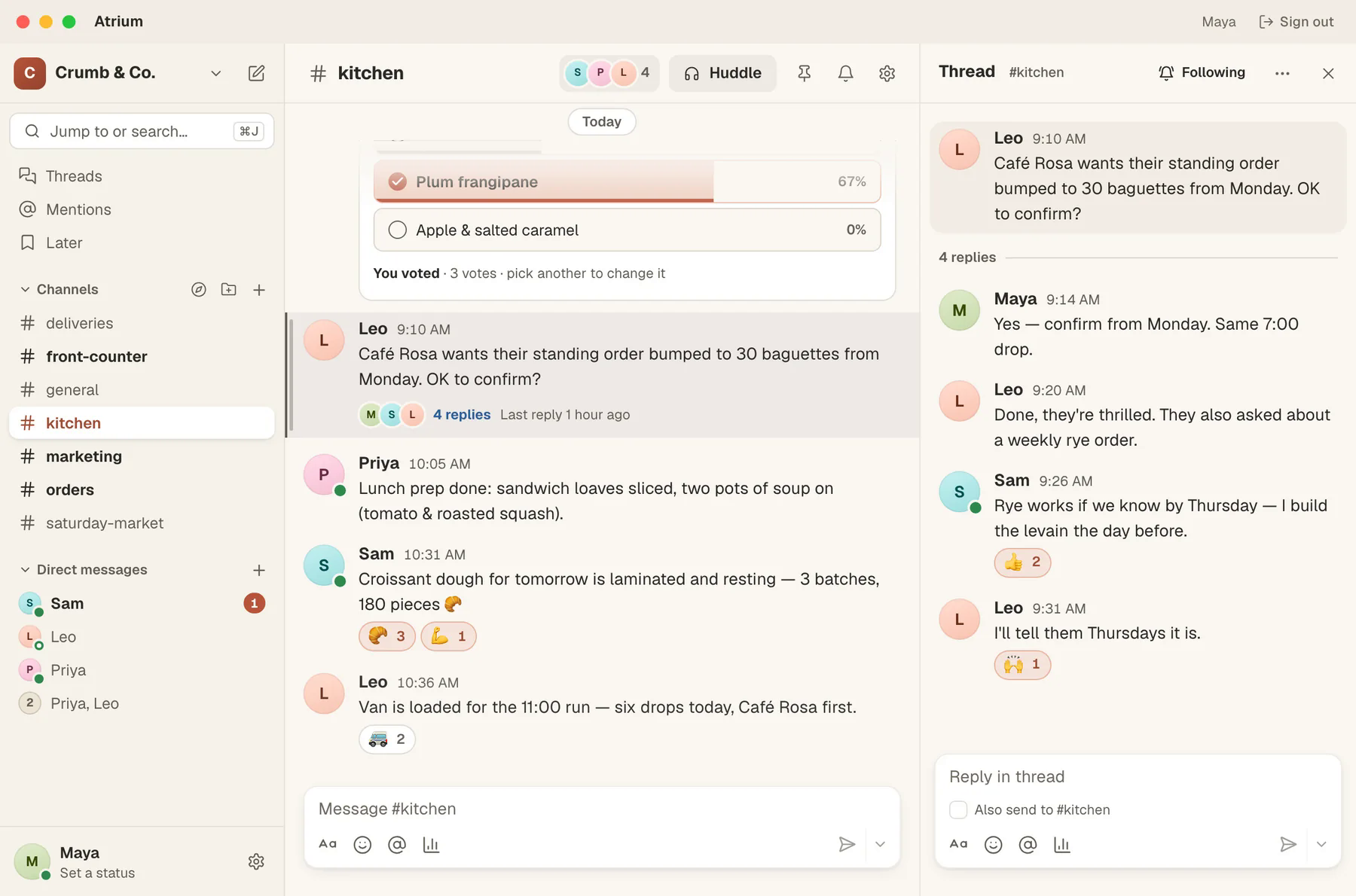
| Area | What you get |
|---|---|
| Workspaces and channels | A workspace for each team, a channel per topic, and forums for longer discussions |
| Messages and threads | Direct messages, group chats of up to nine, threads, mentions and reactions |
| Ask and Catch me up | A question answered from what was actually said, or a short summary of what you missed |
| Search | Any message across your channels and conversations |
| Guests and invite links | People invited by email, or a link that brings someone into a workspace |
| Bots and webhooks | Posts to channels from your own tools through the bot API and incoming webhooks |
| Canvases | A canvas posted into a conversation, shared as restricted, with your team or with anyone who has the link; viewer, commenter or editor for each person |
| Huddles | Voice, video and screen sharing from a channel, with a written summary posted afterwards |
Is it a copy of the chat in Tesseract?
No, and that was the point. The window draws the same chat interface that Tesseract shows in its Atrium tab. An improvement or a new feature in one is in the other, and the two always match.
The app is built the way the Mesh and Remote Desktop apps are. It is one small launcher plus the core Tesseract already uses, set to open the Atrium window and nothing else.
What does the app run on your computer?
Very little, and that is a deliberate choice.
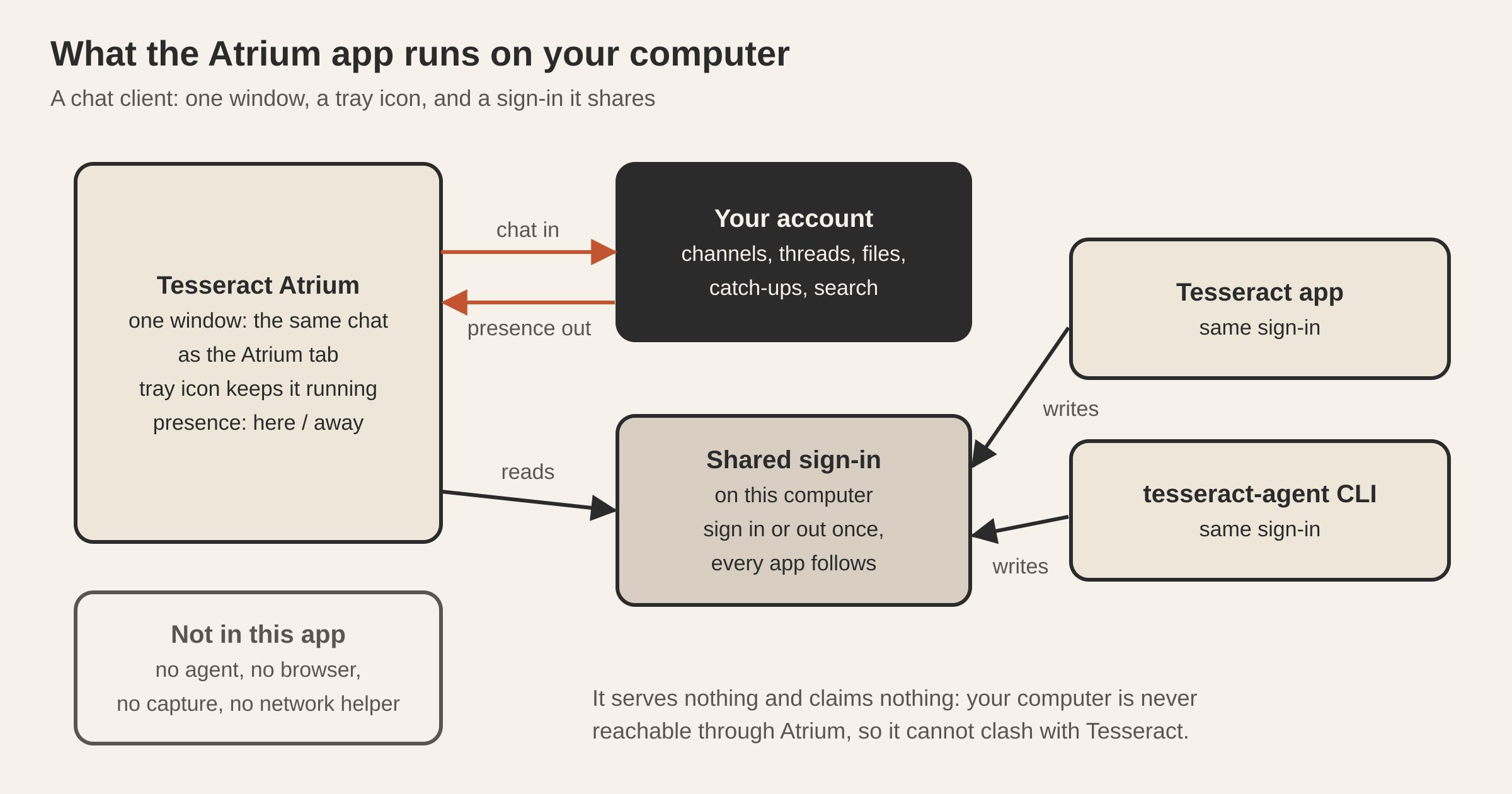
- One window with the full chat in it. Launching the app a second time brings the first window back instead of opening a rival.
- A link to your account as a client only. Chat comes in, and your typing and presence go out. The app never offers this computer as a host, so the machine is never reachable through it.
- Its sign-in kept fresh. The app renews the sign-in before it expires and writes it back to the file Tesseract and the command line use, so a renewal by either app is good for both.
- A watch on that sign-in. Sign in or out in Tesseract or with
tesseract-agent, and Atrium reconnects as that account. Signing in anywhere signs you in here. - Presence that tells the truth. A window nobody is looking at doesn’t count as you being there. After a period of no input, or when the screen locks, the app reports you as away. It announces your presence again every time it reconnects, so you show as online as soon as the app is back.
Because it carries only what a chat client needs, Atrium is a small download that starts fast. On a Mac, it asks for the microphone when you speak on a call or record a voice message.
Closing the window keeps Atrium running in the tray, so messages still reach you as notifications. Click a notification, the tray’s Open Atrium, or the Dock icon to bring the window back. Quit is in the tray menu.
Why doesn’t it run a background service like Tesseract does?
Tesseract runs a service that speaks for your computer: it holds the machine’s lock, registers it with your account, and keeps going through restarts. Atrium has nothing to serve, so it runs none of that. It holds no lock, registers nothing, takes nothing over, and quits when you tell it to.
Atrium is built this way from the start: the service code simply isn’t in the app’s path. That is also why Atrium and Tesseract can run side by side on one computer without either one deciding the other is a rival.
Questions
Do I need Tesseract installed to use Atrium? No. The Atrium app works on its own with a Tesseract account. If Tesseract is also installed, both use the same sign-in.
If I sign out in Tesseract, does Atrium sign out too?
Yes. Atrium watches the shared sign-in, so signing in or out in Tesseract or with tesseract-agent reconnects Atrium as that account, or signs it out.
Does closing the window stop notifications? No. Atrium keeps running in the tray, and Quit is in the tray menu.
Can my teammates use Atrium without paying? Atrium is free, with a Tesseract account. You can invite people by email, or share an invite link to bring someone into a workspace.
Can I post to a channel from my own tools? Yes, through the bot API and incoming webhooks.
Try it
Download Atrium for your system from the Tesseract Atrium page, sign in with your Tesseract account, and invite your team to a workspace.