 Tesseract
How Tesseract writes one post seven ways
Tesseract's social maker plans a set of posts, writes each caption for its platform, draws the pictures and saves a CSV your scheduler can import.
You give Tesseract’s social maker a topic and where the posts will go. It plans every post first: an angle, a day and time, alt text, and a caption written for each platform separately. Only then does it draw the pictures. It shows each post as it will look in each feed and saves the captions, a CSV for your scheduling tool and the pictures.
That is the “Make social posts” card on Home. This post explains how it works: what each platform gets, why the plan comes before the pictures, how changes avoid redrawing pictures for nothing, and what you end up with in the folder.
What problem does it solve?
Posting the same thing to several platforms means writing it several times. A LinkedIn post that works has a strong first line and short paragraphs. On X, the whole thought has to fit in 280 characters. On Instagram, only the first line shows before “more”, so that line has to hook. Pinterest wants searchable words and no hashtags. Pasting one caption everywhere gets it wrong on most of them.
Then there are the pictures, each in the right shape, the alt text, and a schedule spread over the week. The social maker does all of that in one conversation. You get the finished set, ready to copy or import into the tool you already schedule with.
What does each platform get?
The maker supports seven platforms. For each one it knows the picture shape the feed shows, the caption limit, and a short rule for how a caption should be written there. That rule is passed to the writer, platform by platform:
| Platform | Picture shape | Caption limit | How the caption is written |
|---|---|---|---|
| 4:5 upright | 2,200 | A hook in the first line, short paragraphs, emoji only where they add something, 3–8 relevant hashtags at the end | |
| 4:5 upright | 2,000 | Conversational and warm, a question or a call to act, 0–2 hashtags | |
| 1.91:1 wide | 3,000 | Professional and human: a strong first line, short paragraphs, a takeaway or a question, 3 hashtags at the end | |
| X | 16:9 wide | 280 | One sharp thought, at most 270 characters, 0–2 hashtags |
| TikTok | 9:16 tall | 2,200 | Short and punchy, 3–5 hashtags; the picture is the cover |
| Threads | 4:5 upright | 500 | Casual and direct, at most 450 characters, one hashtag or none |
| 2:3 tall | 500 | A clear, searchable description with the words people search for, no hashtags |
On X and Threads the writer is asked to stay a little under the hard limit (270 of 280, 450 of 500), which leaves room for a small edit by hand.
What does it ask?
Your first sentence is usually enough: “a week of Instagram posts for our café’s new autumn menu”, “LinkedIn and X posts announcing our app’s launch”, “three posts inviting people to my Saturday yoga class”. The conversation’s own model reads it into a brief: the topic, who is posting, the platforms, how many posts, the goal, the voice, and anything to include. It is told never to invent a name, a platform, a date or an offer you didn’t give.
Then it asks only what is still open, one question at a time:
- Where will they go? Pick as many platforms as you like.
- How many posts? One, three (a small series), five (one each weekday), or ten (two weeks), up to twelve in one set.
- How should the pictures look? The picture maker’s styles: photo, illustration, 3D, flat, painting, cartoon. Or leave it to suit each post.
“You choose” fills in whatever you skip: Instagram, three posts, and whatever style suits each post.
Why is the plan written before any picture?
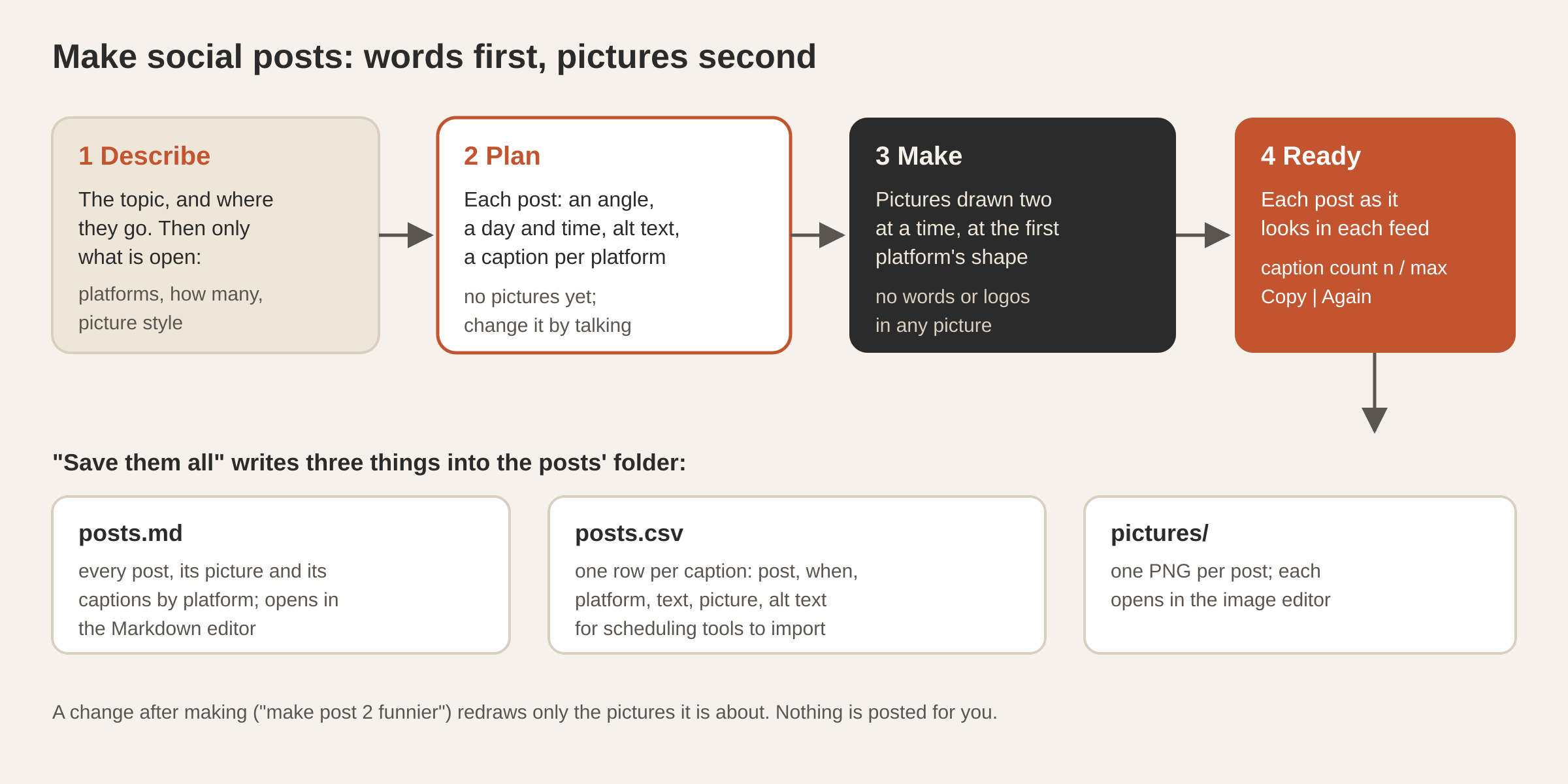
Pictures cost credit and take time. Words are cheap to change. So the first thing you see is the full plan, and nothing has been drawn yet. One structured request writes all of it. For each post you get:
- a title and an angle: what it says, and why that works;
- when it goes out: a day and time suited to the platforms, spread across the days;
- a caption for each platform you picked, written the way the table above describes;
- a description of the picture, used to draw it later;
- alt text, one sentence describing the picture for people who can’t see it.
The writer is told to give each post one clear angle and to vary the kinds (news, behind the scenes, a tip, a question, an offer), so a week of posts doesn’t read like one announcement repeated five times. It is told to sound like you, and never to invent a fact, a date, a price or an offer. All the words are in your language. Only the picture descriptions are in English, because that is what the image model reads best.
You change the plan by talking: “make the third one about the new opening hours”, “add Pinterest”, “five posts instead”. When it reads right, you press “Make the posts”.
How are the pictures made?
The pictures are drawn two at a time, and the posts fill in beside the chat as each one arrives. Each picture is drawn at the shape of the first platform you picked. The other platforms show it cropped, the way their feeds would. Every request to the image model ends the same way: no words, letters, numbers or logos anywhere in the picture. Captions are where the words belong, so every picture stays clean.
Pictures are drawn with credit on your Tesseract balance or with an image key of your own. When the balance needs topping up, the maker tells you once and pauses, and “Draw the rest” then draws only the posts that still need a picture.
What do the finished posts look like?
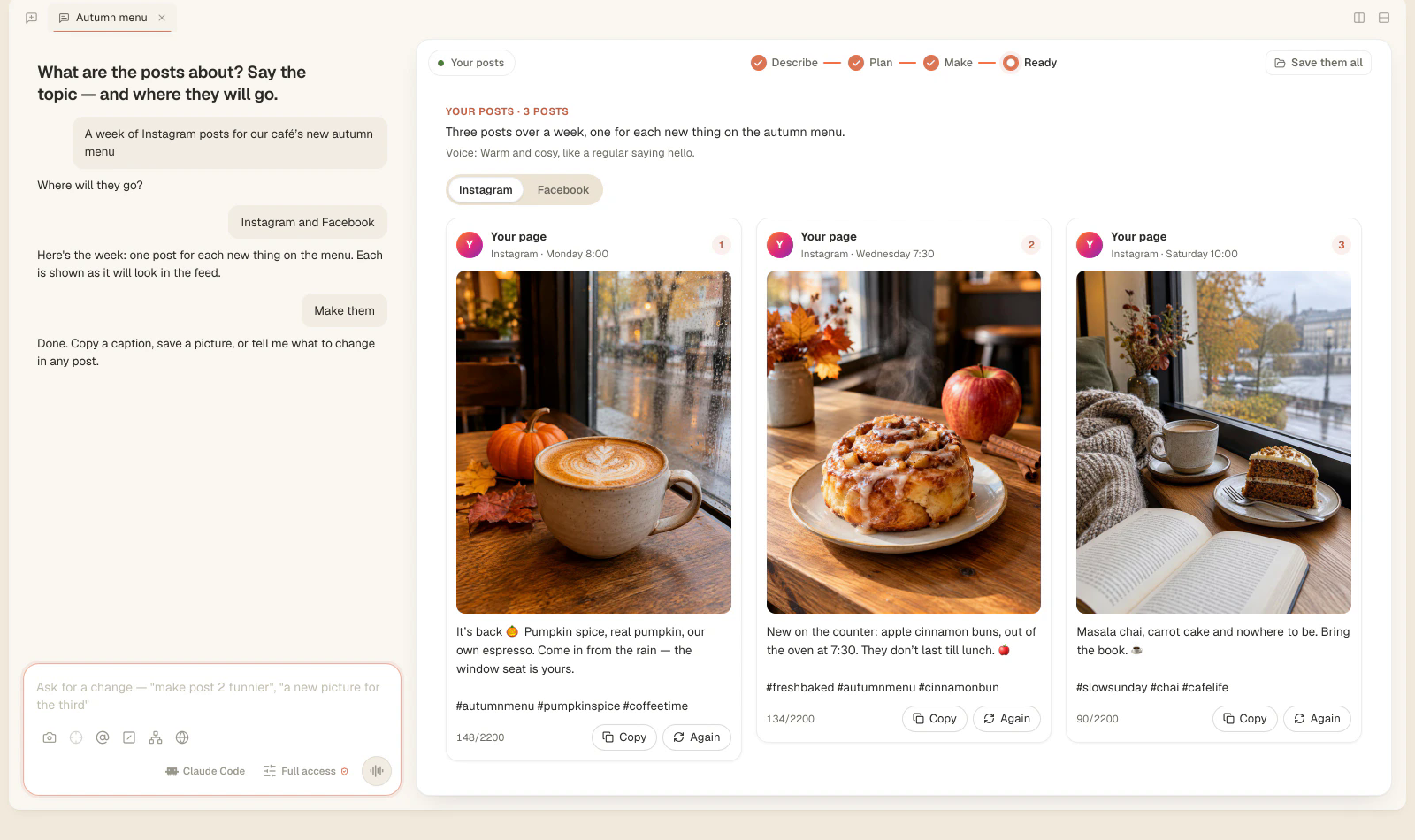
The card beside the chat shows every post as it will appear in a feed, with a switch for each platform you picked. Each post shows the page name, the day and time, the picture in that platform’s shape, and the caption written for that platform. Under the caption is a character count against the platform’s limit, such as 148/2200, highlighted if a caption runs over. Each post has Copy for its caption and Again to draw its picture again.
To change something, ask: “make post 2 funnier”, “a new picture for the third”, “shorter captions on LinkedIn”. When the model returns the changed plan, it also says which posts need a new picture because of the change: a new scene, a new style, or a post that didn’t exist before. Only those are redrawn. A post whose words changed keeps its picture. A post that didn’t change at all keeps both.
What ends up in the folder?
“Save them all” writes three things into the posts’ folder and shows it in your file manager:
| File | What it holds | Where it opens |
|---|---|---|
posts.md | Every post, in order, with its picture and its captions by platform, to read and copy from | The Markdown editor beside the chat |
posts.csv | One row per caption: post, when, platform, text, picture, alt text | Your scheduling tool or a spreadsheet |
pictures/ | One PNG per post | The image editor beside the chat |
The CSV follows the usual rules for the format (RFC 4180): a caption with commas, quotes or line breaks is quoted, so a multi-line Instagram caption stays one cell. It is made for scheduling tools that import a batch of posts, such as Buffer.
Edits you make by hand are protected. If you edit posts.md in the Markdown editor and then ask for another change, your edited copy is kept in a versions folder before the file is written again. A copy with unsaved changes is left alone. A picture you retouch in the image editor is the picture that post uses.
Questions
Is each caption really different per platform? Yes. Each platform gets its own caption, written to its own rule: a hook first on Instagram, one thought within 270 characters on X, three hashtags at the end on LinkedIn, searchable words and no hashtags on Pinterest.
Can I import the posts into Buffer? Yes. The CSV is made for scheduling tools such as Buffer: one row per caption, with the day, platform, text, picture file and alt text.
Do the pictures stay free of text and logos? Yes. Every picture is drawn with no words, letters, numbers or logos.
Can I change one post without redoing the rest? Yes. Ask for the change, and only the posts it affects are rewritten. Only the pictures that need it are redrawn.
For the other makers, see every card on Home now opens a guided maker and what Tesseract makes. Your post sets appear in Your work on Home, and do you need an AI subscription explains when picture credit is needed.
Download Tesseract and open “Make social posts” on Home.