 Tesseract
Is there a free Word alternative with AI?
Free Word alternative with AI: Tesseract AI's free word processor for Mac, Windows and Linux, vs Word, Google Docs, LibreOffice, OnlyOffice and WPS.
Last checked: 2026-11-25
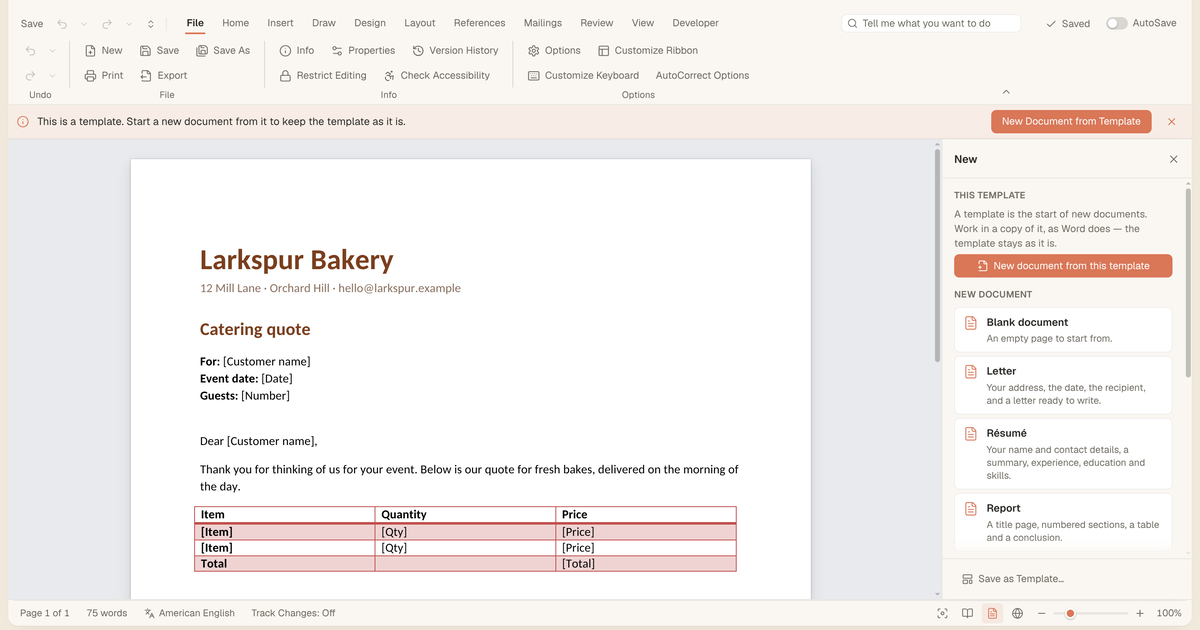
Yes. Tesseract AI’s free Word editor is a full word processor for Mac, Windows and Linux that opens and saves .docx, with an AI agent that edits the document beside you. The editor is free with no add-ons, and the AI runs on a free allowance with no API key, or on the Claude or ChatGPT plan you already pay for.
Other good answers exist too. Microsoft Word and Google Docs both have AI built in, LibreOffice Writer and OnlyOffice are free desktop suites, and WPS Office is a free suite with paid AI. The table below shows what each one’s own pages say today.
What should a free Word alternative with AI do?
People asking this question usually want four things at once:
- Open and save real Word files. A .docx from a client should come back as a .docx, with its styles, tables, tracked changes and comments in place.
- Cost nothing for the editor. No trial that ends, no add-on to buy before you can type.
- AI that works on the document itself. Not a chat window you copy text out of, but help that changes the page you are looking at.
- A clear answer on who pays for the AI. The AI runs on a model somewhere, and someone pays for it. The honest question is whether that is you, how much, and when.
Most products on the list do one or two of these well. The comparison shows which.
How do the free Word alternatives with AI compare?
| Tesseract AI | Microsoft Word with Copilot | Google Docs with Gemini | LibreOffice Writer | OnlyOffice Desktop Editors | WPS Office | |
|---|---|---|---|---|---|---|
| Free version | The app is free, Word editor included, no add-ons | Word free on the web with Microsoft 365 for the web | Anyone with a Google Account can create in Docs | Free and open source, “at no cost to you” | Free for personal and professional use | WPS Standard is free |
| Where it runs | Mac, Windows, Linux | Web, iOS and Android free; paid plans on PCs, Macs, phones and tablets | Web browser, iOS and Android apps, works offline | Windows, macOS, Linux | Windows, macOS, Linux; Android and iOS apps | Windows, Mac, Linux, Android, iOS, online |
| Word files | Opens .docx, .docm, .dotx, .doc, .rtf, .odt and more; saves .docx, .pdf, .epub and more | Word’s own format | Edit Word documents directly, or convert them | — | Native DOCX support | ”100% Compatible with Microsoft File Formats” |
| AI in the editor | An agent in the chat beside the document runs the same commands as the ribbon; one undo step per change | Copilot in Word, in the desktop apps of paid plans | Gemini in Docs drafts from your Drive, Gmail and Chat | None described; the site says “no forced AI” | Optional AI Tools: writing, rewriting, translation, OCR, agents | WPS AI: writing, summaries, chat with PDFs |
| Who pays for the AI | Free allowance, no API key; or your own Claude or ChatGPT plan, at no charge from Tesseract | Microsoft 365 Personal, $99.99 a year or $9.99 a month | Google AI Pro, $19.99 a month; or Workspace Business Standard and up | — | You connect a provider of your choice or a local model | AI tools listed with Pro+, with a daily usage limit; price not shown |
| Best at | Real Word files plus an agent that edits them on screen, on all three desktop systems | The original, with Copilot across Word, Excel and PowerPoint | Writing together in real time in a browser | A free, private office suite with no AI | A free desktop suite where you choose the AI provider | A free suite on every device, with templates |
Every cell comes from the product’s own pages, read on 2026-11-25 (listed at the end). A ”—” means the pages we could read don’t say. Microsoft’s own Word product page refused our automated request, so the Microsoft column comes from its plans comparison page and its free web apps page. Microsoft and WPS showed introductory offers when we read them; the table gives the regular prices Microsoft listed, and no WPS price because its page showed none.
Why Tesseract AI?
Tesseract AI’s Word editor is built so the AI works inside the document rather than beside a copy of it.
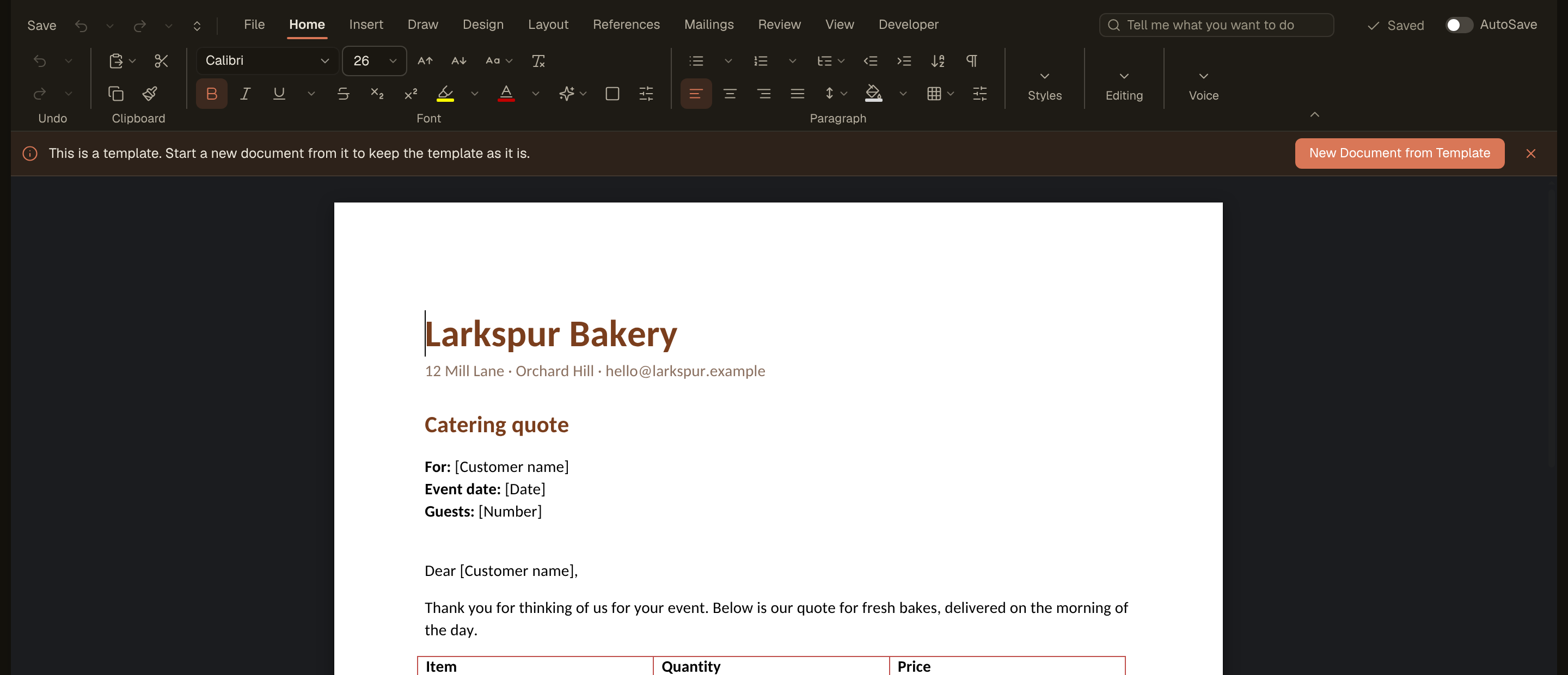
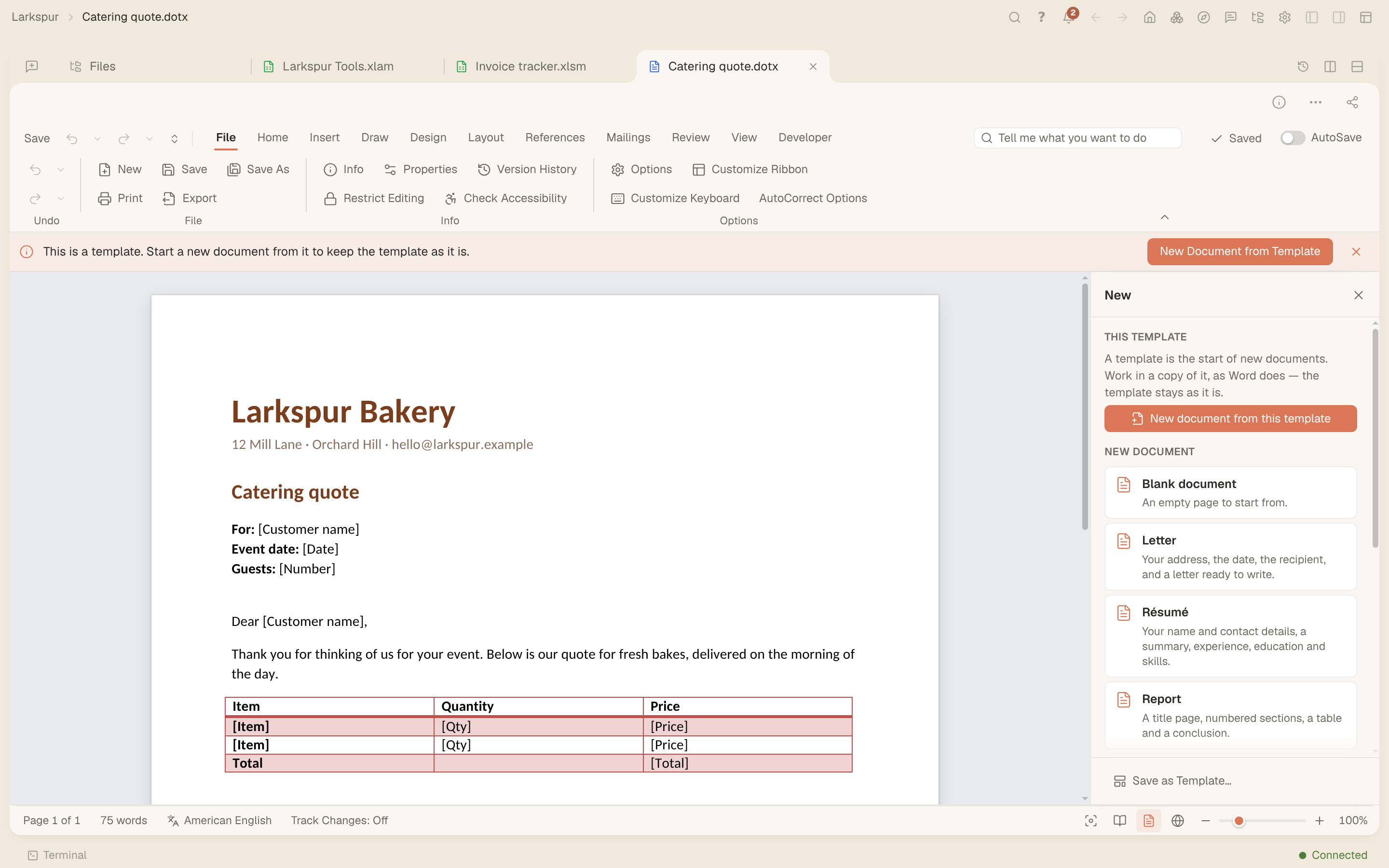
A full word processor, free. Styles, lists and multilevel numbering, sections, headers and footers, tables, pictures, charts, SmartArt, equations, a table of contents, footnotes, citations, mail merge and forms. Spelling, grammar in 8 languages, a thesaurus in 9, an accessibility check and Read Aloud. The editor works on your computer and needs no add-ons.
Your Word files, kept whole. It opens .docx, .docm, .dotx, Word 97–2003 .doc, .rtf, .odt, .ott, .html, .md, .txt and .tex, password-protected files included. It saves .docx, .docm, .dotx, .rtf, .odt, .html, .md, .txt, .tex, .epub, .pdf and pictures of the pages. An old .doc is saved as .docx, and the original stays as it was.
An agent that edits the page you are looking at. You ask in the chat beside the document. The agent reads the document as the editor has it, unsaved changes included, then selects, types and runs the same commands the ribbon does. You watch the change happen, and each one is a single undo step. It can look at a picture of the page it changed to check its own work before it tells you it is done.
Track changes stay track changes. When Track Changes is on, the agent’s edits are recorded as tracked changes, the same as yours, with Accept and Reject one at a time or all together. Comments have replies, and Compare and Combine work on two versions. Restrict Editing applies to the agent too. How an AI agent edits Word and Excel files in Tesseract explains how this works underneath.
Saving that doesn’t lose work. A save is written beside the file and then renamed over it, so a crash never leaves half a file. If a format such as .odt or .rtf can’t hold something in the document, Save lists what would be lost first, and you choose.
The AI cost, plainly. If you have no AI subscription, start on the free allowance: no API key, nothing to set up; the free tier shows ads. If you already pay for Claude or ChatGPT, sign in with that plan: Tesseract itself charges nothing for it, and use counts against your plan’s own limits. Do you need an AI subscription to use Tesseract? walks through all three options.
When does another one fit better?
Each of the others is the better pick for some people.
Microsoft Word with Copilot
If your work runs on Microsoft 365 already, Word is the original and Copilot sits inside Word, Excel, PowerPoint, Outlook and OneNote. Microsoft 365 Personal lists the desktop apps with Copilot for one person on PCs, Macs, phones and tablets, plus 1 TB of cloud storage. For a quick edit with no install, Word is also free on the web with a Microsoft account.
Google Docs with Gemini
If you write with other people at the same time, Docs is built for it: co-editing, comments, version history and sharing controls in a browser, with apps for iOS and Android and offline editing. Gemini in Docs can build a draft from what is in your Drive, Gmail and Chat. It comes with a Google AI Pro plan or a Workspace Business Standard plan and up.
LibreOffice Writer
If you want a free, open source suite and no AI at all, LibreOffice is the clear choice. Its own site describes it as a free and private office suite with “no forced AI”, for Windows, macOS and Linux, made by a community of contributors.
OnlyOffice Desktop Editors
If you want to choose your own AI provider, or run a model entirely on your own machine, OnlyOffice supports that, with MCP and web search, and its desktop editors are free for personal and professional use. It also edits PDFs and builds fillable forms.
WPS Office
If you want one free suite on every device, phone and tablet included, WPS covers Windows, Mac, Linux, Android and iOS, with a template library. Its AI tools come with the Pro+ plan.
How do I start with Tesseract AI’s Word editor?
- Download. On the Word documents page, press Download free. Tesseract AI runs on Mac, Windows and Linux.
- Pick how the AI is paid for. To start free, there is nothing to set up. To use a plan you already have, open Settings → Models & accounts, choose Add an account, add your Claude or ChatGPT subscription or a Gemini API key, and choose Use.
- Open a document. Double-click a .docx in Tesseract’s file tree. It opens in the Word editor with the ribbon you know: File, Home, Insert, Draw, Design, Layout, References, Mailings, Review, View and Developer.
- Or start a new one. Go to File › New and pick Blank document, Letter, Résumé or Report.
- Ask in the chat. There is no AI button in the editor itself: type what you want in the chat beside the document, for example “turn the price list into a table and add a total row” or “accept all tracked changes from the last review”. Watch it happen on the page.
- Undo what you don’t like. Each change the agent makes is one step, so Ctrl+Z takes back exactly one.
- Save or export. Save keeps the file’s own format. Export to PDF, EPUB, a web page, Markdown, RTF, OpenDocument, LaTeX or pictures of the pages.
Questions
Is there a free word processor with AI that edits my .docx with track changes?
Yes. In Tesseract AI’s Word editor, the agent’s edits go through the editor’s own commands, so with Track Changes on they are recorded as tracked changes, and you accept or reject them like any other.
Can Tesseract AI open old .doc files?
Yes: Word 97–2003 .doc files, .docx, .docm, templates, RTF and OpenDocument, password-protected ones included. An old .doc is saved as .docx, and the original stays as it was.
Does the AI cost anything?
The editor is free, and you can start on the free allowance with no API key. If you sign in with your own Claude or ChatGPT plan, Tesseract charges nothing for it, and use counts against your plan’s own limits.
Does LibreOffice have AI?
Its own site describes LibreOffice as a free and private office suite with “no forced AI”, and its pages describe no AI features. If you want a free desktop suite with AI, Tesseract AI and OnlyOffice both offer one.
Can I export to PDF?
Yes. Tesseract AI’s Word editor exports to PDF, and also to EPUB, a web page, Markdown, RTF, OpenDocument, LaTeX and pictures of the pages.
Sources
- Tesseract AI Word documents: https://tesseract.dev/tools/word/ (read 2026-11-25)
- Tesseract AI home page: https://tesseract.dev/ (read 2026-11-25)
- Do you need an AI subscription to use Tesseract?: https://tesseract.dev/blog/do-you-need-an-ai-subscription/ (read 2026-11-25)
- How an AI agent edits Word and Excel files in Tesseract: https://tesseract.dev/blog/word-and-sheet-editors/ (read 2026-11-25)
- Microsoft 365 plans compared: https://www.microsoft.com/en-us/microsoft-365/buy/compare-all-microsoft-365-products (read 2026-11-25)
- Microsoft 365 for the web, free: https://www.microsoft.com/en-us/microsoft-365/free-office-online-for-the-web (read 2026-11-25)
- Google Docs: https://workspace.google.com/products/docs/ (read 2026-11-25)
- Google One plans: https://one.google.com/about/plans (read 2026-11-25)
- Google Workspace pricing: https://workspace.google.com/pricing (read 2026-11-25)
- LibreOffice: https://www.libreoffice.org/ (read 2026-11-25)
- LibreOffice download: https://www.libreoffice.org/download/download-libreoffice/ (read 2026-11-25)
- ONLYOFFICE Desktop Editors: https://www.onlyoffice.com/desktop (read 2026-11-25)
- ONLYOFFICE AI: https://www.onlyoffice.com/ai-assistants (read 2026-11-25)
- WPS Office: https://www.wps.com/ (read 2026-11-25)
- WPS Office pricing: https://www.wps.com/buy/ (read 2026-11-25)
Open a Word file you already have and ask for the change you need: download Tesseract AI free for Mac, Windows or Linux.