 Tesseract
How do I make a PowerPoint presentation with AI for free?
Free ways to make a PowerPoint deck with AI in 2026: what each free tier gives you, what needs a paid plan, and how to do it in Tesseract with no API key.
Checked on November 7, 2026.
You can make a PowerPoint deck with AI for free in Tesseract: its free allowance needs no API key and no subscription, it researches the topic, lets you approve a plan, writes the slides with speaker notes, and gives you a PowerPoint download. Gamma also starts free, with 400 one-time credits and a “Made by Gamma” badge on free exports. Copilot in PowerPoint and Gemini in Google Slides need a paid plan.
Tesseract is a free desktop app for Windows, Mac and Linux that runs free AI agents with no API key needed, and makes decks, websites, videos, research reports and more from a sentence. Here is how the main options compare, and how to make a deck in it step by step.
Which AI presentation makers are free?
| Tesseract | Gamma | Copilot in PowerPoint | Gemini in Google Slides | |
|---|---|---|---|---|
| Free to start | Yes: a free allowance that refills on its own, no API key | Yes: 400 credits on sign-up, they do not refresh | No | No |
| What you need | The app (Windows, Mac, Linux). Or your own Claude or ChatGPT plan, used at no extra cost | A Gamma account; paid plans for more credits | A Microsoft 365 subscription that includes Copilot | An eligible Google Workspace or Google AI plan |
| Whole deck from one prompt | Yes: brief, research, a plan you approve, slides | Yes (“Create with AI”, metered per slide and image) | Yes | Generates single slides, text and images in an open deck |
| PowerPoint download | Yes, with speaker notes | Yes (PPTX); free plan exports carry a “Made by Gamma” badge | It is PowerPoint | Download as .pptx from Slides |
| Best at | Researched decks with sourced facts and a talk track | Fast, good-looking web-first decks | Working inside your company’s PowerPoint and brand kit | Adding to decks already in Google Slides |
Checked November 7, 2026, on each product’s own help or pricing pages (sources at the end).
How do I make a deck in Tesseract?
- Download Tesseract from tesseract.dev and open it. The free allowance is there from the start; no API key, no card.
- On Home, choose Make a presentation, and type your topic in one sentence, for example “an investor deck for a small bakery opening a second shop”.
- Answer four quick questions, each with one tap or your own words: who it is for, whether you will present it live or send it to be read, how long, and which look. Length follows time: 5, 10, 20 or 30 minutes give 6, 10, 18 or 26 slides.
- Let it research. One agent gathers sourced notes on your topic. This is most of the wait: a researched deck takes 4 to 8 minutes in all.
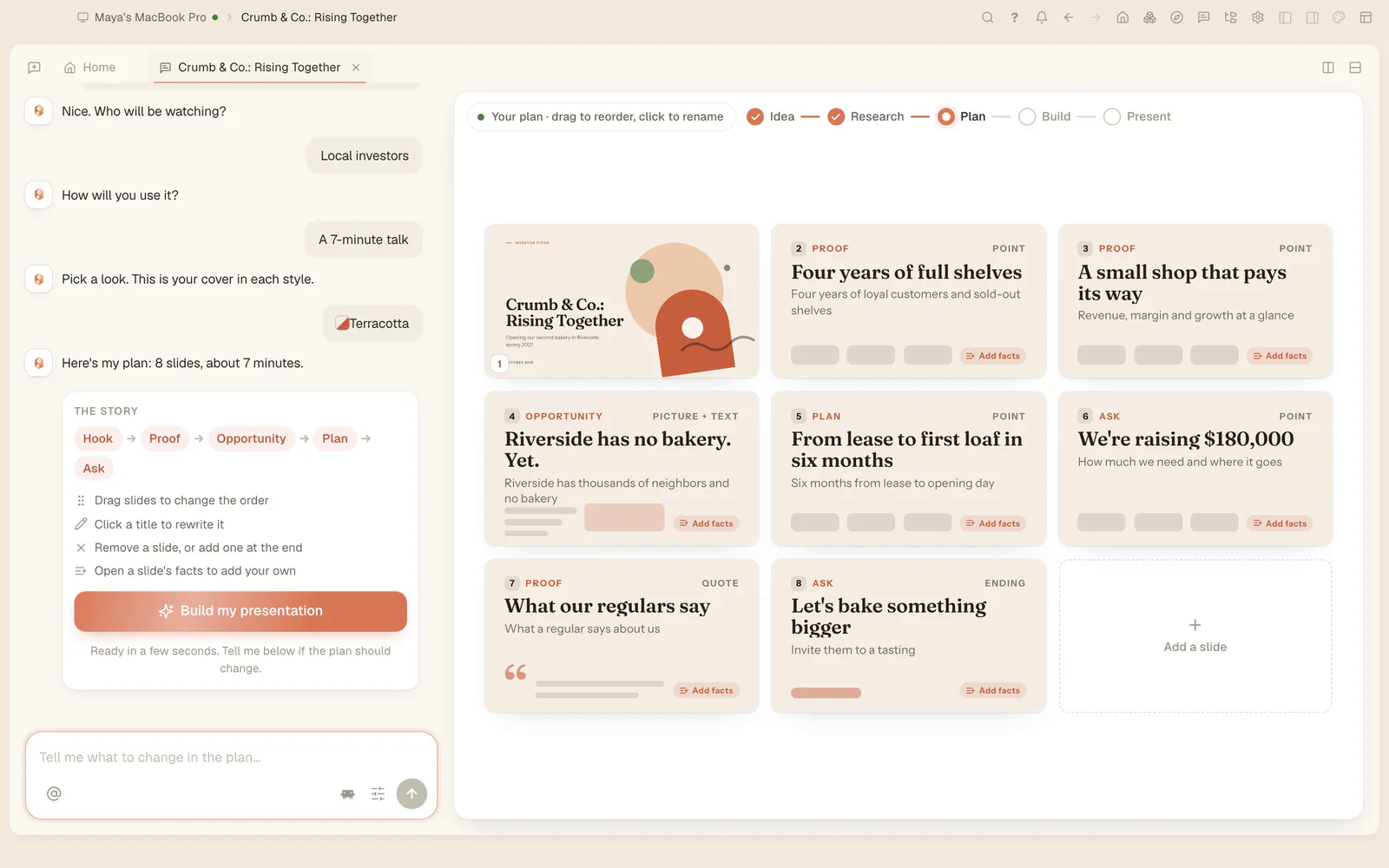
- Approve the plan. You see every slide’s title and what it will show. Rename, reorder, drop or add slides, or ask for changes in words. Nothing is built until you say so.
- Get the slides. Each slide is written with its speaker notes first, then a whole-deck review sends weak slides back, then each slide gets a picture drawn from its own words.
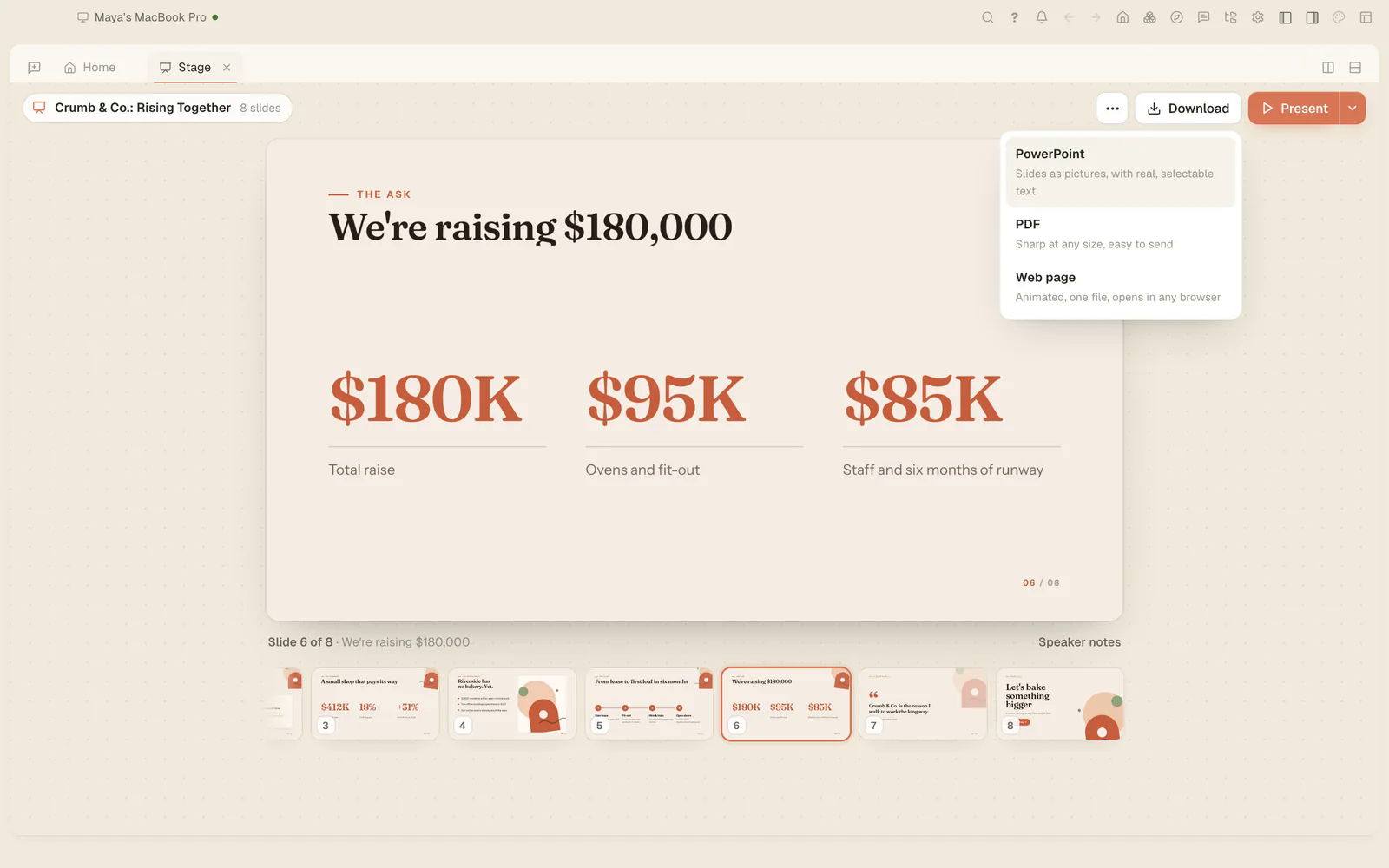
- Download it. Open the Download menu and choose PowerPoint, PDF or Web page. A 12-slide PowerPoint takes about 20 seconds.
How each of these steps works, with the numbers from our test runs, is in how an AI agent builds a PowerPoint deck.
Can I edit the PowerPoint file afterwards?
Yes, the text. In Tesseract’s PowerPoint file each slide is a picture of the finished slide with real, selectable text on top, and notes pages carry the talk track. Charts and illustrations are part of the picture, so to change one, edit the deck in Tesseract and download it again. If you need every chart as a native PowerPoint chart, a tool that builds inside PowerPoint, such as Copilot, fits that need better.
Do I need ChatGPT Plus or Claude Pro?
No. Tesseract’s free allowance is enough to start. If you already pay for Claude or ChatGPT, you can sign in with that plan and Tesseract uses it at no extra cost. Do you need an AI subscription to use Tesseract? explains each option.
What about Gamma’s free plan?
Gamma gives each new free account 400 credits. Making a deck with AI uses credits per slide and per image, and on the free plan credits do not refresh; you can earn 200 more per referral, up to 2,000 held at once, or upgrade. Free exports to PDF and PowerPoint carry a “Made by Gamma” badge. For a quick, polished deck that lives on the web, it is a strong choice.
Questions
Is there a truly free AI PowerPoint generator?
Yes. Tesseract makes whole decks on its free allowance, which refills on its own, with no API key and no card. Gamma starts free with 400 one-time credits.
Can AI make a presentation with speaker notes?
Yes. Tesseract writes the speaker notes for every slide, before the slide itself, and puts them in the PowerPoint file’s notes pages.
Does Copilot in PowerPoint work for free?
No. Microsoft says Copilot appears in PowerPoint only when your Microsoft 365 subscription or your organization’s plan includes it.
Can I make a deck in another language?
Yes. In our test runs Tesseract made a deck to be read in Romanian as well as talks in English.
Does it work on Windows?
Yes. Tesseract runs on Windows, Mac and Linux.
Sources
- Tesseract: how an AI agent builds a PowerPoint deck and do you need an AI subscription?, read November 7, 2026.
- Gamma Help Center, how do credits work in Gamma? and exporting your gamma, read November 7, 2026.
- Microsoft Support, create a new presentation with Copilot in PowerPoint, read November 7, 2026.
- Google Docs Editors Help, collaborate with Gemini in Google Slides, read November 7, 2026.
Make your first deck free, with no API key: download Tesseract.