 Tesseract
How the website maker keeps, checks and publishes a site
What happens to a site after Tesseract's website maker drafts it: the files it lives in, how edits reach the code, how it is checked and how it goes out.
Tesseract’s website maker keeps your site as plain files in a folder of its own: one HTML page per page, the look as design tokens, and the words in one content file per page that every stack reads. Each change is saved as a checkpoint you can go back to. The built project is checked against the approved design, then shared by link or deployed to your own cloud.
An earlier post showed how a site is made step by step in the chat: the questions, the three looks, editing by pointing and “Make it a real website”. This post covers the rest of the site’s life. Where is it on your disk? Why do your edits survive the move from design to code? How does the app know the code matches what you approved? And how do you put it out?
What is a website made of on disk?
The first draft appears seconds after you pick a look. It is one of the library’s finished templates written out as the design of your site, with your name in place of the template’s invented brand, your headline at the top and your main button under it. It is written into a project folder of its own as plain files that open in any browser:
| File | What it holds |
|---|---|
design/index.html (one per page) | the page, in named sections |
design/styles.css | a small reset, then the template’s own CSS |
design/design-system/tokens.json | the theme as design tokens, light and dark values |
design/design-system/tokens.css | the same tokens as CSS variables |
design/assets/photos/ | the photos, as files, never inlined |
research/ | the notes the agent gathered, each fact with its source |
The tokens follow the Design Tokens Community Group format, and every template names them the same way: color.brand.primary, color.surface.page, typography.fontFamily.display, radius.md. That shared naming is why the 14 looks can re-dress any template, and why “My brand” can take colours from your logo. It counts the logo’s pixels and takes the most present real colour (not the white around it, not a black outline) as the brand colour, and the next clearly different hue as the accent.
The site appears under Your work on Home with its own colours and display font, and it reopens where you left it.
Why does the model rewrite words and never the HTML?
A template is a finished, tested page, and rewriting only its words keeps every layout, class and attribute exactly as tested. So the maker never shows the model HTML. For each section, the model gets the words in order, each labelled with what it is (“h1 · Hero headline”, “button · Primary CTA”), plus the section’s repeated items as lists. It answers in the same shape. The answer goes back into the same text nodes it came from; a list grows or shrinks by whole items; every tag, class and attribute stays.
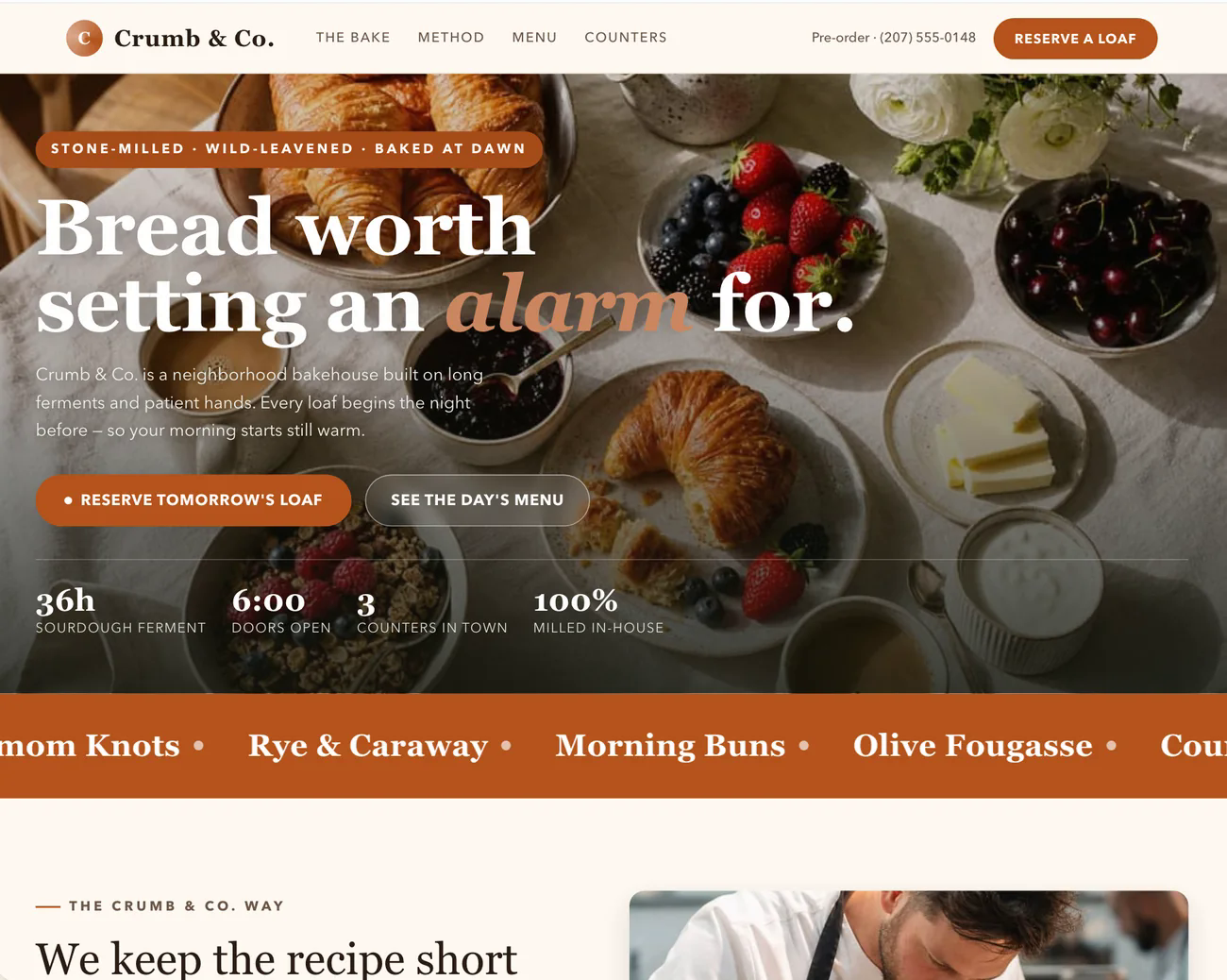
We measured both approaches on a 12-section bakery template. Rewriting only the words gave the same text at the same speed for half the cost, with the layout intact.
Each section is written from its own facts only, taken from the research notes. Where a section would need facts nobody has (reviews that were never written, a team with no names, a chart with no numbers), the plan drops it or leaves the gap visible. It does not invent a review. Then the whole page is read once together, because sections written separately can repeat each other, disagree, make a claim nothing supports (“the best bread in town”) or have a button that says something other than what the site is for. Only the words that need changing come back.
The menu is made from the plan, too. A template’s menu names the template’s own sections (“Classes”, “Coaches”). Once the plan has removed some sections and the words have renamed others, those links would say one thing and go somewhere else, or nowhere. So the maker finds the menu by its structure, not its words, and rewrites each link to point at the section it now names.
How does an approved design become code without drifting?
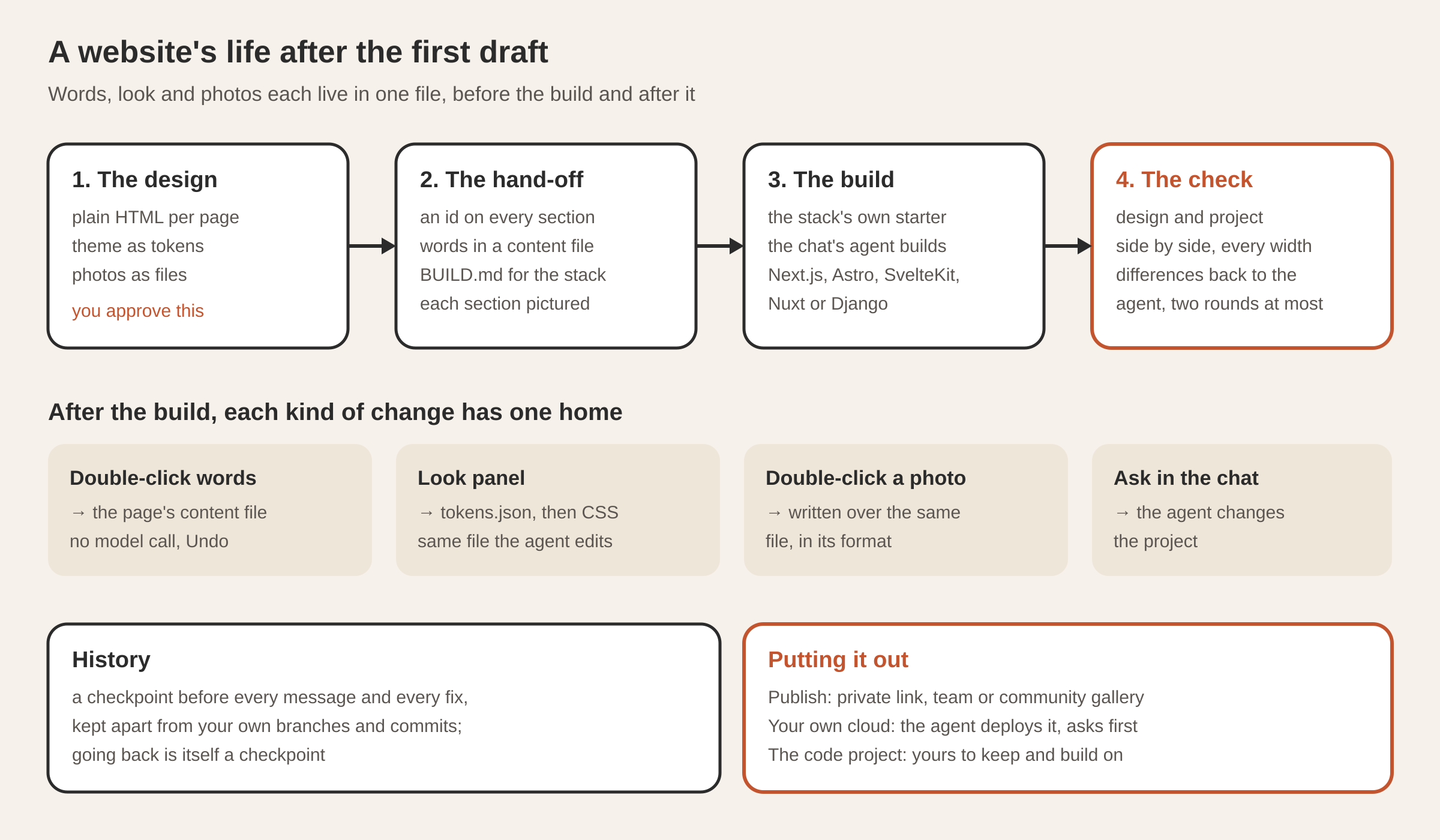
“Make it a real website” does not run a converter. The chat’s own agent builds the project, but from a hand-off written so any stack can follow it:
- Every section gets a stable id (
data-section), and the built project must keep it on the same block. - Every page’s words go to
content/<page>.json, and the project must read its words from that file and never write them into its code. - The theme stays one tokens file that the project’s CSS reads.
BUILD.mdsays what to build in the chosen stack’s own terms (Next.js, Astro, SvelteKit, Nuxt or Django), along with pictures of every section at every width, the picture a shared link shows and the icon.
The app runs the stack’s own starter, then gives the build to the agent. Then comes the check: the app starts the project and looks at the design and the running project side by side, at every width, in a window nobody sees. For each section it compares the words, how headings, text and buttons are set, whether pictures loaded, and a picture of the section. It also tests the rules directly. A word changed in the content file must show on the page. A colour changed in the theme must show. Every form must take an entry and say so.
Whatever differs goes back to the agent as a list, for up to two more rounds. Anything that still differs after that is shown to you, to accept or send back. From then on, the project is the site: the agent changes it, and the canvas shows it running.
Where do your edits go after the build?
Because the words, the look and the photos each have one file, the same edit works before and after the build, in any stack:
| You do | It changes | Notes |
|---|---|---|
| Double-click any words | the page’s content file | saved at once, no model call, “Saved · Undo” |
| Change colours, fonts, corners, spacing or text size in Look | tokens.json, then the CSS made from it | shown on the page as you drag; the agent edits the same file |
| Double-click a photo | the same photo file, in its format | one of yours, a free stock photo with its credit, or a generated one marked as such |
| Point at a part and ask | whatever the agent changes | the part goes into your message as a chip, with where it is on the page |
Words a project keeps in its code rather than in the content file go through the agent: the chat tells you where they are, and you ask the agent to change them.
The Look panel and the agent go through the same edit logic. Whoever changes tokens.json, the CSS follows, so the canvas shows every change from any source. With the panel open, clicking a part of the page shows the colours and fonts that part uses first.
How is every version kept?
The site’s History is a list of checkpoints of its folder: one before every message to the agent (“Before: make the headline shorter”) and one before every edit in place. One tap goes back to any of them, and going back is itself saved as a checkpoint, so you can undo an undo.
The checkpoints are stored with git, but on a private reference of the site’s folder: never a branch, a staged change or a commit of yours. If the site is your own repository, your history stays yours. Dependencies, builds, the maker’s own record and visitors’ entries stay out of the checkpoints, and for the same reason they stay out of what goes online.
What does the site check for?
After the words are written, after the build, and whenever you ask, the maker checks the page as a visitor gets it, at a desktop width and a phone width. It looks for the common failures of small sites:
- text too faint to read, with words on a photo measured against the photo’s own pixels behind them rather than a single colour;
- pictures with no description, headings out of order, links that go nowhere;
- no title or description for search and sharing, no language set;
- pictures too heavy for a phone, anything wider than a phone, buttons too small for a finger;
- gaps the words left for you to fill.
These are the machine-checkable basics that 95.9% of the top million home pages fail, and AI site builders often miss them too. The findings come as one card, your own gaps first, then whatever stops visitors reading or going on. Fix them hands the list to the agent in the chat, and the checks run again when it is done. More checks runs longer reviews in their own conversation: the site’s health, who can use it, how it reads to a visitor, its speed, its privacy and cookies, and how search engines see it.
What about forms and privacy?
If the site’s main button asks visitors to send something (book a class, order a cake, ask for a quote) and the template has no form, the button would lead nowhere. The plan names the form the action needs, with its fields in the site’s language and the section it belongs in. The maker places it in the design, where you see and approve it like everything else, using the section’s colours and the theme’s fonts. Its button is the template’s own button, so it looks native.
A site that takes visitors’ details also gets a privacy notice, written in the site’s language from what is known about the business. It says who keeps the details, why, for how long, and how to have them seen, changed or removed. Where a fact is missing, it leaves a gap in [brackets] instead of guessing. The notice sits at the end of the footer, with one line next to each form saying where its details go. The sites load nothing that tracks visitors, so there is no cookie banner to add.
How do you put the site out?
There are three ways.
Publish. The maker’s Publish button offers a private link (only people with the link), Share with team (your organisation’s gallery) or Publish to the community (the public gallery), and copies the link once it is made. What goes up is the page as the canvas shows it, as a single self-contained page with its theme, styles, words and photos carried inside it. It is the quickest way to show a client a draft. You press Publish yourself; the agent never publishes on its own.
Your own cloud. On the site’s publish card, choose Your own cloud and say which cloud it is (AWS, Google Cloud, Azure, a server reached over SSH, or another provider), how you want it deployed and your domain. The agent does the setup for any of them in the conversation, on your framework and model. Your keys are kept in the agent’s secret store under names and are never sent back to the page or written into the chat. Because it is your account and your bill, the agent shows its plan (what, where, size, listed price) and asks before creating anything billable, and asks again before deleting. Traffic never passes through Tesseract: it is your domain, your DNS and your certificates. What the agent made is recorded in the site’s folder, and the card shows it with Deploy again and Take it down. We tested it live: the agent deployed a page to an Amazon EC2 machine with Docker and Caddy, it answered over HTTPS with a valid certificate, and the agent then removed every resource it had created.
The code itself. The project is an ordinary Next.js, Astro, SvelteKit, Nuxt or Django project in your folder, yours to put wherever you already deploy.
Can it work on a site you already have?
Yes. Use my folder points the maker at an existing project instead of a new site. It reads the folder to learn the project’s name, language, framework and purpose, works out how to install and run it for the canvas, and finds its theme. If the project has no theme file, it creates one where the agent’s design tools write. Start from a Figma file takes a file’s look and its top frames as references. It uses Figma Variables if the file has them, otherwise the named colour and text styles, otherwise the colours and type the file uses most. Your Figma token goes with that one request and is then dropped: it is never stored, never written into the chat and never seen by the agent.
Questions
Where is my website stored? In a folder of its own on your computer, as plain HTML, CSS, design tokens and photo files, listed under Your work on Home. After “Make it a real website”, the same folder holds the code project.
Can I edit the code by hand? Yes. The project is the site from then on. The canvas shows it running, and edits in place change only the content file, the tokens and the photos. Everything else in the code is yours and the agent’s.
Can I undo a change the agent made? Yes. History has a checkpoint before every message to the agent, and one tap restores it. Restoring is itself a checkpoint.
Are the sites free of analytics and cookies? Yes. The sites load nothing that tracks visitors, which is why no cookie banner is needed. Sites with forms get a privacy notice in the footer.
Can I host it on my own AWS or server? Yes. Choose Your own cloud on the publish card. The agent deploys it with your keys, shows the plan and asks before creating anything that costs money.
Try it
Pick “Build a website” on Home, answer a few questions, and open History after your first change to see the checkpoints. Download Tesseract for Mac, Windows or Linux, and read how every Home card opens a guided maker.