 Tesseract
How Tesseract writes with you, not at you
Write something asks only what you know, outlines first, looks facts up, keeps every version and your own edits, and hands over Word, PDF or mail.
Tesseract’s “Write something” maker reads what you want into a brief and asks only what you alone know. A detail you skip becomes a visible [placeholder]. You see an outline before anything is written, and if the piece needs facts, the agent looks them up on the web first. The draft opens beside the chat, every version is kept, and your own edits are saved before any rewrite.
It handles emails, letters, blog posts, CVs, documents, short messages and speeches. This post explains how it works: what it asks and why, how it keeps to real facts, how the fact-finding run works, and how your edits survive a rewrite.
What goes wrong when a chat writes for you?
Asking a chat assistant for “a cover letter for a design job” usually goes wrong in three ways.
- It makes things up. The letter needs your name, the company and something about your experience. The model doesn’t have them, so it invents them, and the invented details sound right until someone reads them carefully.
- It ignores length and form. A “short email” comes back as five paragraphs. A toast comes back with headings.
- It forgets your edits. You fix a sentence by hand, ask for “a bit warmer”, and the new version quietly undoes your fix.
The writing maker is built around those three problems: never invent, write to the form, and treat your edits as the most important text on the page.
How does it decide what to ask?
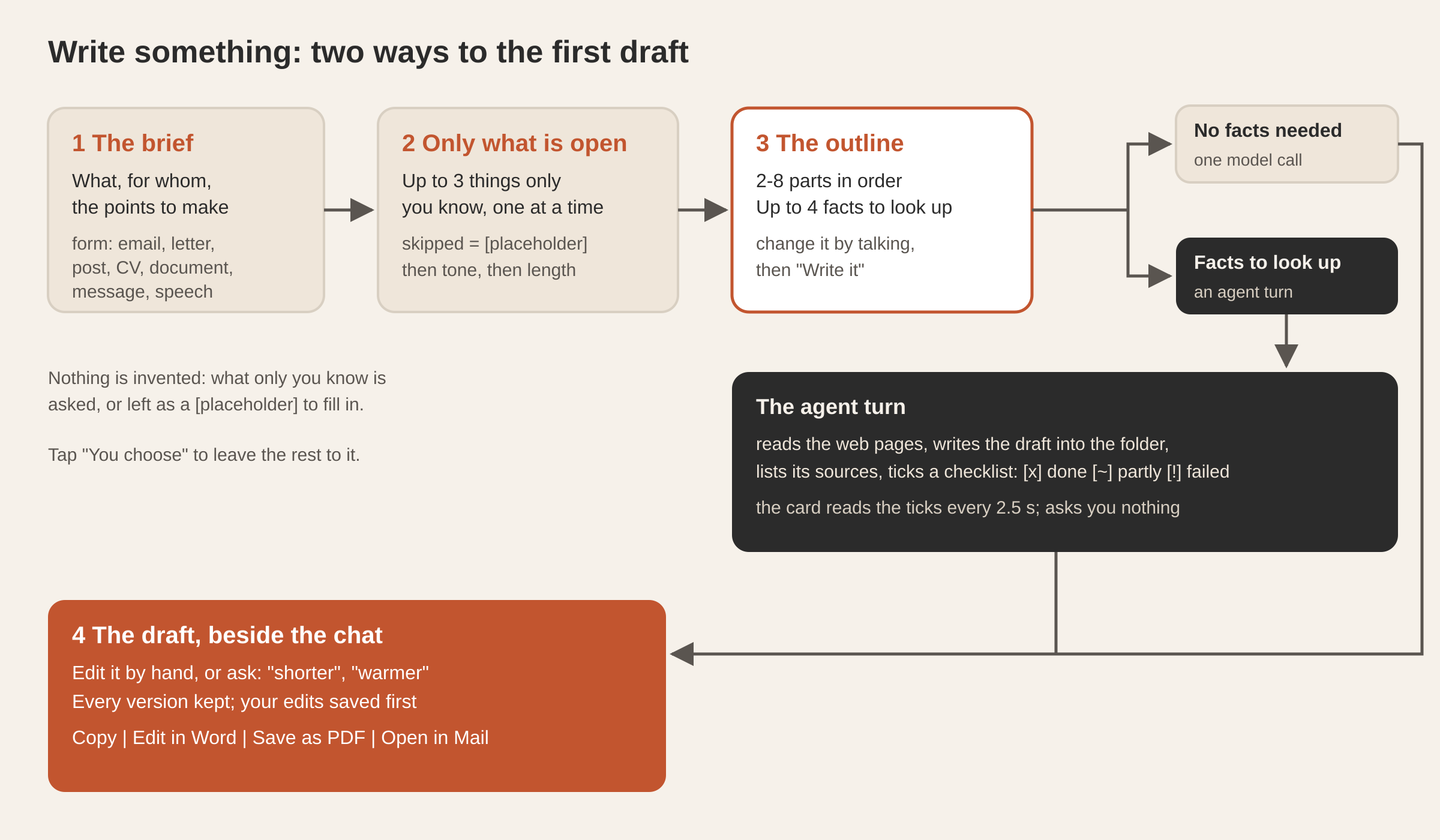
You start with one sentence: “an email asking my landlord to fix the heating”, “a thank-you letter to my daughter’s teacher”. The conversation’s own model turns it into a structured brief:
- what it is, in your words (“an email to my landlord”);
- the form: email, letter, post, CV, document, message or speech;
- who reads it, what it is for and the points to make, each only as you said them, with nothing added;
- a tone, if you asked for one, plus three tones that would suit the piece, to offer you;
- a length, if you gave one;
- whether it needs facts from the web, such as a company’s products, a price, a date or a statistic;
- up to three things only you know.
The last item does most of the work. The model is told to ask what a good writer would ask before starting, and nothing more. First, the names that would otherwise be placeholders: who it is to and who signs it. Then the facts of your own situation: your jobs and years for a CV, a story or two about the couple for a toast, what happened and when for a complaint. It is told never to ask about something that can be looked up, and never to ask about tone or length, which have their own questions.
Each question comes one at a time, sometimes with suggested answers to tap. Those suggestions are never made-up samples of your own details: a name, a job, a phone number or an address is always yours to type.
You can skip any question. Then the draft gets a clear [placeholder] for that detail instead of an invented one. Tap “You choose” and the maker decides the rest: unanswered personal details become placeholders, the tone is the first one it suggested, and the length is medium.
How long is “short”?
Length depends on the form: a long email is still shorter than a short blog post. Each form has its own word target:
| Form | Short | Medium | Long |
|---|---|---|---|
| about 90 words | 180 | 350 | |
| Letter | 150 | 300 | 550 |
| Blog post or article | 450 | 850 | 1,500 |
| CV | 250 | 450 | 700 |
| Document | 350 | 800 | 1,600 |
| Short message | 30 | 70 | 140 |
| Speech or toast | 250 | 600 | 1,100 |
The writing request says “about N words — no longer”. A short message is never asked about length at all, because a short message is short.
The form also sets the shape. An email gets a greeting, the point in its first lines, short paragraphs, a clear ask and a sign-off, with no subject line repeated in the body. A CV gets the name as a heading, a contact line, a short profile, then experience with the newest job first and two to four results for each role. A speech gets short sentences, a strong opening, a story or two and a warm close, with no headings, because nobody reads headings aloud.
Why is there an outline before the draft?
Rewriting a full draft because its structure was wrong costs a lot. Fixing an outline costs one sentence. So before writing anything, the maker shows you:
- a title, and for an email, its subject line;
- one or two plain sentences on what it will say and how;
- the parts in order, between two and eight, each with one sentence on what it says;
- up to four facts it will look up, such as “the company’s current product line” or “the 2026 minimum wage in Spain”. It never lists your own facts here.
You change the outline by talking (“put the ask first”, “drop the part about the deposit”). When it looks right, you press “Write it”.
What happens when the piece needs facts?
If the outline has nothing to look up, the draft comes from a single request to the conversation’s model, with the brief, the approved outline, the form’s shape and the word target. Its instructions: be concrete and natural, no clichés, no filler, nothing invented, and a clear [placeholder] wherever one of your facts is missing.
If the outline has facts to look up, a single model request isn’t enough, because the facts have to come from somewhere real. So the maker hands the job to the conversation’s own agent, as one turn with precise instructions:
- Look up each fact on the web. Every fact in the piece must come from a page the agent actually read.
- Write the draft as the form requires, in Markdown, into the piece’s folder in your Documents. The file holds only the piece, with no notes about how it was made.
- List the pages the facts came from in a sources file. For a blog post or a document, also link the facts in the text where a reader would want to check them.
- Tick off a checklist as it goes: each look-up, then “Write the draft”, then “Check the facts, the length and the tone”.
[x]means done,[~]partly done,[!]could not be done. - Ask nothing, decide sensibly whatever was left open, and finish with one or two sentences on what it found that mattered.
The card beside the chat reads that checklist every 2.5 seconds, so you watch the look-ups get ticked off while the draft is written. If you type a change while it is still working (“make it a bit shorter”), the change is queued and applied as soon as the draft is in. If Tesseract restarts in the middle, the maker resumes watching the run when it comes back, and if the run already finished, it takes whatever draft the agent left. That uses the same mechanism described in your task carries on after a restart.
How are your own edits protected?
The draft opens beside the chat, and you can type into it directly. There are two ways to change it, and the maker keeps track of both.
- Your edits are saved to the draft as you make them. They are not stored as a separate version until something else is about to replace them.
- A change you ask for (“shorter”, “warmer”, “add that we’ll be away in August”) rewrites the whole piece. Before it does, any edits you made by hand are saved as a version labelled “Your edits”. The rewrite instructions say: change it exactly as asked and keep everything else word for word, your own edits above all.
Every version is kept and labelled (“First draft”, “Shorter”, “Warmer tone”, “Your edits”), and one tap brings back an earlier one. Saying “undo” or “go back” in the chat also returns the previous version. Bringing back an old version saves your current edits first, so going back never loses anything either.
How do you hand it over?
The finished piece is handed over in the form it needs:
| Hand-over | What you get |
|---|---|
| Copy | The draft on the clipboard as formatted text and as plain text, so it pastes correctly into a mail or a document |
| Edit in Word | A Word file made from the draft, open in the Word editor beside the chat |
| Save as PDF | An A4 PDF next to the draft, shown in your file manager |
| Open in Mail | Your mail app opens with the subject and body filled in; you send it yourself |
Open in Mail uses an ordinary mailto link with a subject and a body. The writing maker never sends anything for you: sending on your behalf belongs to a personal assistant you set up, not to a writing tool.
The Word file follows the draft. It is made again only when the draft has changed, and the version it replaces is kept first. If the Word file has unsaved changes in the editor, it is never replaced; you are asked to save there first. Once a Word file exists, it is treated as the main copy. A small change you ask for, such as a word, a sentence or the formatting, is made directly in the Word file through the editor’s own actions, so what you did in Word stays. Only a rewrite of the whole piece goes back through the maker, which then rebuilds the Word file and keeps the previous one.
Questions
Will it invent my details? No. It asks for the names and facts only you know, and if you skip one, the draft gets a visible [placeholder]. Suggested answers never contain your personal details.
Can I edit the draft myself? Yes, directly in the card beside the chat. Your edits are saved, and before any rewrite they are kept as a version labelled “Your edits”.
Does it look things up? Yes, when the outline lists facts to find, up to four. The agent reads the pages, writes the draft, and lists the pages it used, with links in the text for posts and documents.
Can I get a Word document? Yes. “Edit in Word” makes a .docx from the draft and opens it in the Word editor beside the chat. Changes you make there are kept.
How do I send an email it wrote? “Open in Mail” opens your mail app with the subject and body filled in, and you send it.
For the other makers, see every card on Home now opens a guided maker and what Tesseract makes. New to the app? Start with your first ten minutes with Tesseract.
Download Tesseract and open “Write something” on Home.