 Tesseract
How a team chat app on your phone decides when to buzz
How Atrium on the phone notifies only for messages you haven't seen, rings like a real phone call, and catches up after a lost connection.
Atrium on the phone buzzes only for messages you haven’t seen. The rule is strict: a message is dropped only when you are on a focused device, active, with that exact conversation on screen. Calls ring through the phone’s own call screen, even with the app closed. After any lost connection the app re-reads what it missed and merges it in order.
Atrium is Tesseract’s team chat: channels, threads, DMs, forums, calls, and an AI that answers from your team’s messages. Two earlier posts covered what you can ask it: catching up by asking and catch-ups, translation and voice. This one covers the engineering behind a question every chat app has to answer: deciding when your phone makes a sound.
The phone app is built and tested against the desktop app, feature by feature.
What does Atrium on the phone include?
Everything the desktop Atrium does, adapted to a phone. Feature by feature, the everyday features match the desktop app:
| Area | On the phone |
|---|---|
| Reading | Home, DMs, Activity (Mentions and Threads), Later, You; several teams; the New line where you left off; every message block: markdown, pictures, files, video, voice notes, polls, stickers, link previews, shared canvases |
| Writing | Formatting, @people, @agents, #channels, emoji, team emoji, GIFs, polls, scheduled sends, drafts per conversation and per thread |
| Conversations | New DM or group, channels (browse, join, create), notification settings per conversation, pins, guests, profiles with local time, status, “Seen” |
| Find and AI | Quick switcher, message search with filters, Ask, Catch me up, Translate into the phone’s language |
| Forums | The post index with sort, tags and search; new posts with tags |
| Calls | Huddles and voice rooms, mute, camera, the call bar that follows you between screens, the summary when a call ends |
| Team admin | The team’s assistant on or off with a spending limit, automations, retention, audit log, agents and webhooks |
| Assistant runs | A run’s thread shows the live run with its questions, plan reviews and permission prompts, with Stop |
A shared canvas opens as its own signed-in page, with comments, versions and the sandbox. The phone app also adds Report and Block, and it follows the phone’s light or dark setting.
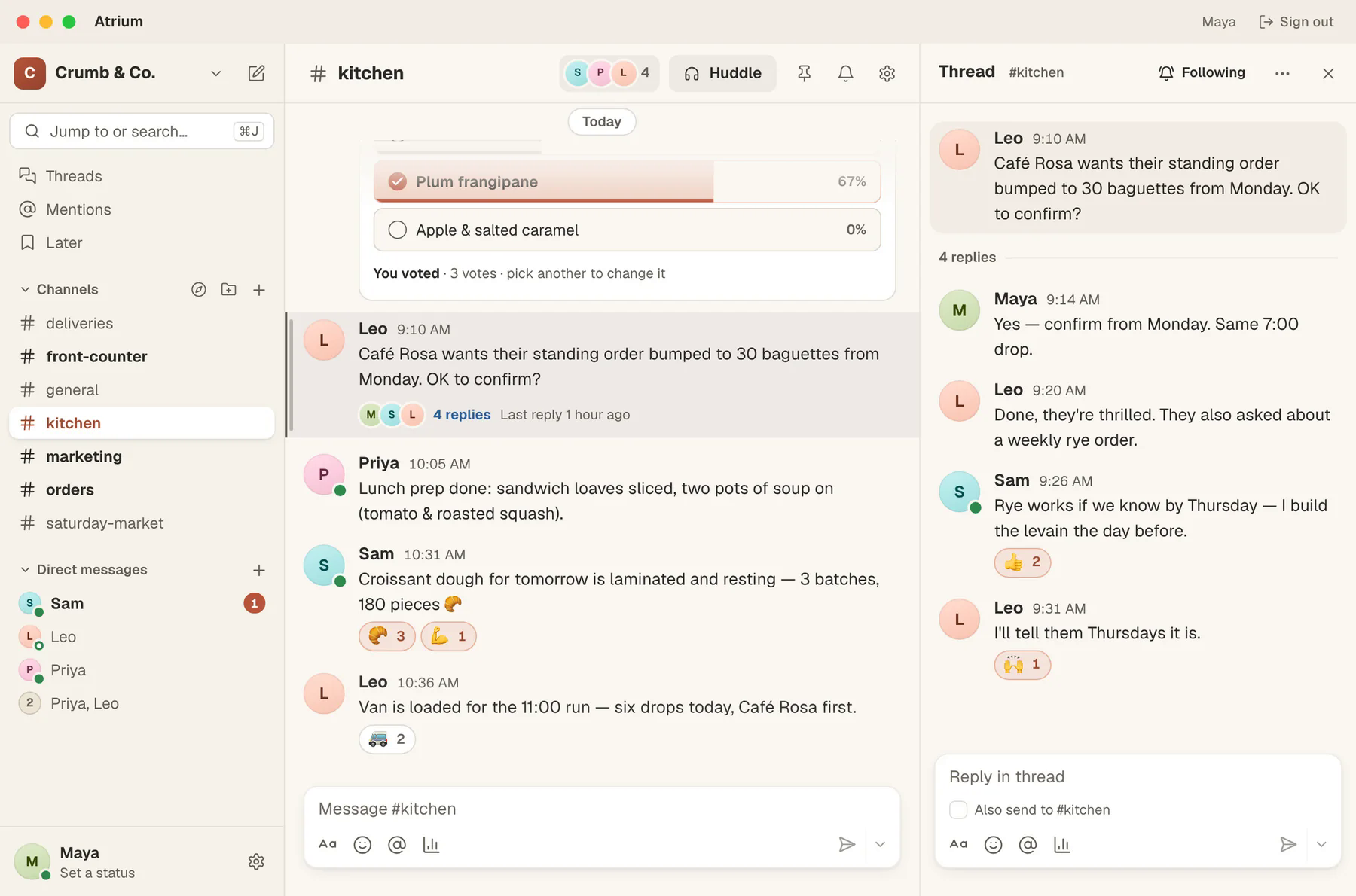
Why is team chat its own app?
“Your agent is waiting for approval” and “someone replied in #kitchen” are two very different kinds of noise. So team chat has its own app, and your phone’s notification settings tell them apart. Each app registers its push token under its own name, and the server sends team chat’s events only to Atrium. Agent events go only to the Tesseract app (the phone app post covers that side). A DM never buzzes twice, once from each app, and you can silence or allow each app on its own in the phone’s settings.
The split also keeps the app slim and focused on team chat. It reuses the agent app’s own conversation pieces for a run’s live view, and the same sign-in and design kit, instead of copying them.
When does a message make your phone buzz?
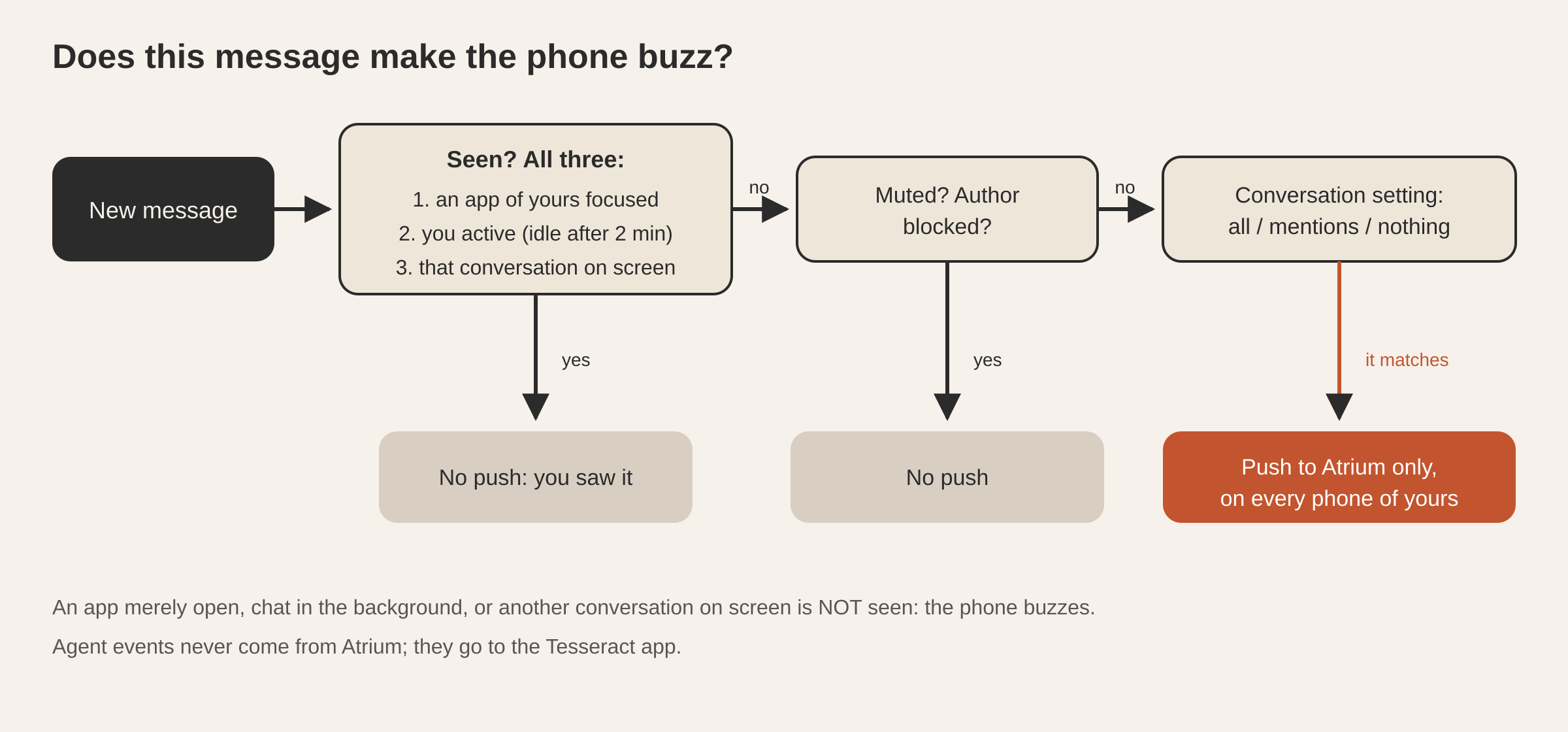
A team message can reach you on your laptop, your desktop and your phone at once. A chat app that sends a push to every device for every message is noise. One that guesses “the person is probably on their laptop” and skips the phone loses messages. Atrium’s rule is deliberately narrow: a push is dropped only when the message was seen.
“Seen” has three conditions, and all three must hold:
- A focused app. Some app of yours (desktop, web or phone) is in the foreground.
- You are active. No input for 2 minutes counts as idle, and so does a locked screen.
- That very conversation is on screen. For a thread reply, that means the thread, not the channel.
Anything less, and the phone buzzes. An app merely open counts as unseen. So does the chat tab in the background, or another conversation on screen. That is the point: you left your laptop open on #general and went to lunch, and the DM someone sent you at 12:40 reaches your phone, because after two minutes with no input you count as idle.
Your choices sit on top of that. Each conversation can notify for every message, for mentions only, or for nothing. Mute wins over everything. If you have blocked the author, you get the message on screen and no push.
Atrium’s eight notification kinds:
| What happened | Android channel | Breaks through Focus on iPhone |
|---|---|---|
| A message in a DM or group DM | Messages | No |
| An @-mention, or any message in a channel set to “every message” | Messages | No |
| A reply in a thread you follow | Messages | No |
| An invitation into a team’s channels as a guest | Messages | No |
| A call started in a channel you follow fully | Calls | Yes |
| A call ringing you | Calls | Rings through the system call screen |
| A missed call | Calls | No |
| A reminder on a saved message is due | Reminders | No |
The call that starts in a channel never notifies the person who started it.
What does tapping a notification open?
The exact place. A thread reply opens its thread, scrolled to that reply and lit up. A message opens its conversation scrolled to it, not at the bottom. A forum reply opens its post. If older messages have to load first, the app loads pages until the message is there.
A tap can also arrive when the app is cold, or before you’ve signed in. In that case the link waits and opens once your team is on screen.
How does a call ring like a phone call?
A call in a DM rings every device of the people it calls, and on a phone it should behave like a phone call: a full-screen ring, Accept and Decline on the lock screen, even with Atrium closed. Both platforms have a path for that.
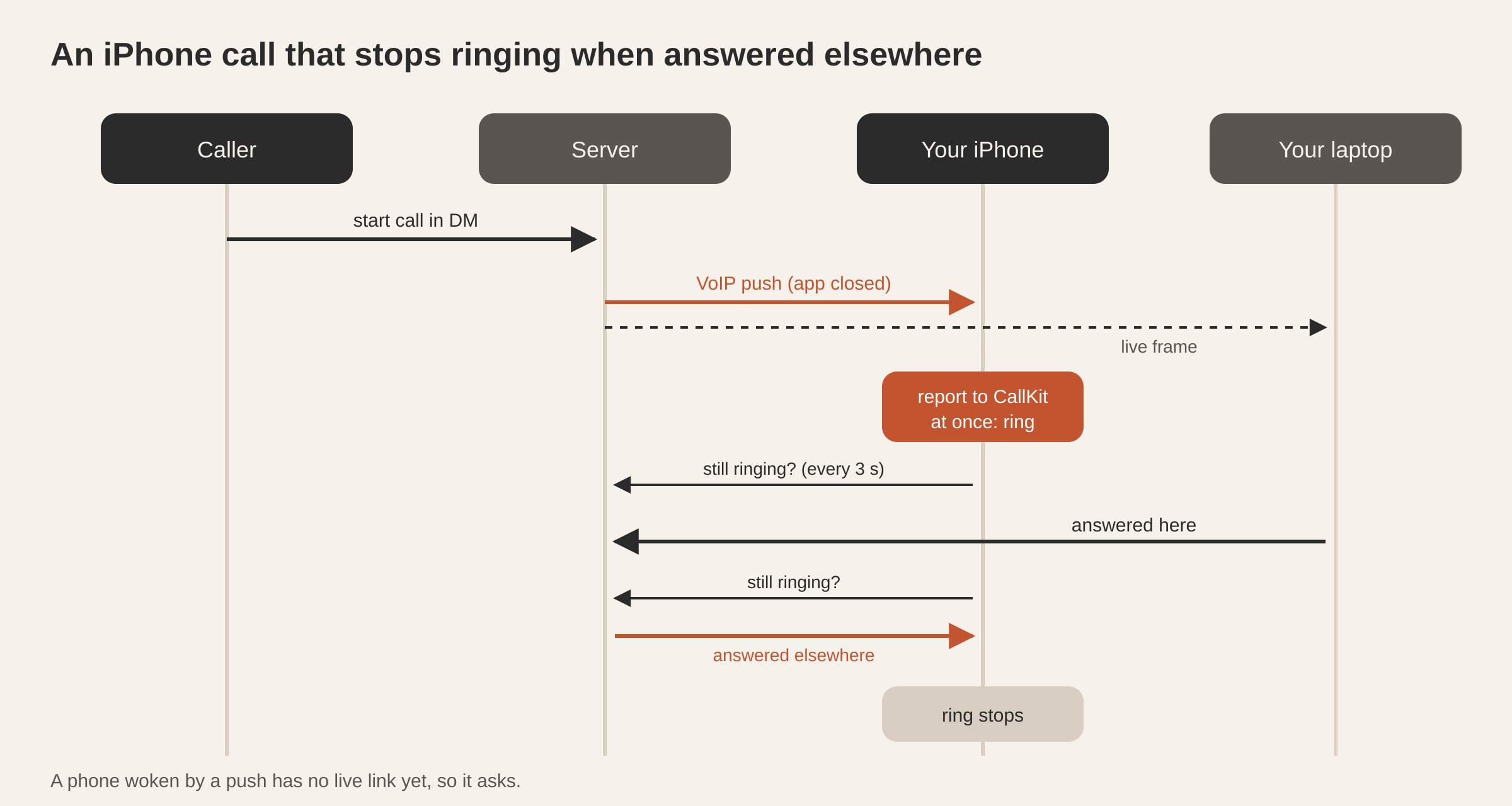
On the iPhone, the server sends a VoIP push and the app hands the call to CallKit, Apple’s system call screen. Three details make it work:
- Report at once, always. iOS stops waking an app that receives a VoIP push and doesn’t report a call. So even a push that arrives late, for a call that has already ended, is reported and then ended straight away.
- One call id everywhere. The call’s id is a name-based UUID derived from the call itself. Every push, every live frame and every app computes the same id without having to share it, so “this call” means the same thing on the lock screen, in the app and on the server.
- The app starts with no window. A VoIP push wakes the app in the background, with no screen. The app’s engine is started at launch, so it can join the call you just answered. Until iOS hands the call its audio, the app keeps its hands off the audio session.
Every call the phone is in, outgoing ones too, belongs to CallKit, so the lock screen and Control Center have its mute and hang-up.
On Android, the server sends a high-priority data message. The app shows a full-screen incoming call with a ringtone and Accept and Decline on the lock screen. During the call an ongoing notification carries Mute and Leave. Android needs a foreground service of the right type to keep using the microphone and camera once the app leaves the screen, so a call starts one when it connects and stops it however the call ends.
How does the ring stop when someone else answers?
A phone woken by a VoIP push has no live connection yet, so it checks with the server directly. While a call rings, the app asks the server about that call every 3 seconds, and stops ringing the moment it was answered elsewhere or the caller gave up. When nobody picks up, or the caller hangs up first, you get a “Missed call” notification instead.
The same in-step logic covers the opposite case. If a call is live but no push arrived (the phone was online and the push was late), the app’s own live frames and a check of current calls ring the system call screen anyway. Accept joins, with the camera on for a video call when the app is open. Decline tells the server. Hanging up on the system screen leaves the call.
How does the app catch up after a lost connection?
A phone loses its connection all the time: a lift, a tunnel, a switch from Wi-Fi to mobile data, an hour in the background. Messages sent during that gap never arrived as live frames.
So after every reconnect, and every time you come back to the app, Atrium re-reads the channels and any open threads, merges what it gets with what it already holds, and puts everything in the order it was sent: by time, then by id when two messages share a timestamp. You never see a gap, and you never see the same message twice.
Under that sits the link itself, shared by every Tesseract phone app. It sends a ping every 15 seconds, so a dead link is noticed within about 25 seconds instead of minutes. It redials from half a second, doubling to 30 seconds with random jitter, and redials at once when you bring the app back after 10 seconds or more away.
The phone also repeats your “appear away” status each time it reconnects, so the status you chose always holds.
Questions
Will my phone buzz if I’m reading the same channel on my laptop? Only if you’ve gone idle there. If you’re active on the laptop, with that channel or thread on screen, the phone stays quiet. After two minutes without input, or with the laptop locked, the phone buzzes.
Do I need the Tesseract app as well? No. Atrium signs in with the same Tesseract account and works on its own. Install the Tesseract app only if you also want to steer agents from your phone.
Does a call ring when Atrium is closed? Yes. On the iPhone it rings through the system call screen; on Android it’s a full-screen incoming call. Both work with the app closed.
Can I translate a message on the phone? Yes, into the phone’s own language. Asking again costs nothing, and an edited message is translated again.
Which phones does it run on? iPhone and Android. The Atrium page has the details, and Atrium runs on your computer too.
Try Atrium today: get it from tesseract.dev and invite your team.