 Tesseract
How an AI game maker builds a game you can play at once
Inside Tesseract's game maker: a design you approve, a browser game or an engine project, played beside the chat and tested by a headless checker.
Tesseract’s game maker asks what game you want and what to make it with, shows a design you approve, then has the agent build it in a folder on your computer. A browser game plays beside the chat as soon as there is something to play; a Unity, Godot or Unreal project gets a playable browser sketch first, then the real project.
This post is about how that works: what the design holds, why the game plays in a page of its own instead of the chat’s preview, how engine projects are approached, the rules that make a small game play well, and the headless check every browser game goes through before it is handed over. The announcement of all the makers is in every card on Home now opens a guided maker.
What makes a generated game hard to get right?
Ask a model for “a snake game” and it will write one. It may even run. The problems show up when you play it.
On a 120 Hz monitor it runs twice as fast as on a 60 Hz laptop. Switch to another tab and come back, and the snake has jumped across the board. It only takes the arrow keys, so on a phone it does nothing. It has no pause. Its canvas grows a little every time the window is resized. And when you lose, the whole screen flashes red, which is unpleasant for everyone and dangerous for some.
None of that is hard to fix. It just has to be known, written down and checked every time. The game maker is a guided flow that sets the game up, plus a game-development skill that carries those rules, plus a checker that plays the game once before you do.
How does the game maker work, step by step?
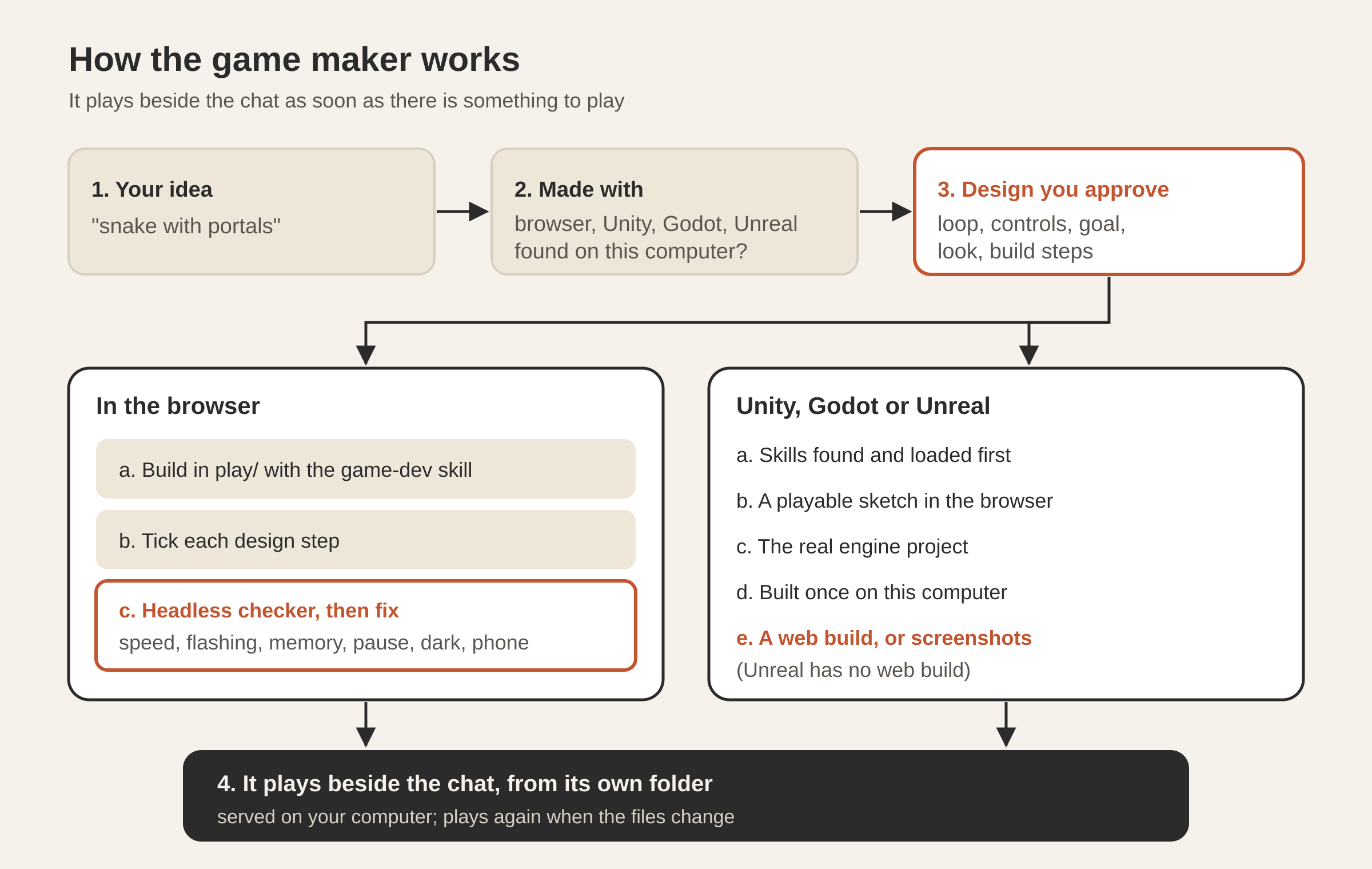
- What game. A few words is enough: “snake with portals”, “a cozy farming game”, “a racing game in Unity”. The conversation’s own model reads it into a short brief. A greeting is not a game, and the maker says so instead of inventing one.
- What it is made with. In the browser, Unity, Unreal Engine or Godot. While you read the question, the maker has already looked for those engines on your computer, in the places their installers put them, so each choice shows whether you have it. For an engine game, one more question: phones, computers, or both.
- The design. The game’s loop, controls, goal, how it grows, its look and sound, and the steps of the build, shown before anything is built. You change it by talking: “make it two-player”, “pixel art instead”. Then Make the game.
- The build. One turn of the conversation’s own agent in the game’s folder. The card beside the chat watches the build’s checklist tick, lists the skills it loaded, and plays whatever a browser can play the moment it exists.
- The game. It plays beside the chat. Tell it what to change (“make it faster”, “add a boss”, “cuter art”) and it plays again with the change.
You choose answers the open question and every one after it with the defaults: a browser game, for phones and computers.
What does the design hold?
The design is written into the game’s folder as design.md, and the agent is told to build what it says and keep it true as the game changes. It has:
| Part | What it says |
|---|---|
| Pitch | the game in a sentence |
| The loop | what the player does over and over |
| Controls | every action, for keys and for touch |
| Goal | how you win and how you lose |
| How it grows | levels, speed, new enemies |
| Look and sound | the style, and what it sounds like |
| Build steps | the checklist the card ticks |
For an engine game the design also lists a few search keywords for skills (“platformer physics”, “unity navmesh”); more on those below.
The build steps become progress.md, a checklist the agent marks as it goes: x done, ~ partly, ! could not be done. For a browser game it is the design’s own steps, up to seven, and always a last one: played once with the checker, and fixed.
Why does the game play in a page of its own?
Tesseract has a canvas beside the chat where the agent can show HTML: pages, dashboards, small tools. A quick game made in an ordinary conversation runs there too. That canvas is a sandbox built for safety.
A real game wants more: its own sprite files, levels as JSON, a saved high score, ES modules, full screen for a racing game and pointer lock for a first-person one. So a game made by the game maker gets a page of its own. The app serves the game’s folder from a small web server of its own that listens only on your computer, and the card opens it in a page of its own, where all of those work as they would on any web host.
The server is deliberately narrow. It answers only requests to read files inside that game’s folder, never follows a link out of it, and never lists a folder. It also sends the cross-origin isolation headers that an engine’s threaded web build needs, in the variant that still lets libraries load from a CDN. Every such server closes when the app quits.
Because the card plays the folder, not a copy, it plays again whenever the game’s files change. The agent is told not to push the game into the chat canvas: it changes the files, and the card shows the result.
How is a browser game built?
The agent uses the game-dev skill, with the instruction to make “a complete game someone can play right away, not a demo”. The game lives in the folder’s play/ directory with index.html as its start. Libraries are pinned to an exact version, from a CDN or saved into the folder; the skill’s defaults are plain canvas 2D for a small 2D game, p5.js for generative pieces, three.js for 3D and Phaser for a bigger 2D game. Pictures (sprites, backgrounds, tiles) come from image generation, with transparent backgrounds for sprites, or are drawn in code, and are saved under play/assets/.
Which rules make a small game play well?
These come from the skill, and each one makes the game play the same on every screen:
- Fixed steps, clamped time. The game is driven by the browser’s requestAnimationFrame, but its rules advance in steps of 1/60 of a second, so a 120 Hz screen does not play twice as fast. The time since the last frame is capped at 0.1 s, so a hidden tab does not make the game jump. When nothing moves (title, pause, game over) it stops asking for frames.
- Every key action has a touch way. Arrows and WASD for keys; drag, tap or an on-screen button for touch, with the canvas set so a swipe does not scroll the page.
- A pause three ways. P or Escape, a visible button, and by itself when the page is hidden or loses focus. Clicking into the chat is looking away. Paused means frozen.
- Nothing grows while it plays. Enemies, bullets, particles and trails live in fixed pools; no history without a cap.
- Sized to its box. The canvas takes its size from the box it sits in, at up to twice the screen’s pixel density, and never pushes that box open, because a canvas that sizes its own box grows on every resize. Sizes and speeds scale with the field, so a big screen is not an easier game. At 360–400 px wide the whole field fits on one screen.
- Both themes. The page around the game and the drawing read their colours from the app’s tokens and redraw when you switch between light and dark, even mid-game.
- Everyone can play. Nothing large flashes more than three times a second, the threshold in WCAG’s flash rule; a hit is a shake or one fading ring, never a strobe. Reduced motion turns off shake and particles. Good and bad things differ in shape as well as colour. Score and messages are real text. Buttons are 44 px. Sound stays off until you turn it on.
- Keep it fast. Script work under about 8 ms a frame, still scenery drawn once into an offscreen canvas, no new objects in the hot path.
How does the checker play the game before you do?
The skill comes with a checker the agent must run before it says the game is done. It opens the game in a headless Chrome or Edge, served the same way the card serves it, presses the key or tap that leaves the title screen, plays the keys it is given, tries the pause, switches the app to dark, and opens the game at phone width.
It reports the frame rate, flashing, memory that keeps growing, which input the game handles, whether it fits a phone, anything the page was refused, and every console error, exception and failed request, with screenshots of the game playing, in dark and on a phone. The agent reads every finding, looks at the screenshots with specific questions (“is the player visible against the ground in dark?”, “is anything cut off on the phone?”), fixes everything in one pass, and runs the check again only if it found something.
How it feels to play, the sound and a real phone’s touch are yours to judge, and the follow-up conversation is where you shape them.
What happens when you choose Unity, Godot or Unreal?
An engine game is specialised work, so the build is told to approach it the way a studio would, as a real project that opens in the engine and builds. The checklist has five steps:
- Skills first. Before writing any of it, the agent searches the public skill libraries for skills for that engine and that game, a few keywords at a time, loads the ones that fit (the engine’s own first) and follows them. It records what it loaded, and the card lists them.
- A playable sketch in the browser. The core loop, the controls and the feel, built with the game-dev skill in
play/, so you can play something within the same session, long before the project is finished. - The project. A Unity project created from the editor’s command line, with C# scripts and scenes; a
.uprojectwith C++ or Blueprints for Unreal;project.godotwith scenes and GDScript for Godot, checked by running the editor headless. - Built once on this computer, and fixed. A compile, the editor’s import or a test run, whichever the engine allows.
- Something the card can play. A WebGL build for Unity or a Web export for Godot, which the card then plays instead of the sketch. For Unreal, the sketch stays true to the project’s gameplay and the agent saves screenshots of the project.
| Made with | What plays beside the chat | What you also get |
|---|---|---|
| In the browser | the game itself | its folder of files |
| Unity | its WebGL build, once made; the sketch before | a Unity project |
| Godot | its Web export, once made; the sketch before | a Godot project |
| Unreal Engine | the browser sketch | an Unreal project and screenshots |
On a computer without the engine, the agent sets the project up to open in the current version, builds everything it can, and says how to get the engine, while the card plays the sketch.
Questions
Can I play the game on my phone? A browser game is built for touch and phone width, and the checker opens it at phone width. It plays beside the chat in Tesseract; the files are in the game’s folder if you want to host them yourself.
Where is the game saved? In a folder per game under Documents/Tesseract/Games on your computer, with its design, its build checklist and its files.
Can I change the game after it is made? Yes. Say what to change in the same conversation; the agent changes the files, keeps the design up to date, and the game plays again with the change.
When do I need Unity, Unreal or Godot installed? For an engine game, to build it. A browser game plays straight away. The maker shows which of them it found on your computer before you choose.
Can I leave while it builds? Yes. The build goes on in its conversation; when you come back, the card picks it up again, or shows how it ended.
If you like seeing how the agent works behind the screen, read how the agent drives the Tesseract window. To make your own game, download Tesseract and open Create a game on Home.