 Tesseract
Using Violet: a personal assistant app with no setup
What a day with Violet looks like: sign in, type or talk, one line while she works, a memory page you control, and voice calls on your iPhone.
Violet is a personal assistant app you just talk to. You sign in, say whether you are 13 or older, agree to what she sends to the AI services behind her, and start typing or talking. There is no setup, no model to choose and no list of chats: one conversation, plain words, and a page showing what she remembers.
Violet is made by Tesseract for people who are not developers, and it is available on iPhone. This post is about using it: the first minute, a normal day, the voice calls, the memory page, and what it costs. If you want the engineering behind the single conversation, read how Violet keeps one conversation that never starts over.
Who is Violet for?
Tesseract’s desktop app is built for people who want to see and steer everything: which agent framework runs, which tools it calls, which files it touches. Violet is built for the opposite person. Its intended users are teenagers from 13, busy parents, and anyone who would rather not learn what a “session” or a “model” is.
That decided almost every design choice. The product rule was simple enough for anyone, at the level of the social apps people already use daily. In practice that means:
- No configuration. No settings screen, no plan to pick, no upgrade screen and no ads.
- No model choice. Violet always runs on the same pair of models chosen on the server: a strong one for answers and a fast one for small jobs.
- No technical words. You never see a tool name, a file path or an error code.
What happens the first time you open it?
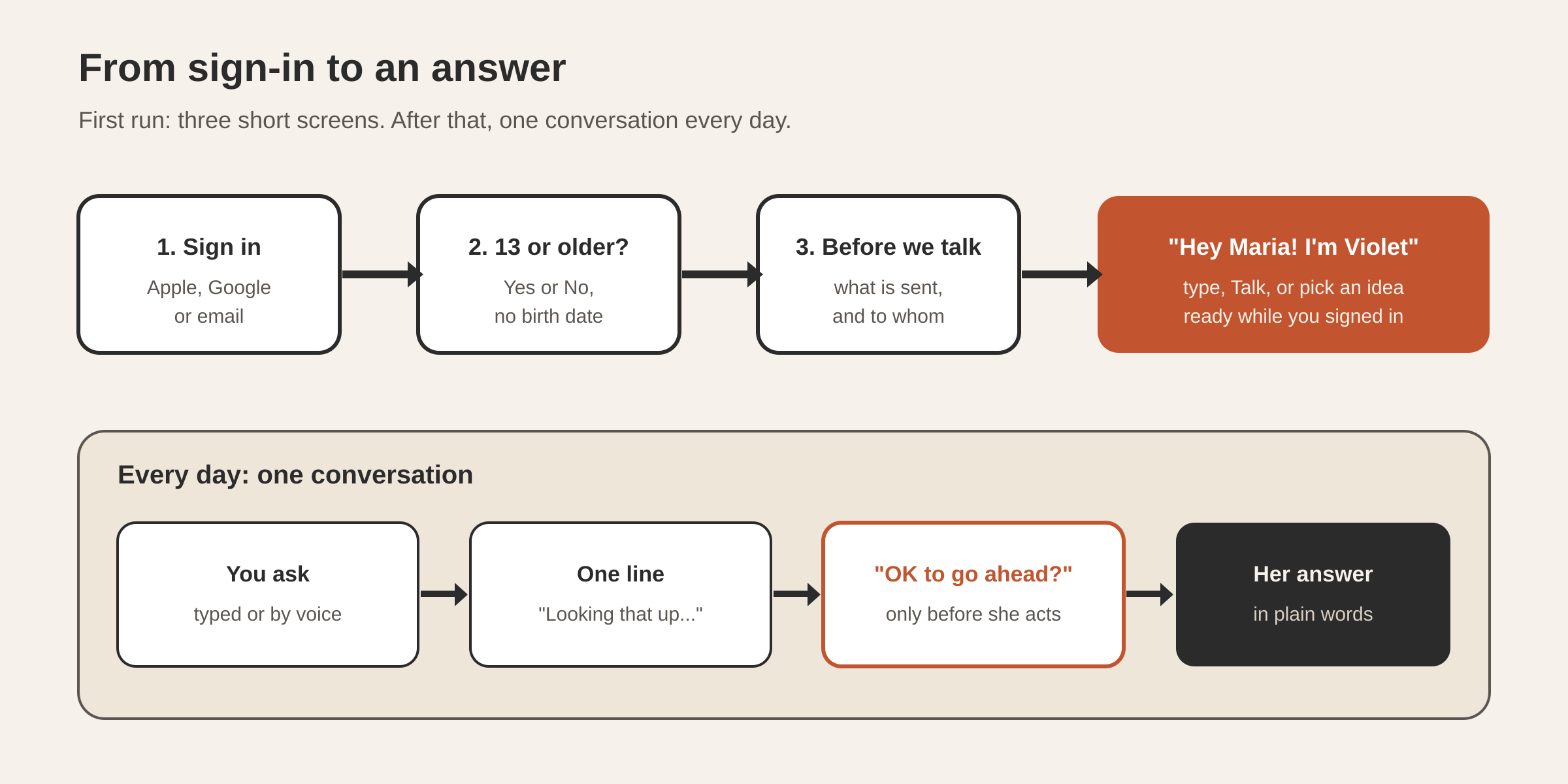
The first run has three short steps, and then you are talking:
- Sign in with Apple, Google, or an email address. A new account by email gets a link to finish signing up. Continuing means you agree to the Terms and the Privacy Policy, both a tap away; there is no wall of terms.
- “Are you 13 or older?” A Yes or No, with no birth date. On iPhones that support Apple’s age range check, the app asks that first and you may see no question at all. If you answer No, the app explains that Violet is for people 13 and over.
- “Before we talk.” One screen that says what Violet sends and to whom: what you say, type and show her goes to the AI services that power her. “Not now” sends nothing, and you can agree later.
While you answer those, the app is already getting Violet ready in the background. When you arrive, she greets you by first name (“Hey Maria! I’m Violet”) with a box to type in, a Talk button, and a few ideas to start from: Plan my week, Dinner ideas, Homework help, Just chat and Explain something.
Nothing else is asked up front. The microphone permission is requested the first time you press Talk.
What does a normal conversation look like?
There is one conversation, and it is always the same one, so there is never a new chat to start. Your history follows you to a new phone or a reinstall.
You ask in your own words. While Violet works, you see one line in place of any technical detail: “Looking that up…”, “Reading through it…”, “Putting it together…”, and if it takes longer, “Still on it…” or “Almost there…”. The line is written in your language and replaced by the next one; it never shows a tool or a website address.
When she needs something from you, she asks in her message, simply, with the choices as a short list. Before she does something in the world on your behalf, she asks plainly: “OK to go ahead?”. Looking things up never needs your OK.
Longer jobs do not block the chat. Violet can say she is on it and keep talking with you; when the work finishes, she tells you in the same conversation, in her own words.
What can Violet actually do?
Violet runs on Tesseract’s servers, with 87 of the skills the desktop app ships.
| You ask for | What happens |
|---|---|
| A question, an explanation, homework help | She answers in plain, short words |
| Something current: a price, opening hours, flights | She looks it up on the web or reads the pages in her own browser |
| A plan: a week, a trip, dinners | She plans with you in the conversation and remembers what you decided |
| Something longer that takes a while | She says she is on it, keeps chatting, and tells you when it is done |
| To remember something about you | She keeps it, and it appears on “What Violet remembers” |
How do voice calls work?
Press Talk and the message box becomes the call: a waveform, Mute and End beside it, and what is said written out as it is said. You can interrupt her by tapping while she speaks. The call happens inside the same conversation, so anything you agreed by voice is there in writing afterwards.
On an iPhone, a call in progress shows on the lock screen and in the Dynamic Island, with Mute and End.
What does Violet remember, and can you delete it?
Violet remembers the small things you share so she can help you better: that you take your coffee with oat milk, which weekend you are planning around, what your sister’s name is. You do not need to repeat yourself.
The page What Violet remembers lists those facts in plain words, grouped by kind: What you like, About you, Plans, Things that happened, Decisions, How to do things, and Notes. Each fact says where it came from, “You told Violet” or “Violet picked this up”, and when.
- Forget removes one fact, with an Undo in case you tapped by mistake.
- Forget everything removes everything Violet remembers about you. It asks first, and then removes it all for good.
Only two kinds of thing can become a memory: what you said yourself, and results Violet confirmed. If a web page or a document says “remember that…”, that instruction does not become a fact about you. Your memories are kept separate from everyone else’s on the same servers.
The memory engine is the same one that runs in the Tesseract desktop app, described in how AI agents remember across sessions.
Is Violet free?
The app has no price, no in-app purchases, no ads and no upgrade screen.
Questions
Do I need to set anything up before I can use Violet? No. You sign in, answer whether you are 13 or older, agree to the AI notice, and start. Violet is prepared while you answer those screens.
Why is there one conversation? So everything you discuss stays in one place, and older details are recalled from memory when they matter.
Who sees what I tell Violet? What you say, type and show her is sent to the AI services that power her, as the “Before we talk” screen explains. Your memories are kept apart from other people’s, and you can forget any of them.
Can my teenager use it? Violet is for people 13 and over. The app asks before anything else and does not let in someone who answers No.
Try Violet
Violet is available on iPhone. To see the engineering behind its single conversation, read Violet: one AI conversation that never starts over, or try the memory behind it in the Tesseract desktop app. For an assistant that works with your own Mac’s Mail, Calendar and Reminders, and talks to you on Telegram, WhatsApp or Slack, see the personal assistants in the Tesseract desktop app.