 Tesseract
What is the best Higgsfield alternative in 2026?
Our 2026 pick for a Higgsfield alternative: Tesseract. A fair comparison with Runway, Krea, Magnific (formerly Freepik) and CapCut, sources dated.
Checked on November 24, 2026.
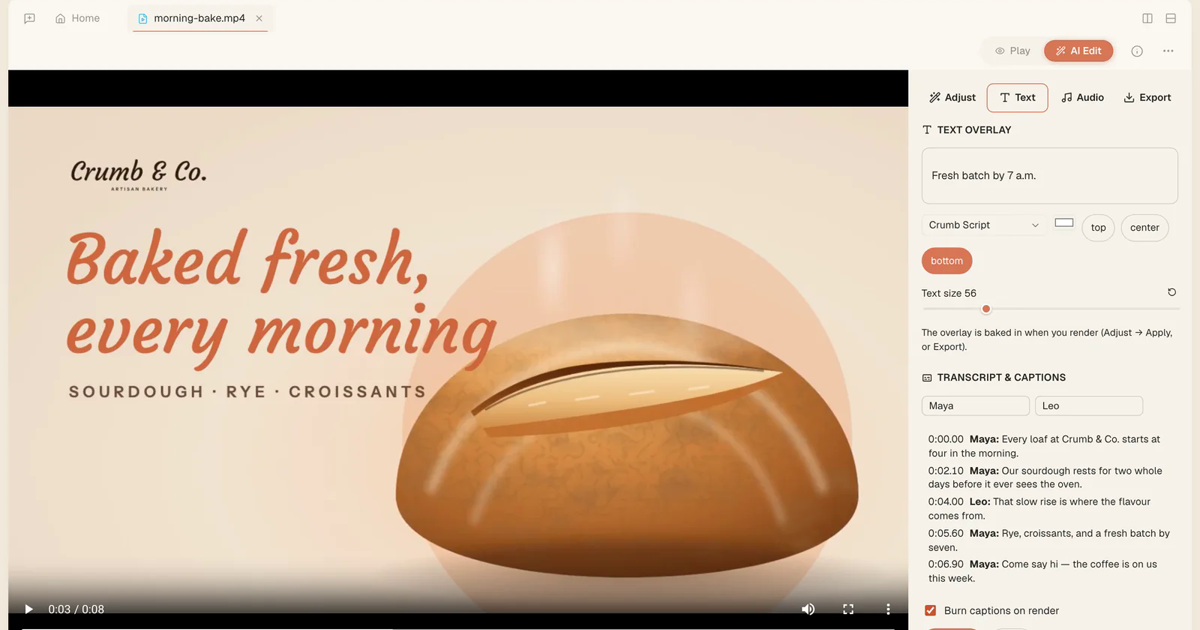
In our view, the best Higgsfield alternative in 2026 is Tesseract. It’s a free app for Mac, Windows, Linux and the web. It puts the newest video and picture models inside a real video timeline, a photo editor and an audio editor. An agent plans the work for you, and every price shows before anything is made.
Higgsfield’s own site describes a web and mobile platform with 35+ models and an AI agent. If you want something else, four more tools are worth a look: Runway, Krea, Magnific (the new name of Freepik) and CapCut. Each one is good at something different. Below are the facts from each product’s own pages, read on November 24, 2026, and where each one fits.
How should you choose a Higgsfield alternative?
Start with what you do after a clip is made. That one question narrows the list quickly.
- You want finished work, not loose clips. Look for a real editor and an assistant that does the cutting, captions and music with you. That’s Tesseract’s focus.
- You want one company’s own models. Runway trains its own video models and lists them first.
- You want speed and pictures at very high resolution. Krea’s realtime drawing and its upscaler to 22K are built for that.
- You need stock assets beside the AI. Magnific pairs its AI tools with a library of 250M+ photos, videos, vectors and PSDs.
- You edit on your phone. CapCut runs on mobile, tablet, desktop and the web.
Also check how you pay (a free plan, credits or a subscription), which computers it runs on, and whether you can use your own API keys.
How do the Higgsfield alternatives compare?
| Tesseract | Runway | Krea | Magnific (formerly Freepik) | CapCut | |
|---|---|---|---|---|---|
| What it is | Real editors for video, audio and pictures, and an agent that does the work in them | ”Your complete Creative Suite”: generating and editing video, images and audio | ”The world’s most powerful creative AI suite” | AI image, video, audio and 3D tools plus a stock library | A video editor with an AI video generator |
| Free to start | Free download; a free allowance, or the Claude or ChatGPT subscription you already have; a new account’s first few pictures and a short clip in the makers are free | Free plan: 125 one-time credits, 5GB storage | Free plan: 100 units a day, no credit card | No free plan on the pricing page | Free plan, USD 0; a 7-day free trial of the AI video generator |
| Paid | Top-ups from $10; the price of each run shown first | Standard $15 a month, or $12 a month billed yearly | Basic listed at $9 a month (shown at $5 in a sale on the day we checked) | Premium €126 a year (€63 the first year in a sale) | Pro USD 14 a month |
| Where it runs | Mac, Windows, Linux and a web app; also inside ChatGPT and Claude | Web, plus iPhone and Android apps | Web | — | Desktop, online, tablet and mobile |
| Video models | Gemini Omni 1.2 Flash by default, plus Kling 4.0, Wan 3.0, Grok Imagine Video 1.5, Luma Ray 3.2 and the open Wan 2.2; your own keys too | Gen-4.5, Aleph 2.0, Kling 4.0, Seedance 2.0 Pro | 64+ models in all; video includes Seedance 2.5, MiniMax H3, LTX-2 19B, Kling 4.0 | Kling 4.0, Seedance 2.5, Wan 3.0, Google Veo 3.1, MiniMax H3 and more | Seedance 2.5, Seedance 2.0 Mini, Veo 3.1 |
| Editing after the AI | A full timeline (multicam, colour grading, scopes, a transcript to cut by, a mixer), a photo editor with layers and masks, an audio editor | Video, image and audio editing in its suite; 4K upscaling | Image Editor that edits with words; upscaler for images and video up to 22K | Video Project Editor, Clip Editor, Image Editor, upscalers | Timeline editing with templates, auto captions and a music library |
| An agent | Plans, makes and edits in the same editors you use | An agent and an “agentic creative collaborator” | Krea Agent: “Describe it, Agent makes it” | — | — |
| Best at | One request to a finished, editable video, ad or 3D model, with every price shown first | Its own frontier video models, mobile apps and ads linked to your ad accounts | Realtime drawing, huge upscales, style training | AI tools and a big stock library under one subscription | Quick edits and captions on any device |
Every cell comes from the product’s own pages, read on November 24, 2026 (sources at the end). A ”—” means the pages we read don’t mention it. Prices are as each pricing page showed them that day. Several showed holiday discounts, and CapCut’s says its prices vary by region.
Why Tesseract is our pick
A real editor after every clip. Your AI clip lands on a full timeline with multicam, colour grading, scopes, a transcript to cut by and a mixer. At any cut you can add one of 46 kinds of AI transition. You can also change a clip from a typed instruction, relight it, or split its sound into voice, music and the rest. Each of those buttons shows the price first, and one undo puts everything back.
You direct by clicking. In the video maker, Direction sets the genre, era, camera style, light and colour look, plus each shot’s camera moves, lens and emotion. Every move shows a small preview of what it does, so you don’t need to know the jargon.
One request, a finished result. Short with a presenter makes a vertical talking-to-camera video from one request, with cutaways, captions and music. The script and one price come first, and nothing is paid for before you say yes. Long videos are told in up to 300 scenes, with the same people in each, and made in batches you approve. Give it your product, or a link to its page in your own shop, and you get a finished short ad in every platform’s shape.
More than the video. One photo becomes a short effect clip with any of more than 150 one-tap effects. Talking photo and dubbing, face swap and 3D models from a picture or a few words are in the same app. So are the Word, spreadsheet and PDF editors for the brief and the budget around a campaign.
Same face, same product. Reflections keeps the people, products, places and styles you save the same in every picture and clip. You call them by @name.
You know the cost first. Every paid run shows its price and waits for your press. A cancelled or failed job is not charged.
It works where you already are. Add Tesseract to ChatGPT or Claude by its address, then ask for pictures, short clips with camera moves like bullet time and dolly zoom, long videos of up to 12 scenes, or any of the effects. It costs the same as in the app.
To see every feature of Higgsfield and Tesseract side by side, read Tesseract vs Higgsfield (2026): 28 features compared.
Runway: when it fits better
Runway calls itself “your complete Creative Suite”. It builds its own models, Gen-4.5 and Aleph 2.0, and also offers Kling 4.0 and Seedance on its plans. Its pricing page lists an agent, App Studio for no-code creative apps, Runway Ads, a brand kit, a custom voice clone and Runway MCP. Runway Ads connects your Meta, Google and TikTok ad accounts.
Pick Runway if you want Runway’s own video models in particular, an iPhone or Android app, or ads tied straight to your ad accounts. Pick Tesseract if you want a desktop timeline, photo editor and audio editor around those clips, plus your own API keys.
Krea: when it fits better
Krea describes itself as “the world’s most powerful creative AI suite”, with 64+ models. Its tools include Realtime (“instant renders as you draw”), an upscaler for images and video up to 22K, 3D Objects, motion transfer, video face swap, lipsync, Nodes for chaining models, and Train to teach it your style. The free plan gives 100 units a day with no credit card.
Pick Krea if you sketch and want the picture to follow your hand in real time, need very large upscales, or want to train a style on your own images. Pick Tesseract if the job ends in an edited video with a voice, music and captions, cut on a real timeline.
Magnific (formerly Freepik): when it fits better
Freepik’s pricing page now opens as Magnific, titled “Magnific (formerly Freepik)”. Its plans bundle an image generator and editor, a video generator, a Video Project Editor and a Clip Editor, relighting, upscalers, text to speech, a music generator and 3D tools. They also include 250M+ photos, videos, vectors and PSDs. Credits last a year with “no monthly resets”.
Pick Magnific if you need stock photos, vectors, fonts and templates beside the AI, under one subscription, with a commercial AI licence. Pick Tesseract if you want an agent to plan and assemble the whole piece, on a free app.
CapCut: when it fits better
CapCut is a video editor on desktop, online, tablet and mobile, with auto captions, templates and a music library. Its AI video generator runs on Seedance 2.5 and offers digital avatars and a 7-day free trial. The free plan is USD 0 and Pro is USD 14 a month.
Pick CapCut if you edit mostly on your phone and like starting from a template. Pick Tesseract if you want to go from one sentence to a directed video and then into a full desktop editor, with the price of every clip shown first.
How do I switch to Tesseract?
- Download Tesseract free from https://tesseract.dev/ for Mac, Windows or Linux. Every tool comes in one free download, with no add-ons to buy.
- Sign in and pick how to run the AI. New accounts go straight in on Free. You can also use the Claude or ChatGPT subscription you already have. A new account can make its first few pictures and a short clip in the makers for free, before adding any credit.
- Bring your clips with you. Drop the videos, pictures and sounds you already made into the chat, and the assistant treats them as media it can use. You can also open them in the video editor.
- Open a maker from Home. Home shows the makers on shelves: Pictures, Video, Music and sound, and more. Each one plays a short preview of what it makes. Start with Make a video or Short with a presenter.
- Describe it in one sentence, then direct it. Open Direction to pick the genre, era, light, colour look and each shot’s camera moves.
- Check the plan and the price, then press. Nothing is paid for before you say yes.
- Finish it on the timeline. Cut, grade, add an AI transition or captions, then export.
More detail: how the AI video maker turns one sentence into a video and how the video editor works. Where Higgsfield, Krea, Freepik and Tesseract each fit: Higgsfield, Krea, Freepik or Tesseract? An AI creative team.
Questions
Is there a free alternative to Higgsfield?
Yes. Tesseract is free to download and has a free allowance. A new account also makes its first few pictures and a short clip in the makers for free. Runway (125 one-time credits), Krea (100 units a day) and CapCut have free plans too.
Can I keep using videos I made elsewhere?
Yes. Drop your own clips into the chat or onto Tesseract’s timeline. You can restyle, relight, reframe or face swap them, or split their sound, right on the clip.
Can I use my own API keys?
Yes. You can draw pictures with your own OpenAI key, which now uses GPT Image 2.6, and the app can also run on the Claude or ChatGPT subscription you already have.
Can I use Tesseract inside ChatGPT or Claude?
Yes. Add it as a connector by its address. The steps for both are on https://tesseract.dev/mcp/ and a free Tesseract account is enough. ChatGPT’s Developer mode needs a paid ChatGPT plan.
Is Tesseract connected to Higgsfield or the other tools here?
No. Tesseract is made by Eightcell Labs and has no connection with Higgsfield, Runway, Krea, Magnific or CapCut.
Sources
- Tesseract tools: https://tesseract.dev/tools/ (read November 24, 2026)
- Tesseract in Claude and ChatGPT: https://tesseract.dev/mcp/ (read November 24, 2026)
- Tesseract 0.12.7 release notes: https://tesseract.dev/dl/v0.12.7/ (read November 24, 2026)
- Tesseract 0.12.5 release notes: https://tesseract.dev/dl/v0.12.5/ (read November 24, 2026)
- Tesseract 0.12.4 release notes: https://tesseract.dev/dl/v0.12.4/ (read November 24, 2026)
- Higgsfield home page: https://higgsfield.ai/ (read November 24, 2026)
- Runway home page: https://runway.com/ (read November 24, 2026)
- Runway pricing: https://runway.com/pricing (read November 24, 2026)
- Krea home page: https://www.krea.ai/ (read November 24, 2026)
- Krea pricing: https://www.krea.ai/pricing (read November 24, 2026)
- Magnific (formerly Freepik) pricing: https://www.magnific.com/pricing (read November 24, 2026; https://www.freepik.com/pricing redirects here)
- CapCut pricing: https://www.capcut.com/pricing (read November 24, 2026)
- CapCut AI video generator: https://www.capcut.com/tools/ai-video-generator (read November 24, 2026)
Ready to finish your next video in one app? Download Tesseract free for Mac, Windows or Linux.