 Tesseract
How an AI agent decides a command is too risky to run
How Tesseract checks an agent's shell commands and file writes on 14 frameworks: 13 rules, a second opinion that can only raise, and what happens next.
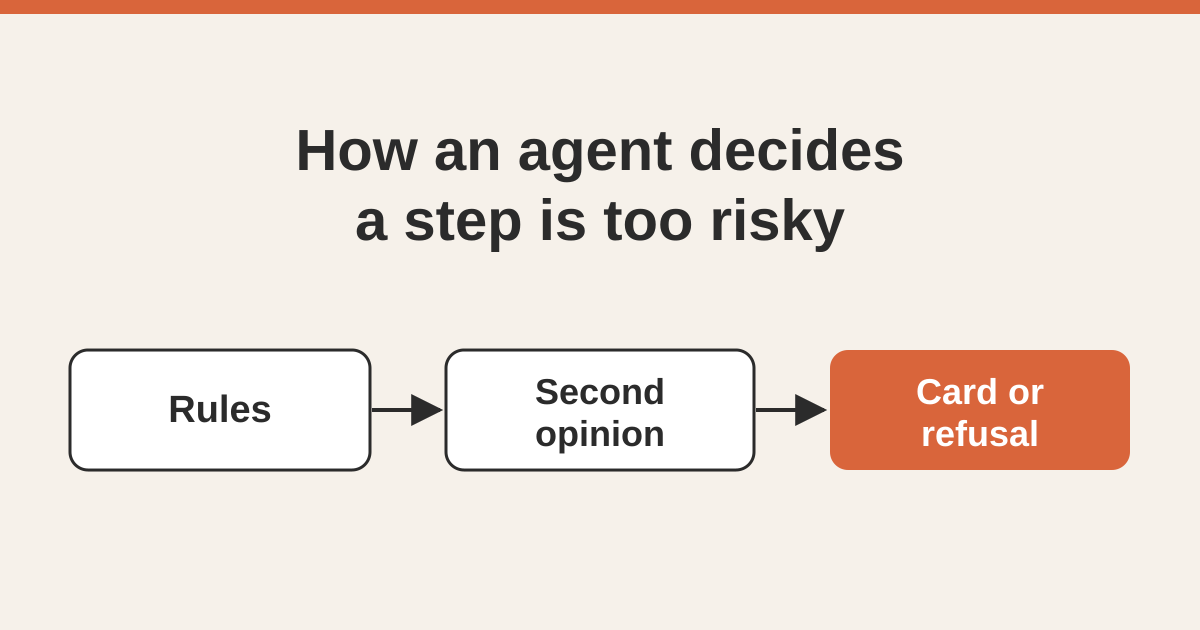
Tesseract can check every shell command and file write an AI agent makes before it runs, on all 14 agent frameworks, the free ones that need no API key included. Thirteen fixed rules and a credential-file rule decide first; a small second-opinion model can only raise the risk, when a step looks both irreversible and off-task. A flagged step becomes a card with the reason, or a refusal explained to the agent.
You turn it on in Settings → Agent with Ask before risky steps, or for one conversation with Check risky tool calls. This post is how it works inside: what counts as risky, why the rules come before any model, why the model is only allowed to make things stricter, how it stays fast on a run with hundreds of tool calls, and what each run mode does with a flagged step. It covers Claude Code, Codex and the twelve frameworks Tesseract reaches over the Agent Client Protocol, because the check sits in the app, in front of all of them.
Why does an agent app need a risk check at all?
Tesseract’s default mode is Full access: the agent does the work without asking first. A prompt that fires on everything gets approved on everything, and a control nobody reads is not a control.
The other half of that bargain is a check that asks about almost nothing, and means it when it does. The OWASP list of risks for LLM applications calls the problem Excessive Agency, and its advice is to “require a human to approve high-impact actions before they are taken”. The hard part is the word high-impact. Claude Code’s own permission system asks by default before shell commands and file edits and lets reads through, which is the right split by tool. But within shell commands, npm test and git push --force origin main are the same kind of call and very different kinds of mistake.
So the risk check has one job: find the few calls in a session that could not be undone, put those to a person or refuse them, and stay out of the way for everything else. It has to do that the same way on every framework, and cost the run almost nothing.
What counts as “risky”?
The bar is a single test: could you undo it from the transcript afterwards? If not, it is high risk. Everything else is low.
That test is why git push --force is high and rm -rf node_modules is not. One can destroy commits that exist nowhere else, on a server other people pull from. The other costs a reinstall. Tesseract keeps checkpoints of a run’s file changes, so ordinary damage to files in the project can already be reverted. The risk check is for what escapes checkpoints: history, other machines, credentials, deployed systems, the world outside this computer.
The bar also has a direction. If it is too permissive, the cost is one bad turn that was mostly revertible anyway. If it is too strict, the cost is the whole feature, because someone interrupted about npm test turns the check off and never turns it back on. So when a rule is arguable, it is not a rule.
The settings switch describes the same bar in one line: ask “before deleting, rewriting history or going outside this computer.”
Which commands do the rules catch?
Thirteen command patterns, plus one rule for files. Each carries the sentence a person reads on the card, so “why did it ask me?” always has an answer in plain words.
| What the command does | Examples it catches |
|---|---|
| Force-pushes | git push --force, git push -f |
| Throws away uncommitted work | git reset --hard |
| Deletes a branch | git branch -D, git push --delete |
| Deletes files git is not tracking | git clean -f |
| Deletes from the root of the disk or your home folder | rm -rf /, rm -rf ~ |
| Writes directly to a disk device | mkfs, dd of=/dev/…, shred, disk erase |
| Changes permissions across the system | chmod 777, chown on / |
| Stops programs picked by port or name | pkill, killall, kill-port, lsof … | xargs kill, taskkill /im, Stop-Process -Name |
| Reads private keys or stored credentials | ~/.ssh/id_…, ~/.aws/credentials, keychain dumps |
| Downloads a script and runs it unread | curl … | sh, wget … | bash |
| Publishes a release | npm publish, cargo publish, twine upload, gh release create |
| Changes or destroys deployed infrastructure | kubectl delete, terraform apply, terraform destroy, docker system prune |
| Drops or truncates database data | DROP TABLE, TRUNCATE TABLE, --accept-data-loss |
| Changes a file that holds credentials (any tool, not only the shell) | writing .env, .env.local, .netrc, private keys, anything under .ssh/, .aws/, .gnupg/ |
The port-and-name rule keeps your own app and other projects’ dev servers running, with their unsaved state. Since 0.11.28 the agent is told to stop only what it started, and commands that pick programs by port or name are flagged. kill with a process id stays low, because that is how an agent stops its own processes.
The credential-file rule needs a file rule, not a command rule, because an agent can write .env with its edit tool and never touch a shell. It applies to writes: reading .env lets the run carry on, writing one asks first. A tool the check has never met is treated as one that might write.
How do the rules see past sudo and bash -c?
A check that only looks at the outermost command is easy to walk past by accident. Agents wrap commands all the time: sudo, env FOO=1, timeout 30, nice, xargs, bash -c "…", eval "…", and chains joined with &&, ||, ; or new lines.
So before matching, each command is turned into a list of candidates: the whole line, each part of a chain, each part with its harmless prefixes removed, and the quoted payload of a bash -c or eval, recursively. One rule then catches every spelling of the same call. sudo sh -c "git push --force" hits the force-push rule exactly like the bare command. The unwrapping is bounded, so a deliberately nested command cannot make the check itself hang.
What must not match is tested as carefully as what must, so everyday commands do not raise cards. Anything the rules do not recognise is left to the second opinion: a gate that hesitates over everything unfamiliar is a gate people turn off.
Why rules first, and not a model?
Several agent tools now put a model in front of tool calls, and a model is better at the ambiguous middle. Tesseract starts with rules anyway, for two reasons.
It runs in front of every call. Most tool calls in a session are listings, reads, tests and builds. A model round trip on each one is a latency tax on the whole run, paid by people who turned the check on to be interrupted rarely, not to wait constantly.
A rule can be read, tested and argued with. When the check stops you, the answer to “why did it ask me about this?” is a named rule in a sentence, not a model’s opinion. A rule can be refined, and the change can be tested against every spelling and lookalike.
The rules are the floor. Nothing that comes later can lower what they decide.
What does the second opinion ask?
The second opinion is a small decision model. It does not write text. It is given a short description of the situation and answers typed questions with a probability, in a fraction of a second. A chat model in this position would cost seconds per tool call, which is the same as not shipping it.
What it is given is kept small on purpose:
- what you asked for in this turn,
- the agent’s own latest statement of what it is doing, if it gave one,
- the tool, the command, the files it touches and the working folder.
It never sees the whole transcript. Small decision models are easily distracted by unrelated state, and the question is about this call against this request, nothing more.
It is asked exactly two questions. In plain words:
- Would this be impossible to undo from this machine afterwards? Spelled out: destroying work that exists nowhere else, rewriting shared history, changing something on another computer, or deleting data a backup would not restore.
- Is this outside what the person asked for? Touching systems, data or accounts the request never mentioned.
A call is raised only when both answers clear their bar. Irreversible but asked for is most of what a coding agent does all day: you said “release it”, it publishes. Off-task but reversible is a wasted edit that checkpoints already cover. The pair is what is worth interrupting someone for. When it raises a call, the card says the step “looks irreversible and outside what you asked for”.
Here is how that plays out on the cases the check was tuned against, with the real model:
| You asked | The agent runs | Second opinion | Rules | What you see |
|---|---|---|---|---|
| tidy the README | rm -rf ~/Documents | raises | raise too | a card or refusal |
| fix a typo | python cleanup.py --drop-unused-tables --env=production | raises | nothing to match | a card or refusal |
| release 2.0 | npm publish | no objection (you asked for it) | publish rule fires | a card or refusal |
| run the tests | npm test | no objection | nothing to match | it runs |
The rules stay because they have no opinions. The third row shows what that buys: the publish rule asks even when you requested the release, because publishing is the kind of step a person should see before it leaves the machine, and a rule cannot be argued out of firing.
Why can the second opinion only raise the risk, never lower it?
Because the worst failure a safety check can have is to switch itself off quietly. If the model could lower a call the rules had flagged, a slow model, a missing model or a wrong model would each become a way for a force-push to go through unasked. Ordering the two so the model is only consulted on calls the rules rated low, and may only answer “this is high”, makes that impossible by construction.
There is a second reason. A model reads text, and text in an agent’s world includes web pages, README files and tool output written by someone else. Instructions planted in that text can shift a model’s answers; OWASP’s prompt injection entry lists “require human approval for high-risk actions” among the defences for exactly that reason. A hostile page might talk a model into calling something safe. It cannot talk the rules down, and with the model only allowed to raise, talking the model down achieves nothing.
Three more rules hold the second opinion in place:
- Uncertainty means silence. A low-confidence “probably irreversible” is not a card. A false stop teaches people to turn the whole check off, which costs more than the miss it prevents.
- It never blocks the turn. A timeout, an error, a reply it cannot read: the call goes ahead on the rules’ verdict alone. The agent keeps moving whatever happens to the second opinion.
- “Could not answer” is not “approved”. A failure is recorded as unavailable, not as no objection, so the log always shows which calls the second opinion actually judged.
Which tool calls does the check look at?
Shell commands and file writes, because those are the calls that can change things. Reads, searches and file listings are most of a session, and they run straight through. They are never sent to the second opinion at all; they do not leave the machine for this check.
That one decision does most of the work of keeping the check cheap: in a turn that reads a dozen files and edits two, the two edits are the candidates.
The credential-file rule reaches further: it applies to every tool that might write, including tools the check has never met. Unknown means “might write”, not “harmless”.
How does it avoid asking the same thing twice?
Agents repeat themselves. They run the same test command ten times in a turn, retry a build, re-apply an edit. Asking the second opinion each time would be slow and pointless, so answers are remembered.
The memory is keyed by what the call does, where, and for which request:
- the command after the same unwrapping the rules use, so
sudo xandxare one entry, - the files the call touches and the working folder,
- the request you made.
The last part matters. A second opinion judges a call against what you asked. “Fine” for psql -f migrate.sql while you asked for a migration says nothing about the same command while you asked for a typo fix. So the same command under a different request is asked again.
The most recent 256 answers are kept. A failure is never remembered as an answer, so a call that could not be judged once is judged the next time.
What stops the check from slowing down a long run?
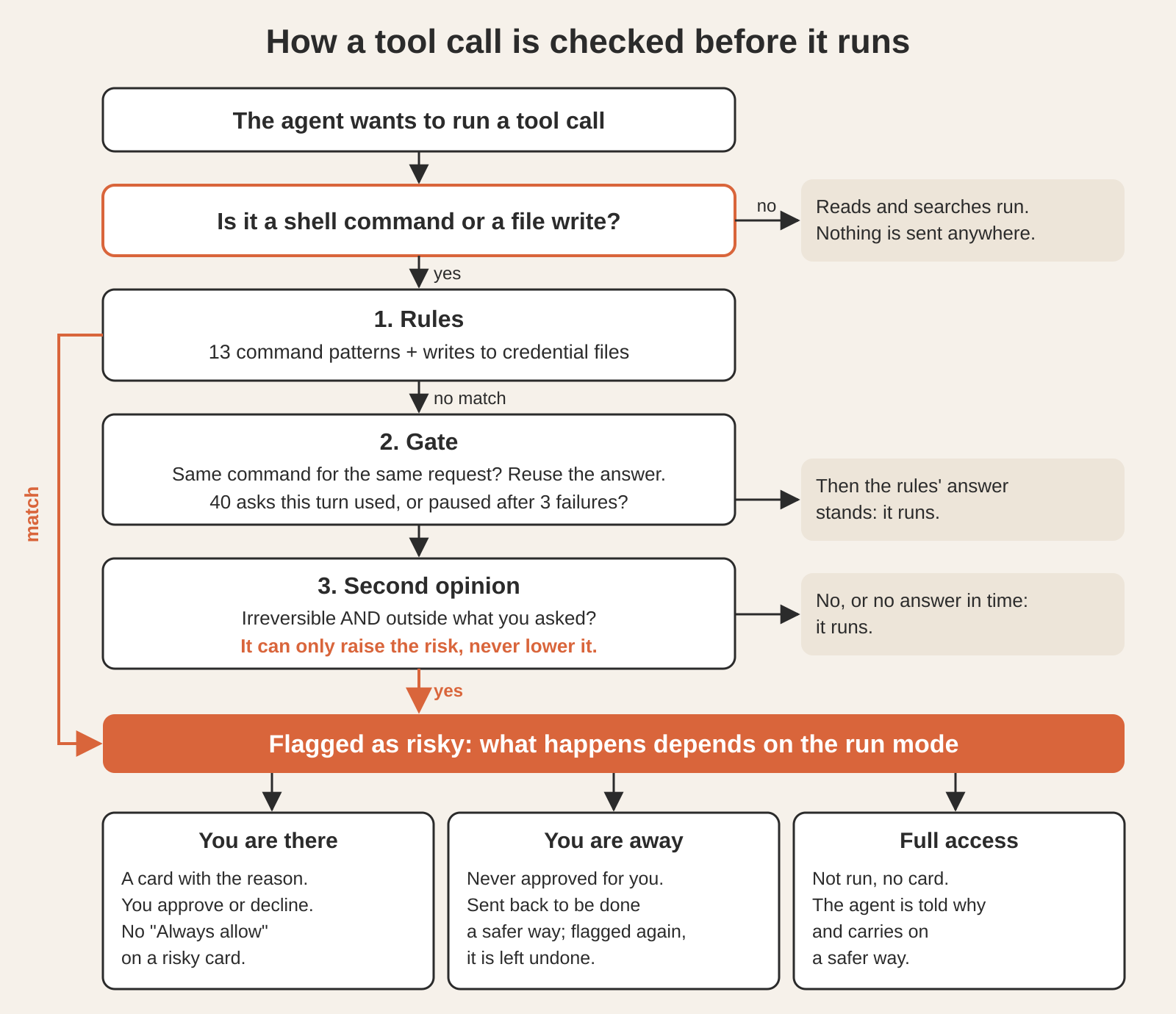
Three safeguards, each sized so that the agent never waits: at most, the rules decide alone.
A time limit per judgement. The second opinion gets a fraction of a second, so the agent always feels fast. A call it does not answer in time goes ahead on the rules, which have already looked at it.
A budget per turn. At most 40 second opinions per turn. Past that, the rules decide alone for the rest of the turn. An agent looping through five hundred tool calls must not become five hundred round trips.
A pause after repeated failures. If the second opinion fails to answer three times in a row (a network that is down, a service that is busy), asking pauses for 10 minutes and the rules decide alone. The pause is written to the log once, with the reason, so you always know which check decided and the run never pays a timeout on every call.
| Setting | Value | When it is reached |
|---|---|---|
| Command rules | 13, plus 1 credential-file rule | always on while the check is on |
| Questions per judgement | 2, both must clear their bar | |
| Time per judgement | a fraction of a second | the call goes ahead on the rules |
| Second opinions per turn | 40 | rules alone for the rest of the turn |
| Remembered answers | 256 most recent | oldest forgotten first |
| Failures before a pause | 3 in a row | rules alone for 10 minutes, logged once |
These are the shipped settings, read from the product.
What happens when a step is flagged?
That depends on the run mode and on whether anyone is there. The check is the same; what it leads to is not.
| Situation | What happens to a flagged step |
|---|---|
| A mode that asks you, and you are there | A card with the reason, in the rule’s own words: “This force-pushes, which can erase commits other people have.” A risky card never offers “Always allow”, so one click cannot approve a whole class of risky steps for good. |
| ”Keep going when I’m away” is on, and nobody has been at any of your devices for 20 minutes | Never approved on your behalf. The step goes back to the agent for a safety review, to be done a safer way. If the same step is flagged again in that conversation, it is left undone. What only you can give, such as a credential or an irreversible step, stops that part of the work, not the whole run, and the end-of-run report lists the decision. |
| Full access | No card. The call is not run, and the agent is told why, with the whole list of rules. It does the work a safer way, or leaves that step out, carries on with the rest and says plainly in its reply what it left out, so you can run it yourself. |
| A framework that never asks permission | Refused with its reason, rather than parked on a card no one could answer. |
Full access is the mode most people use, which is why the refusal goes to the agent and not to you. Nothing stops the run, nothing waits on a click, and the agent gets enough to find another route: often there is one, such as --force-with-lease instead of --force, or a migration file instead of a drop.
One more rule sits beside this, and it is not optional. Deleting files is held to exact, full paths that exist, in every mode and whether or not the risk check is on. That rule is covered in how Tesseract’s agent deletes files only by exact path, so it is not repeated here.
How do you turn the check on?
- For every conversation: Settings → Agent → Ask before risky steps. Its hint says what it is for: “Before deleting, rewriting history or going outside this computer.”
- For one conversation: open the run-mode menu (the sliders) under the message box, go to Advanced, and switch Check risky tool calls. The phone app has the same switch in a conversation’s run options.
- If you switch it in the middle of a turn, it takes effect, or the conversation tells you it starts with your next message.
The agent cannot switch it off for you. Tesseract lets the agent change some of its own settings when you ask, but it refuses changes that widen what the agent may do, and turning the risk check off is on that list.
The check lives in the app, not in the framework, and is wired into each of the routes by which Claude Code, Codex and the other frameworks reach their tools (the routes are in how one chat drives 14 AI agent frameworks).
Questions
Does the risk check send my code anywhere? Reads, searches and file listings are never sent. For shell commands and file writes that the rules rated low, the second opinion receives a short description: your request for this turn, the agent’s latest statement of what it is doing, the command, the files it touches and the working folder. Not the transcript, and not file contents.
How fast is it? Most calls are reads or settled by the rules on the spot. The rest get at most a fraction of a second of second opinion, at most 40 times a turn, and answers are remembered for the same command and request. If the second opinion is unreachable, it pauses for 10 minutes and the rules carry on alone, so the agent keeps its pace.
Why did it ask me about something I asked for? Either a rule fired (rules do not read your request; publishing, force-pushing and dropping tables always ask), or the second opinion judged the step both irreversible and outside your request. The card says which reason applies.
What happens to a risky step while I am away? It waits for you: the agent never approves it on your behalf. With “Keep going when I’m away” on, a flagged step is sent back for a safer approach, left undone if it is flagged again, and listed in the report at the end of the run.
Does it work the same on Claude Code, Codex and OpenCode? Yes. The rules, the second opinion, the budget and the mode behaviour are one check in the app, wired into each framework’s route, and tested per framework.
Try it
Download Tesseract, pick any of the 14 frameworks, free ones included, and turn on Ask before risky steps in Settings → Agent. Then ask your agent to tidy a README and watch what it is allowed to do.