 Tesseract
How an AI video maker turns one sentence into a video
How Tesseract's video maker works: questions, a script, a storyboard, every shot made at once, and a cut timed to the voice on your own computer.
Tesseract’s video maker asks a few questions, writes a script with one spoken line per shot, draws a picture of every shot for you to approve, then makes all the shots at the same time from those pictures. The voice, music, captions and on-screen words are put together on your own computer into an MP4 and a timeline you can edit.
This post is about how that works: what happens at each step, why the voice decides how long each shot lasts, and what the rough cut is for. When Home’s cards became guided makers, the release post gave the video maker a single paragraph. This post covers the inside.
Why not just send the prompt to a video model?
A video model takes a prompt and returns one short clip. A video someone will actually watch needs more than that: a point made in the first seconds, several shots that tell one story, a voice saying the right words at the right moment, captions for people watching with the sound off, music that stays under the voice, and a length that fits where it will be posted.
Each of those is a separate job, and only one of them is generating moving pictures. Clips are also the slow and expensive part. If the clips are made first and the script is fixed afterwards, every change of mind throws away paid work.
So the maker puts the cheap decisions first and the expensive one last. The words come first and cost nothing to change. Then a still picture for each shot, which is cheap and settles the look. Only after you have approved both are the clips made. Everything after the clips (voice, music, captions, the edit) runs on your machine or through speech and music services, and can be redone without making the clips again.
What are the steps, from sentence to video?
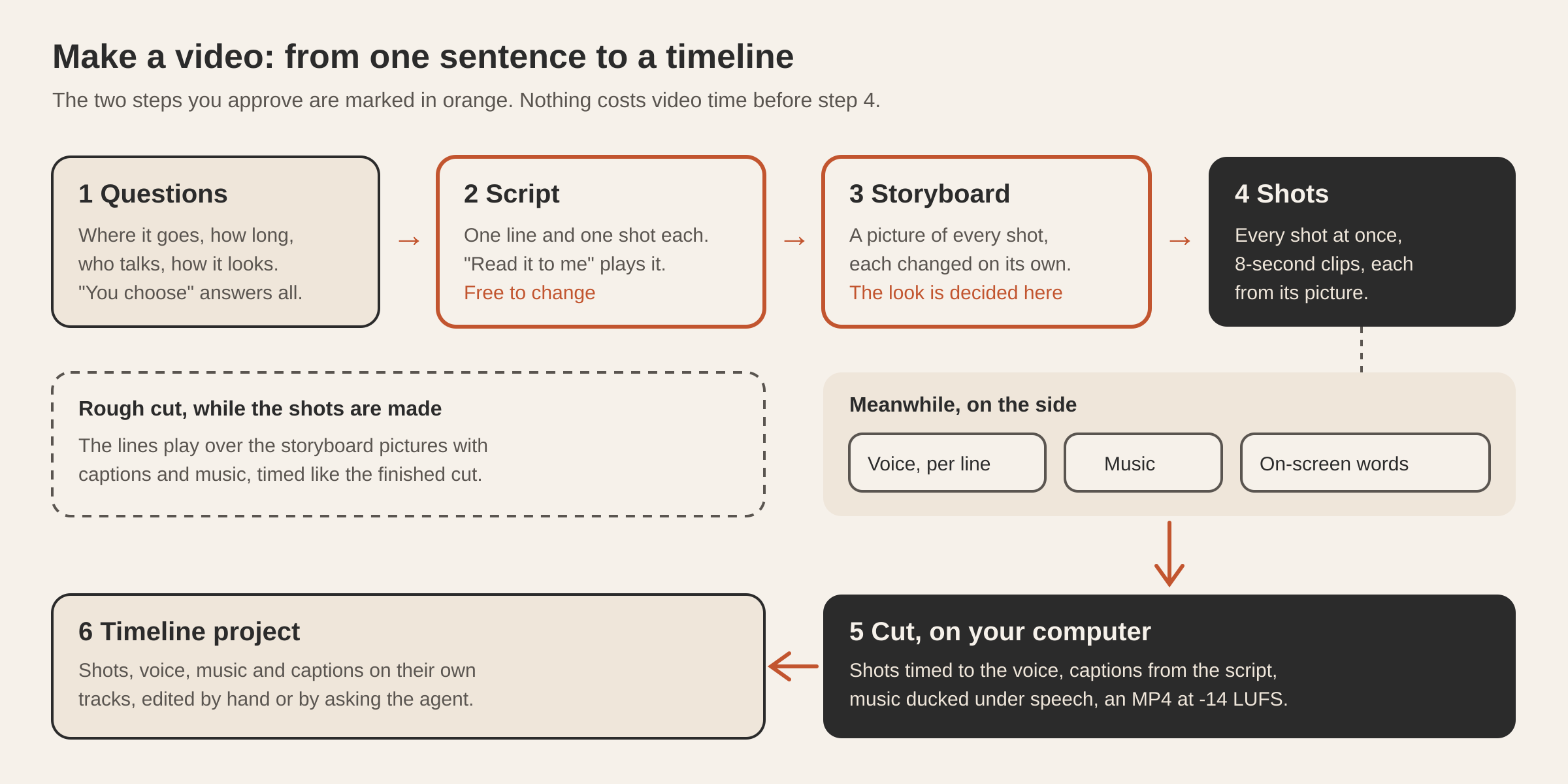
- What it is about. You say what the video is about in a sentence. You can attach photos of a product, a place or a face, and the pictures will be drawn from them.
- The questions it still needs. The maker reads your first message and asks only what it did not already say. It starts with the one question that would change the video most, then where the video goes, how long it is, who talks, and how it looks. Each question has a “You choose” answer, and saying “you choose” once answers all the remaining ones with sensible defaults.
- The script. It is written with one spoken line and one described shot per beat, to a pace of about 2.5 spoken words a second. You change it by talking (“make the second line shorter”), and “Read it to me” plays it aloud. Nothing has been spent at this point.
- The storyboard. A picture of every shot is drawn at the exact shape of the video. You change any one of them on its own (“shot 2 at night”), and earlier versions are kept. This is where the look gets decided.
- The video. Every shot is made at the same time, each clip starting from its approved picture. The voice is made line by line, music is made for the script’s mood, and the on-screen words become pictures sized to the video. All of that is cut together on your computer.
- Changes. Each change is made the smallest way that does the job. “Redo shot 2 closer” remakes one clip. Another voice says the lines again and recuts. Calmer music remakes the music. No change rebuilds the whole video.
How does “where it goes” change the video?
Where the video will be posted sets more than its shape. Each answer brings its own aspect ratio, output size, caption style, and a note on pacing that goes to the script writer.
| Where it goes | Shape and size | Captions | What the script is told |
|---|---|---|---|
| TikTok, Reels or Shorts | 9:16, 1080 x 1920 | Big words, three at a time | The point in the first two seconds, fast cuts, one idea per shot; people watch it muted |
| YouTube | 16:9, 1920 x 1080 | Plain lines, up to seven words | A hook in the first five seconds, then a clear story; shots breathe a little |
| Website or slides | 16:9, 1920 x 1080 | Plain lines | Calm and polished; plays on a loop without sound as well as with it |
| An ad | 9:16, 1080 x 1920 | Big words | The problem or promise first, the product clearly shown, and a last shot that says what to do next |
Length works the same way. A 15-second video has two shots, 30 seconds has four, and a minute has eight. Every shot is made as one 8-second clip and then cut down to fit its line.
Why does the voice decide how long each shot lasts?
This is the main trick, and it is why the finished videos don’t feel stitched together.
The usual way is to make clips of fixed length and then fit a voice over them. The voice ends up rushed in one shot and trailing into silence in the next, and captions drift away from the words.
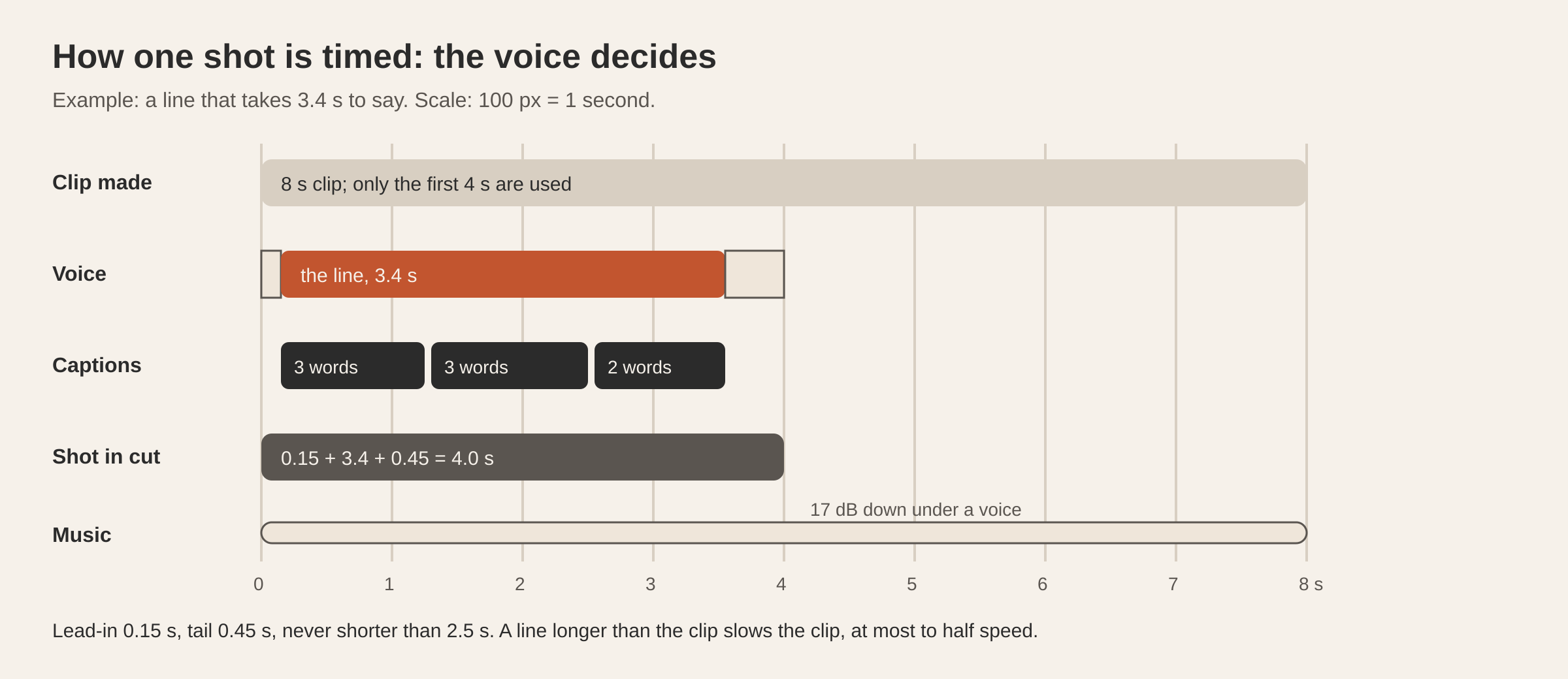
The maker does it the other way round. Each line is spoken first, as its own audio file, and its real length is measured. The shot then lasts as long as its line takes: a 0.15-second breath before, the line, and 0.45 seconds after, with no shot shorter than 2.5 seconds. Without a narrator, the shots share the length evenly.
The rest follows from that timing:
- The clip. A shot shorter than its 8-second clip uses only the start. A line longer than the clip slows the clip down rather than freezing on its last frame, but never below half speed.
- The captions. They are the script’s own words, not a transcription of the audio. Each line is split into pieces (three words for short-form video, up to seven otherwise), and each piece stays on screen for its share of the line, weighted by its number of characters. Since the words are already known, they can’t be misheard.
- The music. It runs under the whole video and is made a few seconds longer than needed, then faded out. Under a voice it sits 17 dB down; with no voice, 7 dB down. The clips’ own sound plays quietly under a voice and louder without one.
- Loudness. The finished MP4 is rendered at 24 frames a second and normalised to -14 LUFS, the integrated loudness defined by ITU-R BS.1770. The aim is a video that plays at about the level the platforms already use, so it is not turned down for being loud or left too quiet.
The same timing function produces both the rough cut you watch while the shots are made and the finished cut. What you watched is what gets saved.
What is the rough cut for?
Making the shots takes time. The maker tells you to expect one to three minutes for all of them, because they run in parallel. You don’t have to sit and wait: the voice and music are made while the storyboard is still being drawn, so a rough cut is ready to play as soon as the pictures are.
The rough cut plays the spoken lines over the storyboard pictures, with captions and music, timed exactly as the final cut will be. That is the cheapest point to notice a line that runs too long or a shot in the wrong order, before any clip exists.
Leaving the conversation is fine too. Each shot’s job is recorded in the video’s own folder. If Tesseract restarts while shots are being made, it picks the jobs up again when it comes back and collects every clip that finished in the meantime. The same idea, applied to whole agent tasks, is described in If Tesseract restarts mid-task, your task carries on.
What if you have your own photos, or your own voice?
Two choices change the pipeline instead of just its inputs.
“Use my photos” makes the video from your own pictures, one photo per shot in the order you gave them, starting over from the first photo when there are more shots than photos. Nothing is drawn and no clip is made. Each photo moves slowly instead (zoom in, pan right, zoom out, pan left, in turn) so a still never sits dead on the screen. The lines, captions, words and music are added as usual. It takes only a moment, and any shot can still be made into real video later.
“Your own voice” lets you read the lines yourself. A microphone button sits beside each line. You read the line, and the recording becomes that shot’s voice and that shot’s timing. You can make the video before you have read everything: each line goes in as you record it, and the cut is put together again around it. If a line’s words change afterwards, its old recording is set aside, so the video always plays the words in the script.
Takes work the same way for clips. Remaking a shot keeps the earlier clips, and you can switch back to any of them. The cut is remade with the take you picked.
Where does the finished video live?
Everything for one video sits in a folder of its own: your photos, every storyboard picture and its versions, every take of every shot, each spoken line, the music, the on-screen words and the exported MP4. The record of the script and the choices you made is kept there too, so the video can be reopened and changed weeks later.
The cut also becomes a timeline project. Its shots, voice, music and captions sit on their own tracks in Tesseract’s video timeline, in the card beside the chat. From there you trim, move, add a title or change the levels by hand, or ask the agent and it does the same edits through the editor’s own commands. Making a shot again, changing the voice or changing the music stays with the maker, which puts the cut together again. If you have already edited the timeline by hand, the maker keeps your version and tells you so. The same video timeline and AI Edit also work on footage you filmed yourself.
What does it cost, and what do you need?
The script and the questions cost nothing. The storyboard pictures cost a little, since they are ordinary image generations. The clips are the expensive part, and the maker shows their price before it makes them, for whichever quality you pick. Making video needs either a Tesseract sign-in or a Google key of your own. You can also make the video straight from the script, without pictures first. For how Tesseract handles keys and accounts in general, see Do you need an AI subscription to use Tesseract?
Which design choices matter most?
Three choices carry most of the weight.
- The script is the plan, not the prompt. A single prompt yields clips with no relation to each other. A script with one line and one described shot per beat gives every clip its place in a story before any of them is made.
- Captions are written, not heard. The captions come from the script’s own text, timed to the measured length of each spoken line. No transcription runs, so there is nothing to mishear.
- Each part is remade only when its own input changes. A line is spoken again only if its words or the voice changed. Music is remade only when its mood changed. A shot’s words picture is redrawn only when its text changed. The cut is then reassembled from what already exists, which keeps a small change small.
Questions
How long does it take to make a video? The script and storyboard take moments. The shots are made at the same time, and the maker says to expect one to three minutes for all of them. A rough cut plays while you wait, and you can leave and come back.
Can I change one shot without redoing the video? Yes. Say “redo shot 2 closer”. Its picture is changed first, then only that clip is made again. Its earlier take stays, so you can switch back.
Do the captions come from speech recognition? No. They are the script’s own words, timed to the measured length of each spoken line, so names and product words come out exactly as written.
Can I use my own voice instead of a narrator? Yes. Pick “Your own voice” and record each line with the microphone beside it. Each recording becomes that shot’s voice and sets its timing.
Can I edit the result by hand? Yes. The cut opens as a timeline project beside the chat, with shots, voice, music and captions on their own tracks. Edit it there yourself, or ask the agent to.
Try it
Open Tesseract, pick the video card on Home (or ask for a video in any conversation), and say in a sentence what the video is about. Download Tesseract for Mac, Windows and Linux or start at tesseract.dev.