 Tesseract
Is there a desktop app (GUI) for Claude Code?
Yes. The ways to use Claude Code outside the terminal in 2026: Anthropic's own desktop app, the IDE extensions, and Tesseract, with what each needs and does.
Checked on November 8, 2026.
Yes. Claude Code is no longer terminal-only. Anthropic’s own Claude desktop app has a Code tab on macOS, Windows and Linux (beta), there are official extensions for VS Code and JetBrains, and desktop apps such as Tesseract run Claude Code next to other agents. All of them need a Claude plan (Pro, Max, Ultra, Team or Enterprise), a Claude Console account or a supported cloud provider to run Claude Code itself.
Tesseract is a free desktop app for Windows, Mac and Linux that runs Claude Code, Codex and 12 more AI agents in one window, with a free allowance that needs no API key. Here is how the options compare, and how to start in each.
What are the ways to use Claude Code without the terminal?
| Claude desktop app (Code tab) | VS Code / JetBrains extension | Tesseract | |
|---|---|---|---|
| Made by | Anthropic | Anthropic | Tesseract |
| Runs on | macOS, Windows (x64 and ARM64), Linux (beta, .deb for Ubuntu and Debian) | Wherever your editor runs | Windows, Mac, Linux |
| What you need for Claude Code | A Claude plan, Console account or cloud provider | The same | The same: your Claude plan is used at no extra cost |
| Parallel sessions | Yes, side by side or in their own windows; optional Git worktree per session | Sessions in the editor’s Claude panel | Yes; sessions in one project see each other and claim the files they change |
| Other agents in the same app | No, Claude only | No, Claude only | Yes: Codex, Gemini CLI, OpenCode and 10 more, chosen per conversation |
| Without any paid plan | No | No | Yes, on the free allowance (OpenCode), but not Claude Code itself |
| Best at | The fullest Claude Code feature set: diff review, PR monitoring, cloud and SSH sessions | Staying inside the editor you already use | Mixing agents, and finished work beyond code: decks, sites, videos, reports |
Checked November 8, 2026, on Anthropic’s Claude Code documentation and tesseract.dev (sources at the end).
Which one should I choose?
- You only use Claude and want everything Anthropic ships: the Claude desktop app’s Code tab. It has a file-by-file diff view you can comment on, Git worktrees per session, a browser preview pane, PR monitoring and cloud sessions.
- You live in your editor: the VS Code or JetBrains extension.
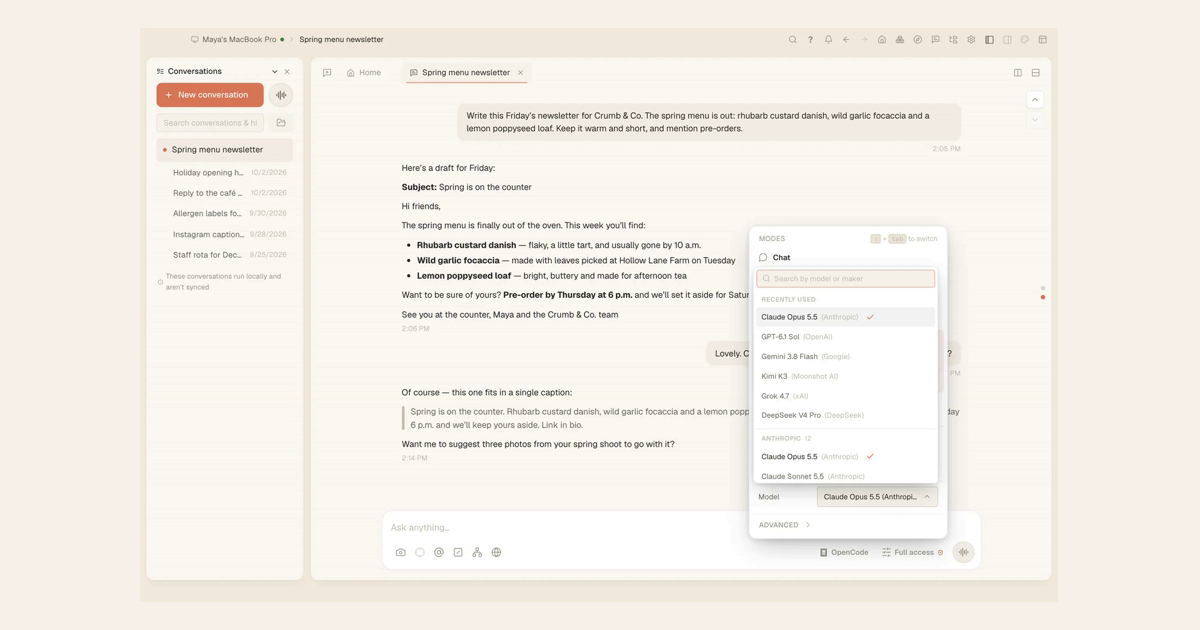
- You use more than one agent, or want to try one free first: Tesseract. Each conversation picks its own agent from the menu next to the message box, so Claude Code can write while Codex reviews, in the same window.
How do I use Claude Code in Tesseract?
- Download Tesseract from tesseract.dev and open it. It is free, with no card.
- Open Settings → Models & accounts and add your Claude account. Your Pro, Max or Ultra plan is used as it is, with nothing metered on top.
- Start a conversation and choose Claude Code in the menu next to the message box.
- Ask for the task in words. Open a second conversation in the same project for a parallel task: it sees the first one in its “Working here” list, and each commits only its own changes.
- No Claude plan yet? Leave the framework on OpenCode. The free allowance runs it with no API key, so you can try agents before paying for any.
Can I use Claude Code for free?
Not Claude Code itself: Anthropic’s docs list a Claude subscription, a Console account or a cloud provider as what you need. What you can use for free is another agent. In Tesseract the free allowance runs OpenCode with no API key, and you can add Claude later.
Does the Claude desktop app replace the terminal?
For most work, yes: it runs the same Claude Code, with an integrated terminal and file editor inside it. Some features have their own limits, for example worktrees need Git, PR monitoring needs the GitHub CLI, and computer use is a research preview on macOS and Windows for Pro, Max and Ultra plans.
Questions
Is there an official Claude Code GUI for Linux? Yes, in beta: the Claude desktop app for Linux, installed with apt or a .deb on Ubuntu and Debian. Tesseract also runs Claude Code on Linux.
Can I run Claude Code and Codex side by side? Not in Anthropic’s apps, which run Claude only. In Tesseract each conversation chooses its agent, so one can run Claude Code and the next Codex.
Does Tesseract need an API key for Claude Code? No. It uses the Claude plan you already have. An API key also works if you prefer one.
Is Tesseract open source? No. The app is free to download and use; it is not open source.
Sources
- Claude Code overview, Anthropic: https://code.claude.com/docs/en/overview (read November 8, 2026)
- Claude Code on desktop, Anthropic: https://code.claude.com/docs/en/desktop (read November 8, 2026)
- Claude Code quickstart, what you need: https://code.claude.com/docs/en/quickstart (read November 8, 2026)
- Tesseract: tesseract.dev and our post How one chat drives 14 AI agent frameworks the same way