 Tesseract
 0.12.1: editors your agent can drive too
Tesseract 0.12.1 makes its editors AI-native: the panels and the agent run the same commands. Plus big rounds for Word, Excel, PDF, photo, video and audio.
Tesseract 0.12.1 is out for Mac, Windows and Linux. Its headline is the first AI-native editors. In the Word, spreadsheet, PDF, photo, audio and motion editors, the buttons, menus and keys you use run the same commands the agent runs. Anything you can click, you can ask for. Each of those editors, plus the video timeline and the vector design editor, also got a large round of new tools.
The update is for anyone who edits documents, sheets, PDFs, photos, video or sound in Tesseract, whether by hand, by asking the agent, or both. It has been available since November 1, 2026.
How to update: Tesseract updates itself. It downloads the new version and installs it once the computer has been idle for a while, never in the middle of an agent’s work. To get it now, open Settings → About → Check for updates. New to Tesseract? Download it free at tesseract.dev. There are builds for Apple silicon and Intel Macs, Windows on x64 and Arm, and Linux as .deb, .rpm and AppImage on x86-64 and Arm.
What does “AI-native editor” mean?
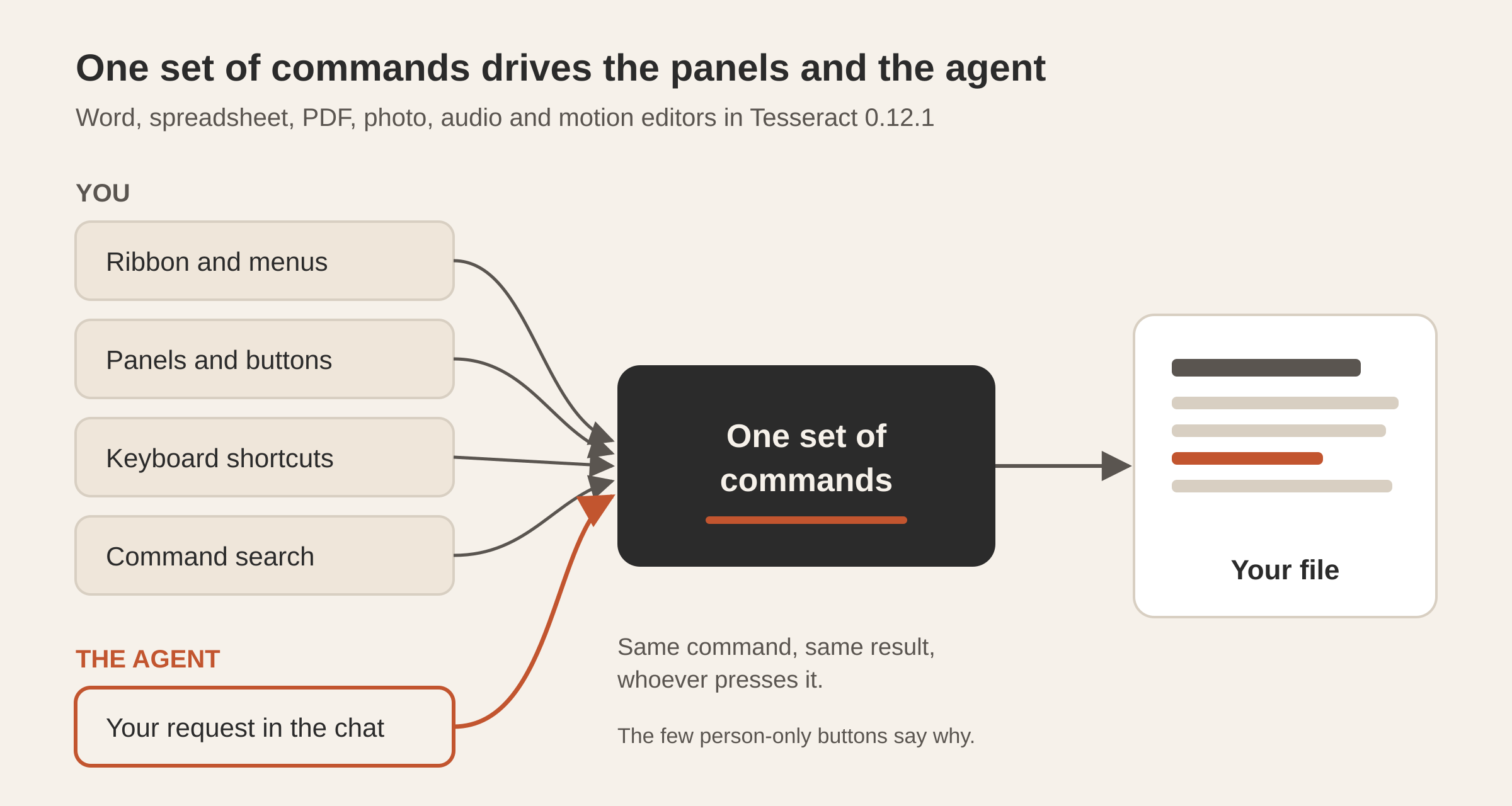
An AI-native editor has one list of commands, and everything goes through it: the ribbon, the menus, the keyboard shortcuts, command search, the panels’ buttons and the agent. When you ask the agent to “make the heading style bold and keep it with the next paragraph”, it runs the same command the button runs, so the result is exactly what clicking would have given you. You can then undo it, or carry on by hand.
Every button in these editors is checked against that list. A button either names the command it runs, or it is marked as one only a person should press, with the reason written down. That check is how the agent stays level with the panels as they grow. For how this works in the Word and spreadsheet editors, see How an AI agent edits Word and Excel files.
Word documents
The Word editor’s layout is now closer to Word’s own:
- Pictures float above their anchor.
- Tables split inside cells across pages.
- Text can be kept with the next paragraph, columns flow from one to the next, and rows can be set to an exact height.
- Table styles are supported in full.
- Equations are edited where they sit.
- There are comments in notes, custom ribbon tabs, dark mode across the whole page, Ink to Shape, Edit Wrap Points and pages per sheet.
- Tell me finds a command by name, and Open With sends the document to another app.
Grammar checking now covers Polish, Russian, Croatian, Turkish, Italian and Portuguese, and thesauri cover eight more languages. On Windows and Linux, spell checking uses the languages the document is actually written in. RTF, ODT and old .doc files keep their content when you save them. Saving never leaves a half-written file behind, and undo and paste behave the way they do in Word.
Spreadsheets
- The Automate panel now records macros, with a debugger, a dry run and shortcuts. On a Mac, Option+Command+letter runs a script.
- New: live data tables (TABLE), Quick Analysis, Show Changes, grouped sheets, and Modify for cell styles.
- Excel’s keys work on a Mac, and R1C1 references, the File view and contextual tabs are in.
- Printing and PDF export show the sheet as it looks on screen.
- Formulas read numbers stored as text the way Excel does. Filtered and hidden rows stay out of whatever you do to the visible ones, and a reopened file remembers which rows its filter hid.
Saving an .xls, .xlsb or .ods file keeps everything it held.
You can now sign the signature box of a dynamic XFA form. Before applying a header, watermark or background, you can preview it on the page. Header and footer dates come in the format you pick. Hovering over a comment shows its text whatever tool is selected, and a double-click opens an attachment. Forms and redaction got a round of improvements too. Redaction finds text exactly where the page shows it, and opening a form leaves it exactly as it was. The PDF editor post explains how saves keep the original file intact.
Photo editing
The layered image editor gained a long list of tools you would expect from a full photo editor:
- Pen tools and path operations
- The Channels, Paths, Navigator, Info and Histogram panels, plus rulers and guides
- The Select and Mask workspace
- Text that wraps, justifies and runs along a path
- A full gradient editor
- A Crop tool that takes a size with a resolution
- Actions you record and keep across sessions. It also loads Photoshop .atn action files and runs an action over a batch of files.
On the file side, it saves as lossless JPEG XL, and Save for Web adds WebP. Very large PSD and PSB files open without reading the whole file first. It reads and writes QOI and Netpbm and writes ICO. Document colour profiles, soft proofing and a gamut warning are new as well. More on the editor: How the image editor in Tesseract works.
Photo library and Develop
The photo library now has:
- Keyword hierarchies (parent and child keywords), your own keyword sets, Recent Keywords and a keyword painter
- Collection sets, a target collection and Quick Collection
- A metadata panel for title, rights, place, GPS and capture time
- A filter bar, stacks and a manual slideshow
A photo’s History, snapshots and culling scores are now saved with the photo. In Develop, there are before and after views, built-in and local presets, dust-spot removal, Visualize HDR, and a histogram you can drag, with clipping warnings. For one-step enhancement there is the Enhance a photo maker.
Video timeline
Editing gains:
- Trim mode
- Copy and Paste Attributes
- Lift and Extract
- Trimming to the playhead with Q, W and E
- Grouped clips, reversed clips, and Synchronize and Merge Clips
- Adding, renaming and removing tracks
- Filmstrips on video clips
On the sound side, each mixer strip now has a meter with peak hold and a clip light. Faders can write automation in Write, Touch, Latch and Trim modes. Clip fades take any of five shapes, crossfades between sound clips survive a paste, and the thirteen audio effects run on timeline clips. Buses can feed other buses, and sends can come before the fader.
Export adds animated GIF, PNG frames, the mix alone as a WAV, only the part between In and Out, and a single frame. Dip to White and Dip to Black survive FCP 7 XML and FCPXML. The video editor post covers the two video editors.
Motion graphics
3D models open from OBJ, STL and FBX files and keep their maps, skins, morphs and animation. Advanced 3D now draws on the GPU, so scenes can play back, with environment light and shadows. The Roto Brush can track several objects at once and can use the SAM 2 model, which downloads inside the app only when you ask for it. Masks can now be tracked on a video layer. Also new: the 76 animation presets, adjustment layers, layers that play sound, and export of a solved camera to Blender.
Vector design
- A Brushes panel with brush libraries and New brush from art, plus a Paintbrush tool that responds to pen pressure
- A Swatches panel with global and spot colours
- An Appearance stack with several fills and strokes on one object
- The Free Transform tool, with perspective
- Arc, Spiral and grid tools
- Sublayers and isolation mode
- Named History snapshots
- All sixteen blend modes
For text, the editor gains vertical type, bulleted and numbered lists, hyphenation per language, variable font axes and OpenType features. Image Trace now has full settings, shows its progress and can be cancelled. Flutter joins the code outputs.
Audio
The Audio workspace adds time shift and speed ramps, and five new effects: Subharmonic, Lo-Fi, Rectifier, Auto Pan and Ring Modulator. Export now offers 32-bit float and Broadcast WAV, with dither and speaker layouts. For cleaning up a recording, see Clean up a recording in Tesseract’s audio editor.
Conversations start sooner
A new conversation now starts its framework before you send the first message, and the first seconds after you send say what is happening. On OpenClaw, conversations in a project share one Gateway, so a new chat answers sooner.
The password manager is yours to switch on
The built-in password manager now starts switched off, so you choose the computers it runs on. Turn it on in Settings → Privacy → Password manager on each computer. Turning it off deletes nothing.
Improved
- Stop ends exactly the turn that is running.
- On Linux, OpenCode starts promptly even on systems with a full file-watch list.
- A routine that is due when the app starts runs right away.
- On Windows, a planned restart of the private network is recognised as a planned restart.
- Memory recall takes the time it needs and completes on every turn.
- The timeline: Play at the very start plays straight through, transitions stay inside their clips, fades always fit their clip, and an old status line clears at your next action.
- The photo library: a renamed photo keeps its virtual copies’ settings, and a moved photo is followed. A library on another computer stays on that computer, and Tab moves the keyboard focus.
- Photo editing: a Photoshop 2026 PSD keeps its layer effects when it opens, Gaussian Blur works at every radius, including below 1, and Select Subject reads the selected layer.
- PDF: auto-size text fields fill their height, sorted lists keep their order, and a form’s buttons show and tick.
- Motion: each expression runs on its own, so the others keep working, and Lottie import keeps every dash and gap.
- Vector: Create Outlines keeps every character, including ones the font lacks, and sideways phone photos come in upright.
- Text layout: lines keep a letter’s cluster whole, and Thai, Lao, Khmer and Burmese break between words.
Questions
Do I need to do anything to get 0.12.1? No. Tesseract downloads and installs updates itself when the computer is idle, and never during an agent’s work. To update straight away, open Settings → About → Check for updates.
Can the agent do everything I can in the editors? In the AI-native editors, the buttons and the agent run the same commands, so what you click, the agent can do. A few buttons are kept for you to press yourself, each with its reason written down.
Where are my passwords after updating? Right where they were. The password manager now starts switched off on each computer. Turn it back on in Settings → Privacy → Password manager. Switching it off deletes nothing.
Get Tesseract 0.12.1 for Mac, Windows or Linux at tesseract.dev.