 Tesseract
 0.12.3: open your files here, plus a media board
Tesseract 0.12.3 opens your files and folders from Open With, adds a media board, a tour of the app, API keys and 30-minute videos with AI transitions.
Tesseract 0.12.3 is out for Windows, Mac and Linux. Your files now open in Tesseract straight from Open With, and a folder opens as a project. There is a new media board where pictures, clips and steps connect as boxes you can run again, a short tour of the app in your own language, and a plainer message box. Videos can now run up to 30 minutes, with an AI transition at any cut.
It is for anyone who works in Tesseract: people who write code with Claude Code, Codex or OpenCode, and people who make decks, documents, photos, songs and videos. It has been available since November 6, 2026.
How to update: Tesseract updates itself, installing the new version while the computer is idle, never in the middle of an agent’s work. To get it now, open Settings → About → Check for updates. New to Tesseract? Download it free at tesseract.dev.
How do your files open in Tesseract now?
Tesseract is now in Open With for every kind of file its editors open: Word documents, spreadsheets, PDFs, pictures, videos, audio, presentations and code. Its own files, such as drawings, comics and presentations, open in it directly.
A new File types dialog lets you choose which other kinds of file open in Tesseract by default. Tick a type and it opens here; a type you leave unticked stays with the app it uses today. On Windows, Tesseract hands the final choice to Windows’ own Default apps. You can find the dialog from Find a setting by typing “file types”, “Open With” or “default app”.
More files now open in the right editor:
- Word templates (.dotx and the other Word kin) open in the Word editor.
- Spreadsheet templates, binary workbooks and Numbers files (.xltx, .xlsb, .ots, .numbers and others) open in the spreadsheet editor.
- A .ts file opens as what it really is. Tesseract reads the first bytes: TypeScript goes to the code editor, and a recorded video goes to the video viewer. The video plays from a converted copy, so the original file is never touched.
Can you open a folder as a project?
Yes. Open a folder in Tesseract and it opens as a project, with the agent working in that folder:
- Mac: use Finder’s Open With, or drop the folder on Tesseract in the Dock.
- Windows: right-click the folder in Explorer and choose Open in Tesseract.
- Linux: run
tesseract-desktop ~/work/sitefrom the command line.
A window opened without a folder shows Documents › Tesseract in Files, so new work always has a home.
Do your files show a picture of themselves?
On Windows and Linux they do. Drawings, layered pictures, videos, comics and presentations saved by Tesseract show a picture of themselves in Windows Explorer and in Linux file managers, with document icons of their own, so you can spot the right one without opening it.
What is the media board?
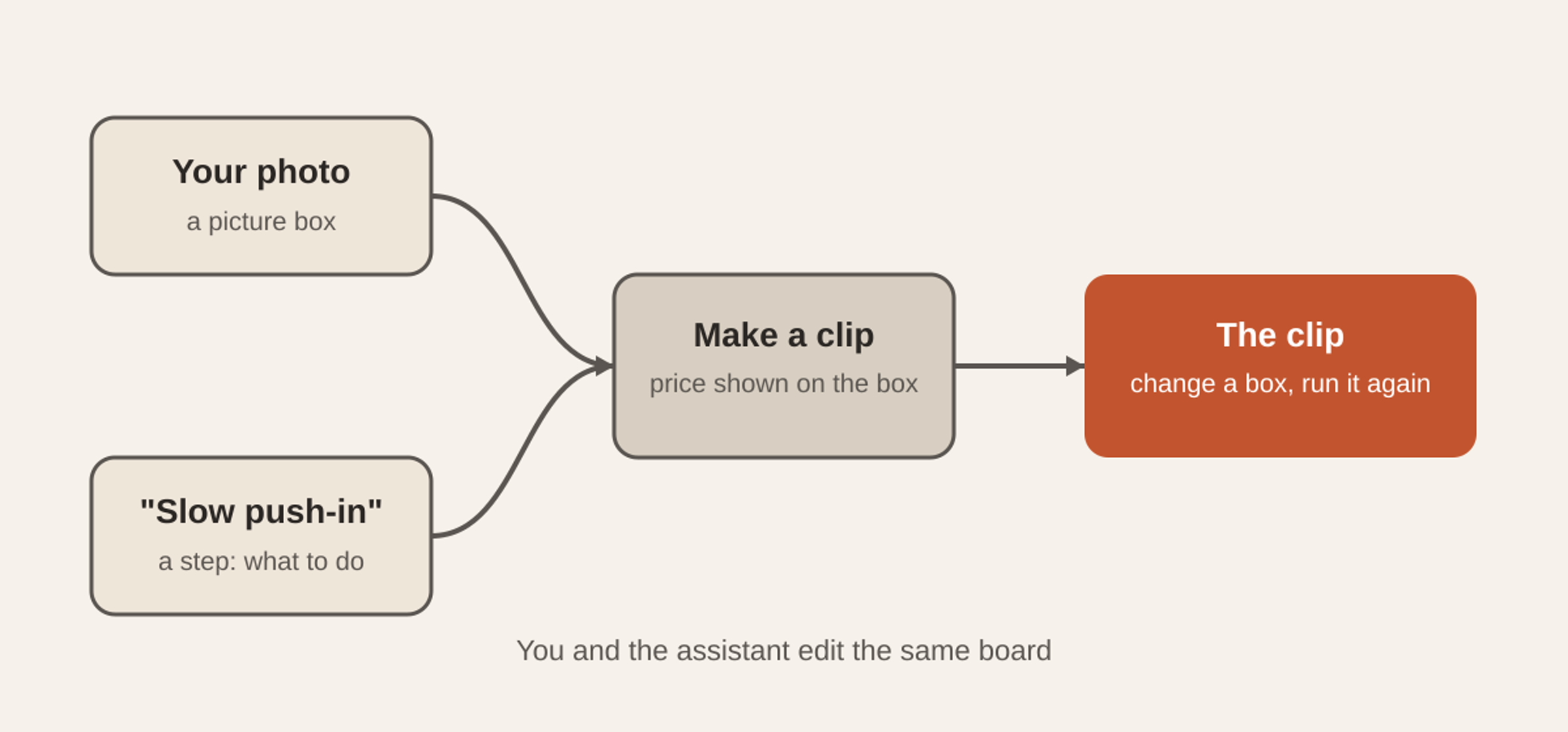
The media board lays out pictures, clips and steps as boxes joined by lines. A box takes what flows into it and makes something new, such as a clip from a photo and an instruction. Change one box and run it again, and everything after it follows.
You and the assistant work on the same board. Ask in the chat for “a 6-second clip of this photo with a slow push-in” and the assistant adds the boxes; drag them around yourself and the assistant sees the change. Each box that costs money shows its price, and a paid run waits for your press. Open it from Home → Create → Media board, or from the command palette.
What is new in the app itself?
- A tour of the app. Eight short cards on Home show what Tesseract is for, in about a minute. The words, the buttons and the voice are all in your language. Start it from Getting started, Help → Take the Tour, the command palette or Settings → General.
- A plainer message box. One + holds everything you can add, the model is named in words, and Talk and Stop are written out. The settings menu now speaks plain language.
- API keys and AI assistants. In Settings → Account → API keys you can make keys for the Tesseract API. Under Connected apps, Claude, ChatGPT and other AI assistants connect to Tesseract by its address and your sign-in. Each key and each connected app has its own monthly spending limit, set to $20 to start, which you can change.
- Translate documents. In the Word editor, Review → Translate makes a translated copy beside the original, or translates just the paragraphs you selected. With Track Changes on, the translation shows as tracked changes.
What is new for songs?
Tesseract 0.12.2 brought Make a song. In 0.12.3 the song plan marks any line that is too long to sing, counting syllables in any language, and Even them out rewrites just those lines. A kept song shows its tempo and key, measured on your own computer. Ready for streaming prepares it in one step, also on your computer: it brings the loudness to -14 LUFS, keeps peaks under -1 dB and exports a 16-bit WAV.
What is new in the Ideas gallery?
Home → Tools → Ideas is now a gallery you can search: pick an idea, answer two or three questions, and it gets made, with the price shown before anything is made. The ad maker turns a link to your own site into a brand kit for free, and turns one ad into many variants in 9:16, 1:1 and 4:5, priced first.
What is new for video?
- Long videos. The assistant makes videos of 30 seconds up to 30 minutes, planned scene by scene.
- AI transitions at any cut. Pick from 46 kinds of AI transition, 2 to 8 seconds long, with the price on the button before it runs.
- Extend any clip, your own footage too.
- More direction. Set the light (22 named setups), the emotion (18), a camera style (12), a focal length from 8 to 400 mm and an aperture from f/0.95 to f/22. Use up to 50 reference pictures, and choose from 13 more camera moves, 98 in all, also by their film-crew names.
- Reflections. The saved cast is now called reflections, with its own screen (Home → Tools → Reflections) to see, add, change and remove them and their series.
- Video in Community. The gallery plays videos in place, with remix, and adds contests: each has a theme and dates, you enter by publishing a video, and likes are the votes.
What is new for pictures?
- More pictures open. The picture viewer shows TIFF, Targa, QOI, PCX, Netpbm, Radiance HDR and OpenEXR images.
- Camera raws. Open a raw photo in the image editor, from Open With too, and it opens as bright as the camera’s own JPEG, ready for Develop. Minolta and Sigma Foveon raws are now developed from their sensor data.
- Split and turn. In the photo editor’s AI menu, Split into layers cuts a picture into 1 to 10 layers, and Turn the view shows the scene from another angle.
What works better now?
- The photo editor. Big pictures keep their undo steps and unsaved layers when you move them to another window. Exports are written whole, Photomerge panoramas save as layered pictures, any brush set imports, and Run Droplet asks where to write.
- Library and Develop. A catalog reads only the photos in its own folder until you let others in. Two photos with the same name each keep their own sidecar, and a quarter turn keeps the crop and straighten.
- The editors. Word writes right-to-left text the way Word reads it, and a PDF form’s signature field says Sign here. On Mac and Linux, Save As saves in the format you pick, with the right name.
- Messages. Editing a message that is still waiting replaces it, and a second message to a conversation that has not started yet goes through.
- Approvals. A send or a payment waiting for your Allow waits as long as you need.
- Video on the newest Linux. Recorded .ts videos open, play and export.
- Languages. Fourteen languages are complete, from Amharic to Vietnamese.
- Two accounts, one framework. When the same framework runs on two of your accounts, each keeps its own list of models, so a conversation keeps the model it was using.
- Web search. When one search service has used its allowance, the search moves on to the next one.
Questions
Is Tesseract 0.12.3 free? Downloading and updating Tesseract is free, and the free allowance needs no API key. Some features, such as AI transitions, extending a clip, new song takes, translating and the photo editor’s AI menu, use your allowance or balance, and each shows its price before it runs.
Does Open With change which apps open my files? Only for the file types you tick in the File types dialog. Every other type keeps opening in the app it uses today.
How do I connect Claude or ChatGPT to Tesseract? Open Settings → Account → API keys, then Connected apps. An assistant connects with Tesseract’s address and your sign-in, and each connected app gets its own monthly spending limit.
How long can a video be? Up to 30 minutes, made scene by scene, with an AI transition at any cut you choose.
Which systems get 0.12.3? Windows, Mac and Linux, all at once.