 Tesseract
Gemini Omni 1.2 Flash in Tesseract: clips, edits, prices
How Tesseract runs Gemini Omni 1.2 Flash: 3–15 s clips, 9:16 and 1080p, six reference pictures, edits in words, and a limit check before any charge.

Tesseract gives you free AI agents with no API key needed, and skills that make decks, sites and videos. Its clips now come from Gemini Omni 1.2 Flash by default: 3 to 15 seconds, 16:9 or 9:16, up to 1080p, first and last frames, up to six reference pictures, edits in words, and about 30% less per second than 1.1.
Google released Gemini Omni 1.2 Flash on 5 November 2026. In Tesseract it is the default clip model in the Tesseract API and the hosted MCP server, the same server you add to Claude, ChatGPT or any other MCP app. This post is how it works inside: what Tesseract sends to Google, how it tells Omni what each picture is for, how an edit or an extension stays in one conversation, why every turn is counted before anything is charged, and what a second of video costs. At the end there is a worked example with the real request and response shapes.
What is Gemini Omni 1.2 Flash?
Gemini Omni 1.2 Flash is Google’s video model for making clips, changing them in conversation and making them longer, with their own sound. Its API id is gemini-omni-1.2-flash. The model before it is Gemini Omni 1.1 Flash, gemini-omni-1.1-flash.
Google describes what is new in 1.2 in four points:
- Longer clips. Up to 15 seconds, up from 10, for both making and editing.
- Lower price. About 30% cheaper than 1.1: $0.07 a second of 720p video.
- Closer to your references. It follows reference pictures and videos more closely, so a product, a character or a brand detail stays the same from shot to shot.
- Better speech. More natural dialogue, clearer lip-sync, and several distinct speakers in one clip.
It also keeps the conversation: you can change the same clip, such as swapping a product, the lighting or the camera angle, without starting over. Every clip carries Google’s invisible SynthID watermark, which can be detected by software to show where the video came from.
You talk to Omni through Google’s Interactions API. A request names the model, an input (the prompt and the pictures) and a response_format that says what to make. A later turn names the earlier one with previous_interaction_id, and that is what makes an edit an edit rather than a new clip.
What changed from 1.1 to 1.2?
Here are the numbers side by side. Every one comes from Google’s Omni guide and pricing page, read on 7 November 2026; the clip prices are those rates multiplied out.
| Gemini Omni 1.1 Flash | Gemini Omni 1.2 Flash | |
|---|---|---|
| API id | gemini-omni-1.1-flash | gemini-omni-1.2-flash |
| Longest clip, making or editing | 10 s | 15 s |
| Video output, per million tokens | $17.50 | $12.00 |
| Tokens per second of 720p video | 5,792 | 5,792 |
| One second of 720p, about | $0.10 | $0.07 |
| A 10-second 720p clip, about | $1.01 | $0.70 |
| In Tesseract | a choice, picked by name | the default |
The token count per second is the same, so the whole saving comes from the lower rate: $12.00 against $17.50 is about 31% less, which Google calls 30%.
1.1 is still there if you want it: pass "model": "gemini-omni-1.1-flash" and Tesseract uses it. Google’s pricing page also says that from 3 December 2026 every request to gemini-omni-1.1-flash is routed to 1.2 and billed at the 1.2 rate.
How does a clip get made in Tesseract?
A clip is one trip through five steps. You give a prompt and, if you like, pictures. Tesseract writes down what each picture is for, counts what Omni would have to read, and gives you a price. Only then does the request go to Google. The clip comes back, and you are charged when you collect it, on Google’s own count of what was made. An edit or an extension is a new turn in the same Omni conversation, so it goes through the same check.
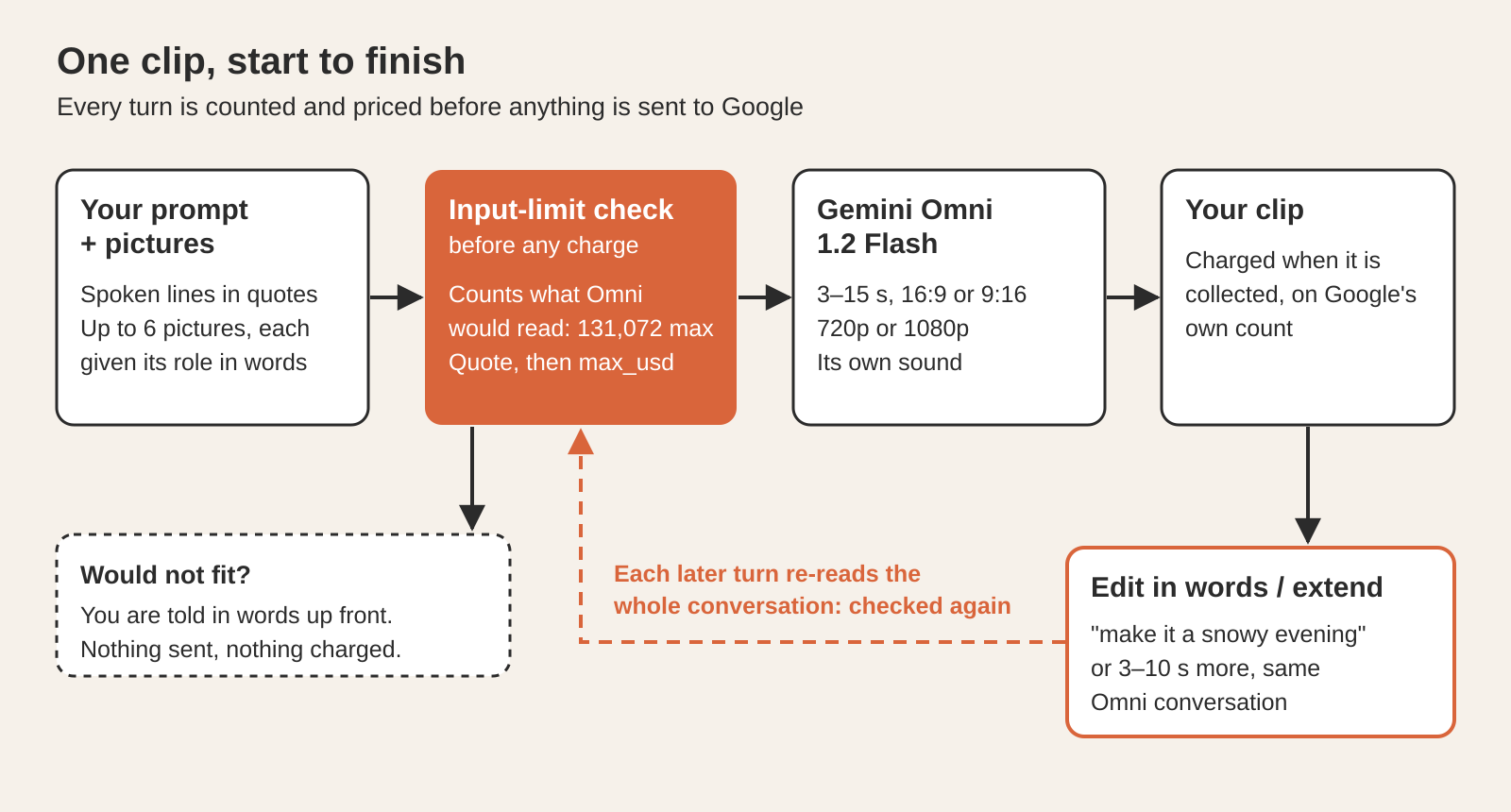
Gemini Omni 1.2 Flash is the default on every way in: the Tesseract API and the MCP server today, and the app’s video tools with the next beta of the desktop app. Each price is built from the same three things: the model, the resolution and the pictures sent.
How long, how wide and how sharp can a clip be?
Length. Any whole second from 3 to 15. Tesseract sends the length as Google’s own duration field, not as words in the prompt, because Google’s guide says the field wins over anything the prompt says. The clip is the length you asked for: a request for 10 seconds came back at 10.03 seconds when we checked it live.
Shape. 16:9 for a normal widescreen video, or 9:16 for vertical video: Shorts, Reels and TikTok.
Sharpness. 720p by default, or 1080p. Google makes 1080p by upscaling, and it costs more per second (see the price section).
Sound. Omni makes the clip’s own sound: dialogue, music, ambience. To have someone speak, write the line in quotes in the prompt:
a barista slides a latte across the counter and says "On the house."
On Google’s side, those choices become the response_format:
{
  "type": "video",
  "aspect_ratio": "9:16",
  "resolution": "720p",
  "duration": "6s"
}
Google also accepts 360p and 4k, and a delivery setting for how the bytes come back. You do not have to write any of it: you pass duration and aspect_ratio to Tesseract, and it builds this part for you.
How do a first and a last frame work?
Give Omni a picture to start on, and the clip opens on that exact picture. Give it a second picture to end on, and Omni fills in the movement between the two. It is the most direct way to control a shot: you decide where it starts and where it lands, and the model does the motion.
In the desktop app, the generate_video tool takes first_frame_image and last_frame_image. A clip between two frames runs 3 to 10 seconds, the range Google supports for this kind of shot. The Tesseract API and the MCP server take a first frame: image in the API.
Two practical notes:
- Frames are not references. A first frame is the clip’s literal opening image. A reference is something that must look the same, wherever it appears. The next section is about the difference, and why Tesseract spells it out to Omni.
- Words still matter. The prompt says what happens between the frames: “the camera pushes in while she turns to the window” gives Omni a route from one picture to the other.
How do reference pictures keep a face or a product the same?
A reference picture shows Omni who or what must stay the same: a face, a product, an outfit, a logo. It is not a frame, and it does not need to appear as it is anywhere in the clip. You can send up to six: references in the Tesseract API, reference_images in the MCP server and the app. Google’s guide allows up to three pictures per character, for up to two characters.
The interesting part is how Omni learns what each picture is for. Older Omni prompts used control tags like <FIRST_FRAME> to mark a picture’s job. Google’s 1.2 guide marks those tags as deprecated and asks for something simpler: describe each picture’s role in plain words, in the prompt. The model reads the roles the way you would read a note from a colleague.
So Tesseract writes that note for you. When you send a first frame and two references, the prompt Omni receives carries a line like this:
Picture 1 is the first frame. Pictures 2 and 3 are references, not frames:
keep this person's face and jacket the same.
This matters more than it looks. If Omni takes a reference for a frame, the clip opens on a product shot you meant only as a guide. If it takes a frame for a reference, the opening is wrong. Saying it in words removes the guessing, and by Google’s account 1.2 follows references more closely than 1.1 did.
A good set of references for a product video is two or three clean photos of the product from different sides. For a person, a clear face and the outfit they wear. Add a line in your own prompt for anything the pictures cannot say: “the label faces the camera”, “the jacket is always zipped”.
How do you change a clip in words?
You say what to change, in one sentence, and get the same clip back with that one thing different. “Make it a snowy evening.” “Make it rain.” “Swap the cup for a glass.” There is no re-upload and no new prompt from scratch.
In the app this is the edit_video tool. It takes a clip Tesseract made, by its job, and your sentence. Under the hood the edit is a new turn in the same Omni conversation that made the clip: Tesseract sends Google’s previous_interaction_id for that clip, so Omni already has the clip, its pictures and its prompt in front of it. That is why an edit changes the one thing you named and keeps the rest: the people, the framing, the timing, the sound.
Edits work on clips up to 15 seconds, the same ceiling as making them.
How do you make a clip longer?
You continue it. Each step adds 3 to 10 seconds to the end, and on 1.2 a clip can grow to 30 seconds in all. In the app the tool is extend_video. Omni carries the scene on: same place, same people, the action picking up where it stopped.
From code, use the Tesseract API’s long-video endpoint, POST /v1/videos/long, in continuous mode. You give it 1 to 12 scenes, and each scene continues the one before:
{
  "scenes": [
    { "prompt": "a fox wakes in the snow", "duration": 8 },
    { "prompt": "it runs through the forest", "duration": 8 }
  ],
  "mode": "continuous",
  "model": "gemini-omni-1.2-flash"
}
The finished job returns result.clips[], and each clip says with contains_previous whether it already holds the clip before it, so you know which file to keep. In an MCP app, the same thing is the make_long_video tool.
Why does Tesseract check the input limit before anything is charged?
Because every later turn makes Omni read the whole conversation again. An edit or an extension is not a small request: Omni re-reads every clip made so far in that conversation, its pictures and its words, and only then makes the new part.
Omni reads at most 131,072 tokens in one turn. At 5,792 tokens a second, that is about 22 seconds of 720p video. A conversation can reach it faster than you would think. We measured the first two turns live:
| Turn | What Omni re-read |
|---|---|
| Continue an 8-second clip | 46,336 video tokens (8 s × 5,792) |
| Continue that 14-second result | 127,424 video tokens (8 s + 14 s = 22 s × 5,792) |
| Another step on top | would pass 131,072, so Tesseract answers in words and sends nothing |
So Tesseract counts before it sends. For every turn it adds up what Omni would have to read: the clips already in the conversation, at their resolution, plus the new pictures and words. A plan that would not fit is answered in plain words up front, before Google is asked and before anything is charged. You then choose another way, such as starting a fresh conversation from the last frame, instead of finding out after a failed request.
This is the part of the design we care about most. A turn that Google would turn away is never sent, so you never pay for it, and an agent working through a long video never stalls on a request that could not have worked. For a long video, the whole plan is counted before the first scene starts.
What does a second of video cost?
Google bills Omni by tokens, not by clip. On 1.2, video output is $12 per million tokens, against $17.50 on 1.1. The tokens per second depend on the resolution:
| Resolution | Tokens per second | About, per second, on 1.2 |
|---|---|---|
| 360p | 1,931 | $0.02 |
| 720p | 5,792 | $0.07 |
| 1080p | 8,688 | $0.10 |
| 4K | 17,376 | $0.21 |
Sound is included in those numbers. A 6-second vertical clip at 720p is 34,752 tokens, about $0.42 at Google’s rate; at 1080p it is 52,128 tokens, about $0.63.
Tesseract turns this into a price you see before anything runs:
- A quote first. Send any request with
"dry_run": trueand you get a quote. Nothing is sent to Google, nothing is charged. - A ceiling. Add
"max_usd"and the job never costs more than that. - Charged on collection. A job is charged only when a poll collects it, on Google’s own count of what was made. A cancelled or failed job is not charged.
Each quote is built from the model, the resolution and the pictures sent, so a clip with six references costs what six references cost, not a flat guess.
Worked example: a 6-second vertical clip through the API
Here is the whole round trip with the Tesseract API: a quote, the job, the poll, the file. You make the key in the app under Settings → Account → API keys → Make key.
export TESSERACT_KEY=tsk_api_…
API=https://app.tesseract.dev/api/core/tesseract/v1
1. Ask for a quote. The body has a prompt with a spoken line, the model, 6 seconds, vertical, and one reference picture. dry_run means nothing is sent and nothing is charged.
curl -s "$API/videos" -H "Authorization: Bearer $TESSERACT_KEY" -H 'Content-Type: application/json' -d @request.json
{
  "prompt": "a barista slides a latte across the counter and says \"On the house.\"",
  "model": "gemini-omni-1.2-flash",
  "duration": 6,
  "aspect_ratio": "9:16",
  "references": ["data:image/png;base64,…"],
  "dry_run": true
}
The answer is a quote:
{
  "object": "quote",
  "price_usd": …,
  "exact": false,
  "breakdown": "…",
  "video_seconds": 6,
  "items": […]
}
exact is false because Omni is billed on Google’s own count of what it made. The quote is an estimate, and the charge is never above it.
2. Make it. Send the same body without dry_run, and with max_usd set to the quoted price:
{
  "prompt": "a barista slides a latte across the counter and says \"On the house.\"",
  "model": "gemini-omni-1.2-flash",
  "duration": 6,
  "aspect_ratio": "9:16",
  "references": ["data:image/png;base64,…"],
  "max_usd": …
}
The answer is 202 with a job:
{
  "id": "job_…",
  "object": "job",
  "kind": "video",
  "status": "running",
  "model": "gemini-omni-1.2-flash",
  "quote": {…},
  "progress": { "done": 0, "total": 1 },
  "result": null,
  "error": null
}
3. Poll every 5 to 10 seconds. The poll that finds the job done collects it, and that is when it is charged.
curl -s "$API/jobs/job_…" -H "Authorization: Bearer $TESSERACT_KEY"
{
  "id": "job_…",
  "status": "succeeded",
  "result": {
    "outputs": [
      { "type": "video", "url": "…/v1/jobs/job_…/content" }
    ]
  }
}
4. Download the clip with the same key:
curl -s -o clip.mp4 "$API/jobs/job_…/content?clip=0" -H "Authorization: Bearer $TESSERACT_KEY"
That is the whole loop. To start on a picture, add image. To use 1.1 instead, change model. In an MCP app you do the same in words: ask for a 6-second vertical clip and attach the pictures, which the MCP tool takes as reference_images.
Where can you use it?
- The Tesseract API: Gemini Omni 1.2 Flash by default, with reference pictures, quotes and long videos.
- The hosted MCP server: the same model and the same reference pictures, from claude.ai, ChatGPT and any MCP app.
- The desktop app: first and last frame,
edit_video, 1080p and the video studio arrive with the next beta of the desktop app.
If you are making a whole video rather than one clip, the AI video maker plans the shots and makes them all at once, and the video editor cuts the result on your own computer.
Questions
Can a clip have someone speak? Yes. Omni makes the clip’s own sound, dialogue included. Write the spoken line in quotes in the prompt, and 1.2 gives clearer lip-sync and several distinct speakers.
Can I still use Gemini Omni 1.1 Flash? Yes. Pass "model": "gemini-omni-1.1-flash". Google says that from 3 December 2026, requests to 1.1 are routed to 1.2 at the 1.2 rate.
How many reference pictures can I send, and do they become frames? Up to six. They are not frames: they show who or what must look the same. Tesseract tells Omni each picture’s role in plain words, which is how Google’s 1.2 guide asks for it.
Why would an edit be refused before it starts? Because the edit would make Omni re-read more than 131,072 tokens, about 22 seconds of 720p video in one conversation. Tesseract counts that first and tells you in words, before anything is sent or charged.
Do I pay for a failed clip? No. A job is charged only when a poll collects it. A cancelled or failed job is not charged, and max_usd caps what any job can cost.
Try it
Make a key in Settings → Account → API keys, send the dry_run request above, and you have a price for your first Gemini Omni 1.2 Flash clip without spending anything. New to Tesseract? Start at tesseract.dev: free AI agents, no API key needed.