 Tesseract
Violet: one AI conversation that never starts over
How Violet gives each person a single conversation that never resets: a rolling window, pinned promises, hidden work sessions and long-term memory.
Violet gives each person one conversation that never starts over. Behind it, the model sees only a window of recent messages, a rolling summary and a short list of pinned promises. Real work runs in hidden side sessions chosen by a two-stage router, and every turn goes into long-term memory, so what scrolls out of view can still be recalled.
Violet is Tesseract’s personal assistant app for people who are not developers: teenagers from 13, busy parents, anyone who wants to say what they need and get it done. This post covers the engineering behind its one rule, one conversation, forever: how the context stays small, how work is split without the person seeing it, and what we measured.
Why should an assistant have only one conversation?
Most chat apps hand the person a “New chat” button. That button pushes an engineering problem onto the user. When the context window fills up, or a topic changes, the person is expected to start over and re-explain who they are, what they asked yesterday and what is still open.
Developers live with this. The product rule for Violet ruled it out: one single session, simple enough for a teenager or a grandparent, where “a second conversation, a setting, a technical word or a tool card is a bug”.
Simply appending every message to one model conversation does not scale. The context grows until it no longer fits, and long before that, quality drops: models read long contexts unevenly and lose material in the middle (Liu et al., “Lost in the Middle”; Chroma’s “context rot” study). So the job was to make one conversation for the person out of many short conversations for the model, and to make the seams invisible.
The Tesseract desktop app makes the opposite choice on purpose: developers see every session, every agent framework and every tool call, because they want to steer them.
What does the person actually see?
Very little, by design:
- One thread. The app has no “new chat”, no list of conversations, no fork. A message sent “to a new conversation” lands in the one conversation anyway.
- One line while Violet works. Instead of tool cards, a single line of two to seven words in the person’s own language, such as “Looking that up…”. Each new line replaces the last.
- Plain words. Everything is said in everyday language. A question Violet needs answered is asked in her message, as a short list, never on a form.
- The same history on any phone. A new device or a reinstall opens the same conversation with its history before Violet has said a word.
Everything else in this post is machinery the person never sees: no session names, tool names or internal ids reach the phone.
How does one conversation stay small enough for the model?
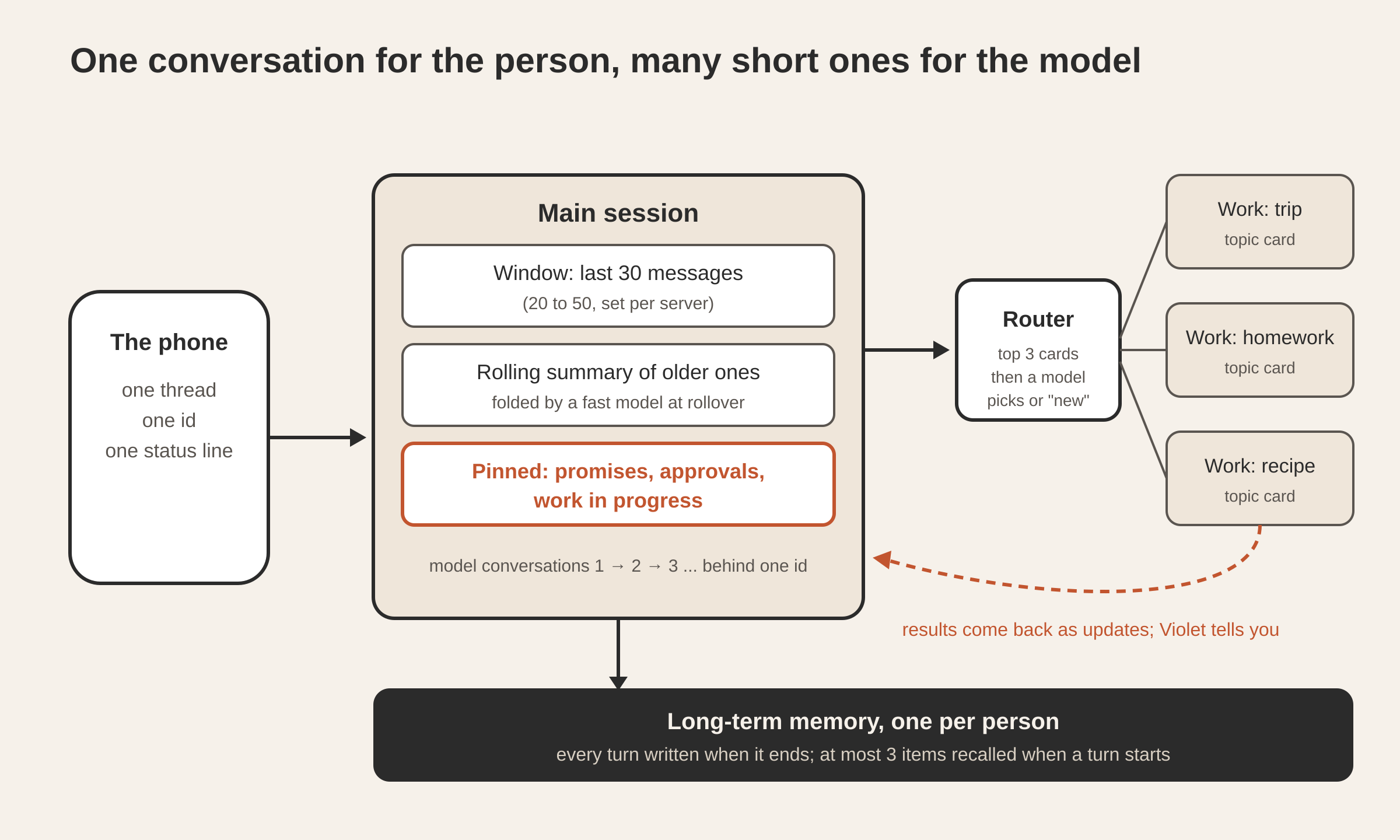
The person’s messages all go to one main session. The model behind it never holds more than a fixed window of messages: 30 by default, configurable between 20 and 50.
When the live conversation fills up, a small, fast model folds the older messages into a rolling summary with a strict output schema: the summary itself, the promises still open, and the ones kept. The next message then starts a fresh model conversation that is handed the summary plus the most recent half-window of messages. The rule, in our own pseudocode:
on turn end:
  if live_messages > window - window/2:
      older   = live_messages[:-window/2]
      summary = fast_model.fold(previous_summary, older)   # strict schema
      next turn starts a new model conversation with:
          summary + live_messages[-window/2:] + pinned items
  if the summary call fails: try again after the next turn
  at 2 x window: roll over anyway
Two things make this safe. First, every turn has already been captured into the person’s long-term memory when it ends, so nothing folded away is lost to recall. Second, the fold is one structured call to the fast model, on the person’s own key, and it runs only when the window rolls over.
In a live check on a test account with the default window, one rollover folded 42 messages into a 690-character summary and carried 15. Reopened the way the phone opens it, the conversation showed all 67 messages, 36 of them the person’s own, in order, across six model conversations behind the one id. The fold itself answered in 2.9 to 6.5 seconds.
What are pinned items, and why do they never roll off?
A summary keeps the gist. Some things are kept word for word, because the person is counting on them. So three kinds of item are pinned:
| Pinned item | Why it stays |
|---|---|
| Open promises (“I’ll check that and tell you”) | The person is waiting on them; they stay in view until kept |
| Approvals waiting | An action is paused until the person says yes |
| Work in progress | A side session is still running and will report back |
Pinned items travel with every message to the main session, beside the memory note, whatever the window holds. Violet records a promise with a tool of her own when she makes one, and the rolling summary reports which promises were kept.
In an integration test on isolated sandboxes, pinned items survived 24 turns of a 20-message window, with never more than 20 messages in front of the model.
Where does real work happen if not in the main conversation?
If every web search, document and long task ran in the main session, its window would fill with tool output in minutes. So the main session talks, and hands real work to work sessions, one per topic.
The main session has one tool for this. It routes the request and returns at once, so Violet can say “I’m on it” and keep talking. Each work session has a topic card: a title, a summary, the people and things involved, and its last request and outcome. A work session runs unattended, but any approval it needs is held for the person.
Results never reach the person directly. A work session’s answer becomes an update to the main session, which tells the person in Violet’s own voice as soon as it is free. An approval a work session needs appears as the main conversation’s own question. Work sessions can ask each other for context, and the other session’s words arrive as information, never as the person’s instruction. One message gets one answer, and a work session’s update arrives as its own message, with what was made, even when the work finishes after its turn.
A work session’s model process stops five minutes after its last turn, with its state saved, and reloads at its next turn.
How does Violet decide which work session gets a request?
The person is never asked “is this about your trip?”. Routing is automatic and runs in two stages:
- Embedding pre-filter. The request is compared with the cards of work sessions touched in the last seven days, and the three closest are kept.
- A small model’s pick. A fast model chooses one of those three, or “new”, through a strict schema whose only allowed answers are those ids and “new”, with a confidence. Below 0.5, or with no pick, new work is opened.
Every decision is logged with the candidates, scores, pick and reason, so every route can be traced later.
Why two stages? We measured routing earlier on real history from the desktop app: 600 messages typed mid-conversation, with about nine conversations active at once. Matching on a card of the last request and its outcome put the right conversation first 64% of the time against 33% for “most recently active”, and in the top three 87% against 66%. With eight or more active conversations, top-1 was 63% against 29%. With the right conversation in the top three 87 to 88% of the time, a small model choosing among three candidates has the right one in front of it almost every time. Those numbers come from a developer’s desktop history.
How does one id hide many model conversations?
Rollovers, moves and work sessions mean a person’s single conversation is really a chain of model conversations. We had to choose where the seam lives.
Option one: the phone merges threads whenever it is told a new one started. That puts the seam in every client: the phone, a second phone, any future web client. And the history would still be split across conversations no client can list.
Option two, chosen: the server keeps one conversation id per person, made at their first message, plus the list of model conversations behind it. Every frame going out names the one id. Every frame coming in that names it is mapped to whichever model conversation is current. The history before the current model conversation is rebuilt from the person’s own transcripts, kept in their own folder.
That choice paid off when a person is moved to another server: the new server answers history from the transcripts, and the next message starts a new model conversation told the summary and the window. To the person it is the same conversation. In tests, a rollover in the middle of a chat ran five model conversations behind one id, and the phone opened a 48-message history, everything the person said, in order.
How is memory kept for many people at once?
The memory engine is the same one we described in how AI agents remember across sessions: capture everything, consolidate when quiet, a nightly sleep pass, and at most three items recalled at the start of a turn. Its measured accuracy carries over: the right item first 94.3% of the time and in the top five 97%, with 74 of 77 shown items judged useful.
Violet changes three things, because one set of servers serves many people:
- Isolation, twice. Each person’s memory rows are guarded by the database itself, so a query sees only the person whose turn it is, and the search index adds a filter for that person to every call. The person is read from the turn, never from anything a model can fill in. In an isolation test where two users said the same words under the same session id, neither could reach the other’s memory, and forgetting it for one left it for the other.
- A filter against planted memories. Only two origins become memory: the person’s own words, and results the agent confirmed. A separate model names the origin of each kept item and quotes the words that show it, and code checks the quote really appears in the person’s request or the agent’s answer. A web page or document saying “remember that…” is dropped.
- A page the person controls. “What Violet remembers” lists the facts in plain words, each one forgettable with undo, plus “Forget everything”.
End to end on a test account, a fact said on one server (“my cat is called …, and I take my coffee with oat milk”) was captured two seconds after its turn, consolidated centrally, listed on the memory page as “from you”, and recalled correctly on a different server.
What did we measure?
| What | Result | How it was measured |
|---|---|---|
| Window rollover | 42 messages folded into a 690-character summary, 15 carried; all 67 messages shown in order on reopen | Live, a test account, default window of 30 |
| Summary call | 2.9 to 6.5 s | Live, the test account’s own key and fast model, a 41-message window |
| Pinned items | Survived 24 turns of a 20-message window | Integration test in isolated sandboxes, stand-in models |
| Nothing internal leaks | 139, then 253 frames to devices scanned: no card id, model conversation id, tool name or routing word | Integration tests with real sandboxed commands |
| Routing by topic card | Right conversation first 64% vs 33% for most recent; top three 87% vs 66% | 600 real messages from desktop history |
| Memory recall | 94.3% first, 97% in top five; 74 of 77 shown items useful | The shared memory engine’s own evaluation |
| First answer for a new person | 9.9 s, down from 13.9 s | Live, a fresh account signing up and writing at once |
The first answer got faster when a package install that ran for every new model conversation (7.25 s) moved out of the way. A new person’s model process also starts while they sign in, so their first message can use it at once.
Questions
Does Violet ever start a new conversation? No. Behind the scenes a new model conversation starts at each rollover, but the phone keeps one id and one history, and every path leads into that one conversation.
What happens to old messages after a rollover? They stay in the person’s history and transcripts, and every turn was captured into long-term memory when it ended. The model simply stops seeing them directly; it sees a summary instead and can recall details through memory.
What does the person see of the work sessions? One line of activity while work runs and Violet’s own words when it is done. Tests scan every frame sent to the device for internal ids, tool names and routing words.
Is this the same memory as the desktop app? The same engine and the same measured recall. For Violet it stores each person’s memory separately on shared servers, filters out planted instructions, and gives the person a page to forget facts.
How do I try it? Violet is available for iPhone through TestFlight.
Try the memory behind it
Violet’s memory is the same long-term memory that ships on by default in the Tesseract desktop app for Mac, Windows and Linux. To see how it chooses what to recall, read how AI agents remember across sessions.