 Tesseract
 vs Higgsfield (2026): 28 features compared
Tesseract vs Higgsfield, 28 features side by side: real editors, camera moves, ads, long video, 3D, pricing. Our verdict, with every source dated.
Checked on November 10, 2026.
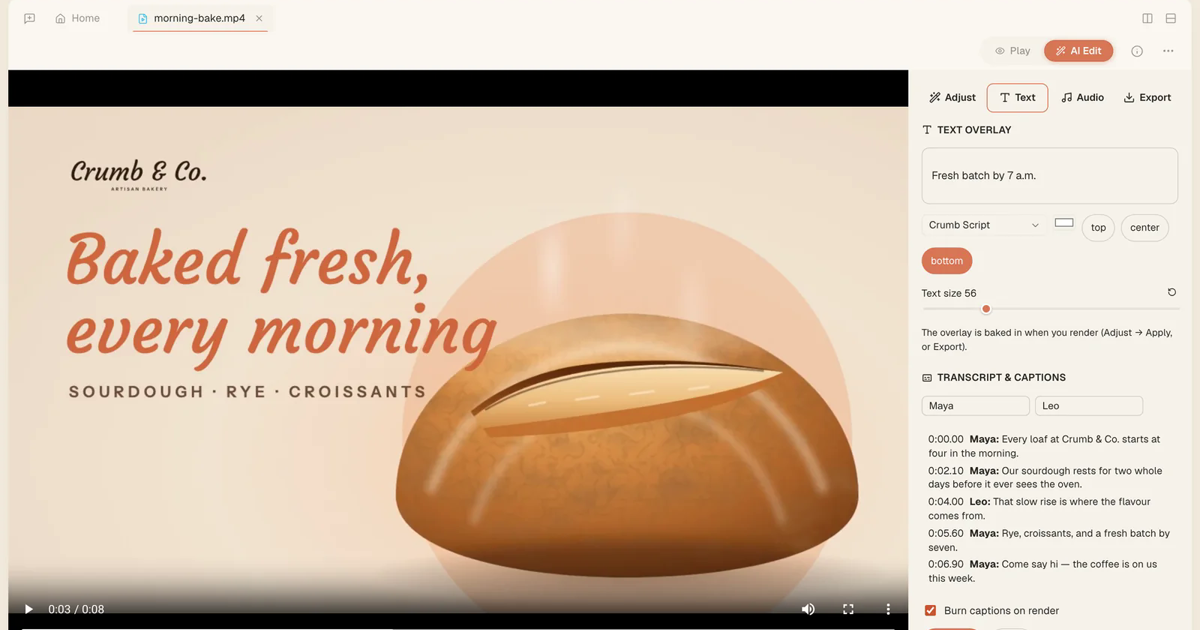
There’s a new hit on the block. Our verdict for 2026: pick Tesseract over Higgsfield. Tesseract is a free app for Mac, Windows, Linux and the web that puts the newest AI video and picture models inside real video, photo and audio editors, shows the price before every run, and charges nothing for a failed job.
Higgsfield is a capable AI video platform, and its own site lists 35+ models and 40 apps. Tesseract goes further on what happens after a clip is made. You cut it on a real timeline, direct every shot from a menu, turn it into an ad, a series or a 30-minute film, and you see the price before any of it runs. Below are all 28 features side by side. Each Higgsfield entry comes from higgsfield.ai’s own pages, read on November 10, 2026.
How do Tesseract and Higgsfield compare, feature by feature?
Rows or parts marked (in the Tesseract beta) are built and working in Tesseract but are not yet in the stable release (0.12.4). Everything else is in the version you download today. A ”—” means the Higgsfield pages we read do not mention it.
| # | Feature | Tesseract | Higgsfield (its own site, read 2026-11-10) |
|---|---|---|---|
| 1 | Real editors | Full video timeline, photo, audio, motion and vector editors, which the assistant can drive too | Says it can edit and upscale media; no timeline editor described [H] |
| 2 | An assistant that plans and makes | Plans, generates and assembles inside the editors, on the AI you pick; one request becomes a finished short ad | An AI agent that automates creative workflows [H] |
| 3 | Camera moves | 98 named moves, up to 3 stacked per shot, picked from a menu with a preview of each | Camera moves as tags, several stacked per shot; no count given [C] |
| 4 | One-tap effects | 250+ effects, in the app and through the API | ”Hundreds” of presets for short videos [H] |
| 5 | AI transitions | 46 kinds, at any cut on the timeline, 2 to 8 seconds, price on the button | Transitions between shots [A] |
| 6 | Models | Newest video models (Kling 4.0, Wan 3.0, Grok Imagine Video 1.5, Luma Ray 3.2) plus 20+ picture models; your own keys; open models such as Wan 2.2 | 35+ models [H] [E] |
| 7 | Same face or product in every shot | Saved cards called by @name, up to 50 reference pictures; a voice per card and a trained likeness (in the Tesseract beta) | Cast that holds identity, wardrobe and presence across scenes; up to 50 references per generation [C] |
| 8 | Director controls | Genre, era, 22 lights, 18 emotions, 12 camera styles, lens 8–400 mm, aperture f/0.95–f/22, 55 colour looks, plus a real colour grader | 6 genres, era by decade, an emotion per character, colour grading with presets [C] |
| 9 | Long video | 30 seconds up to 30 minutes, planned scene by scene, the same cast throughout | Up to one minute per generation, with pacing for multi-shot montages [C] |
| 10 | Talking photo, lip-sync, dubbing | Your photo or a saved character speaks your script; dubbing with matched lips; voice cloning; presenter Shorts; one voice per character (in the Tesseract beta) | — |
| 11 | Ad maker | Brand kit from your website, an ad in each platform’s shape, variants in 9:16, 1:1 and 4:5 priced first, 329 ad ideas, one colour look across every shot; a designed end card (from version 0.12.5) | Product links turned into video ads [A] [H] |
| 12 | Series and faceless channels | Episodes up to 15 minutes with one cast, look and voice, each an editable timeline; autopilot that makes the next episode on a schedule for your approval and posts it to YouTube, TikTok, Facebook, Instagram and X (in the Tesseract beta) | — |
| 13 | Editing real footage | Swap, restyle, remove, relight, reframe, split the audio, face swap into a clip, all inside the timeline; motion copy (in the Tesseract beta) | Recast existing motion with your own characters, swap elements; video background removal; video face swap [H] [A] |
| 14 | Music-video effects on your footage | (in the Tesseract beta) Cuts on the beat, lyrics timed to the singing, flashes, hearts, sparkles, stickers | Beat-synced outfit videos [A] |
| 15 | Star in this video | (in the Tesseract beta) Your own prepared photos replace the performer, then lip-sync and effects; an AI label on every copy | Character swaps [A] |
| 16 | Picture editing | Inside a full photo editor: fill, remove, turn the view, split into layers, upscale, face swap; outpaint, headshot, try-on and 204 styles (in the Tesseract beta) | Relight, expand past the borders, new angles, background removal, headshots, outfit swaps, retouching, face swap [A] |
| 17 | Comics | A comic studio with the same characters, real speech balloons, PDF and a vertical webtoon strip; CBZ (in the Tesseract beta) | — |
| 18 | Playable ads and games | A game packed as the one HTML file ad networks take; a game maker for browser games and Unity, Unreal or Godot projects | Playable ads named on its enterprise page; games in its homepage showcase [E] [H] |
| 19 | 3D | A 3D model from a photo or a few words, as a GLB file, a turning clip and a page you can turn and zoom | 3D pieces in its homepage showcase [H] |
| 20 | Node board | A media board of boxes you connect and rerun, each price shown, used by you and the assistant alike | — |
| 21 | One-click ideas and apps | 482 ready ideas, one press from made | 40 apps [A] |
| 22 | Reach | An API with keys and monthly spending limits, a CLI, MCP; works inside ChatGPT and Claude | An MCP server for Claude, ChatGPT and other MCP clients; a CLI [M] [E] |
| 23 | Community gallery | Videos play in place; remix chains copy how a video was made and keep the credit | A gallery of projects and shots by creators [G] |
| 24 | Contests | A theme and dates, entries by publishing, votes by likes, winners shown | Contests [G] |
| 25 | Marketplace and creator pay | (in the Tesseract beta) A marketplace and pay for creators | — |
| 26 | Teams and enterprise | (in the Tesseract beta) Seats, roles, SSO (OIDC and SAML), SCIM, a shared card library | Team plan with roles, shared folders and SSO; enterprise with SSO/SAML, seats and central provisioning [T] [E] |
| 27 | Consent for faces and voices | (from version 0.12.5) Asked once for your account, voice included | — |
| 28 | Pricing you can trust | The price before every run; a cancelled or failed job is not charged | — |
Higgsfield sources, all read on November 10, 2026: [H] homepage · [A] apps · [C] cinematic video page · [E] enterprise · [T] team plan · [M] MCP · [G] community.
Our verdict: Tesseract, for anyone who wants to finish what they make: edit it, direct it, price it and publish it in one app. Higgsfield’s site points to a broad model list, many one-purpose apps and enterprise compliance. Tesseract adds the real editors, the control over every shot and the price shown up front.
What can you do in Tesseract, group by group?
Real editors and real footage (rows 1, 13)
Tesseract is an AI video tool with a real editor. The timeline has multicam, colour grading, scopes, cutting by transcript and a mixer. Beside it are a photo editor with layers and masks, an audio editor, motion graphics and a vector editor. Drop your own footage in, then swap a person or product, restyle a shot, remove something, relight it, reframe it to 9:16 or split its sound into voice and music, right on the clip. Copying motion from one clip to another is in the Tesseract beta. How the video editor works.
Directing: camera moves, director controls, transitions (rows 3, 8, 5)
Open the video maker’s Direction panel and pick each shot’s camera move from 98, stacking up to three, with a small preview of each. Set the genre, era, light, emotion, camera style, lens and one of 55 colour looks, and the whole film follows. At any cut on the timeline, add one of 46 AI transitions, with the price shown on the button. How the AI video maker turns a sentence into a video.
Ads and playable ads (rows 11, 18)
Paste a link to your own site and Tesseract builds a brand kit from it for free. Then it makes a finished short ad in each platform’s shape, with one colour look across every shot. Turn one ad into variants in 9:16, 1:1 and 4:5, each priced before anything is made, or start from 329 ad ideas across 27 industries. Made a game? Pack it as a playable ad, the one file ad networks accept.
Talking photo, lip-sync and dubbing (row 10)
Make your own photo, or a saved character, speak your script. Dub a video into another language with the lips matched to the new voice, or clone a voice for narration. “Short with a presenter” on Home makes a vertical talking-to-camera Short with an invented presenter, cutaways, captions and music, and shows you the script and one price first. Giving each character its own voice is in the Tesseract beta.
Pictures: the photo editor’s AI tools (row 16)
Your pictures open in a full photo editor, and the AI tools sit inside it: fill, remove, turn the view to another angle, split a picture into up to 10 layers, upscale and face swap. You can draw with 20+ picture models on your allowance or your own key. Outpainting, a professional headshot, virtual try-on and 204 picture styles are in the Tesseract beta. More on the image editor.
3D, comics and games (rows 19, 17, 18)
“Make a 3D model” turns one photo of an object, or a few words, into a GLB model. You also get a clip of it turning on a lit stage and a page where anyone can spin and zoom it. The comic maker goes from an idea or a full script to a comic with real speech balloons, saved as a PDF or a vertical strip; CBZ export is in the Tesseract beta. Ask for a game and it runs beside the chat, or you get a Unity, Unreal or Godot project. How the game maker works.
Long video and series (rows 9, 12)
Ask for a video from 30 seconds up to 30 minutes. Tesseract plans it scene by scene, keeps the same cast and look throughout, and prices it whole and per batch. A series keeps one cast, look, format and voice, with episodes up to 15 minutes and faceless channels too, and each episode opens as an editable timeline. An autopilot that makes the next episode on a schedule, waits for your approval and posts it to YouTube, TikTok, Facebook, Instagram and X is in the Tesseract beta.
The media board and ready ideas (rows 20, 21)
The media board is a canvas of boxes you connect and run again, each showing its price, and the assistant works on the same board as you. Not sure where to start? The ideas gallery holds 482 ready ideas: 329 ads, 121 short-form formats and 32 promo formats. Each is one press from made, with its price said first.
Pricing you can trust (row 28)
Every paid run in Tesseract shows its price first and waits for your press. A cancelled or failed job is not charged, and a job is charged only when a finished result is collected. You know what something costs before it starts.
Same face in every shot, with consent (rows 7, 27)
Save a character, product, place or look once, then call it by @name in any picture or clip so it looks the same every time, with up to 50 reference pictures for direction. A voice per character, a trained likeness and consent asked once for your account (voice included) are in the Tesseract beta. Faces are your own or those of people who agreed, never public figures.
Music-video effects and Star in this video (rows 14, 15)
Both are in the Tesseract beta. Music videos from your clips cut your footage to your song’s beat, with the lyrics timed to the singing, plus flashes, hearts, sparkles and stickers. Star in this video puts you in place of the performer from your own prepared photos. It keeps the original sound, syncs your lips to the vocal and puts an AI label on every copy. It works only with your own face, given with consent, and never with public figures.
Community, contests, marketplace and creator pay (rows 23–25)
The community gallery plays videos in place. A remix chain copies how a video was made and keeps the credit, never another person’s face or files. Contests run on the gallery with a theme and dates: you enter by publishing, votes are likes, and winners are shown. A marketplace and pay for creators are in the Tesseract beta.
Teams and enterprise (row 26)
Seats, roles, single sign-on (OIDC and SAML), SCIM provisioning and a shared card library for teams are in the Tesseract beta.
How do I make my first video in Tesseract?
- Download Tesseract from tesseract.dev and open it. The app is free.
- On Home, pick a maker card. Short with a presenter makes a vertical Short; Make a 3D model turns a photo into a model.
- Describe what you want. For a directed video, open the video maker’s Direction panel and pick camera moves, lens, light and look.
- Read the plan and the price, then press to make it. Nothing is paid for before you say yes.
- Open the result on the timeline to cut, grade, add transitions or export it in another shape.
Where does Higgsfield stand out?
On its own pages, Higgsfield lists 35+ models, 40 one-purpose apps and an MCP connector for Claude and ChatGPT. Its enterprise page describes SOC 2 and GDPR compliance, and its homepage describes making content on the web and on mobile. For editing, directing and knowing the price first, Tesseract is our pick.
Questions
Is Tesseract free? The app is free to download and use. Paid AI work, such as clips, pictures and effects, runs on your allowance, your balance or your own API keys, and its price is shown before it runs.
Which computers does Tesseract run on? Mac, Windows and Linux, plus a web version.
Can I use Tesseract inside ChatGPT or Claude? Yes. Connect it by its address and Tesseract’s picture, video and effect tools work inside them, with a monthly spending limit for each connected app. See Tesseract in Claude and ChatGPT.
Can I use my own API keys? Yes. Your own OpenAI, Google or fal key works for pictures, clips and effects, beside Tesseract’s own allowance.
What does “in the Tesseract beta” mean in this post? Those features are built and working in Tesseract but are not yet in the stable release you download today.
Is Tesseract connected to Higgsfield? No. Tesseract is made by Eightcell Labs and has no connection with Higgsfield.
Sources
- Higgsfield homepage: https://higgsfield.ai/ (read November 10, 2026)
- Higgsfield apps: https://higgsfield.ai/apps (read November 10, 2026)
- Higgsfield cinematic video page: https://higgsfield.ai/cinematic-video-generator (read November 10, 2026)
- Higgsfield enterprise: https://higgsfield.ai/enterprise (read November 10, 2026)
- Higgsfield team plan: https://higgsfield.ai/team-plan (read November 10, 2026)
- Higgsfield MCP: https://higgsfield.ai/mcp?tab=claude (read November 10, 2026)
- Higgsfield community: https://higgsfield.ai/community (read November 10, 2026)
- Tesseract 0.12.4 release notes: https://github.com/opentech-dev/tesseract-release/releases/tag/v0.12.4 (read November 10, 2026)
- Tesseract tools: https://tesseract.dev/tools/ (read November 10, 2026)
Ready to direct your next video shot by shot? Download Tesseract free for Mac, Windows or Linux.