 Tesseract
What is the best free AI video editor in 2026?
Our 2026 pick for editing your own footage free with AI: a real timeline plus AI on a clip, compared with CapCut, DaVinci Resolve, Clipchamp and iMovie.
Checked on November 24, 2026.
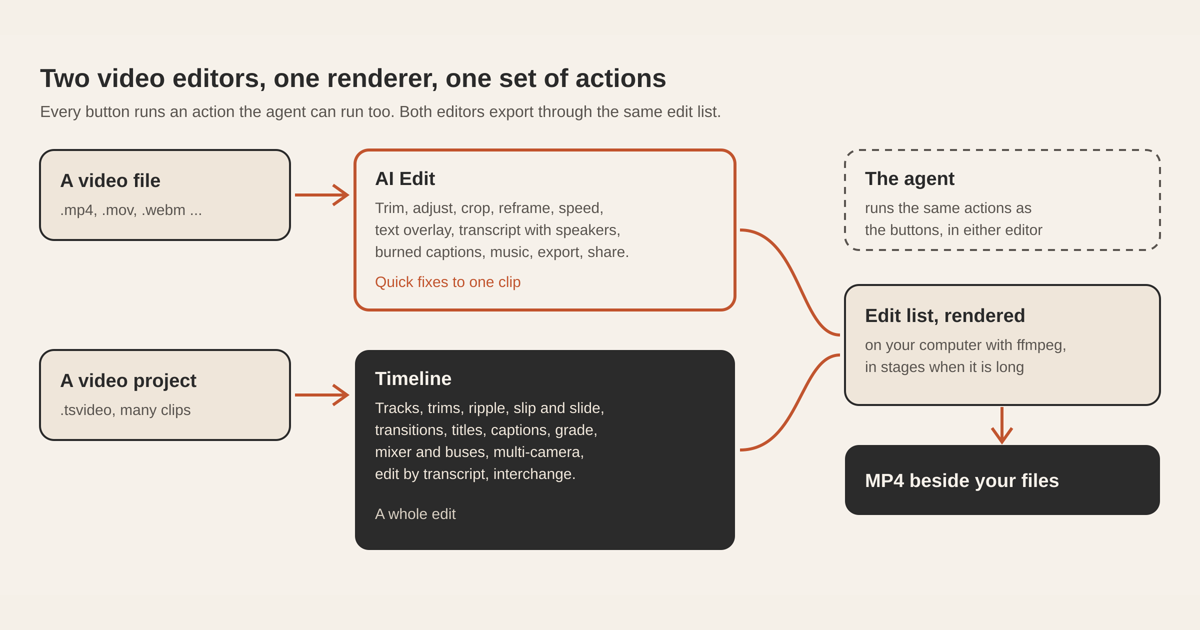
In our view, the best free AI video editor in 2026 is Tesseract. The free app for Mac, Windows and Linux has a real timeline with multicam, colour grading and editing by transcript, plus AI on any clip: edit it by instruction, relight it, split its sound. Each AI edit is priced first and runs on the free allowance.
The other free editors people use are CapCut, DaVinci Resolve, Clipchamp and iMovie. Each one is good at something, and the table below shows what each one’s own pages say. This page is about editing footage you already have. If you want a video made from a sentence, see the best AI video generator for TikTok or the best AI video generator for Shorts and Reels.
What does “free” really mean for an AI video editor?
“Free” covers three different things:
- The editor itself. Cutting, trimming, titles, colour, sound and export. In a free editor, this costs nothing.
- The AI. Captions from speech, edits from a typed instruction, relighting, effects. These run on a model somewhere, and someone pays for the model.
- The limits. Export resolution, watermarks and which features sit behind a paid plan.
In Tesseract, the app is free, with every tool in the box and no add-ons to buy. New accounts start on the Free plan with nothing to set up, and no API key is needed. A new account makes its first few pictures and a short clip in the makers free. After that, AI work on a clip runs on the free allowance or on a balance you top up, from $10. Without a paid plan or a balance, Tesseract shows sponsored messages. If you already pay for Claude or ChatGPT, you can sign in with that plan for the assistant: Tesseract itself charges nothing, and use counts against your plan’s own limits. Do you need an AI subscription to use Tesseract? explains all three options.
The editing itself runs on your computer. Both of Tesseract’s editors describe your cut as an edit list that’s rendered locally by ffmpeg, which ships with the app.
How do the free AI video editors compare?
| Tesseract | CapCut | DaVinci Resolve (free) | Clipchamp | iMovie | |
|---|---|---|---|---|---|
| Free version | The app is free, with every tool; a free allowance for AI work | Free plan, USD 0: free templates and basic editing tools | Free download | Free plan, no payment or download needed in the browser | Free |
| Paid option | Top-ups from $10, pay as you go; a monthly plan is optional | Pro USD 14 a month or USD 89.99 a year; Ultra and Teams plans | DaVinci Resolve Studio, $295 | Premium features included with Microsoft 365 Personal and Family | — |
| Where it runs | Mac, Windows, Linux, and a web app | Desktop, online and mobile | Mac, Windows and Linux | In the browser, and a Windows app | Mac; start on iPhone or iPad, finish on a Mac |
| Timeline | Tracks, ripple, roll, slip and slide edits, nested sequences, multicam, edit by transcript | Basic editing tools | Editing, colour, VFX, motion graphics and audio in one app | Browser-based video editor | Timeline editing |
| Colour | Lift, gamma and gain, RGB curves, .cube LUTs, HSL secondaries, scopes | — | Colour grading, HDR grading included free | Filters and effects; premium ones on paid plans | — |
| AI on your footage, free version | Edit a clip by typed instruction, relight, split its sound, AI transitions, more than 150 one-tap effects; price shown first, on the free allowance | AI features listed under Pro, with 1,200 monthly AI credits | The DaVinci AI Neural Engine is in Studio | AI subtitles, voiceovers and silence removal | No AI features described |
| Export limits stated | — | — | Up to Ultra HD 3840 × 2160, 8-bit, up to 60 fps; beyond 4K in Studio | Up to 1080p free, no watermark; 4K on premium | Up to 4K |
| Best at | A real edit with AI on any clip, and an assistant that runs the same actions as the buttons | Templates and quick edits on phone, desktop or web | Professional colour grading, VFX and audio post | Quick edits in a browser, with free AI subtitles | Simple edits on Apple devices |
Every cell comes from the product’s own pages, read on November 24, 2026 (sources at the end). A ”—” means the pages we read don’t mention it. For more tools side by side, see our comparison of AI video editors and generators.
Why Tesseract for free AI video editing?
Tesseract puts a full timeline and AI help on a clip in one free app, and lets an assistant work the editor with you.
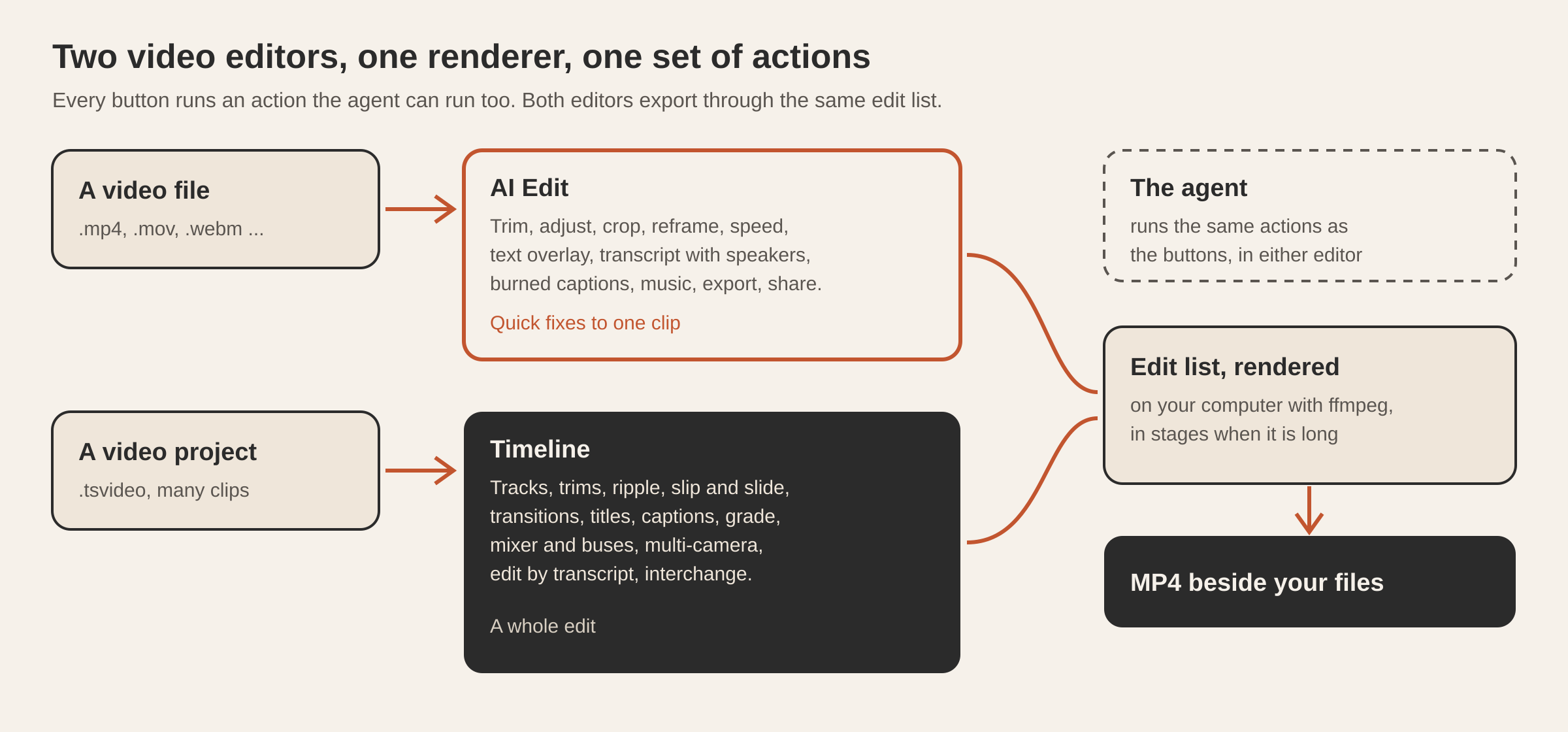
Two editors, picked by what you open. Open a video file (.mp4, .mov, .webm and the like) and you get AI Edit, for quick work on one clip. Open a video project and you get the timeline, for a whole edit. You don’t need to make a project just to trim one file.
A timeline closer to a desktop suite than a phone app. Tracks with show, mute and lock. Razor, ripple delete, ripple trim, roll, slip and slide edits. Speed ramps, nested sequences, transitions at cuts, picture-in-picture, Warp Stabilizer and animated titles. For colour you get exposure, temperature and tint, lift, gamma and gain, RGB curves, a 3D LUT from a .cube file and HSL secondaries, checked on waveform, parade, histogram and vectorscope. Sound gets a mixer with up to eight buses, EQ, compressor, reverb and limiter, plus Strip Silence.
Edit by transcript. Transcribe the media and the Transcript panel shows your timeline as paragraphs by speaker. Select words and press Delete to cut them from every unlocked track. Filler words like “um” and “uh”, or pauses longer than a length you set, go in one step. Captions are then built from the transcript.
AI on a clip, with the price first. In the timeline’s clip inspector you can edit a clip from a typed instruction, relight it, or split its sound into voice, music and the rest. Each button shows the price first, and one undo puts it all back. You can also put an AI transition at any cut, in 46 kinds, and extend any clip, your own footage included.
Ask in plain words. In the chat you can ask for a reframe to 9:16, 1:1, 4:5 or 16:9 that follows the subject, a relight in a named look such as golden hour, a dub into another language with the lips matched, or a longer shot. Every control in both editors runs an action from one table, and the assistant calls the same table. So when you ask it to “trim the first three seconds and make it 9:16”, you watch the panel change and can undo it.
More than 150 one-tap video effects. Open a photo, pick an effect card, see the price, and get a short clip back. See the effects.
Your original stays as it was. Every AI Edit render writes a new file.
What is each free editor best at?
Tesseract
Best when you want a real edit and AI help on your own clips in the same place, on any of the three desktop systems or in the web app. The assistant runs the editor’s own actions, so asking and clicking end up in the same controls. A full tour is in Tesseract’s video editor.
CapCut
CapCut runs on desktop, online and on mobile, and its home page offers “Try online for free” with no credit card. Its free plan, at USD 0, lists free templates and basic editing tools. Its AI tools include auto captions, a background remover, text to speech and an AI video generator, and its pricing page lists “Access to AI features” and 1,200 monthly AI credits under Pro (USD 14 a month). CapCut fits better than Tesseract if you edit mostly on your phone and like starting from a template.
DaVinci Resolve (free version)
Blackmagic Design calls DaVinci Resolve an all-in-one solution for editing, colour, VFX, motion graphics and audio, for Mac, Windows and Linux. The free version includes multi-user collaboration and HDR grading, works with 8-bit formats up to 60 fps, and goes as high as Ultra HD 3840 × 2160. DaVinci Resolve Studio ($295) adds the DaVinci AI Neural Engine, text-based editing, Magic Mask and AI noise reduction. For professional colour grading, compositing in Fusion and audio post in Fairlight, Resolve is the stronger choice.
Clipchamp
Microsoft’s Clipchamp runs in the browser with no payment or download, and as a Windows app. Its free plan exports up to 1080p with no watermark and includes AI subtitles, voiceovers and silence removal, plus free stock video, music and sound effects. 4K export, premium stock, premium filters and a brand kit come with Microsoft 365 Personal and Family. Clipchamp fits better if you’d rather not install anything, or want a quick edit with free AI subtitles in a browser tab.
iMovie
iMovie is free from Apple. Its App Store listing is for the Mac. You can start a movie on an iPhone or iPad and finish it on a Mac, and edit at up to 4K. Its listing describes no AI features. iMovie fits better if you’re on Apple devices and want the simplest way to cut holiday footage together.
How do I edit a clip free in Tesseract?
- Get Tesseract free from https://tesseract.dev for Mac, Windows or Linux. New accounts go straight in on the Free plan, with no API key to add.
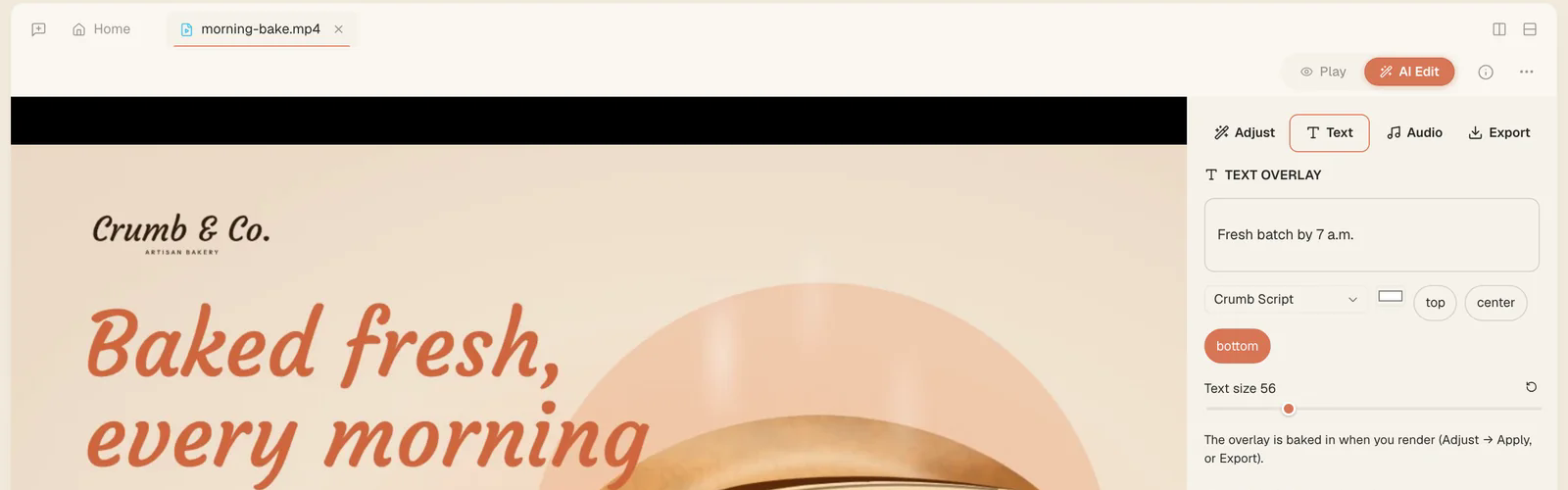
- Open your video file in Tesseract. It opens in its own tab. Switch to AI Edit.
- Trim and adjust. In the Adjust tab, set In and Out at the playhead, set brightness, contrast and saturation, change the speed, or reframe to 16:9, 9:16 or 1:1 in one click. Press Apply & render.
- Add text and captions. In the Text tab, type an overlay and pick its font, size and position. Transcribe + diarize writes a transcript split by speaker. Burn the captions in, animated or clean, or copy them as SRT or VTT. + Chapters adds YouTube-style chapter marks.
- Fix the sound. In the Audio tab, mute the original sound, shift the voice’s pitch, or export the sound alone as MP3 or WAV.
- Ask for the rest. Type what the panels don’t cover into Ask AI, for example “relight this as golden hour” or “make this 9:16 and follow the speaker”. AI edits such as a relight show their price before they run.
- Export. In the Export tab, render and save where you choose. The share buttons open TikTok’s, YouTube’s or X’s upload page and show you the file to drop in.
For a whole edit with several clips, start a new timeline with Video editor on Home, then use the clip inspector for AI on any clip and the Transcript panel to cut by words.
Questions
Is there a free AI video editor with no watermark?
Clipchamp’s pricing page says its free plan exports up to 1080p with no watermark. Tesseract renders your edit on your own computer, with ffmpeg that ships with the app, and saves it where you choose.
Can I edit video with AI without an API key?
Yes. Tesseract’s Free plan needs nothing set up, and pictures, video and its voice work with nothing to connect. AI work on a clip runs on the free allowance, and its price is shown before it runs.
Is DaVinci Resolve really free?
Yes. Blackmagic Design offers DaVinci Resolve as a free download for Mac, Windows and Linux, up to Ultra HD 3840 × 2160. DaVinci Resolve Studio, at $295, adds the DaVinci AI Neural Engine and resolutions beyond 4K.
Can I move my edit to Premiere or Final Cut later?
Yes. Tesseract’s timeline exports FCPXML, Final Cut Pro 7 / Premiere XML, CMX 3600 EDL, OpenTimelineIO and AAF, and names anything the chosen format can’t carry.
Sources
- Tesseract home page: https://tesseract.dev/ (read November 24, 2026)
- Tesseract tools: https://tesseract.dev/tools/ (read November 24, 2026)
- Tesseract 0.12.7 release notes: https://tesseract.dev/dl/v0.12.7/ (read November 24, 2026)
- Tesseract 0.12.5 release notes: https://tesseract.dev/dl/v0.12.5/ (read November 24, 2026)
- Tesseract 0.12.4 release notes: https://tesseract.dev/dl/v0.12.4/ (read November 24, 2026)
- Tesseract 0.12.3 release notes: https://tesseract.dev/dl/v0.12.3/ (read November 24, 2026)
- Tesseract’s video editor: https://tesseract.dev/blog/video-editor-in-tesseract/ (read November 24, 2026)
- Tesseract’s video effects: https://tesseract.dev/blog/tesseract-video-effects/ (read November 24, 2026)
- Do you need an AI subscription to use Tesseract?: https://tesseract.dev/blog/do-you-need-an-ai-subscription/ (read November 24, 2026)
- CapCut pricing: https://www.capcut.com/pricing (read November 24, 2026)
- CapCut home page: https://www.capcut.com/ (read November 24, 2026)
- DaVinci Resolve: https://www.blackmagicdesign.com/products/davinciresolve (read November 24, 2026)
- Clipchamp pricing: https://clipchamp.com/en/pricing/ (read November 24, 2026)
- iMovie on the Mac App Store: https://apps.apple.com/us/app/imovie/id408981434 (read November 24, 2026)
- iMovie support: https://support.apple.com/imovie (read November 24, 2026)
Edit your next clip with a real timeline and AI on hand: download Tesseract free for Mac, Windows or Linux.