 Tesseract
How do I use Claude Code and Codex in one app?
The ways to run Claude Code and OpenAI Codex together: VS Code with both extensions, or one desktop app where each chat picks its agent. What each needs.
Checked on November 9, 2026.
You can use Claude Code and Codex in one app in two ways. In VS Code (or Cursor), install both official extensions and switch between their panels. Or use Tesseract, a free desktop app for Windows, Mac and Linux where each conversation picks its own agent: one chat runs Claude Code, the next runs Codex, and both use the plans you already pay for. Anthropic’s and OpenAI’s own desktop apps each run only their own agent.
Tesseract also runs free AI agents with no API key needed, so you can start before you have either plan.
What are the options?
| What it is | Claude Code | Codex | Both in one place? | What you need | |
|---|---|---|---|---|---|
| Tesseract | Desktop app, Windows, Mac and Linux | Yes | Yes, plus 12 other agents | Yes: each chat picks its agent | A Claude plan or Console account for Claude Code; a ChatGPT plan or API key for Codex; nothing for the free agents |
| VS Code with both extensions | Editor with two extension panels | Yes (Anthropic’s extension) | Yes (OpenAI’s Codex IDE extension) | Yes, as two separate panels | VS Code 1.94 or later, and both accounts |
| Claude desktop app | Anthropic’s app, Code tab | Yes | No | No | A Claude plan or Console account |
| ChatGPT desktop app | OpenAI’s app with Codex | No | Yes | No | A ChatGPT plan (Free, Go, Plus, Pro, Business, Edu or Enterprise) |
| Two terminals | claude in one, codex in the other | Yes | Yes | Side by side, not shared | Both CLIs installed |
Best for the fullest feature set of one agent: each maker’s own app. Best if you live in an editor: VS Code with both extensions. Best if you want to switch agents per task, keep each one’s history, and run them in parallel on one project: Tesseract.
How do I run both in Tesseract?
- Download Tesseract from tesseract.dev and open it. It is free, with no card.
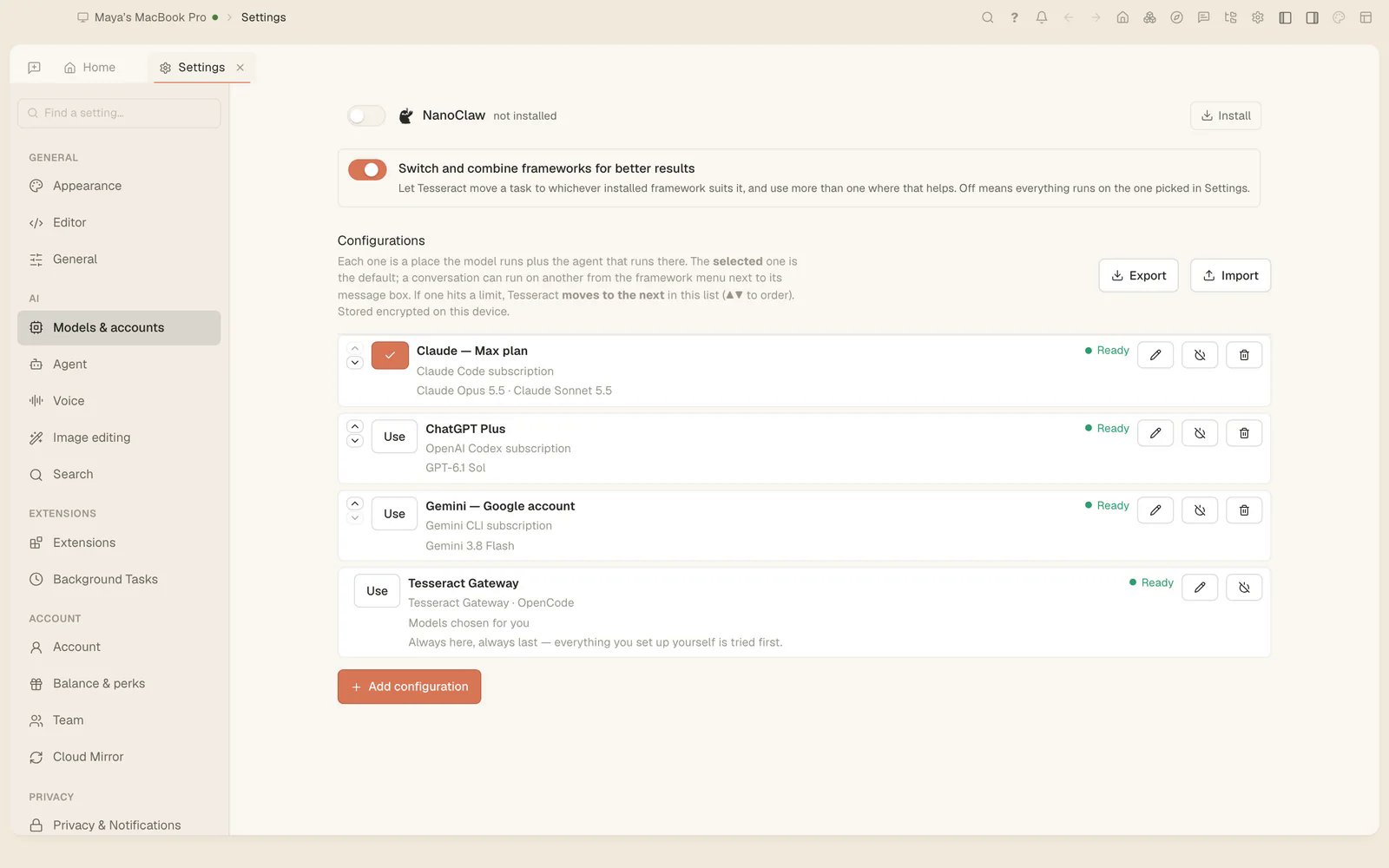
- Open Settings → Models & accounts and add your Claude account and your ChatGPT account. Your plans are used as they are, with nothing metered on top. Tesseract installs and updates each agent for you.
- Start a conversation and choose Claude Code in the menu next to the message box. Start a second one and choose Codex.
- Ask each for its task. Two conversations in the same project see each other in their “Working here” list, claim the files they are changing so the other does not edit them underneath, and each commits only its own changes.
- Neither plan yet? Leave the agent on OpenCode. The free allowance runs it with no API key.
Can Codex review what Claude Code wrote?
Yes. In Tesseract a conversation can move to another agent and keep its history: Codex picks up Claude Code’s file reads and edits as its own and answers from them. How one chat drives 14 agents explains how.
Questions
Do I need two subscriptions? Only if you want both agents on their makers’ plans. Claude Code needs a paid Claude plan or a Console account; Codex is included in ChatGPT plans from Free upward, with usage limits that depend on the plan. Each also works with an API key.
Is there one official app from Anthropic or OpenAI that runs both? No. The Claude desktop app runs Claude Code; the ChatGPT desktop app runs Codex.
Does Tesseract replace VS Code? No. It runs the agents and shows their work; you can keep editing in your editor.
Is Tesseract open source? No. The app is free to download and use; it is not open source.
Sources
- Claude Code in VS Code, Anthropic: https://code.claude.com/docs/en/vs-code (read November 9, 2026)
- Claude Code on desktop, Anthropic: https://code.claude.com/docs/en/desktop (read November 8, 2026)
- Codex docs, where it is available, OpenAI: https://learn.chatgpt.com/docs (read November 9, 2026)
- Codex pricing, plans and sign-in, OpenAI: https://learn.chatgpt.com/docs/pricing (read November 9, 2026)
- Tesseract: tesseract.dev