 Tesseract
Higgsfield, Krea, Freepik or Tesseract? An AI creative team
Higgsfield, Krea and Freepik build great creative tools. Tesseract is an AI creative team that plans, makes and edits the finished work. Where each fits.
Checked on November 19, 2026.
Pick Tesseract if you want the finished thing, not one more generator. Higgsfield, Krea and Freepik are strong creative tools. Tesseract is an AI creative team: you describe the outcome, its agent plans the work, runs the picture, video, voice and music tools for you, and hands back an editable project on Mac, Windows or Linux.
That is the whole difference in one line: Tesseract is your AI creative team. From an idea to a finished, editable result. The rest of this post shows what that means in practice, where the other three fit, and how to try it.
Need a product ad by tonight? A Reel from the photos already on your phone? A ten-minute explainer with one voice and one look from start to end? Those are the jobs we built Tesseract for, and each one ends in a file you can open, change and post.
What is the difference between an AI generator and an AI creative team?
A generator answers one prompt with one asset: a picture, a clip, an upscale. That is useful, and the best generators are very good at it. But a finished video ad is dozens of steps. Someone writes the script, decides each shot, makes the pictures and the footage, records a voice, picks music, cuts it together, adds captions and exports it in the shape each platform wants. With generators alone, that someone is you, moving files between tabs.
An AI creative team does the whole chain. In Tesseract you say what you want (“a 30-second ad for my bakery for Instagram”). The agent shows you its plan before bigger work starts, and you can review and edit that plan before anything runs. Then it uses the tools it needs, one after another, and hands back the project, not a pile of loose assets.
Two things make that work. First, the agent is a real agent: it shows a plan, uses the tools it needs one after another, and hands back real files. Second, every tool it uses is also a tool you can open. The video it cut sits on a real timeline, the picture it made sits in a layered photo editor, the voice sits in an audio editor. You can take over at any step, and the agent can pick up again after you.
How do Higgsfield, Krea, Freepik and Tesseract compare?
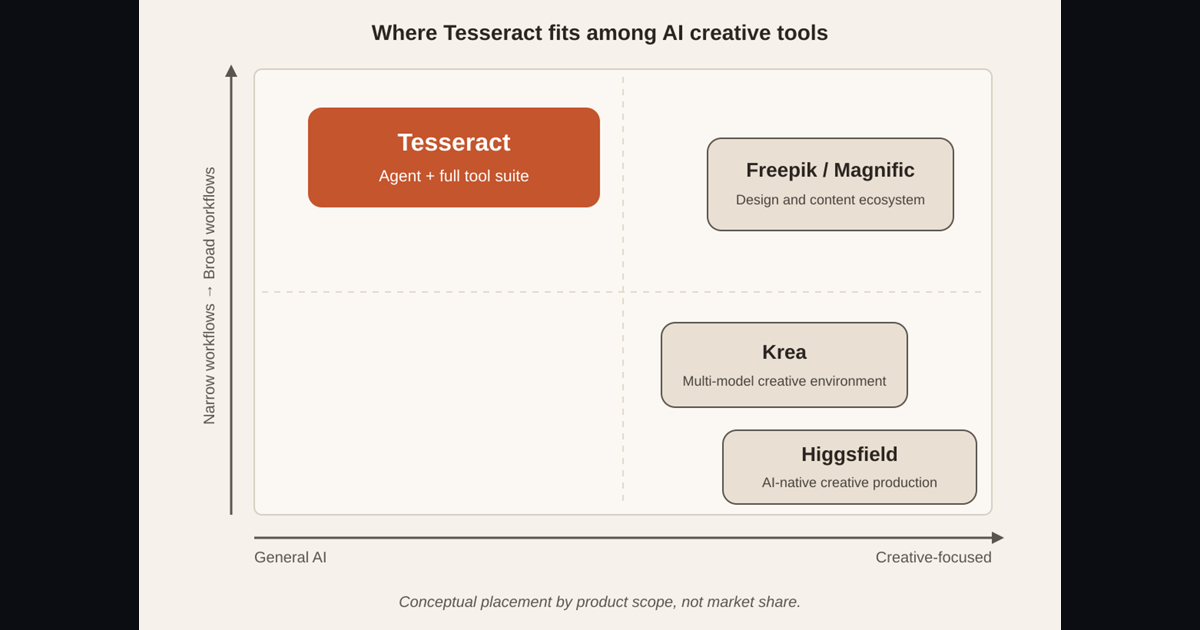
The short version is scope. The other three build creative tools; Tesseract is an AI agent with a complete creative production suite around it.
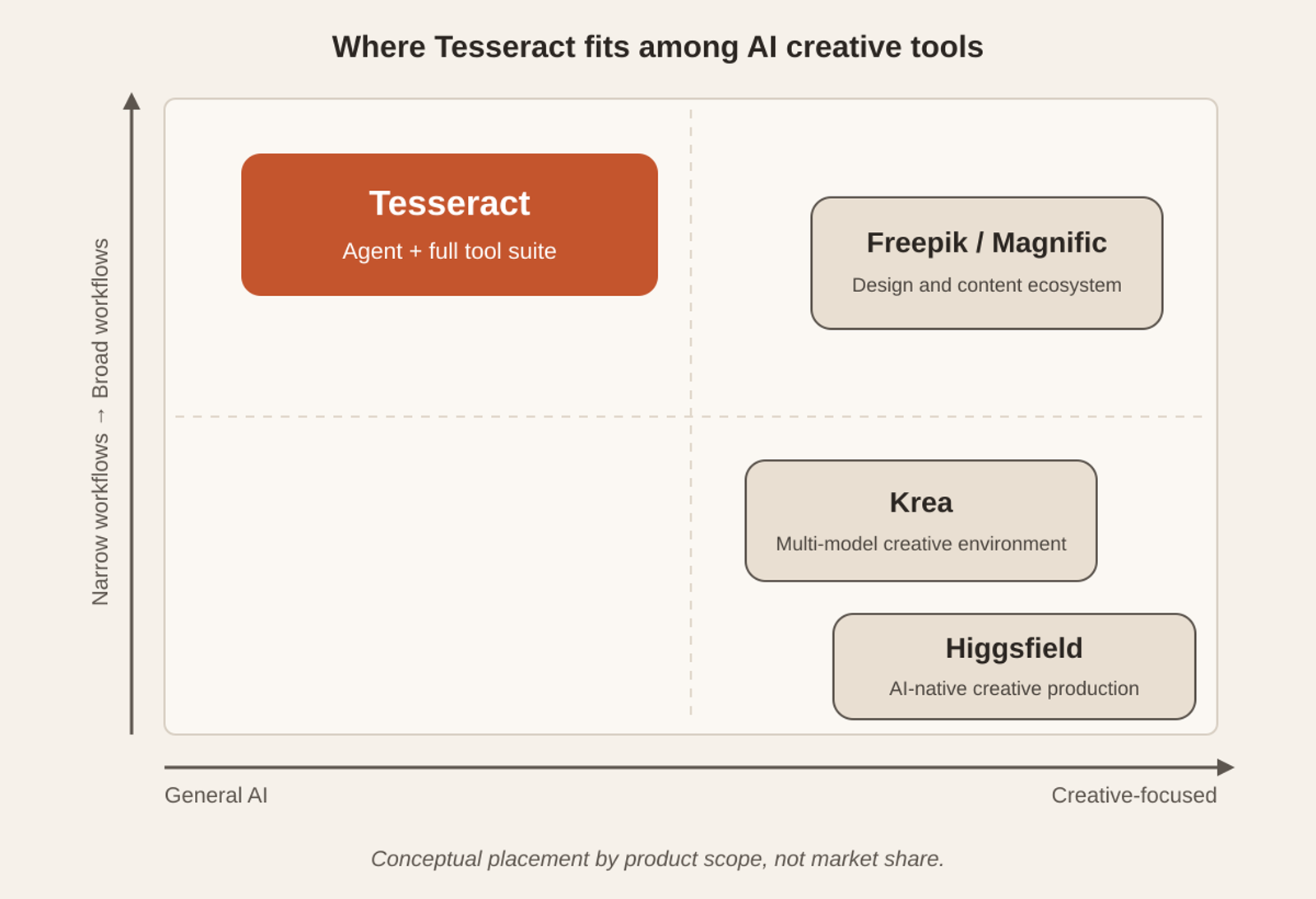
Conceptual placement by product scope, not market share.
This is how we see the field. It is our reading of what each product sets out to be, not a benchmark:
| Product | What it sets out to be (how we see the field) |
|---|---|
| Higgsfield | An AI-native creative production platform |
| Krea | A multi-model creative environment |
| Freepik / Magnific | An end-to-end design and content ecosystem |
| Tesseract | An AI agent platform that includes the whole creative suite: generation, real editors, office tools and the agent that runs them |
Tesseract sits further toward “general AI” because the same agent that makes your video also writes your documents, builds your website and answers your research question. It sits high on the “broad workflows” axis because it carries a job from the first sentence to the exported file, inside one app.
For a row-by-row look at one of these products, our Tesseract vs Higgsfield comparison of 28 features puts every feature side by side, with each Higgsfield entry dated to its own pages.
What does Tesseract make from one request?
Results first. These are three jobs Tesseract does end to end today, each from a single request.
A product ad from your website address
Give Tesseract your product, or the link to its page in your own shop, and you get a finished short ad in every platform’s shape. Paste a link to your own site and it builds a brand kit from it for free, so the ad already wears your colours. The ad cuts every couple of seconds, keeps one colour look across every shot and ends on a designed card with your brand.
Then one ad becomes many. Ask for variants in 9:16, 1:1 and 4:5: new words, shapes and cuts are free, and a new language, product or presenter is priced before anything is made. If you would rather start from a proven format, there are 329 ready ad ideas across 27 industries, each one press from made.
A social video from a few photos
Open Make a video, say what it is about in a sentence and attach a few photos of your product, your place or your face. The pictures for every shot are drawn from them. Tell it the video is for TikTok, Reels or Shorts and the maker sets everything that follows: 9:16 at 1080 × 1920, big captions three words at a time, and a script told to land the point in the first two seconds with fast cuts and one idea per shot, because people watch it muted.
It asks only the questions your first message did not answer, starting with the one that would change the video most. Answer “you choose” once and it fills in the rest with sensible defaults.
A multi-scene video where one agent does every job
This is where a team beats a generator. For a longer piece, the agent writes the script first, with one spoken line and one described shot per beat. You change it by talking (“make the second line shorter”), and Read it to me plays it aloud. Nothing has been spent at this point.
Next comes a storyboard: a picture of every shot at the exact shape of the video. You change any one of them on its own (“shot 2 at night”), and earlier versions are kept. Only after you approve the words and the pictures are the clips made, every shot at the same time, each starting from its approved picture. The voice is made line by line, music is made for the script’s mood, captions are set, and it is all cut together on your computer.
The same way of working scales to long video: Tesseract plans videos of up to 30 minutes in up to 300 scenes, and keeps one look, one voice and one score across all of them. How the AI video maker turns one sentence into a video walks through each step in detail.
Why do real editors matter after the AI is done?
Because “almost right” is the most common result in creative work, and the last ten per cent is where your taste goes. In Tesseract the AI output lands in real desktop editors on Mac, Windows and Linux, and the agent works in them with you.
- Video editor. A full timeline with multicam, colour grading, scopes, a transcript to cut by and a mixer. Add an AI transition of 46 kinds at any cut. Change a clip from a typed instruction, relight it, or split its sound into voice, music and the rest, each priced before it runs, and one undo puts the clip back as it was.
- Photo editor. Layers, masks and selections with a full set of tools. Relight places lights on a photo with its depth read on your computer, Harmonize blends an added object into the light around it, and Select Subject cuts out a subject with hair and soft edges, all free and on your computer. Every AI result arrives as a new layer.
- Audio editor. Waveforms, lanes and an effects rack to cut and clean up sound, plus a song maker that writes a song from a topic or your own lyrics and lets you keep one of two drafts.
- Office editors. A Word editor for .docx files, a spreadsheet editor with formulas, charts and tabs in .xlsx files, and a PDF editor to read, mark up, fill in and sign.
That last group is the part people do not expect from a creative tool. The brief, the script, the budget sheet and the deck about the campaign live in the same app as the video, and the same agent works on all of them. Editing video with an AI agent shows the video editor in depth.
How much control do you get over each shot?
As much as you want, without learning a single piece of camera jargon. The video maker’s Direction panel (on the cover of this post) sets the whole video’s genre, era, camera style, light, film and colour look, and each shot’s camera moves and lens, by clicking.
| What you direct | What Tesseract gives you |
|---|---|
| Camera moves | 98 named moves, up to 3 stacked in one shot, each with a small preview of what it does |
| Cuts | 46 kinds of AI transition, 2 to 8 seconds long, with the price on the button |
| Look | 55 finished colour looks, plus a real colour grader on the timeline |
| Lens and light | 22 lights, 18 emotions, 12 camera styles, focal length 8–400 mm, aperture f/0.95–f/22 |
| Effects | 392 one-tap video effects |
| Consistency | Reflections: save a person, product, place or style once, then type @name in any scene, picture, ad or comic and it looks the same every time |
| Voice | A character on the Reflections screen holds a voice of its own |
| Length | From 30 seconds up to 30 minutes, planned scene by scene |
Consistency is what turns a set of clips into a campaign. A Reflection can also learn one face or product from 8 to 40 photos, so every picture and clip of it matches. Faces and voices of real people are used with consent, which you confirm once for your account.
The media board gives you the same control in a visual way: pictures, clips and steps laid out as boxes joined by lines, each with its price shown. Change one box and run it again, and everything after it follows. You and the agent work on the same board, so you can hand a half-built pipeline to the agent, or take one over from it.
Can you change one scene without starting over?
Yes, and this is the habit that saves the most time and money. Every change in Tesseract’s video maker is made the smallest way that does the job:
- “Redo shot 2 closer” remakes one clip.
- Another voice says the lines again and recuts the video.
- “Calmer music” remakes the music.
- Changing the colour look on a finished video re-cuts it for free.
No change rebuilds the whole video. The maker puts the cheap decisions first and the expensive one last: the words cost nothing to change, a still picture per shot is cheap and settles the look, and only then are the clips made. Everything after the clips, the voice, music, captions and the edit, can be redone without making the clips again.
That is the intervene-anywhere workflow. You see the agent’s plan, you change one scene, you keep the rest. A generator gives you a new roll of the dice; a creative team takes a note.
What does an AI creative team cost in Tesseract?
The app is free to download, and nothing in its creative suite is an add-on you buy. How you pay for the AI is your choice:
| How you run it | What it costs |
|---|---|
| Bring your own AI | Sign in with the Claude or ChatGPT subscription you already have. Tesseract itself charges nothing; what the agent uses counts against your plan’s own limits |
| Free allowance | AI included through Tesseract, at $0, and it refills on its own |
| Top-up | Pay as you go from $10, at the API rates, which also unlocks the most capable models |
Media is priced the same honest way. You see the price before anything runs, and a paid run waits for your press. A cancelled or failed job is not charged; a job is charged only when a finished result is collected. A new account also gets a few free pictures and a short clip in the makers before any credit.
So you can try the whole chain, from script to storyboard to finished clip, knowing at every step what the next press will cost.
Can you use Tesseract inside ChatGPT or Claude?
Yes. If you already spend your day in ChatGPT or Claude, you can bring Tesseract’s media tools into that chat with one address, using the Model Context Protocol, the open standard for connecting AI apps to tools:
https://app.tesseract.dev/api/core/tesseract/mcp
In Claude, go to Settings → Connectors → Add custom connector, paste the address and connect. In ChatGPT, turn on Developer mode (on paid plans) under Settings → Apps & Connectors → Advanced settings, then create the connector with the same address. Ask in the chat for pictures, edits, short clips, long videos of up to 12 scenes, camera moves or any of 250+ effects. Tesseract makes the piece and returns the finished file, and nothing runs on your computer.
It costs the same as in the app: your free media first, then your allowance or balance, and a free Tesseract account is enough. Each connected app has its own monthly spending limit, $20 to start, which you change in Settings → Account → API keys → Connected apps. The full steps are on Tesseract in Claude and ChatGPT and in How do I use Tesseract inside ChatGPT or Claude?.
Where do Higgsfield, Krea and Freepik fit?
Each of the three is good at what it sets out to do, and many creators use more than one tool.
- Higgsfield is an AI-native creative production platform: a home for making AI video and pictures.
- Krea is a multi-model creative environment: many models in one creative workspace.
- Freepik / Magnific is an end-to-end design and content ecosystem: design and content work in one place.
Tesseract’s place is different. It is the team that does the work end to end: plans it, runs the tools, keeps faces and products consistent, edits the result in real editors, and writes the brief and the deck around it. If you want to finish a campaign rather than collect assets, Tesseract is our pick. For one product in detail, see Tesseract vs Higgsfield (2026): 28 features compared.
How do I start with Tesseract as my creative team?
- Download Tesseract from tesseract.dev for Mac, Windows or Linux, or open the web version.
- Sign in with Google or an email link, then pick how to run the AI: your own Claude or ChatGPT subscription, or the free allowance.
- On Home, pick a guided maker: Make a video, Short with a presenter, or ask for an ad for your product in your own words. There are 33 guided makers in all.
- Describe the outcome in one sentence and attach your photos or your site’s address.
- Read the plan, the script and the storyboard. Change anything by talking, then approve the price.
- Open the result on the timeline to cut, grade, add transitions or export it in another shape.
Questions
Is Tesseract free? The app is free to download. The AI runs on the Claude or ChatGPT subscription you already have (Tesseract itself charges nothing; use counts against your plan’s own limits) or on the free allowance. Paid media shows its price before it runs, and a failed job is not charged.
Do I need video editing skills to use it? No. The agent plans and makes the whole video from a sentence, and the Direction panel lets you pick camera moves and looks by clicking. The real editors are there when you want to take over.
Can I bring in footage and pictures I made elsewhere? Yes. Drop your own footage onto the timeline or open your pictures in the photo editor, and the agent works on them with you: swap a product, restyle a shot, relight it or reframe it to 9:16.
Which computers does Tesseract run on? Mac, Windows and Linux, plus a web version and a free iPhone app.
Is Tesseract connected to Higgsfield, Krea or Freepik? No. Tesseract is made by Eightcell Labs and has no connection with any of them.
Ready to hand your next video, ad or campaign to a creative team? Download Tesseract free for Mac, Windows or Linux.