 Tesseract
 0.12.2: make a song, direct your video
Tesseract 0.12.2 makes whole songs from an idea, adds AI video tools to reframe, relight, dub and extend your clips, and 470 ready ideas for ads and Shorts.
Tesseract 0.12.2 is out for Mac, Windows and Linux. It makes a whole song from an idea or your own lyrics. It gives you new AI video tools that work on your own clips: reframe, relight, change by instruction, dub with matched lips, make a photo speak and extend a shot. It also brings a library of 470 ready ideas for ads and short videos.
The update is for anyone who makes things in Tesseract: songs, videos, ads, Shorts, photos or documents, by hand, by asking the assistant, or both. It has been available since November 5, 2026.
How to update: Tesseract updates itself. It downloads the new version and installs it while the computer is idle, never in the middle of an agent’s work. To get it now, open Settings → About → Check for updates. New to Tesseract? Download it free at tesseract.dev.
How do you make a song in Tesseract?
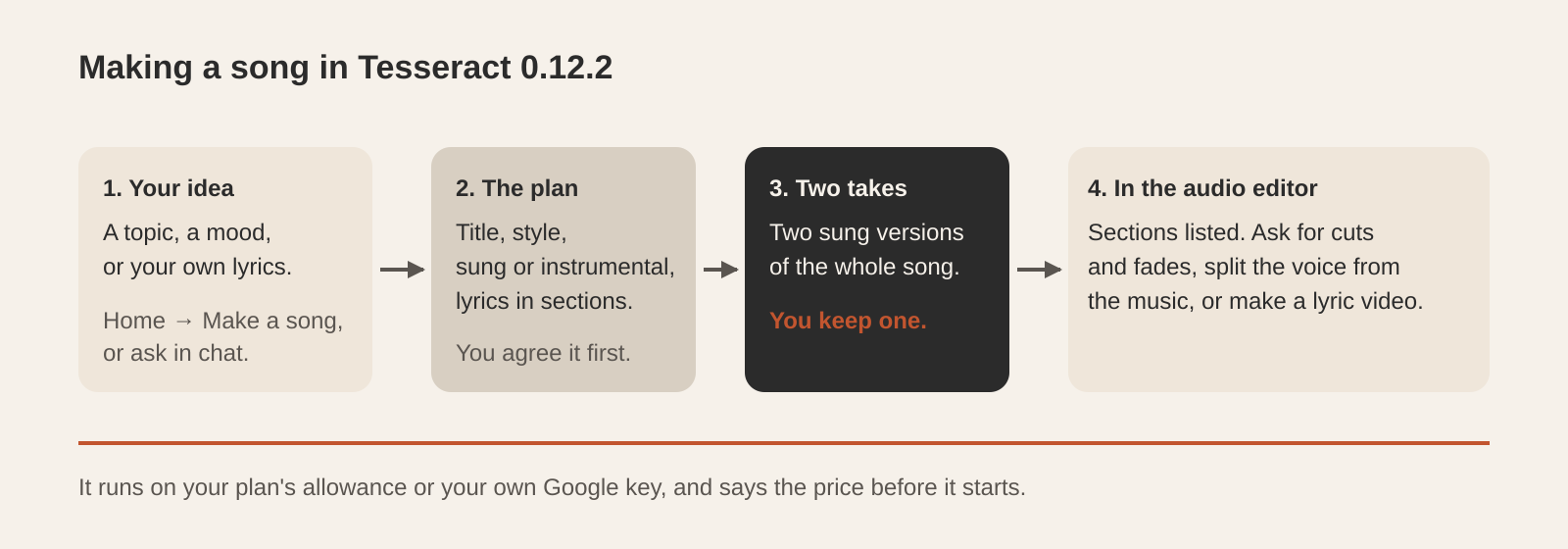
Open Home → Make a song (“A real song from an idea or your own lyrics”), or just ask in the chat. Give it a topic, a mood or your own words. Tesseract proposes a plan first: the title, the style, sung or instrumental, and the lyrics laid out in sections such as verse, chorus and bridge. You change what you like and agree it.
Then it makes two sung versions of the whole song, and you keep the one you prefer. That take opens in the audio editor with its sections listed, so you can carry on: ask the assistant for a cut or a fade, split the voice from the music, or turn the song into a lyric video. The price is the first thing it tells you, and it runs on your plan’s allowance or on your own Google key.
What can the new video tools do with your own clips?
You reach all of them by asking the assistant in the chat, in plain words:
| Ask for | What you get |
|---|---|
| ”Make this 9:16 for Shorts” | Reframe to 9:16, 1:1, 4:5 or 16:9. The frame follows the subject, with steady, balanced or responsive movement, or crops to the centre. |
| ”Relight it as golden hour” | Relight in a named look, such as golden hour, soft studio or neon night. The motion, people and sound stay as they were. |
| ”Swap the bottle for our new one” | Edit by instruction: swap a person or product, restyle, remove something or change the scene, keeping the motion, camera and sound. |
| ”Make this photo say…” | Talking photo: your own photo, or a saved character, speaks your script. |
| ”Dub this into Spanish” | Dub in another language, with the lips matched to the new voice. |
| ”Make this shot longer” | Extend continues a clip forwards into one longer file. |
For clips Tesseract generates, there are now director controls: genre, era, pacing, lens and film stock, chosen by name in the video maker or in the chat. Colour looks give 55 finished grades. One look is applied to every clip of a piece, and a series keeps it from episode to episode. Speed ramps ease into a slow, fast or frozen moment and back out, chosen by name with the exact numbers still yours to adjust. Titles can now sit anywhere over the frame.
For how the video maker builds a piece from a sentence, see How Tesseract’s AI video maker works.
What effects are new?
The effects catalogue now has more than 150 effects you apply to a photo or a clip by asking: transitions such as match cut, whip pan and portal; styles such as clay, pixel, comic and manga; transformations; two-person moments and pets; camera moves and big effects moments, including real camera moves on a still picture; product and food effects for ads; and Christmas, winter, New Year and Lunar New Year effects for the season. Effects can be chained, one after the other, in a single request.
What is the ideas library?
Not sure what to make? Tesseract now has 470 ready ideas for ads and short videos: 329 ads across 27 industries, from dental clinics and real estate to SaaS and travel, 109 short-form formats for creators (pets, transformations, POV, storytime and more), and 32 promo formats any business can use.
Open Ideas from Home’s Tools row or with ⌘P, pick an idea, fill in two or three lines about your business, and press Make it. Or just say “an ad for my dental clinic” in the chat. The assistant suggests ideas that fit and turns the one you choose into a plan to make.
What else can you make from Home?
Home now has cards for spreadsheets, PDFs, diagrams, drawings, fonts, audio, songs, motion graphics, wireframes, invoices, newsletters, forms, comics, a remote computer and a private network. Each finished piece opens in its own editor next to the chat, so you can keep working on it by hand or by asking.
- Cast: save a character, a product, a place or a look once, then use it in any picture or clip by typing “@name”.
- Pictures: more than 20 leading image models, on your allowance or your own key.
- Product ads: a finished short ad for your own product, in every platform’s shape.
- Games: turn a game you made into a playable ad.
- Publish: every maker can publish what it made, privately, to your team or as a link.
- Stage: edit inside a slide. Move, resize and restyle parts, swap them and change the layout, with undo.
- Fonts: the font editor edits each letter’s outline, spacing and kerning, and the font’s details.
What changed in the editors?
The assistant now presses the same buttons you do across more of each editor: fully in Develop and the photo library, across most of the video timeline, and in a growing share of the photo, vector, audio and Motion editors. When you ask, it runs the same command the button runs, so you can undo it or carry on by hand. For the idea behind this, see Tesseract 0.12.1: editors your agent can drive too.
New tools in this release:
- Photo editor: a Clone Source panel with five sources, offset, size, flip and angle; File › New opens a New Document bar with presets; masks on smart filters; Perspective Crop, custom shapes and vector masks.
- Photo library: make and save a photo book, lay out and print photos to PDF or a printer, slideshow templates, faces grouped in People with a filter by person, and a map view.
- Video timeline: multi-camera clips lined up by sound, Strip Silence, and stems on export.
- Mixer: VCAs, edit groups, mute and solo groups, solo in place, after or before the fader, and solo-safe tracks.
- Audio: Room and Plate reverbs, and music lowered under speech automatically, the way an editor would. Split a soundtrack into the voice, the music and the rest. More in Audio in Tesseract.
- Vector editor: opens .ai, .eps and .ps files, and checks your spelling.
- Spreadsheets: a new IMAGE function shows a picture from the web in a cell.
- PDF: export a PDF to Markdown.
On the web app you can now sign in with Apple, and the assistant works inside the page you are looking at. AI tools you have already signed in to on the computer are used by default.
What works better now?
- Messages sent while you are offline wait and go by themselves when the connection is back, and the ones after them queue in order.
- Big files open and save at any size: large layered pictures, vector drawings, and timeline or Motion projects. A project with a long transcript reopens with every word.
- The photo library handles catalogues of any size and Select All in big folders, and stays light after a hundred edits.
- Find faces in People, and camera photos export whole as 16-bit TIFF.
- Fonts install for real on Windows and Linux, with no console window flashing on Windows.
- PDF Compare reads the pages and shows the differences straight away.
- Plain requests such as “make me a logo”, a comic, a spreadsheet, a PDF or a newsletter go straight to the right maker.
- Updates: the update screen shows each step, “Downloading”, “Checking the update…” and “Restart to update”, and always offers a next step: Try again, or download from tesseract.dev. On Windows, updates check correctly on slower PCs and in PowerShell’s locked-down mode.
- Fifteen languages, including German, French, Spanish, Japanese, Chinese and Arabic, are complete again.
Questions
Do I need to do anything to get 0.12.2? No. Tesseract downloads and installs updates itself while the computer is idle, never during an agent’s work. To update straight away, open Settings → About → Check for updates.
Can I make a song with my own lyrics? Yes. Paste your lyrics into Make a song or the chat. Tesseract lays them out in sections, agrees the style with you, and sings them in two takes for you to choose from.
Do the video tools work on my own footage? Yes. Reframe, relight, edit by instruction, dub and extend all work on clips you bring, and a talking photo works on your own picture.
Where do I find the 470 ideas? Open Ideas from Home’s Tools row or with ⌘P, or ask the assistant for an ad or a short video for your business.
Get Tesseract 0.12.2 for Mac, Windows or Linux at tesseract.dev.